The Best Website for Logo Design Is Not Canva
I’ve been testing a bunch of different websites for logo design for some time now, and almost every year, there are new players in the market. Which brings me to conclude that … in 2026, Canva just isn’t the best website for logo design anymore. At least, not in every situation.
About five years ago, Canva was the undisputed king, but since exploding in popularity, there’s been a tendency for its logo designs to look generic, and even almost exactly the same as those of other businesses.
With so many people using Canva’s templates, you run the risk of your brand not being memorable, which is the exact opposite of what a logo should do.
But that doesn’t mean Canva isn’t worth considering anymore. It’s still a very capable design platform and something I use pretty often for quick designs, but it’s not the only available platform, even if you have no design experience.
I tested and compiled the best websites for logo design in 2026, and below are my top picks:
The best websites for logo design: An overview
Adobe Express: Best for Designing Logos and Other Marketing Materials

Pros
- Offers layer-by-layer editing for more logo customization
- Includes thousands of templates, design elements, fonts, and Adobe Stock assets
- Allows commercial use for logos created with Adobe Express, including AI-generated logos
Cons
- Does not provide fully custom logo design from a professional designer
- Some of the strongest templates and design elements require a paid plan
- Logo quality still depends on how much users customize the template
My expert opinion
Adobe Express has since overtaken Canva as my favorite online logo design platform. It has the same ease of use and pretty much identical design capabilities, but it offers a lot more design customization. This customization is mostly thanks to its layer-by-layer design capability, which mimics a similar feature on Adobe’s professional platforms, Illustrator and Photoshop.
It’s a small feature that counts for a lot in making logos (and other design projects) a lot more customized and less generic. And it just makes the design process easier.
As someone who’s used both Adobe Illustrator and Canva, I particularly appreciate how this platform is like the perfect midpoint of both — it combines Canva’s ease with Adobe’s design expertise. You can tell that it was designed by designers.
There are also lots of logo templates, featuring a wide variety of styles. Not all of them are free, as with Canva, but all of them are very well designed.
I recommend Adobe Express to anyone I know who’s a little frustrated with Canva and wants different templates or design elements, but still wants to design a logo in an hour at most — or even other design collateral, like social media content. All the logos made with Adobe Express are also available for commercial use, including the ones generated using AI.
- Free: $0 for limited access to templates, design elements, 1,000-plus fonts, 5GB of storage, and generative AI tools
- Premium: $9.99 per month for unlimited templates and design elements, 25,000-plus fonts, 100GB of storage, brand kit access, and expanded generative AI tools
- Layer-by-layer editing: Gives users more control over individual logo elements, making it easier to customize templates.
- Adobe Stock access: Provides a large library of images and design assets for logos and related marketing materials.
- Commercial-use designs: Logos created in Adobe Express can be used commercially, including logos made with its AI logo generator.
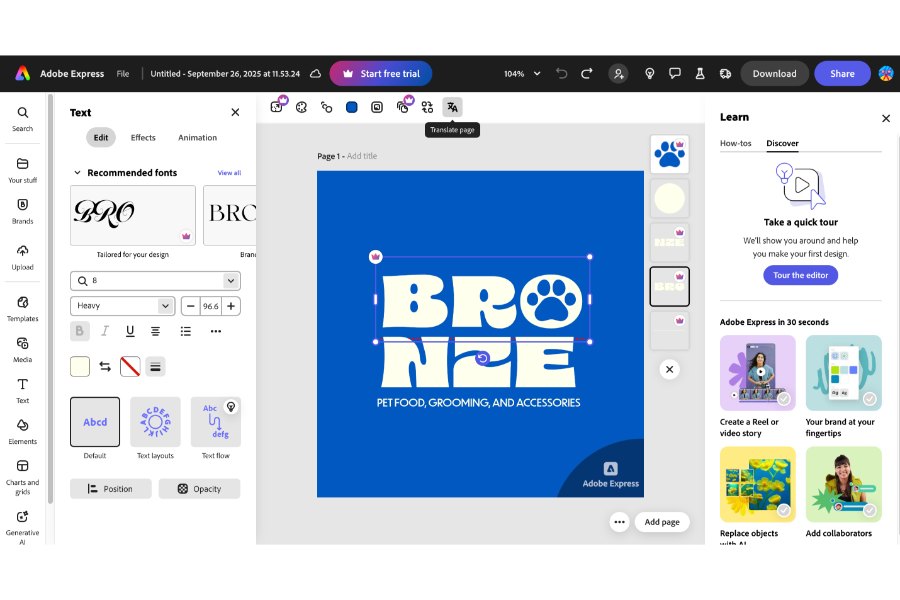
Adobe Express combines Canva’s ease of use with Adobe’s design sensibilities. (Source: Adobe Express)
Canva: Best for beginners
Pros
- Easy enough for beginners to create a logo quickly
- Offers a large library of free templates, fonts, icons, and design elements
- Lets users keep editing logos after downloading or publishing
Cons
- Template-based logos can look generic without heavy customization
- Some design elements may not be available for commercial logo use
- Many of the best tools and assets require a paid plan
My expert opinion
Of course, I couldn’t entirely leave Canva out of this list. Canva’s still one of the most capable websites for logo design, especially for beginners or anyone who wants the quickest and easiest way to build a logo.
If you’ve ever used Canva, you’re probably familiar with how intuitive the platform is, and how many design templates it has, although increasingly now, its best design elements and tools (looking at you, background remover) tend to be locked behind the paid plans (which have also gotten more expensive).
Also, because so many businesses and creators also use Canva, there’s a decent chance your logo might end up looking similar to another business’s. Making a truly unique logo is almost impossible because you’ll be sharing assets with thousands of other small business owners, creators, students, and everyone else on Canva’s massive user base.
So, from a branding perspective, it’s not the best platform I’d recommend for creating a long-term, custom logo, although I’ve seen many small business owners use it for temporary ones to get their business off the ground before transitioning to a more permanent one later on.
Canva also has an AI design tool that can generate logos from scratch. But honestly, they’re imperfect, and you can tell they were AI-generated, even if they are slightly more customized.
My verdict? Canva is perfectly fine for quick, simple logos — nothing that needs custom typography or advanced graphics. It’s not my best recommendation per se, but it’s still handy for quick designs. Convenience and usability are its biggest assets over design quality or customization.
- Free: $0 for drag-and-drop editing, 2 million-plus templates, 3 million-plus design elements, limited AI tools, 5GB of cloud storage, and design printing at an extra cost
- Pro: $18 per month for 4.5 million-plus templates, 130 million-plus design elements, full AI tool access, 1TB of storage, and brand kit features
- Teams: $25 per month for team-based design access, Pro-level templates and assets, 1TB of storage, brand kit features, and admin controls
- Enterprise: Custom pricing for advanced admin controls, multiple teams, design approvals, brand management, and enterprise-level collaboration
- Beginner-friendly editor: Uses a simple drag-and-drop interface that makes logo creation approachable for non-designers.
- Large template library: Provides millions of templates and design elements for building logos and related brand materials.
- AI logo generation: Creates logo concepts from prompts, giving users a quick starting point for simple designs.
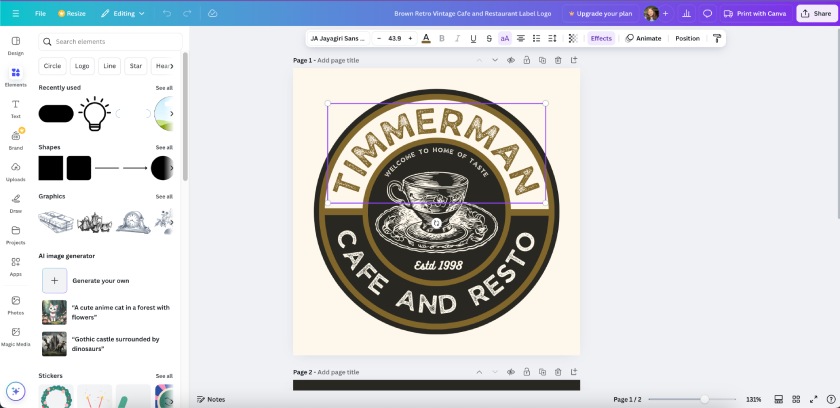
Canva is great for quick and simple logos, but not for fully unique or custom ones. Here’s a sample I made using its AI image generator. (Source: Canva)
VistaPrint: Best logo designer for branding materials
Pros
- Lets users design a logo and apply it directly to printed materials
- Generates commercial-ready logo concepts from short business descriptions
- Free to use for up to 60 logo generations
Cons
- Limited editing tools compared with Adobe Express and Canva
- AI-generated text may be misspelled or inaccurate
- Not ideal for users who already have a specific logo concept in mind
My expert opinion
VistaPrint is first and foremost an online printing platform. But it also has a logo design tool, which is pretty useful for creating straight-to-print designs. However, I will caution that its design capabilities aren’t anywhere near Canva or Adobe Express’s standards.
They’re more basic and have more limited customization. Another big difference is that it uses an AI logo generator first before moving on to the customization platform, which is very limited, as it can only change colors and fonts.
In that regard, it’s a good option if you don’t have a clear idea of your logo yet. The AI can generate some initial designs that you can customize further. On the flip side, it means you get very little design freedom.
Furthermore, VistaPrint’s AI is prone to spelling some words wrong (which it did for me). And there is no way to change it, so I definitely don’t recommend it if you want a logo with text. There’s a good chance something will be misspelled.
And it’s not just that words are misspelled (“compaiy” vs “company”). But the way in which it chooses and places random nonsense words suggests that its AI model is pretty far behind on the comprehension scale.
Personally, I don’t use VistaPrint’s logo maker very often because I prefer more control over my designs. I imagine it’ll be more helpful if you’re not comfortable starting a design from scratch, or you’re using your logo primarily for printed materials and need it done quickly.
It’s also easy with VistaPrint to see mockups of your logo on posters, merch, business cards, and dozens of other marketing materials.
Type of logo designer: AI-generated
- VistaPrint LogoMaker is 100% free to generate 60 logos.
- Print-ready branding: Lets users apply logo designs directly to business cards, posters, apparel, and other marketing materials.
- AI logo generation: Creates logo concepts from short business descriptions, making it useful for users who do not want to start from a blank canvas.
- Logo mockups: Shows how a logo could appear on printed products, helping businesses preview branded materials before ordering.
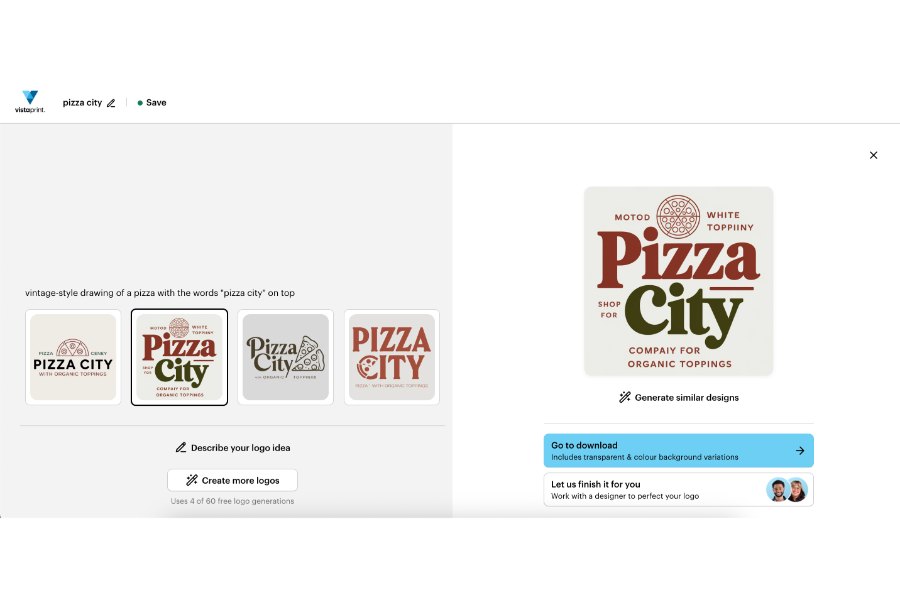
VistaPrint uses AI to generate logos — though not without flaws. Spot the misspellings in this one. (Source: VistaPrint)
CorelDRAW: Best for illustrating fully custom logo designs
Pros
- Offers freehand drawing, vector editing, and layer-based design tools
- Provides more creative control than beginner template platforms
- Includes templates for logos, social graphics, presentations, and other branded assets
Cons
- Not as beginner-friendly as Canva or Adobe Express
- Online editing can lag depending on the project and browser
- Some plans require a subscription instead of a one-time logo purchase
My expert opinion
CorelDRAW is a new entry on this list and the one I’d recommend the most for full creative control over your logo designs. This is the platform for people who want something that allows full creative control and want more than what Canva allows, or if you already have a specific vision in mind for your logo and want to recreate it digitally.
It’s also the one graphic artists or anyone with a design background will appreciate most, as it’s the most similar online platform to Adobe Illustrator by far.
In fact, it’s my best alternative to it (yes, even more than Adobe Express). There are freehand drawing and painting tools, and even layer-by-layer editing. There are also vector and stock image libraries.
This being an online platform, though, the experience doesn’t quite feel as smooth as Illustrator, but it’s good enough and definitely the best website for logo design if you want a fully custom, unique logo. It’s not ideal for beginners, but rather for people with digital design experience.
There are also projects and templates for other designs, like social media graphics and presentations, and the free trial means you can design and download a 100% custom logo completely free if you’re new to the platform.
- CorelDRAW Go: $99.99 per year for full use of the online illustration platform and templates for social media and other branded assets
- CorelDRAW Standard: $299 one-time purchase for the online illustration platform, templates, and photo editing tools
- CorelDRAW Graphics Suite: $269 per year for the online illustration platform, templates, photo editing tools, the CorelDRAW desktop app, 10,000-plus design assets, and Pantone integration
- Freehand design tools: Gives users the freedom to draw and build original logo elements instead of relying only on templates.
- Vector editing: Supports scalable logo design, which is important for using a logo across business cards, websites, signage, and merchandise.
- Desktop and online design options: Lets users choose between browser-based editing and the full CorelDRAW desktop experience on higher-tier plans.
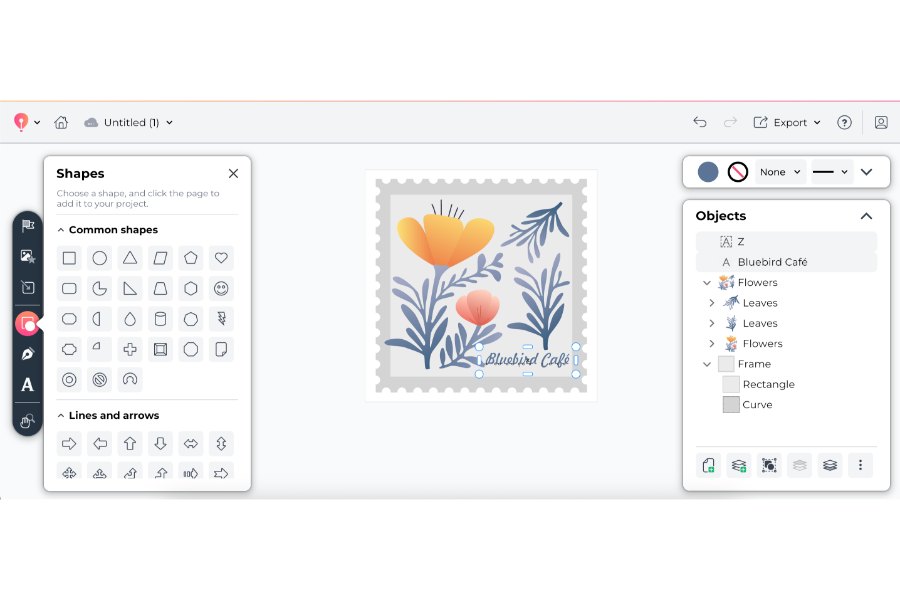
CorelDRAW offers full creative and design freedom — ideal for creating a completely unique logo. (Source: CorelDRAW
Turbologo: Best AI logo generator
Pros
- Generates logo options based on business name, industry, colors, and style preferences
- Lets users customize AI-generated logos in a drag-and-drop editor
- Offers full logo ownership and unlimited logo changes on paid packages
Cons
- Many generated logos follow a basic icon-and-text format
- Downloads require payment, even if the logo generator is easy to test
- More polished or distinctive logos may still require manual customization
My expert opinion
Turbologo is a fully AI-powered logo design generator. But what I like about it is that it doesn’t just generate logos from text prompts. You can choose styles and colors beforehand, and it’ll generate a selection to choose from.
And there are options to customize your design in a drag-and-drop design platform as well, so it’s still possible to make changes before downloading and using your logo.
It combines the ease offered by AI design platforms with the customization capabilities of a drag-and-drop designer, all while being super easy to use.
That said, its logo designs aren’t what I’d call modern or particularly sophisticated. They tend to be a generic combination of text-plus-an-icon, though there are some gems in the mix. Plus, the ability to customize it further in the editor is a huge plus.
The only problem is that it’s not free to download, and downloading with full commercial rights costs $9.99 — higher than most other platforms that offer a similar logo quality.
Overall, it’s a decent platform that provides good value, and if its AI could only produce more complex designs (maybe in a few years?), I’d gladly put it higher on my list.
- Lite: $19.99 for three months or $29.99 for one year, including full logo ownership and unlimited logo changes
- Standard: $39.99 for three months or $59.99 for one year, including everything in Lite, plus transparent background and a brand identity package with font and color names
- Business: $79.99 for three months or $119.99 for one year, including everything in Standard, plus a full brand kit with social media designs, business cards, backgrounds, letterheads, and an AI website builder
- AI logo generation: Creates multiple logo drafts based on business details, industry, colors, and design preferences.
- Drag-and-drop editor: Lets users adjust AI-generated logos before downloading and using them.
- Brand kit package: Adds matching brand assets, including social media designs, business cards, backgrounds, and letterheads on the Business plan.
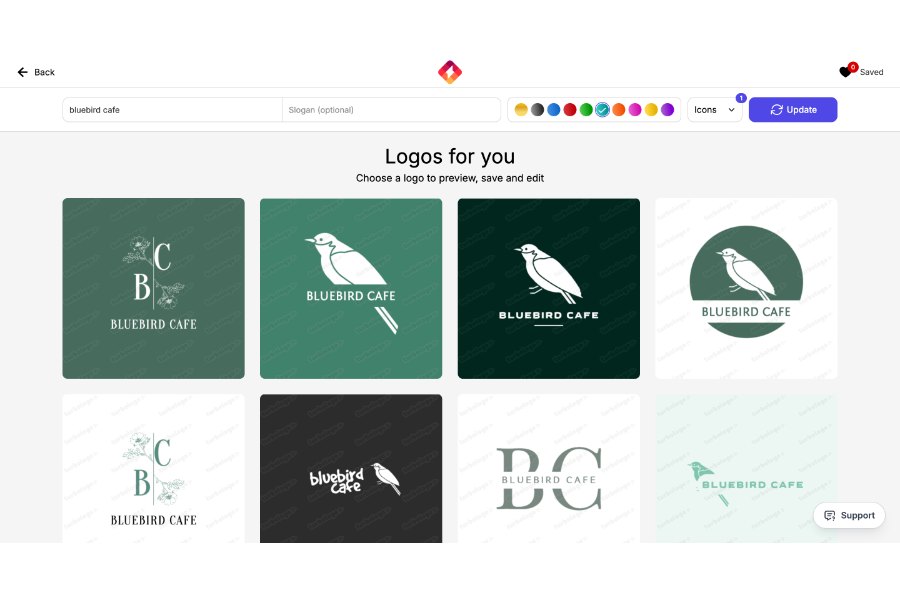
Turbologo uses AI to generate logo drafts that can be customized in a drag-and-drop editor, combining ease and customization. (Source: Turbologo)
Looka: Best for generating full brand kits

Pros
- Create a download-ready logo in 15 minutes or less, no design skill necessary
- Create a brand kit with a website and 300-plus branded templates
- Modern, industry-specific logo designs
Cons
- Logo customization is limited compared with drag-and-drop editors
- Designs may look similar to other AI-generated logos
- Brand kit access requires an annual subscription
My expert opinion
Looka’s primary benefit has always been its ease of use. It’s an AI-powered brand kit generator (before AI platforms were in the mainstream, so props to that), and it’s my top recommendation if you want AI to help generate a full brand kit.
It essentially acts as an AI-powered design agency, where you can choose specific logo icons, font styles, and colors, and it’ll generate some logo designs for you to choose from. It’s a very efficient process that takes about 15 minutes, tops.
The problem is that these logos aren’t exactly the most unique or sophisticated and are the sort of thing you could also create on Canva or Adobe Express at no cost. More than anything, it’s a platform I’d recommend to anyone who doesn’t have a clear vision of what they want their logo to look like but needs a full brand kit quickly and easily for business cards, websites, social profiles, and even marketing swag.
There’s also an editor for further customization, although, unfortunately, not a drag-and-drop one, which significantly limits design freedom. What I do like is that all the logos are nice and modern, and using the tool has no limits — you only pay once you’re 100% satisfied.
- Basic Logo Package: $20 one-time purchase for one PNG logo file
- Premium Logo Package: $65 one-time purchase for PNG, SVG, EPS, and PDF logo files, multiple color variations, and unlimited logo editing
- Brand Kit Subscription: $96 per year for high-quality logo files, full ownership, unlimited logo edits, social media templates, business cards, email signatures, letterheads, invoices, brand guidelines, and 300-plus brand assets
- Brand Kit Web Subscription: $129 per year for everything in Brand Kit, plus a branded website
- AI logo generator: Creates logo concepts based on business name, industry, preferred styles, colors, and symbols.
- Brand kit: Provides ready-to-use assets for social media, business cards, email signatures, letterheads, invoices, and brand guidelines.
- Branded website option: Adds a website to the logo and brand kit package for businesses that want a quick online presence.
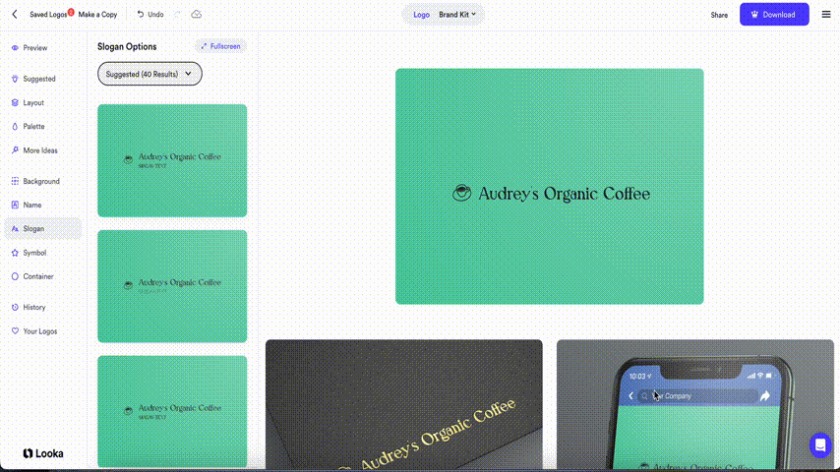
Looka acts as an AI-powered logo design agency, but without the same level of customization as other vendors. (Source: Looka)
Some alternatives to consider
The platforms in this guide are some of the best websites for logo design I can personally attest to, but maybe you want something a little different. For example, if you want a completely custom logo design from a professional graphic designer, or you need a more complex type of tool.
I focused exclusively on online logo design platforms on this list that are good alternatives to Canva, but there are other places you can get good logo designs as well, like 99Designs, Fiverr Pro, or the OG design tool, Adobe Illustrator.
How do you design a good logo?
A good logo is far more than random shapes and colors — it should communicate what your brand is about quickly and accurately.
Think of the iconic logos of Starbucks or Apple, or even newer ones like the Spotify logo. They’re unique, memorable, and give you a sense of what the brand signifies — aka, its brand identity.
The logo you design should accurately represent the thoughts and ideas behind your brand and differentiate you from your competitors, while being easy for audiences to understand and recognize. Doing that first means understanding your brand.
- Understand your brand to its core. No good brand logo exists without a fully formed brand identity behind it. Before designing your logo, know your brand’s mission, vision, values, personality traits, and even elements like colors and motifs. All of these will help shape your logo design.
- Research your market and competitors. The foremost functions of your logo are to help you stand out from the competition and to connect to your target audience. To do that, you’ll need to understand both. Research your audience’s preferences and values, and the design principles that speak to them. Research your competitors’ brands to see how you can stand out.
- Get inspired. One of the best things about logo design is that you can always take inspiration from the thousands of logos that already exist. Take a look at some of the best brand logos from successful businesses and note what design elements and creative interpretations might work for your own logo.
- Choose the right platform to support your vision. Even if you don’t have your full logo designed, it helps to have a general vision of what it should look and feel like, along with the design elements you want to include. This helps you choose the top logo maker to fulfill that vision, whether you want a complex logo that requires a custom design or just a simple wordmark.
- Think for the long term. A simple logo with your brand name might be enough for now, but as your brand grows, you might need something more unique that sets you apart from competitors. Doing a full rebrand is risky if your brand isn’t established enough, so design a logo that can support your brand until the next few stages of your business’s growth.
- Get feedback. No good logo came out of just one design session. Feedback is an important part of the creative process, especially for a public-facing asset like a logo. Before finalizing your logo, get feedback from people important to your business, like investors, team members, trusted friends and family, and even fellow business owners.
How to choose the best websites for logo design
Choosing the best logo design website depends on how much creative control you want, how quickly you need the logo, and whether you also need branded materials like business cards, social media templates, or a website.
If you want the easiest design experience, start with a drag-and-drop platform like Adobe Express or Canva. These tools are best for beginners because they offer templates, icons, fonts, and editing tools that make it possible to create a logo without design experience. If you want something more custom, CorelDRAW is a better fit because it offers greater control over illustration, layers, and vector-based design.
AI logo generators like Turbologo, Looka, and VistaPrint are better for speed and convenience. These platforms can generate logo ideas from your business name, industry, colors, and style preferences, but they usually offer less design freedom than a hands-on editor. They are a good fit if you want inspiration quickly or need a starter logo, but not if you already have a very specific design in mind.
Before choosing a platform, also check whether the logo can be used commercially, what file types are included, and whether you can edit the logo after downloading it. A good logo design website should give you usable logo files, enough customization options, and clear ownership terms so you can confidently use the design across your website, social media, print materials, and marketing campaigns.
How I evaluated the best websites for logo design
To evaluate the best websites for logo design, I focused on affordability, ease of use, customization options, logo quality, file downloads, branding tools, commercial usage rights, and overall value for small businesses. I also considered whether each platform is better suited for beginners, AI-generated logos, printed branding materials, or fully custom designs.
- Pricing (15%): A logo that you create yourself shouldn’t have to make a significant dent in your marketing budget, which is why I specifically looked for design platforms with a starting price of $20 or less and design services with $100 or less. Most of the platforms above also have free plans or a money-back guarantee.
- General features (30%): While each platform is built differently, some specific features I looked for were high-definition logo downloads, multiple logo formats, adequate design tools and services, color and font customization, and the ability to build other branding assets using your logo.
- Advanced features (25%): I also gave extra credit for extra features. These include things like design tools for other marketing materials, brand kits, editable logos, logo printing services, and AI design tools.
- Customer support (10%): The platforms above are also simple enough for beginners to navigate, but having human support nearby is invaluable to a good customer experience, which is why I gave higher scores to platforms with longer support hours and that can be contacted by phone, email, and online chat.
- Expert score (20%): Finally, I also took my experience in marketing and content creation into account when evaluating the platforms above and how they stack up against other logo design platforms. My expert score is based on each platform’s overall features, design tools, value for money, and ease of use.
Frequently asked questions (FAQs)
To choose the best logo design website for your needs, first evaluate the type of logo you need. Do you already have a specific logo design in mind, or do you need to start with some design inspiration?
Some platforms have drag-and-drop editors that allow more creative control, like CorelDRAW and Adobe Express, while others use AI to generate logos based on your preferences, like Looka. Then, evaluate your budget, as well as other design needs. Some platforms have design tools for other brand and marketing assets, like social media posts and business cards.
It largely depends on your specific preferences, but an overall good option is Adobe Express — it’s easy to use with ample design customization, has a design library with thousands of elements, and its designs are all available for commercial use.
It’s an online drag-and-drop design platform like Canva, but often with better templates and customization capabilities. Other good logo design platforms are Turbologo for an AI-generated logo design and CorelDRAW for an online illustration and design platform that allows full creative control.
No, ChatGPT doesn’t create logos as it can only generate text. A good alternative for AI-generated logo designs is Turbologo, which generates logos based on your design preferences using AI, or Looka, which generates full brand kits.
DALL-E, which is also from OpenAI, can generate images, but requires very specific design directions and often takes multiple prompts to get a logo design right. And its results are hard to replicate. If you need to resize a previously generated logo, you run the risk of getting a design that’s close but not exactly the same. Even small design differences can chip away at your brand identity.
Bottom line
Canva’s still a reliable, easy option for designs, but it’s no longer the absolute best website for logo design, in my estimation.
There are dozens of new platforms that can help create a memorable, well-designed logo — whether through AI or using a drag-and-drop design platform — regardless of your design skills, like Adobe Express, VistaPrint, and CorelDRAW.
Source link