7 Great Solutions Under $10

Let’s say you’re on a strict marketing budget and need to keep your website costs down. Fortunately, there are many inexpensive web builders out there to choose from. However, what you actually get with free and cheap plans depends on the provider—and honestly, not all cheap plans out there are great. After all, you want to build a website cheap, not build a cheap website.
However, with the right blend of usability, functionality, and cost, you can meet your business needs for a great site without breaking the bank. Just remember that many providers here offer a low introductory price for the first year (maybe two), but prices can increase substantially.
The best deals, in my opinion, combine website plans and productivity suites or offer a complete web and email hosting plan. This allows you to simplify your IT portfolio and take advantage of the cost-saving bundling services.
To save you time, research, and possible heartache, we brought together and ranked the best cheap website builders—all allow you to build a good, functional website on your own domain for less than $10 per month. We’ll also explain how IONOS rose to the top of our list.
- IONOS: Best value website builder overall
- Hostinger: Best easy-to-use WordPress website builder
- Weebly: Best value for ecommerce
- Webador: Best cheap website builder for beginners
- Web.com: Best for social selling and marketing tools
- Bluehost: Best inexpensive AI-powered WordPress builder
- DreamHost: Best cheap website builder for WordPress
Cheapest Website Builders at a Glance
IONOS: Best Value Website Builder Overall

Pros
- Artificial intelligence (AI) writing and site builder
- Free domain, SSL, and email
- 400-plus templates
- Built-in email marketing tools
- rankingCoach SEO feature
- Dedicated consultant and 24/7 support
Cons
- No free plan or trial
- No ecommerce dropshipping, unlike Weebly
Why I chose IONOS
IONOS is my top overall pick because it offers one of the best values for small businesses on a tight budget. Its Plus plan starts at just $1 per month for the first year and includes a free domain, SSL certificate, business email, AI website builder, booking tools, marketing features, and ecommerce support.
I also found IONOS especially beginner-friendly. The AI builder can generate a starter site with pages, images, and copy, while the section-based editor keeps customization simple. Renewal pricing does increase after the introductory term, but the platform still delivers strong long-term value because of its advanced SEO tools, Google PageSpeed optimization, global CDN, and dedicated success consultant.
- Easy integrations: Native tools for appointment booking, lead capture, email marketing, analytics, reviews, social media integration
- Advanced SEO: Image optimization, Google PageSpeed, CDN, competitor tracking (Plus and Pro plans), as well as rankingCoach (Pro plan) for SEO, making IONOS one of the best website builders for SEO
- Dedicated support: Dedicated consultant to answer questions and offer advice so you can get maximum value from your website, plus 24/7 support from knowledgeable techs who can solve problems for you
- Daily backups: If something goes wrong, IONOS can revert your website to the prior version and get your business back up and running quickly
- Personalized content: Display popups, banners, landing pages, and other elements to site visitors based on rules you set, such as whether they are new or returning visitors, location, and more
- Translations: With over 100 languages, IONOS’ builder is perfect for users with a multilanguage or international customer base
- Content creation assistance: 400-plus templates with premade content blocks and layouts, plus free stock images, and AI for web building, copywriting, image generation, and SEO
IONOS is the cheapest website builder for small businesses overall for the first year. Unlike many providers that offer a range of plans at a fairly even discount, IONOS takes a novel approach to making their robust midlevel plan the cheapest to start. The midtier Plus plan is billed at just $1 a month for the first 12 months, with or without an online store, and renews at a very reasonable price of $18 a month.
In all plans, the IONOS site builder is beginner-friendly, with an AI builder that can generate a starter site with a full set of pages, starter content, and images. When you’re ready to customize the results, an easy-to-use section-based editor allows you to make it so. For functionality, a host of business apps such as marketing, appointment booking, and ecommerce can bring this to your site.
IONOS includes reliable features, including advanced SEO. Sites enjoy Google PageSpeed optimization and a global content delivery network (CDN) for fast site loading time anywhere on any device. Plus, no matter which plan you choose, you’ll get access to a dedicated success consultant to advise you as you build your website and help you get the most out of your plan.
What Is a CDN?
A Content Delivery Network, or CDN is a network that allocates the content on your website across several geographically distributed servers. Caching or preloading images and other content in servers closer to the user reduces site load times, resulting in better engagement and lower bounce rates.
CDNs also reduce the load on the source server and ensure better service in the event of large traffic spikes from users hitting the site simultaneously. They can also ensure service if one server in the network goes down for any reason.
IONOS Pricing & Plans
IONOS’ cheap website builder plans include a free domain and SSL certificate. Uniquely, they also come with a free business email address on your domain. Also unique to IONOS is their native email marketing tools, which require a separate plan. The starter email marketing plan is $7 per month and allows 2,500 email sends per month. With any website hosting plan, you can add an online store, which takes the basic starter plan from $12 per month to $24 per month.
Expert Opinion
IONOS has all the business website basics covered, including ecommerce, in super-cheap plans that will only cost you $1 for the entire first year. You’ll get everything needed to build a small business or ecommerce website quickly and easily, with an AI builder, even on an extreme budget. IONOS is a great overall value, with arguably the best customer service of the providers listed here.
Hostinger: Best Easy-to-Use Website Builder for WordPress

Pros
- 100 websites, one domain, unlimited SSL, and up to 100 emails included
- Top-notch AI builder
- Strong marketing integrations with Google, WhatsApp, Facebook, etc.
- 20-plus payment processing options
- No limits on site size, storage, or bandwidth
Cons
- No free plan or trial
- Ecommerce limited to 500 products without WooCommerce hosting
- Only a handful of third-party apps
- Price increase after first billing term
Why I chose Hostinger
Hostinger is one of the best low-cost options for ecommerce and WordPress websites, especially for businesses that can commit to a longer-term plan. It does not charge additional transaction fees, and its plans include AI tools, integrated WooCommerce support, and branding features like a built-in logo maker.
One feature that stood out during testing was its AI-powered heat map, which helps show where visitors engage most on a page. Combined with Google Ads and Facebook Ads integrations, Hostinger gives small businesses useful insights for improving visibility and conversions. The tradeoff is that the lowest pricing requires a longer upfront commitment, but the long-term value is still excellent.

Hostinger’s excellent AI website generator provides a good starting point for shaping the overall structure of a site before you build out content.
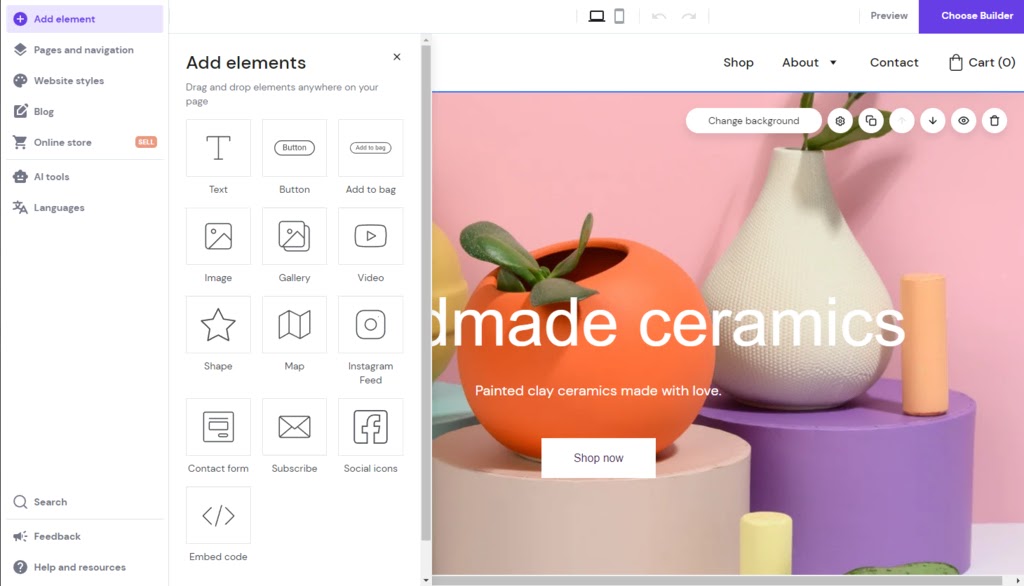
Adding stylistic and functional elements to WordPress in Hostinger’s clean user interface is a simple drag-and-drop operation.
- Multiple websites: Get all the storage and bandwidth you need to build not just one—but up to 100 websites
- Monetization tools: In addition to building an online store with physical or digital products, easily integrate Google AdSense to monetize a blog or connect Google or Facebook Ads and remarketing
- Customer service apps: Connect Messenger Live and WhatsApp to facilitate customer conversations and support
- Multiple site types: Build websites using Hostinger’s site builder or WordPress, and mix and match in the same plan
- Smart tools: Built-in AI for site construction, copywriting, images, SEO, and analyzing site visitors’ content interactions with heat maps
Hostinger’s excellent AI website generator provides a good starting point for shaping the overall structure of a site before you build out content.
Adding stylistic and functional elements to WordPress in Hostinger’s clean user interface is a simple drag-and-drop operation.
Notably, with Hostinger there are no extra transaction fees for ecommerce. You can build an ecommerce website for $3.99 a month for the first two years, and pay $13.99 on renewal. In addition to being the cheapest long-term online store website builder, Hostinger comes with smart tools that make building a brand presence online easier. Plus, there’s a logo maker in the dashboard to help you create a logo, icons, or a favicon for your site.
Hostinger’s unique AI-powered heat map shows you where site visitors are engaged with your content. These insights can help you increase engagement by placing calls to action, buttons, web forms, and other lead and sales-generating elements where site visitors are more likely to notice and interact.
Hostinger also makes it easy to integrate with Google Ads and Facebook Ads, including remarketing for both platforms. This can put your return on investment for advertising into hyperdrive and give your brand far more visibility online.
Hostinger Pricing & Plans*
*For a full list of pricing plans including WordPress, cloud hosting, and VPS hosting plans, visit Hostinger.
Expert Opinion
There’s a lot to love about the Hostinger website builder. Mainly, Hostinger is a tremendous value all-around, especially over the long term if you can commit to two years upfront. If you need WordPress, Hostinger is a great option. It has an excellent AI website builder, and, for building an ecommerce site at an affordable price, its integrated WooCommerce plans are hard to match with any other platform.
Weebly: Best Value for Ecommerce

Pros
- Free-forever plan with ecommerce
- App marketplace for paid users
- Photo studio app to perfect product images and menu items
- Drag-and-drop email newsletter builder
- Integration with Square
Cons
- Unable to switch from Square editor to a more versatile Weebly builder while building
- Free ecommerce only for US users
- Shoppable social posts only via Square editor (not Weebly)
- Limited drag-and-drop capability compared with Wix or Squarespace
Why I chose Weebly
Weebly is still one of the better value website builders for ecommerce businesses, especially for those already using Square. Even its free plan includes payment processing support, making it easier for small businesses to start selling online without immediately upgrading.
I also like its image gallery and product photography tools for restaurants, retail shops, artists, and other visually driven businesses. Its design flexibility is more limited than newer website builders, but features like online ordering, reservations, and Square integration make it a practical and affordable ecommerce solution.
- Two section-based editors with limited drag-and-drop capabilities: AI-generated template via Square editor for ecommerce websites or Weebly editor (choice of template) for personal sites, online stores, and blogs
- Robust ecommerce on all plans, with either editor
- Online ordering (see why Weebly is the best website builder for restaurants)
- One-click integrations (300-plus with Weebly editor, around 36 with Square editor)
- Embed code at the page level for more third-party capabilities
- Great photo handling with PhotoStudio and slideshow maker
Weebly is renowned for best serving ecommerce and dining establishments with their website needs, even for free. It has payment integration even on the free plan, providing comprehensive tools for online shops selling physical goods. It’s also ideal for restaurants needing an online ordering platform and reservation management tools. For more in-depth information, read our guide on how to create a Weebly site.
Another strength of Weebly is its image gallery creation features and product photography app. PhotoStudio facilitates easy shooting, retouching, and uploading of product photography to Square or Weebly-built sites. This alone makes it a great solution for businesses looking to showcase a wide range of visually appealing products that are continually updated such as retail shops and galleries.
Weebly Pricing & Plans
Expert Opinion
If you are a restaurateur considering or already using Square’s point-of-sale systems, Weebly should be your first choice. Its robust reservation system, transaction processing, and image capture and display capabilities make it uniquely attractive for these use cases. If you’re looking for value, Weebly delivers this in spades.
Webador: Best Cheap Website Builder for Beginners

Pros
- Free domain included in paid plans
- Free stock image library
- Strong ecommerce platform
- Able to swap templates easily
- Intuitive design tools ideal for beginners
Cons
- Basic SEO tools and features
- Cheapest ecommerce plan limited to 10 products
- Not much difference between Base paid plan vs free plan, except a custom domain
Why I chose Webador
Webador is one of the easiest and cheapest website builders for beginners. Its simple editor, design-focused templates, stock image library, and ability to switch templates mid-project make it easy to build a polished website quickly.
It also doesn’t impose strict storage limits, which is useful for portfolios, galleries, podcasts, and video-based websites. The Lite plan still displays Webador ads, so I generally recommend upgrading to the Pro or Business plan for a more professional brand presence. Still, Webador is a strong option for startups and beginners who want a good-looking site without a steep learning curve.
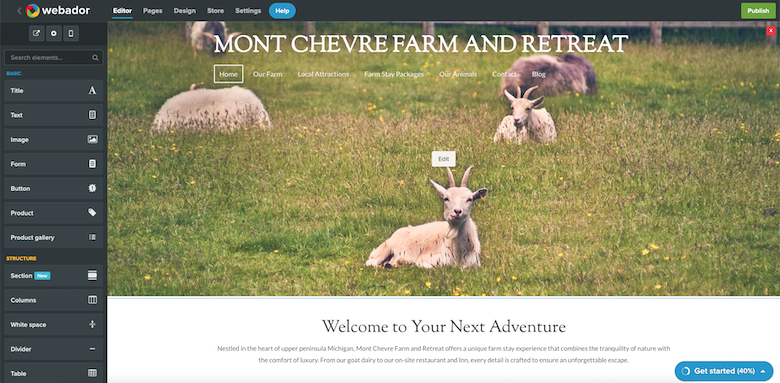
Webador stands out as the most user-friendly but still robust website builder interface for beginners.
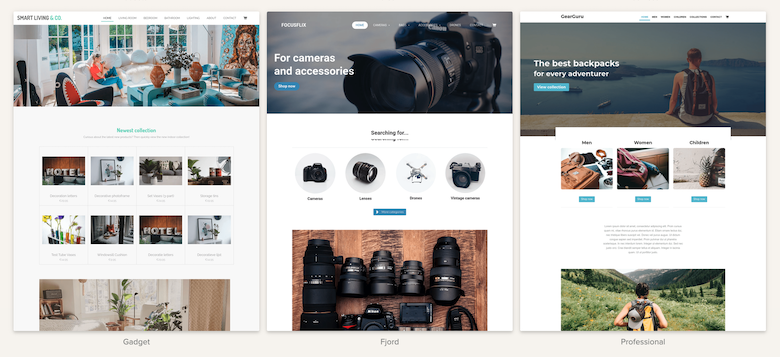
Webador offers a selection of clean and well-curated templates as a starting point.
- Design-forward websites: 50-plus modern templates; change your template anytime without starting over
- Beginner-friendly: Building pages in Webador is just about as easy as it gets, ideal for do-it-yourself website beginners
- Cheap plans with a catch: Ecommerce plans start at $9 a month but is limited to 10 products, stepping up to $18 per month for unlimited products
- No limits: All plans (even free) include unlimited pages, storage, bandwidth, and blogging
- Value-add extras: Paid plans include a free domain, and the Pro and Business plans include an email address and a ton of extra features, including advanced analytics, integrated Google Analytics, Business Page, Search Console, and the ability to host audio and unlimited photo album files
Webador stands out as the most user-friendly but still robust website builder interface for beginners.
Webador offers a selection of clean and well-curated templates as a starting point.
You’ll be hard-pressed to find a website builder that’s easier to use than Webador. Even true beginners can create an account, choose and customize a template, and get a multipage website up quickly. It makes everything easy, including free stock images you can use to personalize your site while maintaining good design flexibility.
If having a solid visual design is your thing, Webador has you covered here as well. Its templates are design-forward and visually impactful, which offers a great starting point. Templates can also be changed midstream, which is a rarity with website builders.
Plus, there aren’t storage limits. So this is a good cheap website builder not only for beginners but creatives who want to showcase their work in an online gallery. In addition, ecommerce plans include audio and video hosting, making it a viable option for influencers looking to build personal branding through videos or podcasts.
Webador Pricing & Plans
Webador made our list of the best cheap website builders in part because you can easily build a basic or ecommerce website in plans that start under $10 a month. Keep in mind that the Lite plan will still display ads on your site, so opt for the Pro or Business plans to ensure brand credibility if possible.
Expert Opinion
Webador is a great addition to our list of the cheapest website builders. It’s great for startups and beginners who don’t want to spend a ton of time learning the technicalities of website building but still want a great-looking site.
The Lite plan offers little more than the free plan except for the ever-important custom domain. The Pro Plan is a good value if you don’t sell many products, but for serious ecommerce or services, the somewhat pricier Business Plan is de rigeur. Use the free version to test the platform risk-free.
Web.com: Best for Social Selling and Marketing Tools

Pros
- Unlimited appointments, reminders, and online transactions offered in ecommerce plan
- Powerful marketing automation tools
- Social selling in the ecommerce plan, including Amazon, Etsy, and eBay
Cons
- No free plan or trial and no money-back guarantee
- Not great for blogging
- Dated templates
- Marketing tools galore: Google site verification, social media embeds, scheduled posts, photo and image editing tools, email marketing, marketing calendar, logo builder, QR code generator, etc.
- Cheap first-year pricing: Affordable first-year pricing to help you build your brand with plans that scale (be ready for a steep increase on renewal)
- Unlimited appointments: The second plan tier includes unlimited appointments plus the ability to take payments for appointments and deposits online
- Integrated ads: Increase return on ad spend with pay-per-click (PPC) tools like Google tag manager setup, ad keyword research, and campaign monitoring
- Full-featured ecommerce: Online store plans cost more with Web.com but are full-featured; cheaper first-year pricing than Shopify or Weebly for serious ecommerce or dropshipping businesses
- Hostinger: Hostinger comes with a lot more (for a lot less) in the first year (and over time). Hostinger is also far more affordable for online stores that don’t need dropshipping or a ton of advanced functionality.
- Weebly: Weebly’s $12 per month plan (or $16 month-to-month) includes inventory management, advanced shipping, automated sales tax, online ordering, discounts, and more. You’ll pay more for features like these on Web.com.
- IONOS: Web.com locks its SEO and marketing tools behind the second-tier plan. Email marketing and appointment booking comes in IONOS’ $1 per month first-year plans but costs $7.95 per month the first year with Web.com.
Web.com is the cheapest website builder for service-based businesses needing online booking tools—at least for the first year. The Website + Marketing plan includes unlimited appointments and reminders, plus online payments and deposits.
Web.com offers powerful marketing automation tools including link-in-bio, CRM, social media scheduling, marketing calendar, email, and PPC. It also has advanced ecommerce capabilities similar to Shopify but at a similar price point after the first year.
Uniquely, Web.com includes an hour of expert design support with all plans. While this doesn’t come close to the value of having a dedicated success consultant (forever) with IONOS, it is a unique offering. And if you want even more help, you can tap the QuickStart plan, which includes setup and initial design of your site for $199.
For those building their websites themselves, Web.com has an intuitive section-based editor. It only offers limited website customization, but it’s easy to use as a result. You can drag apps and social integrations and add basic page-level SEO. Plus, it has good templates and built-in guides to get you started, and a decent variety of prebuilt content sections to facilitate fast website building.
Web.com Pricing & Plans
You will get more in Web.com plans (after the first tier), but you’ll also pay more, especially after the first-year introductory pricing expires. But the convenience of having a full-featured website builder where appointments and service calls can be scheduled online makes it easy to grow your business and cover the cost of renewal.
Expert Opinion
Web.com has the most built-in marketing tools of all the best cheap website builders. However, beyond the introductory period, it definitely costs more, so you’ll need to take full advantage of the first year to build your business to compensate for higher costs on renewal.
But if you want integrated appointments, marketing tools, and ecommerce, it offers the most robust plans on this list. There’s no free trial, but you can test it via a monthly plan for $1.95 the first month before committing long-term.
Bluehost: Best Inexpensive AI-powered WordPress builder

Pros
- User-friendly AI Website builder shines among WordPress builders
- Preinstalled WooCommerce on the online store tier
- Free domain (first year), SSL, CDN on all tiers
- Free email for the first three months
- Google Workspace reseller
Cons
- No month-to-month billing
- Low storage in the base tier
- Upgrade required for backups, domain privacy, and malware scanning
Why I chose Bluehost
Bluehost is one of the best low-cost options for building a WordPress website. Its plans include WordPress preinstallation, hosting, a free domain, custom themes, and the WonderSuite AI website builder, which helps simplify setup and site creation.
The custom dashboard, onboarding tutorials, and guided setup process also make Bluehost easier to manage than traditional WordPress hosting. WordPress still comes with more of a learning curve than standard drag-and-drop builders, especially when adding plugins for advanced functionality. Still, Bluehost remains a strong choice for businesses wanting affordable WordPress flexibility for blogging, ecommerce, and long-term content growth.
- Bluehost WonderSuite AI website builder
- For higher-tiered hosting plans, emails essentially come with unlimited storage as you can allocate additional storage from your plan
- Free domain name for the first year of hosting
- Google Workspace (and Gmail) reseller
- Standalone email hosting plans with 25GB of storage, including webmail via the RoundCube email app (desktop and mobile)
- Free Yoast SEO
Bluehost is a leading WordPress hosting provider and the best for those who want to build a website with WordPress since it comes with a free domain name, web hosting, WordPress installation, custom themes, and, most importantly, the new WonderSuite AI website builder. This builder greatly streamlines and automates the creation of your website for beginners in web design.
If you plan to go with WordPress as your platform of choice, Bluehost offers a very user-friendly setup process with a custom dashboard and one-click WordPress installation. Bluehost enhances this easy onboarding with built-in beginner tutorials and step-by-step guidance to get you started quickly and (fairly) painlessly.
Bluehost Pricing & Plans
Expert Opinion
Bluehost is an extremely robust WordPress website builder, made all the more so by its excellent AI build features. It’s definitely recommended for any business owner who expects to expand their web presence over time, including content management, such as a blog. For ecommerce, its WooCommerce feature is formidable.
DreamHost: Best Cheap Website Builder for WordPress Hosting

Pros
- Free BoldGrid page builder
- Automatic daily backups
- Countless integrations with plugins
- 97-day money-back guarantee
- 100% uptime guarantee
Cons
- No free trial or free plan
- Even with a page builder, WordPress is harder to use than all-in-one site builders
- Plugins need to be vetted for features, reliability, and compatibility
Why I chose DreamHost
DreamHost is a strong option for businesses that want an affordable way to build a WordPress website with AI-assisted tools and reliable hosting included. I like that its plans come with the Remixer AI Website Builder, WordPress-optimized hosting, daily automated backups, unmetered bandwidth, unlimited SSL certificates, and a free domain for the first year. The entry Launch plan also supports up to 25 websites, which gives growing businesses more flexibility than many low-cost competitors.
The tradeoff is that DreamHost still requires more hands-on management than a fully hosted drag-and-drop website builder. You may still need WordPress plugins for ecommerce, security, or advanced functionality, and free business email is only included for the first three months. Still, for small businesses that want affordable WordPress hosting with AI-assisted setup, strong performance features, and room to grow, DreamHost delivers solid long-term value.
- Page builder included: BoldGrid page builder theme for a significantly reduced learning curve for building WordPress sites
- Technical support: Includes installation and management of core and security updates as well as free website migration services and 24/7 support
- Peace of mind: Automated free daily backups and a 100% uptime guarantee to protect your website with the DreamPress plan
- Cheapest long-term WordPress website builder: Lock in cheap pricing for four years at $1.99 per month
DreamHost plans come with a free drag-and-drop page builder theme, BoldGrid for WordPress. This reduces the learning curve to use WordPress and makes it easier to build and design your site quickly and even completely code-free. In fact, DreamHost is one of the best WordPress page builders available.
BoldGrid’s drag-and-drop builder allows you to edit most WordPress themes, has premade content blocks and advanced controls, and allows for CSS editing. One thing to be aware of is integrating plugins that may not be cross-compatible. In addition, DreamHost has launched their new Liftoff AI website builder for your initial site generation process. But as always, the results usually require extensive rework.
However, while DreamHost offers a couple of cheap and easy ways to build a website on WordPress, there will still be a learning curve. For example, you’ll need to install and manage plugins for nearly all functionality, including ecommerce. You’ll also have to find, install, and manage plugins for essentials like website security and protection from hackers and malware.
DreamHost Pricing & Plans
Shared Unlimited plans include WordPress preinstalled, the BoldGrid page builder, a free domain (annual plans), SSL, and unlimited business email and websites. And everything is backed by a lengthy 97-day money-back guarantee. For those looking for managed WordPress, plans start under $20 per month.
Expert Opinion
DreamHost’s builder makes WordPress much more beginner-friendly and accessible than native WordPress because of its BoldGrid designer and AI website generator, as well as its low price. We highly recommend purchasing the Shared Unlimited plan with unlimited websites and starting a free trial of professional email to get the most value for your small business.
Is there a Google Workspace website builder?A lesser-known part of the Google Workspace application suite is an app called Google Sites. Though not as robust as some of the inexpensive website builders reviewed here, Google Sites is a great alternative for Google Workspace users needing a simple business website but doesn’t require robust ecommerce functionality.
For Google Workspace users, go into Drive and select “+ New.” Then go to ”More” under the picklist of apps and select ”Google Sites.” There, you’ll encounter a simple, no-frills website builder that’s serviceable for basic sites. Best of all, it’s free with your Workspace subscription. Visit Google Workspace to learn more or to sign up.
How We Evaluated the Best Cheap Website Builders
While cost is the most important criterion, it’s not the only thing that makes even the most affordable website builder right for your business. We also determined whether its features were worth the price, noted standout features, and assessed the ease of building a sleek, modern site. We also looked at the customer support you can expect and finally weighed everything against our professional opinion.
Total Percentage should equal 100, we have 109%. Please check the data.
Key Considerations When Choosing Cheap Website Builders
Starting with a cheap website builder doesn’t mean you have to make sacrifices. As you compare these or other providers, look beyond price alone and think about the long term. Here are questions to answer as you decide which website-building option is best for your business:
- What does my plan include? The added value of a free domain, email marketing, automated social posting, and the ability to sell online in a base plan could make a provider the better option. However, if a plan doesn’t include niche features you need, like paid appointments, subscriptions, drop shipping, and so on, then spending a little bit more is probably best.
- What will I need in the future? Look beyond the base plan and introductory price to what’s included in higher-tier plans to avoid the headache of changing platforms as your business grows. For example, Wix is one of the best website builders for small businesses overall. While it doesn’t have a plan that starts under $10, it could be the best option if you want a scalable solution with niche features and enterprise-grade capabilities.
- Will Google and customers be able to find my site? One of the main reasons to have a website is to build brand visibility online. A website builder with subpar SEO tools isn’t likely to rank high in online searches, so compare each platform’s automated and manual optimization features. For more guidance, read the SEO considerations dropdown in our list of the best website builders for SEO.
Frequently Asked Questions (FAQs)
Most free website builder plans aren’t appropriate for business use because they host your website on subdomains and display third-party branding. However, you can build a HubSpot website and connect your own domain. It will still display HubSpot branding but is more credible for professional use.
IONOS is the cheapest website builder, especially for the first 12 months. Plans for websites and online stores start at $1 per month and include a free domain, SSL data encryption (HTTPS), and email addresses on your domain. The next cheapest is Hostinger, and while your plan will go up after the first year, most will still be under $10 a month, except for ecommerce.
All-in-one site builders are the easiest and cheapest way to build a website. Even complete beginners can create and publish a site in as little as a few hours. Most website builders include everything you need to get online quickly, from a domain and SSL to intuitive, no-code page-building tools, prebuilt templates, native and third-party apps, and built-in guides.
Bottom Line
Building an affordable website for a new or small business is well within reach with these great tools. Just remember the cost-to-value ratio of these solutions, both during and after the introductory pricing period. If possible, combine some of your product needs—such as website, email, marketing, and productivity tools—for maximum value.
IONOS is our pick for the best and cheapest website builder overall. With paid plans that include your domain, SSL, and free email from $1 per month for the first year, its pricing is hard to beat. The value is certainly there, with everything needed to build a great small business website, including ecommerce.
Source link