10 Best Free CRM Software for 2026

The best free customer relationship management software helps small businesses manage contacts, track deals, and stay organized without adding extra costs. A reliable free CRM for small businesses should include essential tools like pipelines, activity tracking, and communication features, not just a limited trial.
After reviewing dozens of platforms, I identified the 10 best free CRM software based on free-plan value, usability, features, and upgrade flexibility. I focused on tools that small businesses can realistically use long-term without needing to upgrade right away.
How do the best free CRM software for small businesses compare?
What makes my analysis of the best free CRM tools different? Compared to other top results around the best free CRMs for small businesses, my guide takes a hard look at CRMs that are actually free. Others evaluate CRM providers with free trials, which won’t be helpful for users who want a free plan for the foreseeable future.
As much as my team and I love recommending vendors like Insightly CRM and monday CRM, for example, their lack of free-forever plans means they’re just not right for this particular use case.
Additionally, my analysis is current. The top Reddit thread for discussions around simple CRMs hasn’t been active in any meaningful way in over a year. So the advice might not reflect what’s best or available today.
Why you can trust Fit Small Business
To ensure that we provide readers with the best answers, the Fit Small Business editorial process adheres to strict standards, including rigorous research, assessment, and scoring of providers.
In this review, I examined the essential aspects of the best free CRM software for small businesses, including their general and niche features, ease of use, pricing, and range of support services. My full methodology also involved firsthand experience testing software intuitiveness and reviewing real product users. Furthermore, I leverage the following work experiences when carrying out software reviews:

Sales & Marketing Analyst at Fit Small Business
How I chose the best free CRM for small businesses
To create this guide, I chose free popular CRM software and assessed them according to a scoring rubric that takes into consideration several factors that are critical for small businesses. I focused on pricing, usability, and quality of support, and also assigned my expert score based on my experiences testing or using the software firsthand. Read my full methodology below.
What makes Vtiger the best overall free CRM for small businesses?

Pros
- 10 free users means keeping your free plan even after you start to grow
- Full telephony features available: click-to-call, incoming call contact pop-up, call logging, and call recording
- Robust marketing automation tools allow you to do more in one platform
Cons
- Two-way email syncing isn’t available on the free plan
- Inventory capabilities are limited to products and services, not subscriptions or invoices
- Integrations are limited to Google Workspace, Outlook, Dropbox, and OneDrive
I chose Vtiger as the top overall best free CRM software because its free plan feels built for real small-team operations, not just light testing. When I reviewed its free features, the 10-user limit immediately stood out, especially because it still includes contact and lead management, customizable pipelines, task and project tracking, workflow automation, mobile access, and built-in telephony.
I did note that Vtiger’s free plan lacks two-way email sync and reporting dashboards, which may matter for teams that need deeper visibility. However, based on the amount of functionality available at no cost, I found its automation, calling tools, team capacity, and open-source Community Edition strong enough to make it the most complete free CRM option for small businesses.
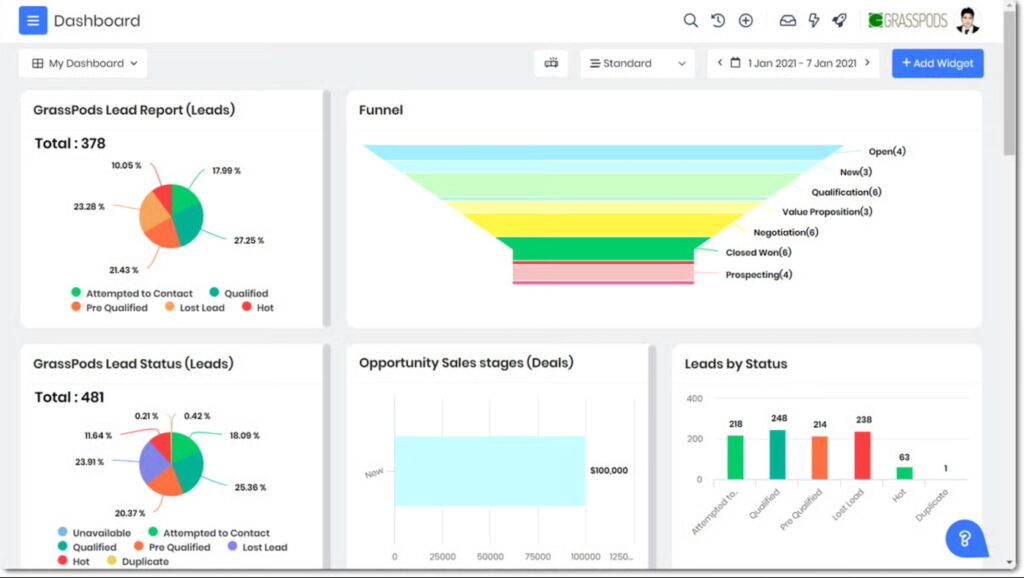
Vtiger’s home dashboard gives you a bird’s-eye view of lead and deal statuses. (Source: G2)
- 10-user free plan: Supports small teams at no cost, making it more practical than free CRMs built only for solo users.
- Sales pipeline tools: Includes contact and lead management with customizable pipelines for tracking deals.
- Task and project tracking: Helps teams manage follow-ups, assignments, and internal work.
- Workflow automation: Automates routine CRM actions to reduce manual work.
- Built-in telephony: Includes click-to-call, call logging, call recording, and real-time caller ID.
- “I like Vtiger because it is quite helpful to manage my clients and potential clients’ databases. The best thing is that Vtiger allows you to customize its modules and also create your very own ones.” — G2 reviewer
- “If you’re considering Vtiger CRM Sales Professional, make sure to have a clear understanding of your sales process so you can fully customize the pipeline to your needs. Take advantage of the powerful automation features to save time on routine tasks like follow-ups. Be prepared for a potentially complex setup and consider involving IT support to streamline the process.” — Info-Tech reviewer
- “While Vtiger CRM packs a ton of features for small and mid-sized businesses like sales, marketing, support, and project management all in one place, it can feel a bit overwhelming at first. People love how customizable and affordable it is, plus the automation really helps save time. But heads up: The setup can be tricky if you are not super tech-savvy, and the interface is not the slickest, sometimes feeling clunky or confusing.” — Reddit reviewer
What makes EngageBay the best for marketing-driven sales teams?

Pros
- Generous 15-user limit on the free plan
- Strong core CRM features with tools for marketing automation, web pop-ups, landing pages, and forms
- Social suite supports X, Instagram, and Facebook
Cons
- No workflow automation to manage follow-ups or lead nurturing in the free plan
- The 250 contacts limit may run out quickly for teams that also max out their number of free users
- Doesn’t specify support turnaround times or availability; you must enter your name and email to get help through the live chat bot
EngageBay (All-in-One) is a strong free CRM for small business teams that rely on marketing to capture and nurture leads. Its free plan goes beyond basic contact storage with email marketing, segmentation, campaign management, lead scoring, drip campaigns, a reporting dashboard, and a 360-degree contact timeline.
I would not recommend it as the strongest free option for workflow automation, since that is not included in the free plan. Still, its lead nurturing and campaign tools make it one of the stronger free CRM software choices for teams that want sales and marketing features in one platform.
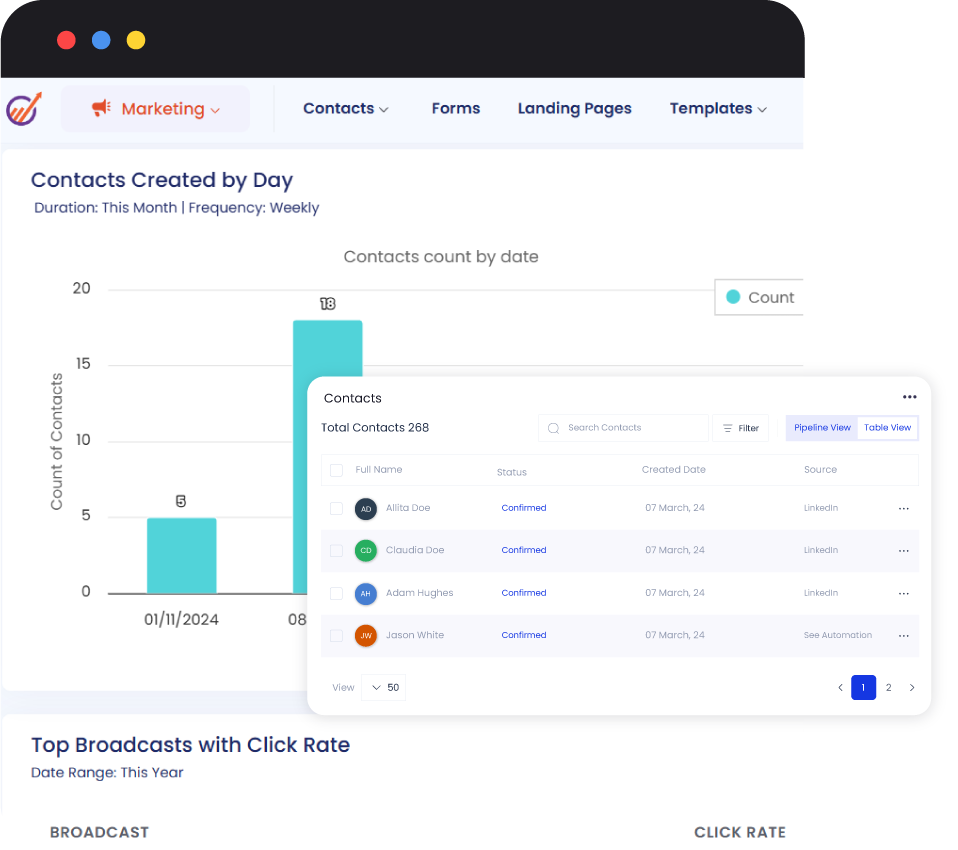
EngageBay scored full marks for its core CRM features, including contact and deal management. (Source: EngageBay)
- Email marketing tools: Includes email templates and campaign management for basic outreach.
- Lead scoring: Helps prioritize prospects based on engagement and sales readiness.
- Drip campaigns: Supports automated email sequences for nurturing leads.
- 360-degree contact timeline: Shows sales and marketing activity in one customer view.
- Reporting dashboard: Gives teams visibility into performance without requiring a paid plan.
- “Before EngageBay, our marketing and support tools were scattered. Now, everything from lead capture to order-related follow-ups is through a single workflow. We’ve reduced response time by nearly 30% and built stronger post-purchase relationships.” — G2 reviewer
- “Engage Bay provides us with an entire marketing stack minus the insane prices. The email automation and landing page builder are our favorites; both of them are easy and quick. Our CRM has made the communication with clients transparent, and our whole sales pipeline is now present in a single location.” — G2 reviewer
- “EngageBay has been a reliable platform for our mid-sized marketing team. We use it daily for managing leads, running campaigns, and automating client follow-ups. It’s rare to find this many features bundled together at such an affordable price.” — Capterra reviewer
What makes HubSpot CRM the best free CRM for ease of use?
Pros
- Highly intuitive to operate, navigate, and set up; scored the highest for ease of use across all CRMs in this guide
- Extensive third-party app integrations mean there’s a good chance you can connect your entire tech stack to the platform
- All-in-one system with free sales, marketing, service, content, and data management tools
Cons
- Two-user limit may not be realistic for long-term use
- Only one pipeline in the free tier
- Free plan users are limited to a self-help Knowledge Base and community forums for technical support
HubSpot CRM (via HubSpot Sales Hub) is my pick for ease of use among free CRM software options because it removes much of the friction that often comes with CRM setup. Its drag-and-drop pipelines, prebuilt templates, Gmail and Outlook integrations, and HubSpot Academy resources make it approachable for non-technical users.
The free version limits advanced customization, automation, and live support, so it may not be enough for complex sales processes. However, I found its clean interface, training resources, and core CRM tools make it one of the best free CRM tools for small businesses that need a fast, low-pressure starting point.
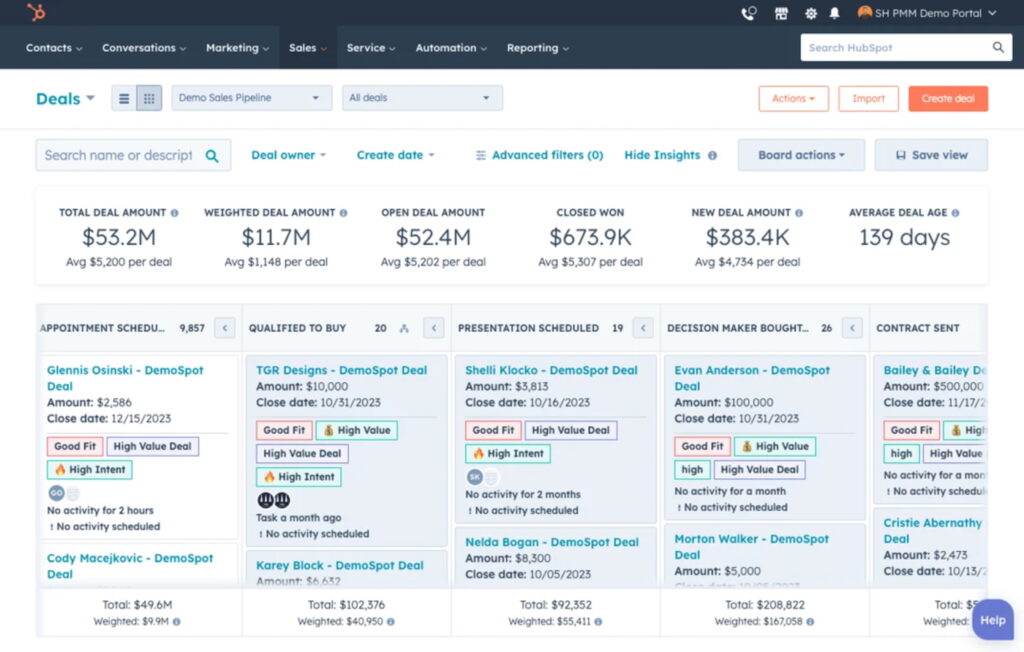
HubSpot CRM’s Kanban-style deal pipeline gives you an overview of deal details so you can prioritize leads accordingly. (Source: HubSpot)
- Drag-and-drop pipelines: Makes deal tracking simple for new CRM users.
- Prebuilt templates: Speeds up setup with ready-made sales and marketing assets.
- Gmail and Outlook integrations: Connects inbox activity with CRM records.
- HubSpot Academy: Provides free tutorials and certifications for onboarding.
- Core CRM tools: Includes contact management, deals, email marketing, and analytics.
- “We’ve finally got a system that keeps us consistent. The sequences make it so easy to stay in touch with hundreds of people without it feeling automated. It’s simple, organized, and actually helps us build better relationships instead of just managing data.” — G2 reviewer
- “I appreciate the intuitive user interface and the convenience of filters in HubSpot Sales Hub, which greatly facilitate tracking customer activities and managing emails. The seamless backend integration is a significant aid in creating sequences and conducting A/B testing. The setup process is straightforward, supported by helpful customer service representatives and video documentation.” — G2 reviewer
- “The learning curve was almost flat: We imported three years of data and ran our first pipeline in under a day. Sequences, meeting links, and automatic email tracking save each rep four hours a week, while Breeze AI writes snappy follow-ups and summarizes calls. Native integrations with Xero, Slack, and Zoom mean no messy zap-work. The mobile app is clean and lets me move deals while standing in airport security.” — Capterra reviewer
What makes eWay-CRM the best free CRM for Outlook users?

Pros
- Seamless integration with Microsoft Outlook and Microsoft 365
- Strong customization options
- Free plan includes invoice, quote, and order management
Cons
- Not ideal for teams that don’t use Outlook
- Advanced sales, marketing, and project management tools cost extra
- Performance and speed issues with large data volumes
eWay-CRM works best for businesses that already operate inside Microsoft Outlook. I selected it for this use case because users can manage contacts, deals, emails, tasks, and calendars directly in Outlook, with automatic email tracking and one-click conversion of emails into contacts, deals, projects, or tasks.
Its biggest drawback is that it is less useful for teams outside the Microsoft ecosystem. For Outlook-based businesses, though, that same focus is a strength because it reduces tool switching and makes this free customer relationship management software easier to adopt.
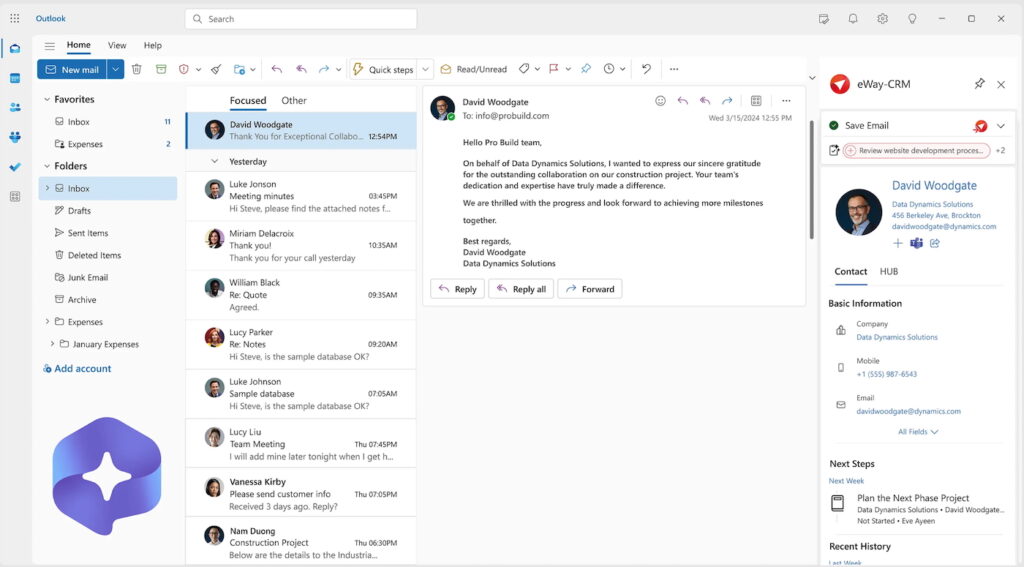
e-Way CRM is plugged into Microsoft Outlook, allowing you to access your CRM contacts, deals, tasks, and projects from your email inbox. (Source: eWay-CRM)
- Native Outlook CRM: Lets users manage CRM activity directly inside Outlook.
- Email tracking: Automatically tracks communication tied to customers and deals.
- Email-to-record conversion: Turns emails into contacts, deals, projects, or tasks.
- Shared CRM data: Keeps customer and deal information accessible to the team.
- Calendar and task management: Helps users manage appointments, deadlines, and follow-ups.
- “The integration with Outlook and Microsoft 365 is seamless and makes using the product on a desktop or mobile device a breeze. eWay-CRM handles all of our use cases and more! The sales team uses eWay-CRM daily, and the customer support is very responsive and helpful.” — G2 reviewer
- “It is so incredibly easy to use because of its deep connection with Outlook. No more missing contacts or loading to a separate system. Great value for the money and perfect for any small business.” — Capterra reviewer
- “You can tailor forms, workflows, hide modules you don’t need, adjust fields, etc. We can adapt eWay to our way of working. The eWay team is responsive and helpful.” — Capterra reviewer
What makes Agile CRM the best free CRM for small business owners focused on lead scoring?
Pros
- Lead scoring available in the free plan
- Free custom deal milestones and basic reports for gamification
- Combines sales, marketing, and service features in a single platform
Cons
- No free templates and website builder
- Outdated and clunky interface
- Steep learning curve
Agile CRM earned its spot for lead scoring because it gives teams a way to prioritize prospects without paying for a more advanced sales platform. Its free plan lets users assign values to email opens, web visits, form submissions, and offline activity, which is useful for comparing free CRM programs with built-in qualification tools.
The interface feels less modern than some competitors, which may slow adoption for first-time CRM users. Even so, its lead scoring, built-in telephony, basic marketing automation, email campaigns, appointment scheduling, and web tracking make it a capable free CRM software option for sales-focused teams.
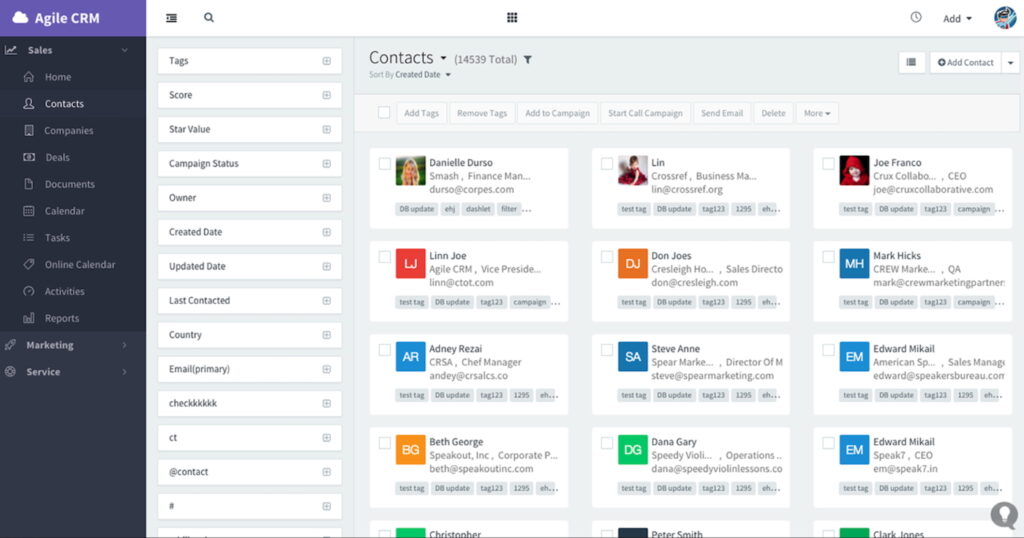
Agile CRM’s contact management system has a built-in function for lead scoring. (Source: G2)
- Lead scoring: Prioritizes leads based on engagement signals and prospect behavior.
- Built-in telephony: Supports calling activity directly from the CRM.
- Marketing automation: Includes basic automation for sales and marketing workflows.
- Email campaigns: Lets teams send outreach campaigns from the platform.
- Appointment scheduling: Helps prospects and customers book meetings more easily.
- “With just a few taps on my fingertips, I can effortlessly maintain contact with all my associates, track transactions, and manage various ventures. Agile CRM has truly empowered us to optimize our sales, service, and marketing functions, enabling us to interact with our customers seamlessly on a daily basis.” — G2 reviewer
- “Agile CRM offers a wealth of features — email and leads management, plus customer data organization — all in one place. Keeping everything under control is a breeze, and staying updated with customer information is effortless. The insights gained from this data have significantly enhanced our customer relations.” — G2 reviewer
- “I liked the ability to have revision control and the ability to have multiple people working on a large assembly at one time, which updates. It does a great job keeping a history of all the tasks and allowing you to go back to an older design. It is not a very intuitive program, and it is pretty clunky to use.” — Capterra reviewer
What makes ClickUp the best no-cost CRM alternative?

Pros
- Highly customizable data fields, processes, automations, and modules for any business need
- Cost-scalable paid plans
- Workflow automation included in the Free plan
Cons
- Not a traditional CRM; users must use templates or design their own system to get CRM features
- Most third-party integrations are only available in paid plans
- Limited to up to 60 monthly sessions in certain views in the free plan, like timeline, workload, Gantt, or mind map views
ClickUp is a flexible alternative to traditional free CRM tools for teams that want to build their own sales workflows. In assessing it as a CRM alternative, I found the free plan useful for managing pipelines, projects, and client work through unlimited users and tasks, custom views, docs, and task linking.
The trade-off is that ClickUp is not a dedicated CRM, so users need to create and maintain their own structure. That setup work is worth considering, but its flexibility makes it valuable for teams that want a no-cost workspace they can shape around their process.
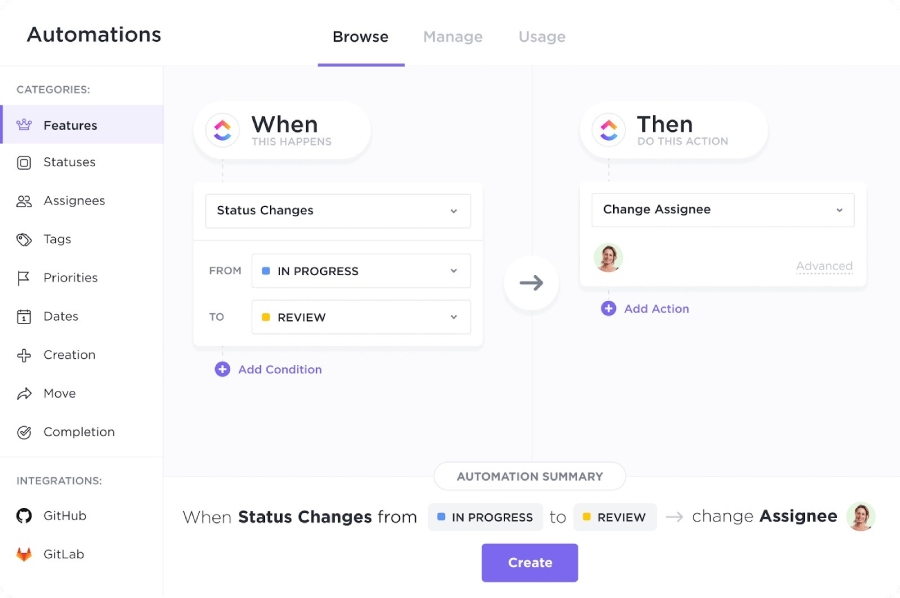
ClickUp automation design tools for customizing workflows. (Source: ClickUp)
- Unlimited users and tasks: Allows teams to collaborate and manage work without upfront costs.
- Custom pipelines: Lets users build CRM-style workflows around sales stages.
- Multiple views: Supports list, board, calendar, and other layouts for tracking work.
- Task-to-deal tracking: Allows teams to treat tasks as sales opportunities.
- Docs and task linking: Connects notes, documents, and tasks to pipeline activity.
- “The best thing about ClickUp is its incredible flexibility and customizability. You can really tailor it to fit any workflow or project management style. The ability to create custom views, dashboards, and fields is amazing. I also love the wide range of features it offers, from task management and time tracking to document collaboration and goal setting. It’s truly an all-in-one workspace” — G2 reviewer
- “ClickUp is a powerful platform, but it can feel a bit overwhelming at first because of how many features it offers. The interface sometimes feels cluttered when managing multiple spaces or projects. Occasionally, loading times can be slower for large workspaces, and the mobile app experience isn’t as smooth as the desktop version.” — G2 reviewer
- “Customizability is limitless. I can have my boards set up precisely how I prefer, and the AI automation built in helps greatly with task organization. The learning curve for new team members is steeper than other task management software, but it is well worth it.” — Capterra reviewer
What makes Bigin by Zoho CRM the best free CRM software for individual users?
Pros
- User-friendly CRM with essential features, perfect for freelancers and solopreneurs
- Built-in phone system
- Low-cost upgrade options
Cons
- No free AI tools for contact enrichment and sales email generation
- Lacks advanced marketing, customer support, and sales tools
- Mass email capabilities are locked in with paid plans
For solo business owners and freelancers, Bigin boils down CRM to the essentials without the overhead of bulky enterprise-level tools. With a clean, intuitive interface and a one-user-friendly free plan, it enables an individual to move from spreadsheets and sticky notes to a proper sales pipeline in minutes.
The free plan, which is specifically designed for one user, packs enough functionality to make it genuinely useful. This includes deal tracking through a visual pipeline, lead/contact management, built-in telephony, email sync and tracking, workflow automations (albeit limited), and mobile apps.
Because you don’t have to manage multiple user licenses or complex team setups, the experience is clean, fast, and focused. It’s optimized for one person who needs to manage customers, calls, emails, and deals without distraction or cost.
Key freemium features
- One user and up to 500 records
- Single pipeline for tracking deals and customer flow
- Lead and contact management
- Workflow automation (three instant workflows)
- Built-in telephony
- Web form builder (one web form)
- Email integration and tracking
- Dashboard and analytics with standard charts and KPIs
- Mobile apps for iOS, Android, and macOS
- Integration with other Zoho applications and select third-party tools through Zapier or API
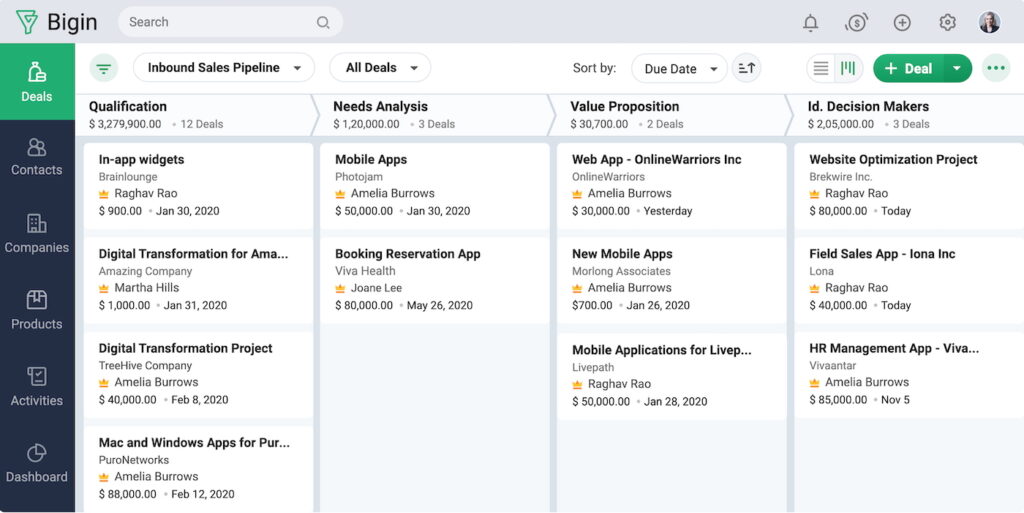
Bigin by Zoho CRM has a simple layout that shows all modules, including deals, contacts, companies, products, activities, and the dashboard. (Source: Bigin)
- “It has exactly the functions that a small business needs. We set it up completely in just two hours and were ready to go immediately. The dashboard is simple and clear, you find your way around right away, and there is no long learning curve. There is enough time to test everything. It was so easy to implement that we managed it right away without customer support.” — G2 reviewer
- “I love how clean and intuitive the interface is — everything is easy to find and manage without extra clicks. The visual pipelines, automation options, and excellent mobile app make it simple to stay on top of deals anywhere. It’s perfectly balanced between functionality and simplicity, ideal for small, fast-moving teams like ours.” — G2 reviewer
- “Bigin is easy to use, visually clear, and highly effective for managing leads and sales. The value for money is excellent — you get powerful features without the complexity of enterprise CRMs. The system feels secure and stable, and the customer support team is quick and helpful whenever we have questions. Email tracking and pipeline views make follow-ups effortless, and the mobile app is a big advantage.” — Capterra reviewer
What makes Capsule CRM the best for free AI sales emails?
Pros
- Up to 10 AI content assists for creating sales emails in the Free plan
- Unique free CRM tools like project management, contact enrichment, and email communications
- Opportunity management features available for free
Cons
- Only two users and 250 contacts allowed on the free plan
- Relatively expensive workflow automation features ($36 per user monthly with Growth plan)
- Access to email templates locked in with paid plans
Capsule CRM has a built-in AI Content Assistant, earning it a spot in our list of the best AI CRMs. This feature enables users to generate relevant, polished email copy in seconds.
You simply provide a prompt (e.g., “follow-up after meeting,” “proposal nudging email”), select a tone and length, and the tool drafts thoughtful messaging for you. This feature is a big win for small teams or solo entrepreneurs who may struggle with writer’s block or lack dedicated marketing support.
Beyond that standout AI feature, Capsule CRM supports email templates, integration with Gmail and Outlook, shared inboxes, and contact management. These features ensure the generated emails are grounded in real customer data and follow up automatically.
This way, you’re not just writing better emails but you’re also doing so efficiently, aligned with your CRM workflows, and without needing a huge time investment or specialist resource.
Key freemium features
- Two users with up to 250 contacts with tagging options and activity tracking
- Gmail and Outlook sync to use the email system in the CRM
- Contact data enrichment
- Unlimited tracks, which create task sequences to oversee entire processes
- Custom lead and contact lists
- Zapier integration to create dataflow automations
- Opportunity management with custom milestones, reasons-lost tracking, and stale opportunity alerts
- Up to 10 AI content assists for writing emails
- Built-in task and project management with calendar sync
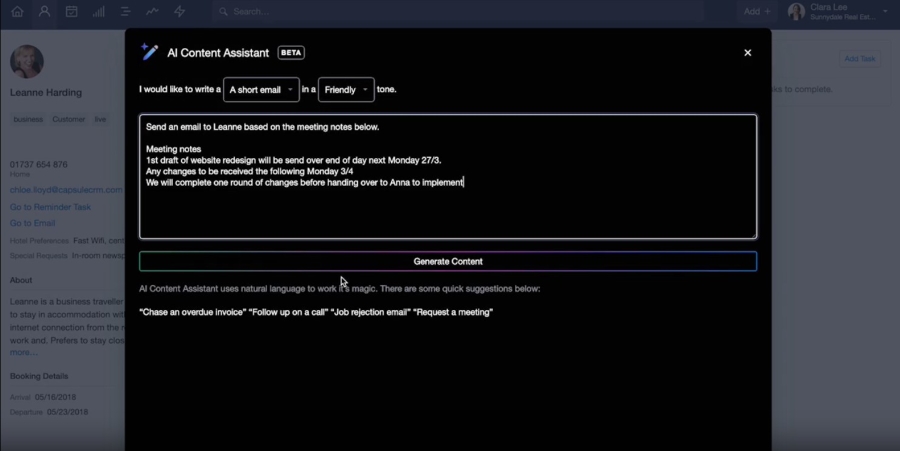
Capsule CRM’s AI-powered assistant helps craft email content for lead prospecting and nurturing. (Source: Capsule CRM)
- “Capsule has improved business processes and automated a large number of projects for me and my team. This system helps us keep on track and helps us deliver projects swiftly, and keeps my whole team organized. Capsule is the reason my business has tripled its turnover! Keeping everything organized within the dashboard is key for keeping everything on track!” — G2 reviewer
- “This CRM is great for those who need to use CRM to keep up with projects. If you, like me, have up to 20 projects at a time, this tool is so helpful and necessary. When I first started at my company, it took me no more than a few days to get implemented in Capsule.” — G2 reviewer
- “It makes it really easy to store emails between teams to pick up work while members are away. Pipeline sales tracking is really useful to keep track of sales prospects, and we created a pipeline specifically for renewals as well to get a good overall picture of both. Custom tags can be added as well, so we can personalize them to our product types.” — Capterra reviewer
What makes Zoho CRM the best for workflow automation?
Pros
- Ability to set basic automation for emails and tasks based on preset triggers in the free plan
- Account management tools available for free
- Low-cost, scalable options for small businesses
Cons
- Free plan limited to three users
- Limited access to features beyond basic CRM data storage, such as leads, contacts, deals, and accounts, in the Free plan
- Poor product usability ratings because of robust and advanced feature inclusions
Zoho CRM offers a thorough, flexible automation engine that allows small business teams to define triggers, conditions, and automated actions in a few intuitive steps. These actions include sending emails, assigning leads, updating fields, and creating tasks or records.
Because this platform does the heavy lifting when it comes to workflows, your team can save time and focus on selling and not just entering data. Beyond automation, Zoho CRM offers several capabilities that make it especially appealing to small businesses looking to use a CRM for free.
You get contact and lead management, deal tracking, task and event scheduling, web form integration, and basic reporting for up to three users. It also includes limited email marketing and data import/export.
Aside from that, it integrates with other Zoho apps like Zoho Books and Zoho Campaigns, as well as third-party tools such as Google Workspace. These built-in features give small teams everything they need to centralize their sales processes, automate routine work, and scale operations efficiently.
Key freemium features
- Lead and contact management
- Deal/opportunity tracking
- Tasks, events, and call logging
- Web forms and visitor tracking
- Basic workflow automation (up to five workflows)
- Analytics/dashboard charts and reports
- 1GB file storage and import/export data support
- Email templates and opt-out tracking
- Integration with other Zoho apps and select third-party tools
- Custom list views and limited customization of modules
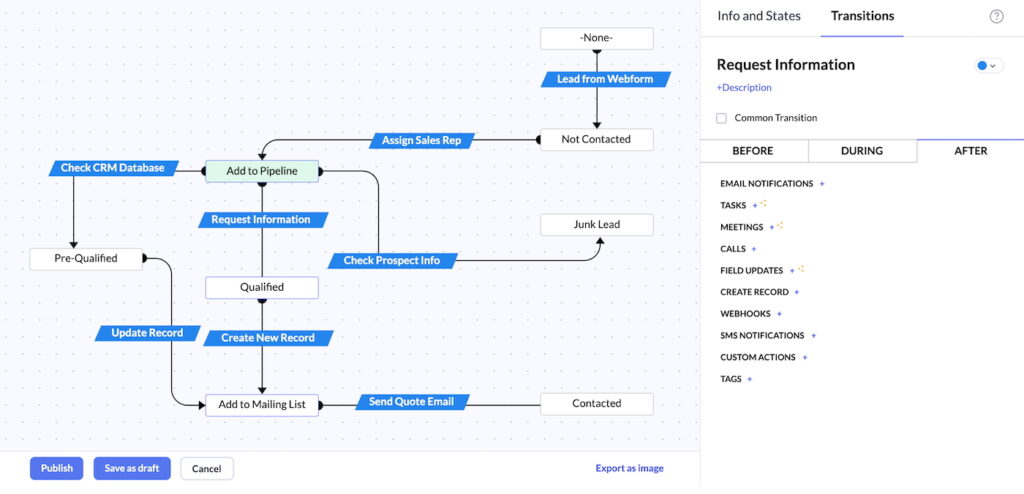
Zoho CRM’s Blueprint feature gives you a visual editor of your sales workflow. (Source: Zoho CRM)
- “Zoho CRM stands out for its robust sales automation capabilities, flexible customization options, and intuitive user interface. It has helped us increase sales by efficiently identifying and nurturing high-quality leads, streamlining both sales and marketing workflows, and supporting informed decision-making with its advanced analytics.” — G2 reviewer
- “Overall, I was happy with the experience of using Zoho CRM. Setting up workflows, creating custom fields, and managing contacts was straightforward. This is a great CRM option for businesses that don’t have a large budget. That being said, it doesn’t feel cheap and includes a lot of great features for sales and marketing teams.” — Capterra reviewer
- “I love Zoho CRM for so many reasons. One, we keep track of all of our staff, clients, and vendors in one place. Two, it integrates wonderfully with Zoho Invoice. Three, I can customize the customer information with the information I need to be there. Four, it integrates wonderfully with our website forms, allowing a client to fill out a form, and it automatically goes right into Zoho CRM.” — Capterra reviewer
What makes Freshsales the best free CRM with integrated communication tools?

Pros
- Built-in communication tools (email, phone, and chat)
- Clean and intuitive interface; fast onboarding
- Free plan includes deal tracking, custom fields, and access to the mobile app
Cons
- Only one pipeline in the free plan
- Messaging channels (text, WhatsApp, LINE, and Messenger) are locked in with paid tiers
- Freemium plan lacks out-of-the-box reports and third-party app integrations
Freshsales brings phone, email, and chat capabilities together in one unified platform. Small teams can make calls, send and track emails, and engage leads through the chat widget embedded into your website, all while automatically logging every interaction within the CRM.
This seamless integration helps businesses stay connected with prospects without relying on multiple external tools.
The free plan supports up to three users and includes key CRM essentials like contact and deal management, a visual sales pipeline, task and appointment scheduling, and basic reporting.
It also offers custom fields, allowing users to tailor records to their specific sales process. Lastly, Freshsales is one of my top recommendations if you want a small business CRM that’s easy to use and quick to onboard.
Key freemium features
- Three users
- Contact, account, and deal management with a visual Kanban-style pipeline
- Built-in phone
- Two-way email sync
- Email templates
- Chat widget
- Basic dashboards and sales analytics views
- Task and appointment management with calendar sync
- Custom fields
- Mobile app access (iOS/Android)
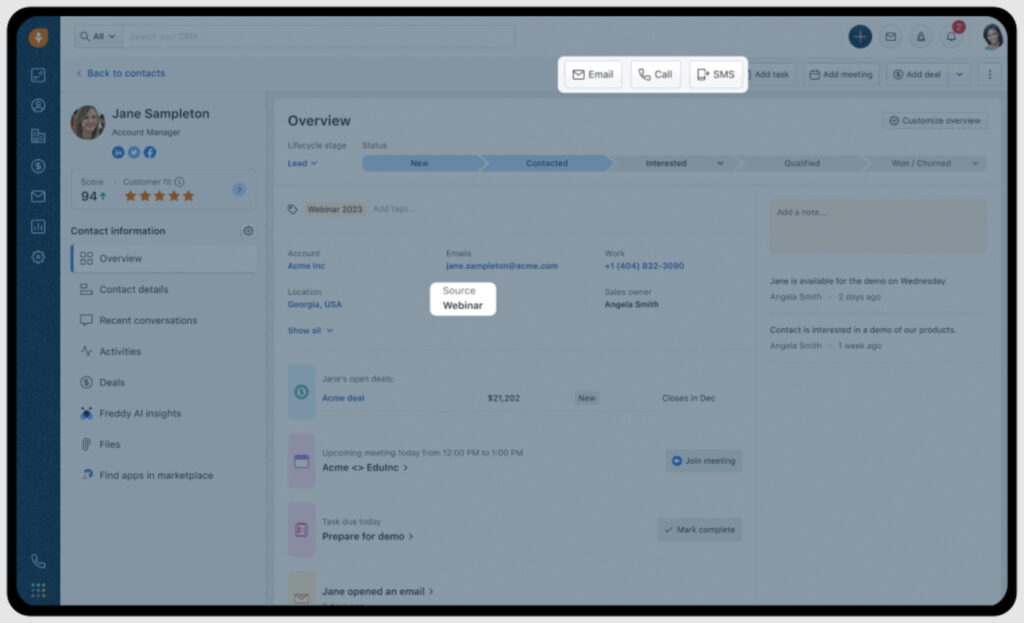
Freshsales allows you to communicate with customers on their preferred channels, all without leaving the CRM. (Source: Freshsales)
- “What I like best about Freshsales is its user-friendly interface and automation capabilities. It simplifies lead management, automates follow-ups, and provides a clear view of the sales pipeline, which saves a lot of time and effort.” — G2 reviewer
- “It packs a powerful set of tools at your disposal for a great price. It is easy to implement, and the support is excellent and timely. It helps us engage our customers in all the channels that we need.” — G2 reviewer“
- We use Freshsales mainly as a call management program, as our company does not use the lead-sales type model. It has worked very well for us, and the customer service is top-notch, replying to our inquiries very quickly and effectively. It is also a good way to send emails and have all agents with visibility and the ability to step in if needed. It is easy to use and intuitive. We use it daily, at all times of year.” — G2 reviewer
How did I evaluate the best free CRM for small business owners?
To determine the best free CRM software systems, I only considered products that offered a freemium plan for users. Providers that only offered free trials on their paid plans were not considered in my evaluation.
I then looked at product attributes included on those no-cost plans, including free features and customer service availability, as well as product ease of use. The tabs below offer insight into my evaluation process of the best free CRM for small business teams.
30% of Overall Score
I looked at the overall features included in the free plans that I felt were crucial to any free customer relationship management software, regardless of use case or industry.
This included contact and lead management, reporting and dashboards, customizable pipelines, workflow automation, and email management. I also examined its options for data import/export and third-party integrations. Plus, I checked the availability and quality of its mobile app.
25% of Overall Score
To assess the ease of use, I checked if the provider had built-in templates or automations when I assessed the free CRMs for small businesses. I also searched reputable review sites to gauge general user sentiment regarding its learning curve and ease of setup. In addition, I considered its plan options to see if it is easily scalable.
20% of Overall Score
Customer support looked at the service availability users get while on a freemium plan. This considers the hours of operation of the support team and the number of channels available, including live chat, phone, and email. I also wanted to see self-service resources like a knowledge base or community forum.
15% of Overall Score
Separate from the free plans, I wanted to see the providers of the best free CRM for small businesses offer subscriptions that would let businesses ease into the paid plans. This criterion considered the cost and scalability of the paid plans as well as billing flexibility, such as letting users save by subscribing annually.
10% of Overall Score
In addition to firsthand experience with these free customer relationship management software systems, I wanted to see what real users say about each product. I used online reviews to evaluate how users felt about the features and perceived value to their business. Additionally, I was able to gauge the ease of use for each product in terms of setting up, navigating, and operating the system.
*Percentages of overall score
Frequently Asked Questions (FAQs)
Yes. In fact, there are quite a few. Many CRM providers offer freemium plans to give users risk-free access to specific features in hopes that they will upgrade to a paid plan once their business and capacity needs grow. Some of the best no-cost CRM products include Vtiger, EngageBay, HubSpot CRM, ClickUp, and Zoho CRM.
Yes. Each of the individual “Hubs,” including Sales, Marketing, Operations, Service, and Content Management, all offer a freemium option. Additionally, the HubSpot CRM Suite, which puts all the modules into one product, also provides no-cost access for unlimited users to manage contact and company records, create email campaigns, engage web visitors via live chat, store documents, schedule appointments, and so much more.
Yes. Zoho CRM offers a free-forever plan for up to three users. The primary features available in this plan include lead and contact data storage with activity tracking, account management tools, document storage, and deal tracking. Users can also store email templates and develop basic workflow automations for task and record creation.
Bottom line
Free CRM software is great for small businesses on a tight budget, providing no-cost access to sales and marketing features. While many providers offer a freemium option, no two plans are built the same. Bitrix24, for example, is known for its unlimited users and high data capacity.
On the other hand, although HubSpot CRM only allows five users in its free plan, it offers robust features for sales, marketing, service, content, operations, and ecommerce management.
Source link