My Content Tracker Idea Became a Real App – Unite.AI
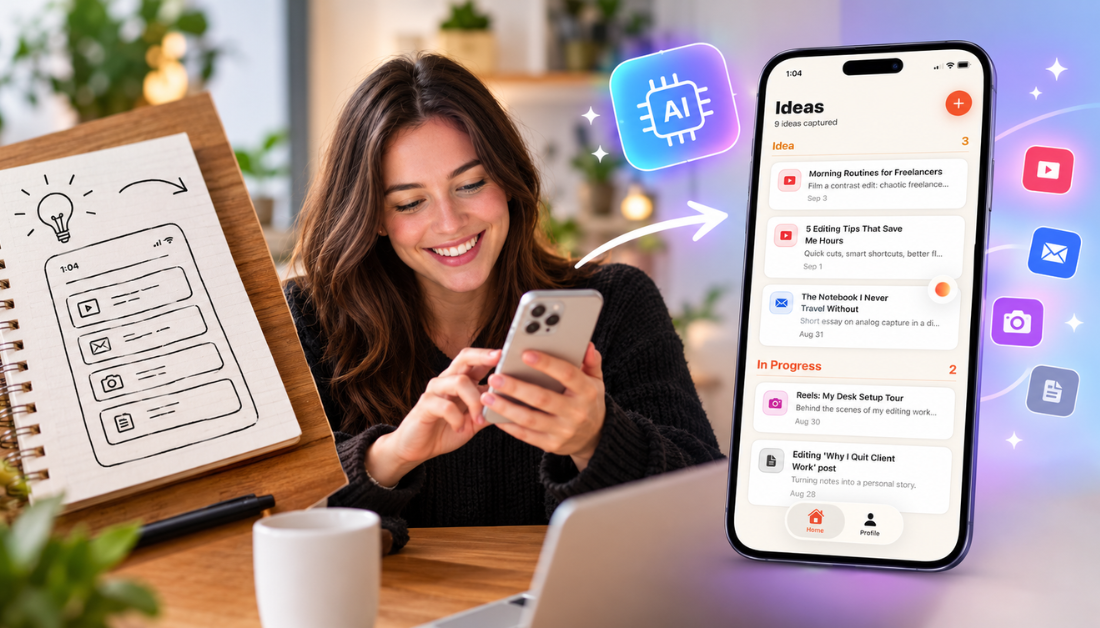
Plenty of people these days have the same idea sitting in their Notes app: a mobile app they’re sure would take off, if only they could actually build it. Until recently, the honest answer was the same for most of us: learn to code, hire a developer, or let the idea die.
That’s what Rork claims to solve. It’s an AI app builder that turns a regular chat conversation into a native iOS and Android app. The best part? There’s no coding, no developer, and no build that takes months. You describe what you want, Rork writes the code, and you can preview it on your own phone within minutes.
In this Rork review, I’ll show you how it worked, where it impressed me, and where I think it still falls short. I’ll finish the article by comparing it to my top three alternatives (Bubble, Base44, and Softr). By the end, you’ll know which tool is right for you.
Verdict
Overall, Rork makes it surprisingly easy to turn an app idea into a real, installable iOS or Android app without writing any code. This is especially true if you want to quickly prototype something or see if an idea is actually worth building.
Pros and Cons
- Generates native iOS and Android apps using React Native, not a web wrapper pretending to be an app.
- Turns a prompt into working code and a live preview in minutes, not weeks.
- Preview the app on a real iPhone and interact with it in real time once the app and device are connected.
- Full code ownership, with free export to GitHub available on paid plans.
- Built-in authentication and data storage (Rork Backend), so there’s no need to conenct a separate database from scratch.
- Screenshot Studio automatically generates App Store-ready images.
- AI App Store Reviewer checks your app against Apple’s guidelines before you submit it.
- Rork Max extends building to native Swift apps for iPhone, iPad, Apple Watch, Apple TV, and Vision Pro.
- Backed by $2.8 million in funding from a16z with users generating real revenue, including two 18-year-olds who reportedly hit $240,000 in six months.
- A free plan is available, so you can test the core experience before committing to a paid tier.
- Chat-only interface with no visual drag-and-drop editor if you want more hands-on design control.
- The free plan doesn’t allow App Store publishing, private projects, or code export.
- Credits reset monthly and don’t roll over, so anything you don’t use is gone.
- Customer support is limited on the lower-priced plans, with priority support reserved for higher tiers.
- Can struggle with complex, enterprise-grade app logic beyond straightforward MVPs.
What is Rork?
Rork is an AI app developer that builds mobile (iPhone and Android) and web apps by chatting with AI rather than writing code. Instead of drag-and-drop, you just describe what you want, Rork generates the React Native code behind it, and then lets you preview the result on your own phone almost instantly.
The idea is simple: describe what you want, and Rork turns it into an app you can publish.
Company Background
Rork was founded by Levan Kvirkvelia and Daniel Dhawan, with the company operating out of San Francisco, Tbilisi, and London. They’ve raised $2.8 million in funding from a16z, which is a pretty big vote of confidence for a company in such a crowded space.
What stood out to me most in Rork’s case studies is the story of two 18-year-old runners who used the platform to build an app and grew it to $240,000 in annual revenue within six months. Whether or not that’s the typical outcome (it almost certainly isn’t), it’s the kind of proof that tells you Rork isn’t just a toy for tinkering around with. People are shipping and monetizing real products with it.
How Rork Works
Rork’s workflow is simple:
- Describe your app: Tell Rork what you want to build in the chat.
- Rork builds it: The AI generates the React Native code for your app.
- Test it: Preview the app and see how it works.
- Make changes: Keep chatting with Rork to add features, change the design, or add new screens.
- Rork updates the app: Your changes are added to the code automatically.
To actually see your app, install the Rork app, sign in with your Apple ID, connect your iPhone to your computer via USB, and turned on Developer Mode. Once everything’s connected, open the app on your phone and test it in real time. If you’re happy with it, you can export the full codebase to GitHub, or publish it directly to the App Store and Google Play.
Rork has also recently launched Rork Max. It’s the first online Swift app builder, focusing on building apps for the Apple ecosystem, including iPhone, iPad, Apple Watch, Apple TV, Vision Pro, and iMessage. You can publish to the App Store in two clicks without needing to use Xcode.
Rork vs. Traditional App Development
Building a mobile app the traditional way usually means learning Swift or Kotlin, hiring a developer, or piecing together a no-code platform that still asks you to manually connect screens and logic.
So even with “no-code” tools, building an app still takes a massive amount of time and effort. Rork’s approach removes almost all of that friction: you’re not learning a visual builder’s interface, you’re just describing what you want and reviewing what comes back.
But that speed comes with a tradeoff. You have less granular control than you’d get from a full visual editor or actual custom code, and you’re leaning heavily on the AI to interpret your requests correctly.
So for fast prototyping and MVPs, that tradeoff is worth it. But for something more custom, you’ll likely eventually outgrow it.
Who is Rork Best For?
Here’s who Rork is best for:
- Non-technical founders who want to validate an app idea without hiring a developer or learning to code.
- Solo creators and indie hackers who want to build and monetize their own apps.
- Freelancers and agencies who need to mock up realistic client app demos quickly.
- Developers who want to quickly prototype an MVP before writing the final code themselves.
- Content creators and influencers looking to build a branded app for their audience.
- Small business owners who want a simple booking, loyalty, or marketplace app without a big budget.
- Young or first-time builders testing their first app idea, similar to Rork’s own success stories.
- Apple-focused creators who specifically want native Swift apps across iPhone, iPad, Watch, and TV through Rork Max.
Rork Key Features
Here are Rork’s key features:
- Conversational App Builder: Describe your app in English and Rork generates working React Native code in real time.
- Live Device Preview: Connect your iPhone to your computer and preview the app through the Rork App on your phone as you build.
- Native Cross-Platform Output: Ships native apps for iOS and Android from a codebase, not a wrapped website.
- Web App Support: Generate a browser-based version of your app alongside the mobile build.
- GitHub Code Export: Pull your full, unlocked codebase into GitHub on paid plans so you’re never locked into Rork.
- Built-In Backend (Rork Backend): Handles authentication and data storage without connecting a separate database service.
- Screenshot Studio: Automatically generates App Store and Google Play screenshots for your listing.
- AI App Store Reviewer: Scans your app against Apple’s guidelines before you submit, flagging likely rejection issues.
- One-Click App Store Publishing (Rork Max): Publish native Swift apps to the App Store without touching Xcode.
- Multi-Device Native Apps (Rork Max): Build for iPhone, iPad, Apple Watch, Apple TV, Vision Pro, and iMessage from a single prompt.
- Iterative Chat Refinement: Keep chatting with the AI to adjust features, layout, and functionality after your first draft.
- Chat & Priority Support: Higher-tier plans unlock direct chat support for troubleshooting your builds.
How to Use Rork
Here’s how I used Rork to build and test a mobile app from scratch:
- Sign Up for Rork
- Describe Your App Idea
- Choose the Platform & Model
- Answer Clarifying Questions
- Review the Preview & Generate
- Preview & Interact on Your Phone
- Refine Your App Through Chat
- Add Authentication & Data Storage
- Test Core Features & Navigation
- Connect to GitHub
- Create a Repo with GitHub
- Access the GitHub Repo
- Copy the GitHub Repo Link
- Generate App Store Screenshots
- Run the AI App Store Reviewer Check
- Export Your Code or Publish to the App Store
Step 1: Sign Up for Rork AI
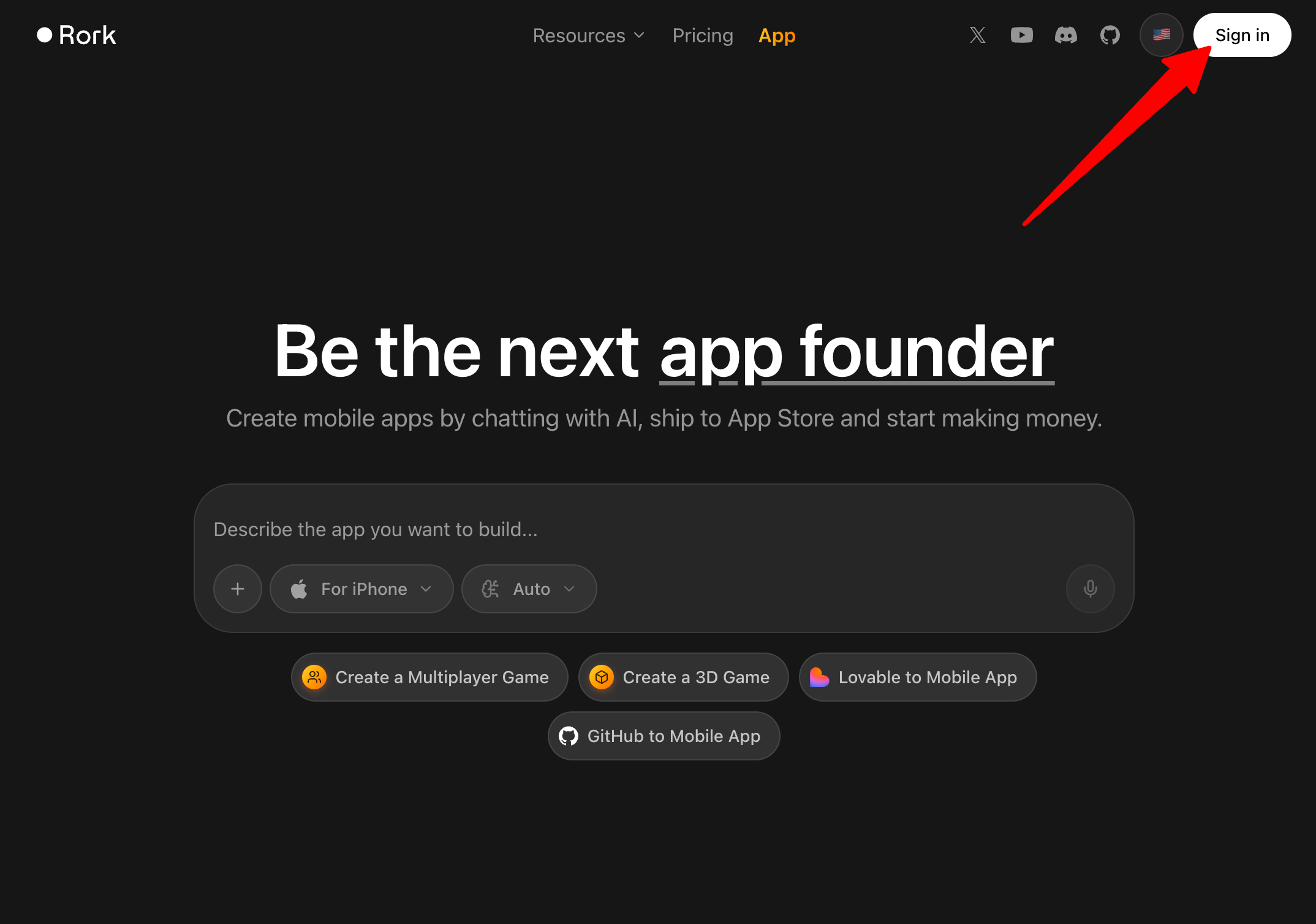
I started by heading to rork.com and creating an account. Signup was quick, and I was dropped straight into the chat interface where the actual building happens.
Step 2: Describe Your App Idea
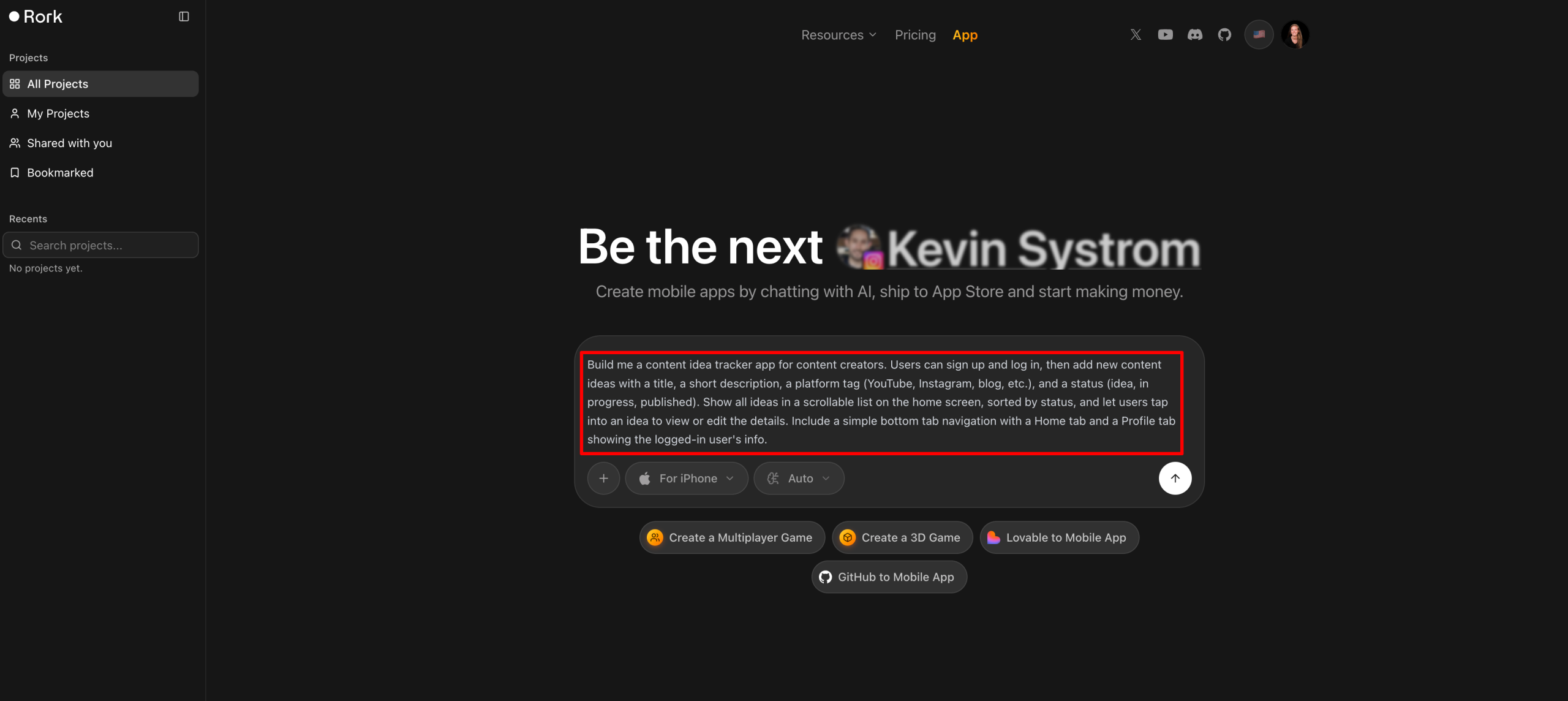
Next, I typed out a prompt of the app I wanted to build. This included the core screens and what I wanted users to be able to do:
“Build me a content idea tracker app for content creators. Users can sign up and log in, then add new content ideas with a title, a short description, a platform tag (YouTube, Instagram, blog, etc.), and a status (idea, in progress, published). Show all ideas in a scrollable list on the home screen, sorted by status, and let users tap into an idea to view or edit the details. Include a simple bottom tab navigation with a Home tab and a Profile tab showing the logged-in user’s info.”
The more specific, the better and more accurate the first draft will be.
Step 3: Choose the Platform & Model
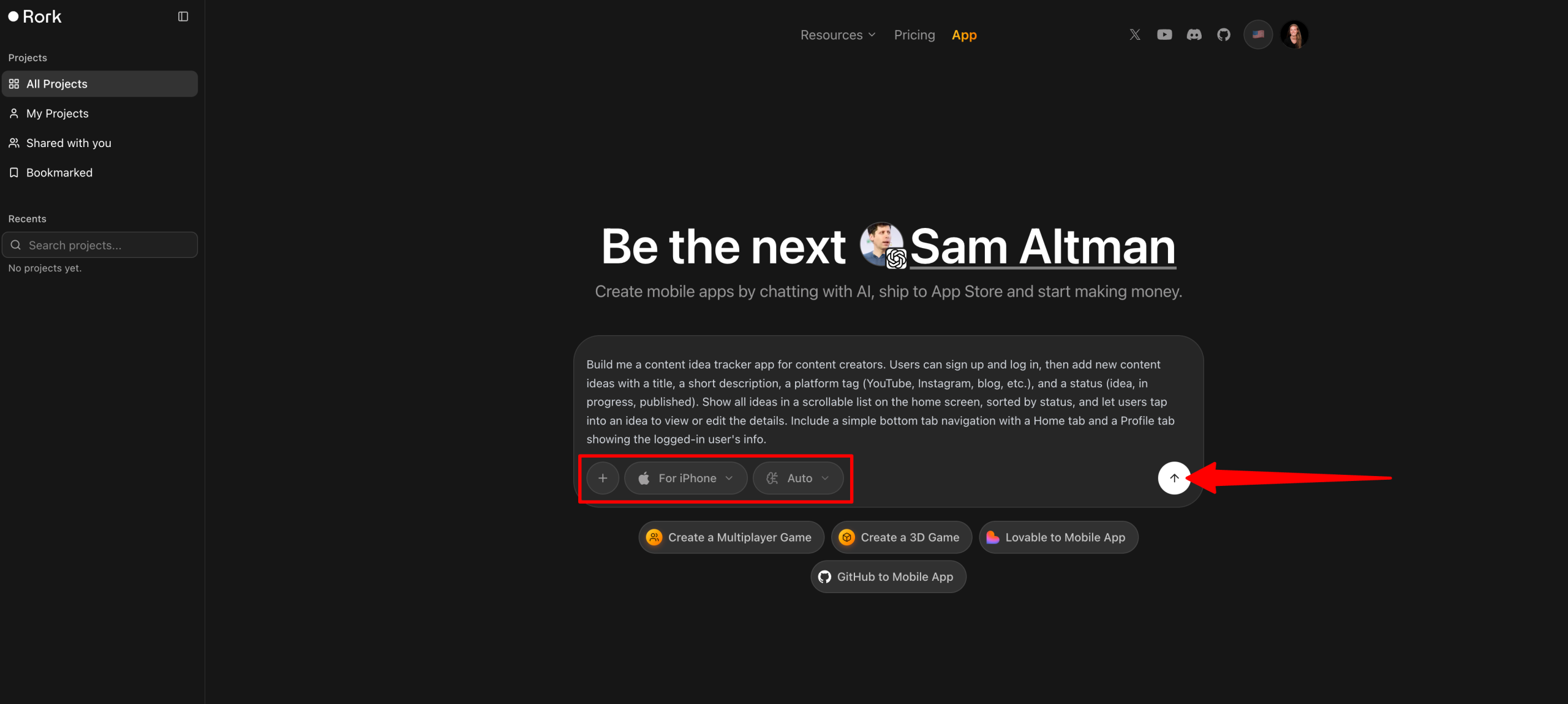
Before sending the prompt to Rork, I set the platform to “iPhone” (you can also choose Android or web), and I kept the model on “Auto” so Rork could choose the model it thought was best for the task.
Step 4: Answer Clarifying Questions
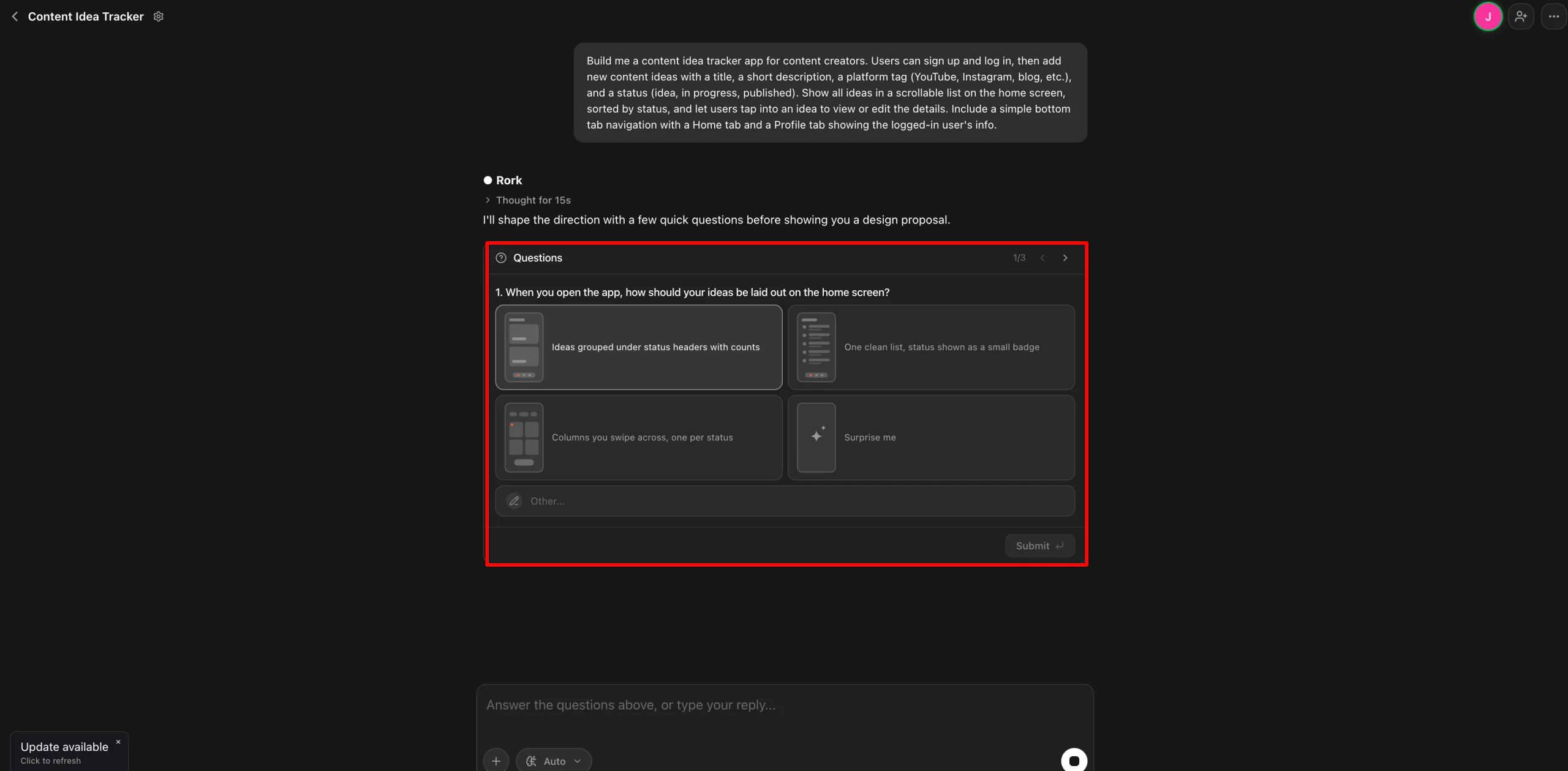
A few seconds later, Rork asked some clarifying questions before showing the design proposal:
- When you open the app, how should your ideas be laid out on the home screen?
- What color direction feels right for the app?
- Besides your name and email, what should the Profile tab show?
Step 5: Review the Preview & Generate
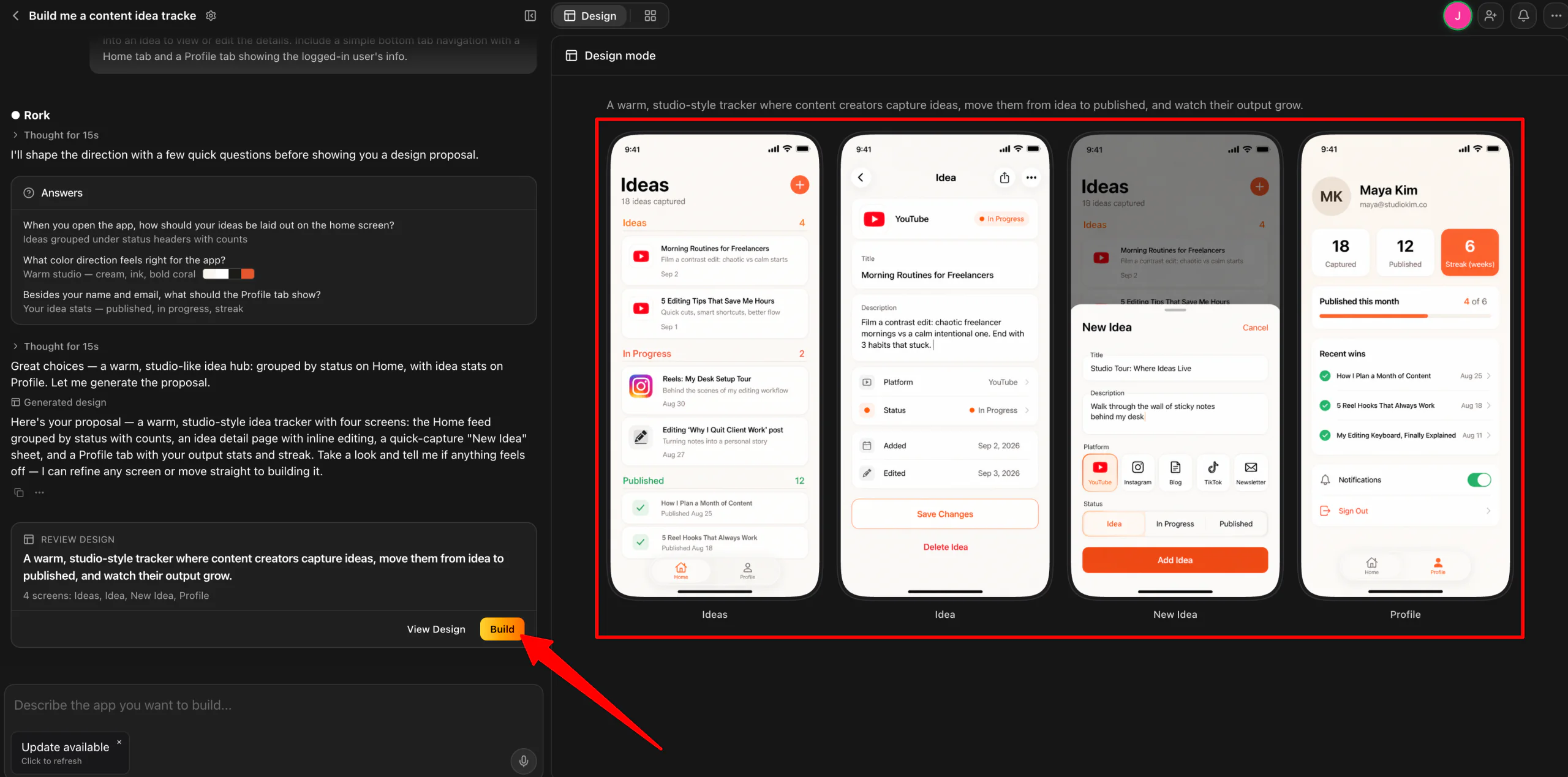
Within a minute or two, Rork generated a preview so I could see how the app would look. The app looked clean, professional, and aligned with my prompt and answers. I selected “Build.”
Note: Free credits cover design, but building your app needs a plan. You’ll have to upgrade to a paid plan to actually build the app.
Step 6: Preview & Interact on Your Phone
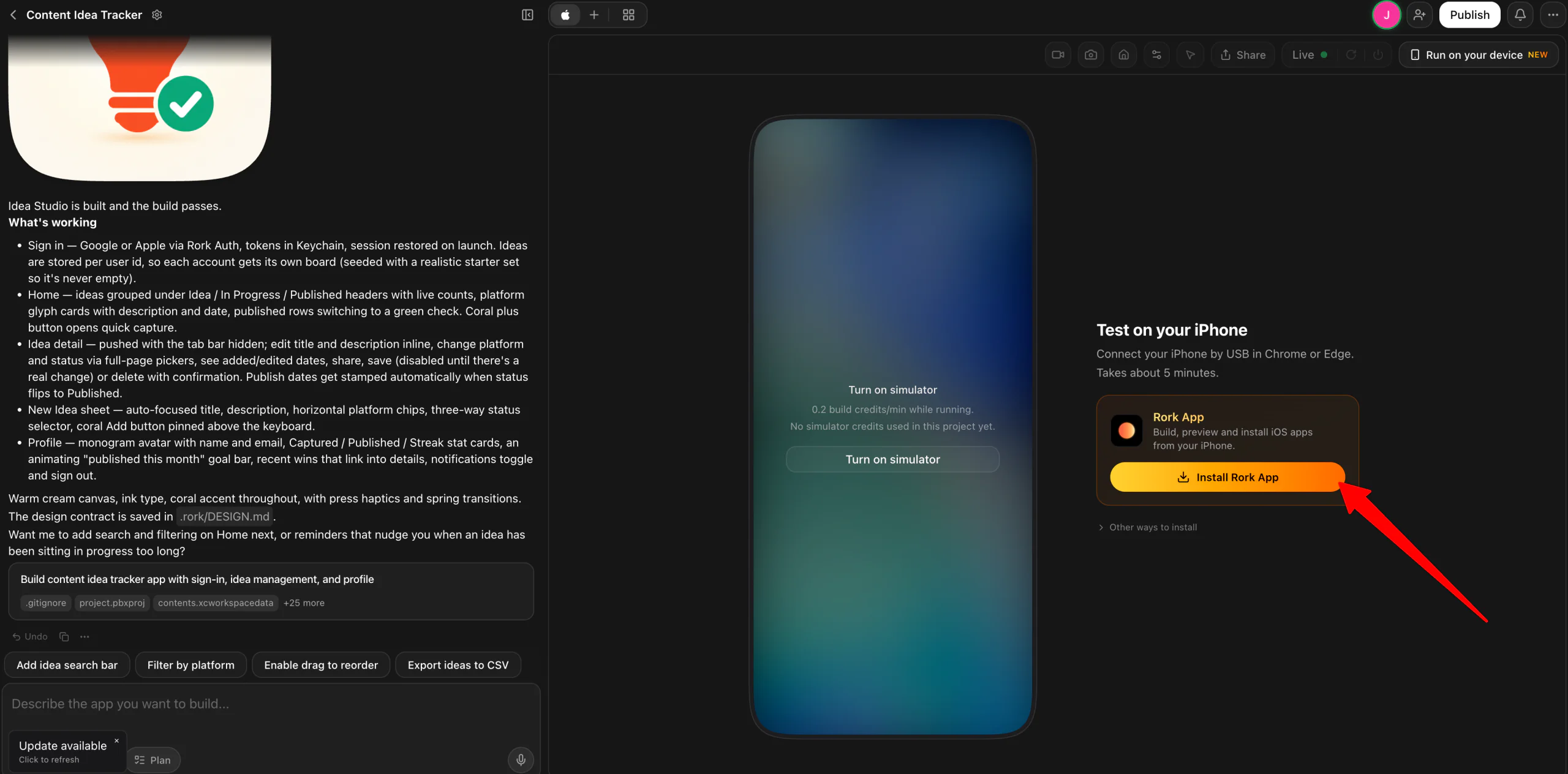
A couple of minutes later, the app was built. From there, I installed the Rork app by signing in with my Apple ID account, connected my phone to my computer via USB, and turned on Developer Mode on my phone.
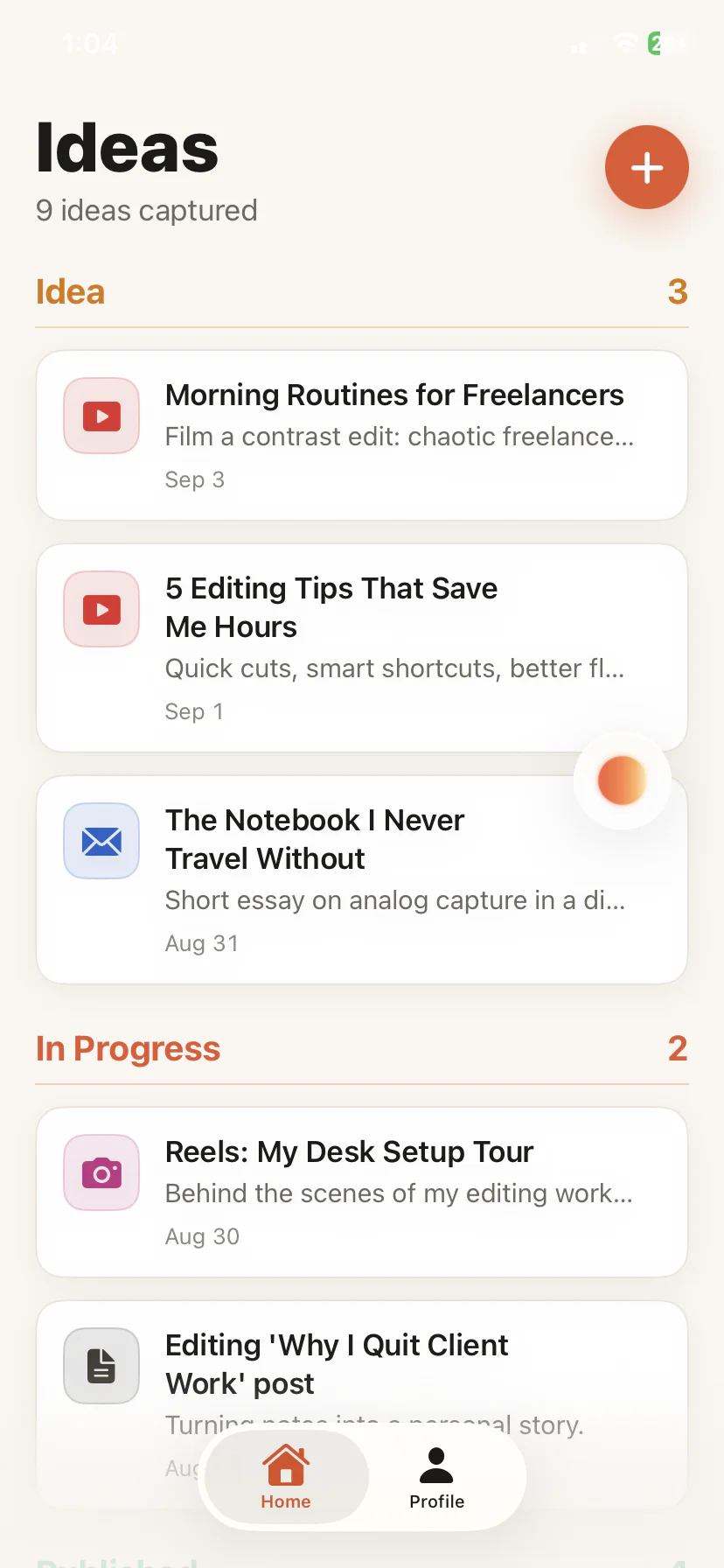
Once everything was installed and connected, I could preview the app on my phone and interact with it in real time. The whole build was really clean and impressive with no lag, and this was just from one prompt!
Step 7: Refine Your App Through Chat
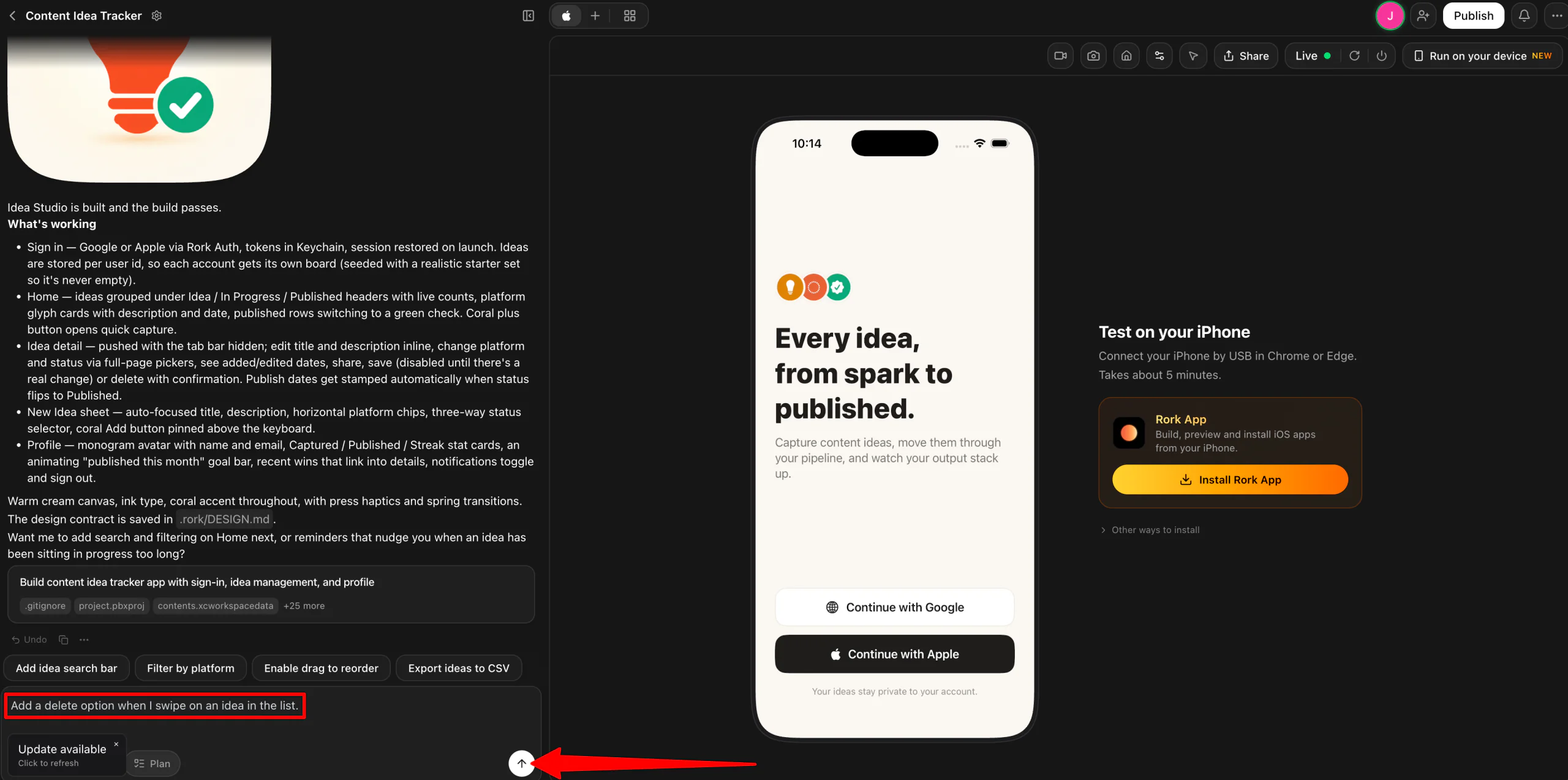
Now that I had a live interactive version on my computer and phone, I kept chatting with Rork to tweak the layout, adjust colors, and add screens I’d forgotten in my first prompt:
“Add a delete option when I swipe on an idea in the list.”
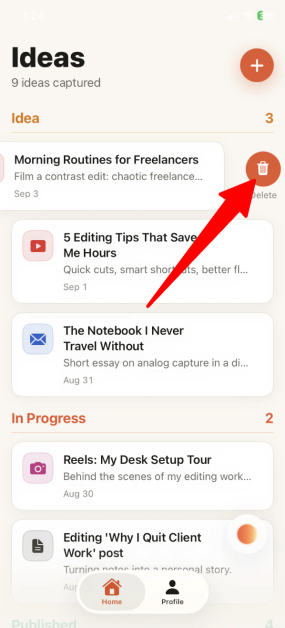
The first attempt actually seemingly failed, but the second attempt worked. Each change updated the live preview within a few minutes.
Step 8: Add Authentication & Data Storage
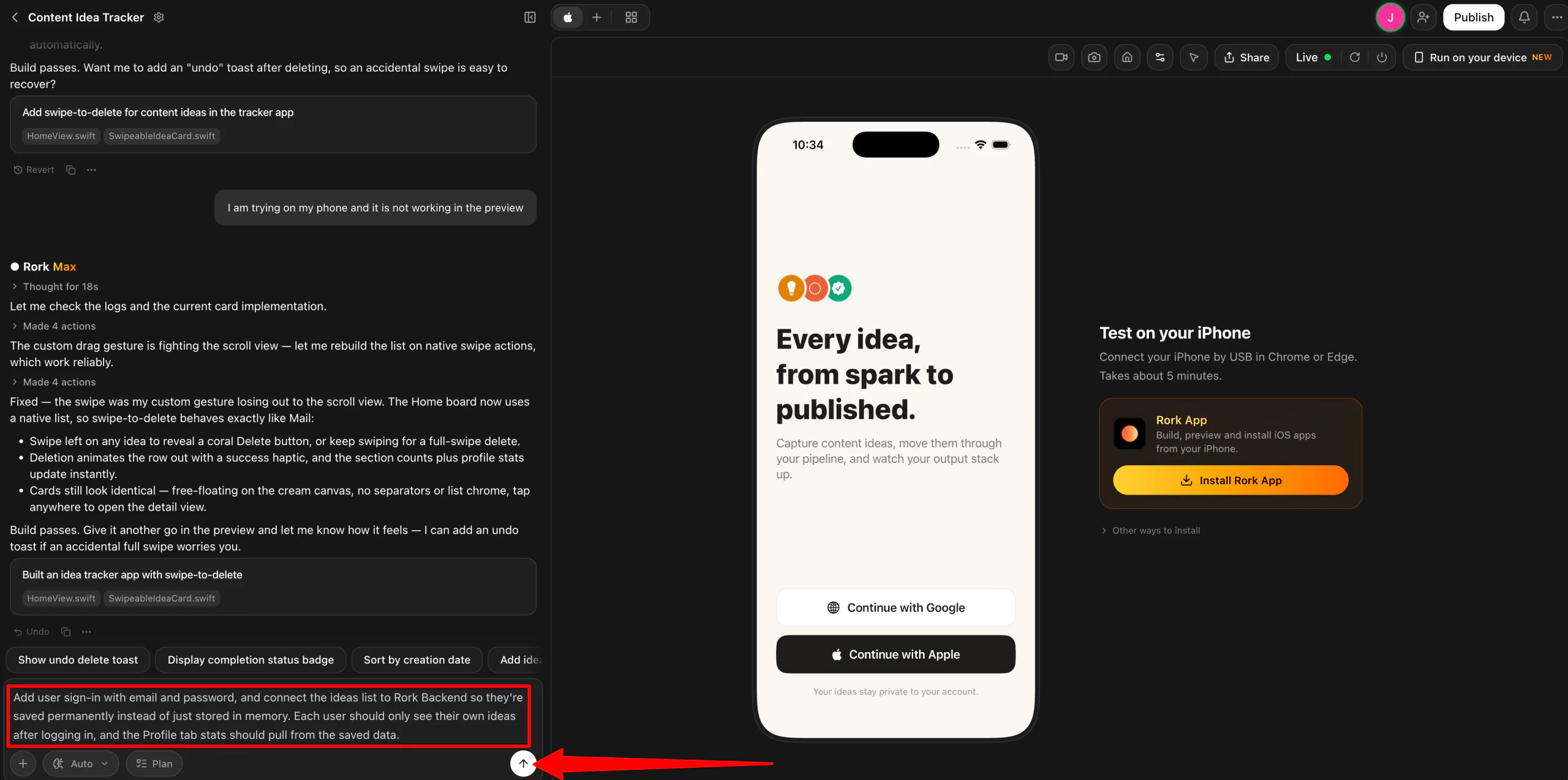
Next, I asked Rork to add user sign-in and a place to store data.
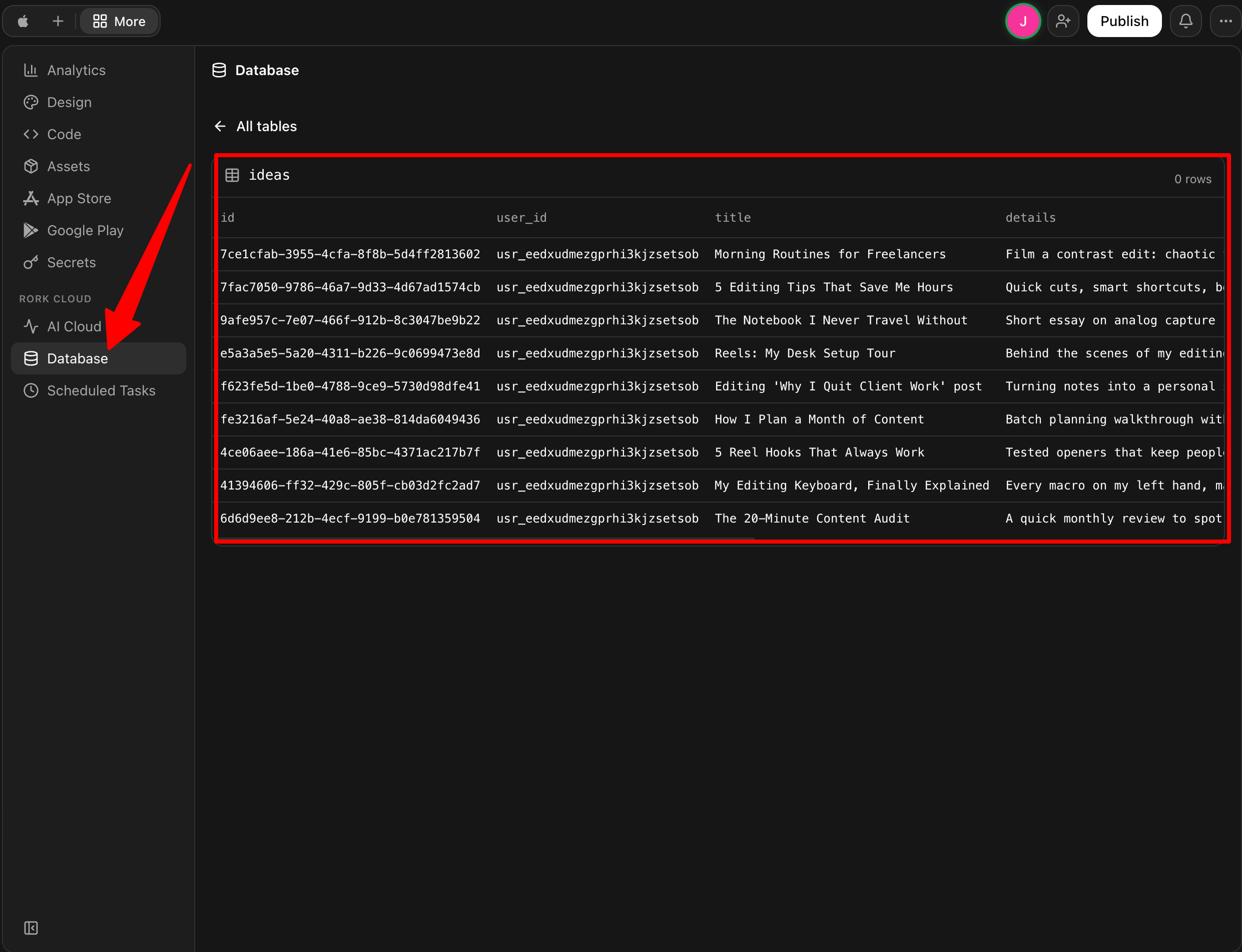
It informed me I already had sign-in enabled (Google and Apple) so I left it. However, it managed to wire up the database through Rork Backend without me touching a separate service, which was really convenient.
Step 9: Test Core Features & Navigation
Next, I spent time tapping through every screen and flow to make sure navigation, buttons, and forms actually worked the way I expected before moving any further.
Step 10: Connect to GitHub
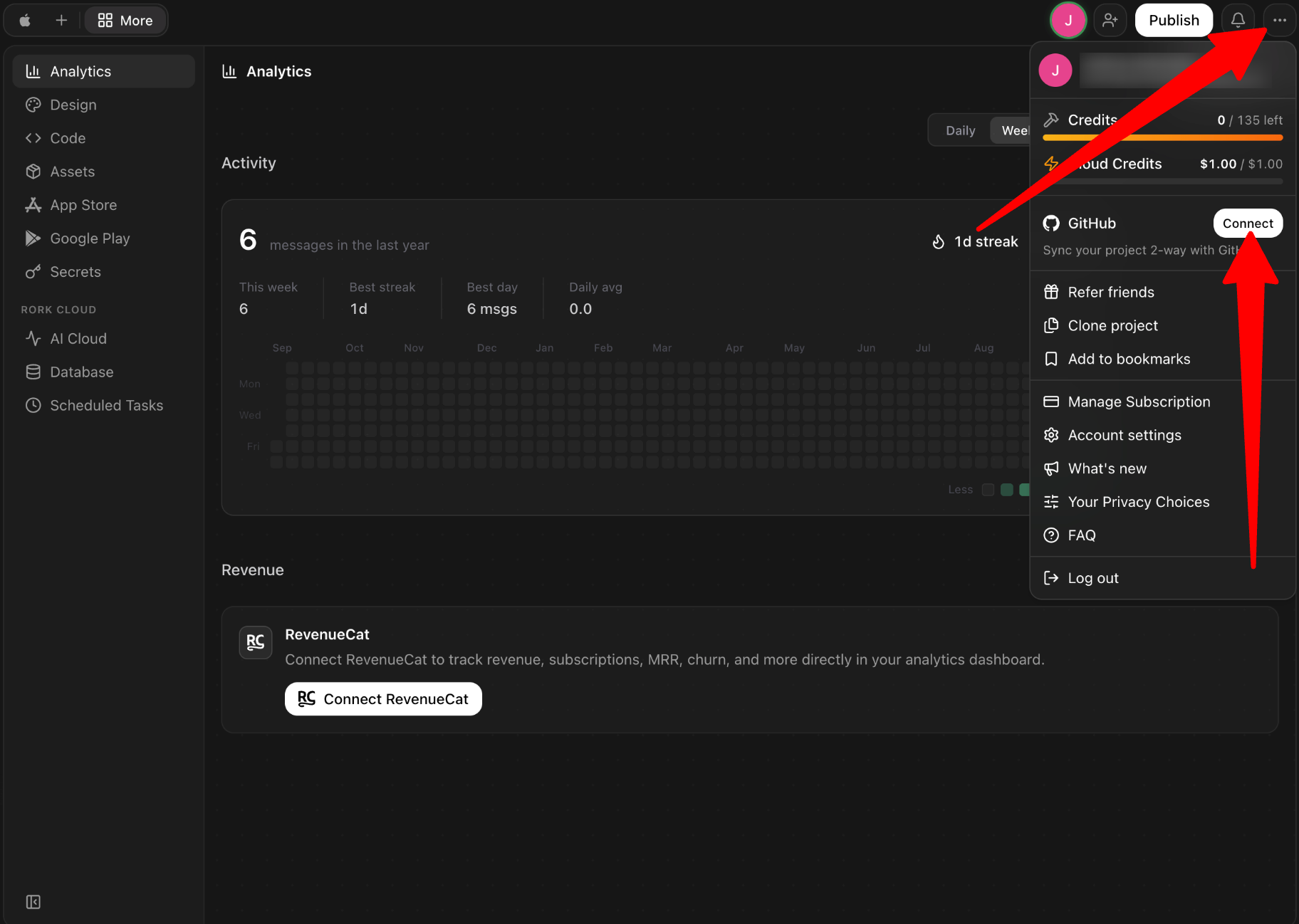
At this point, I was ready to connect my app to GitHub. Head over to the “Options” menu on the top right (the three dots) and click “Connect” next to GitHub.
Step 11: Create a Repo with GitHub
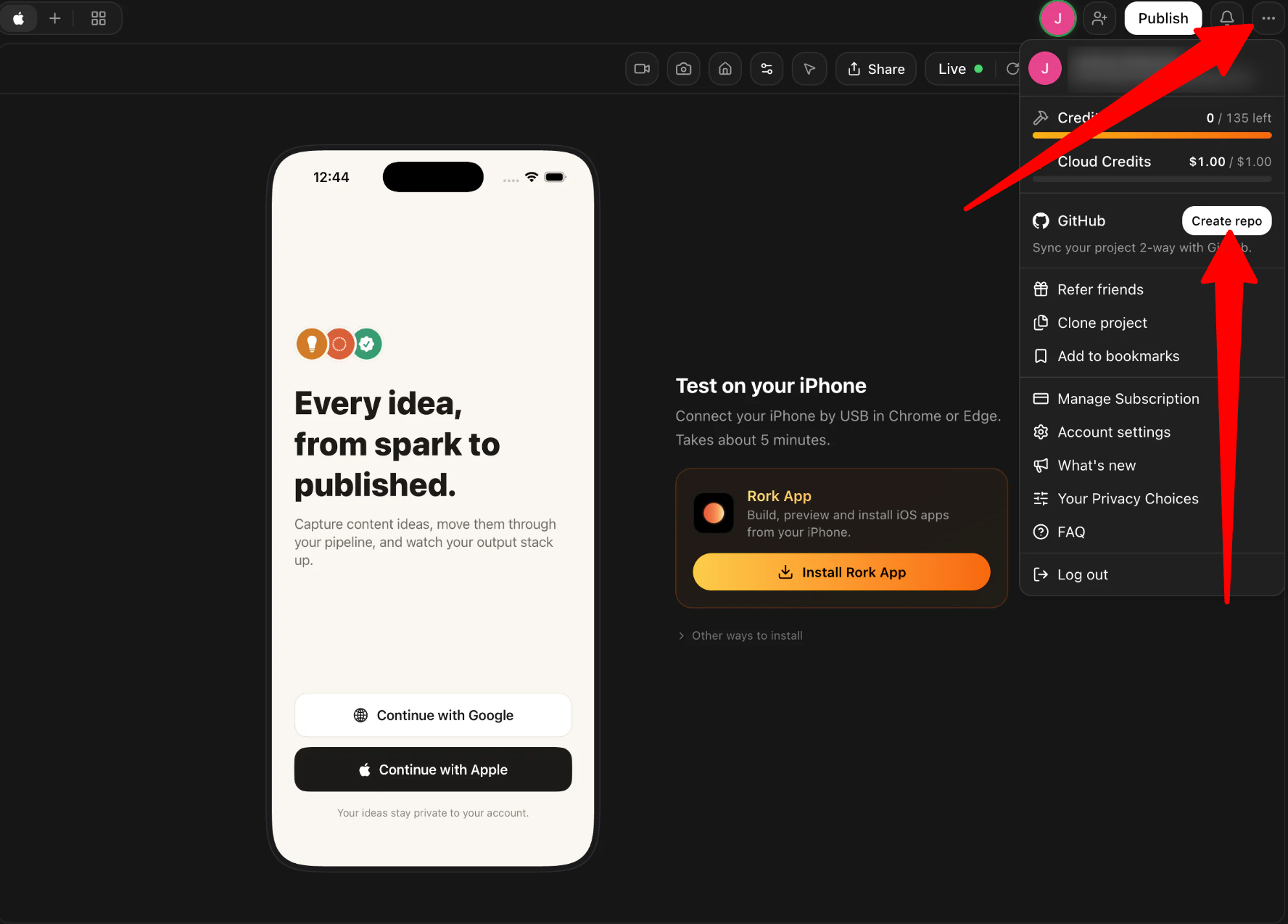
Now that GitHub is connected, go back to the “Options” menu, give it a name, and click “Create repo.”
Step 12: Access the GitHub Repo
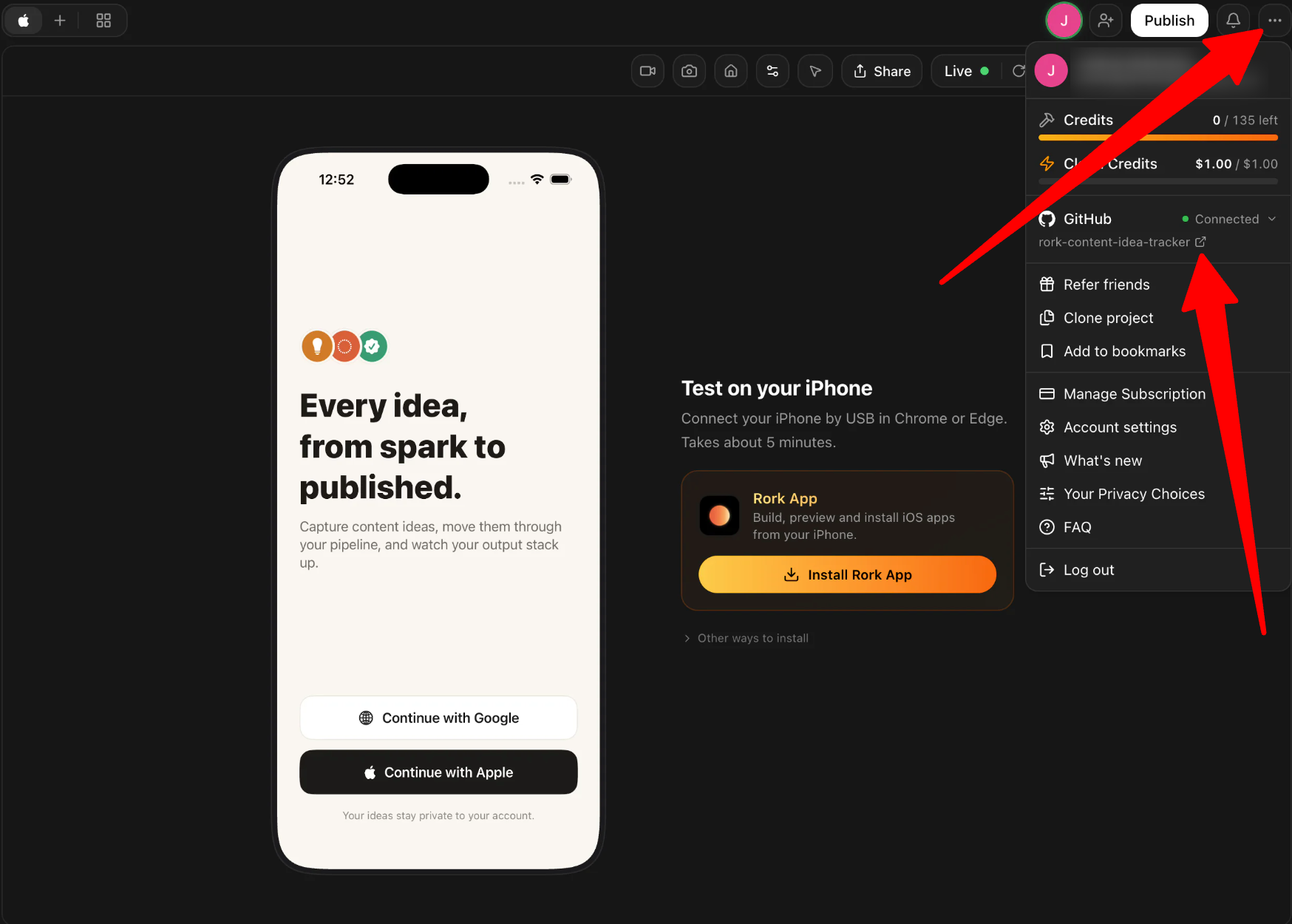
Once the repo has been created, go to the “Options” menu one last time to view the GitHub repo.
Step 13: Copy the GitHub Repo Link
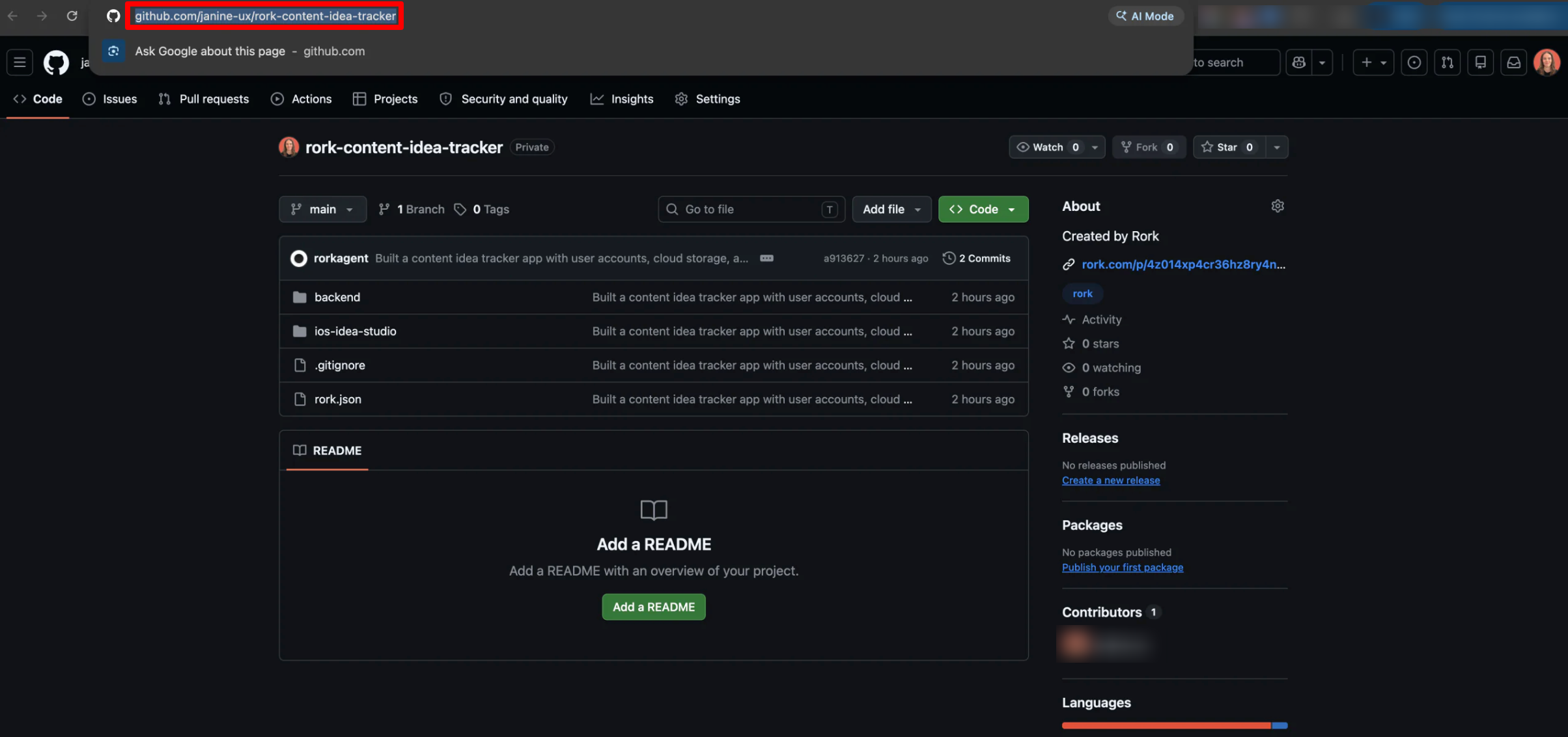
Within GitHub, copy the repo link.
Step 14: Generate App Store Screenshots
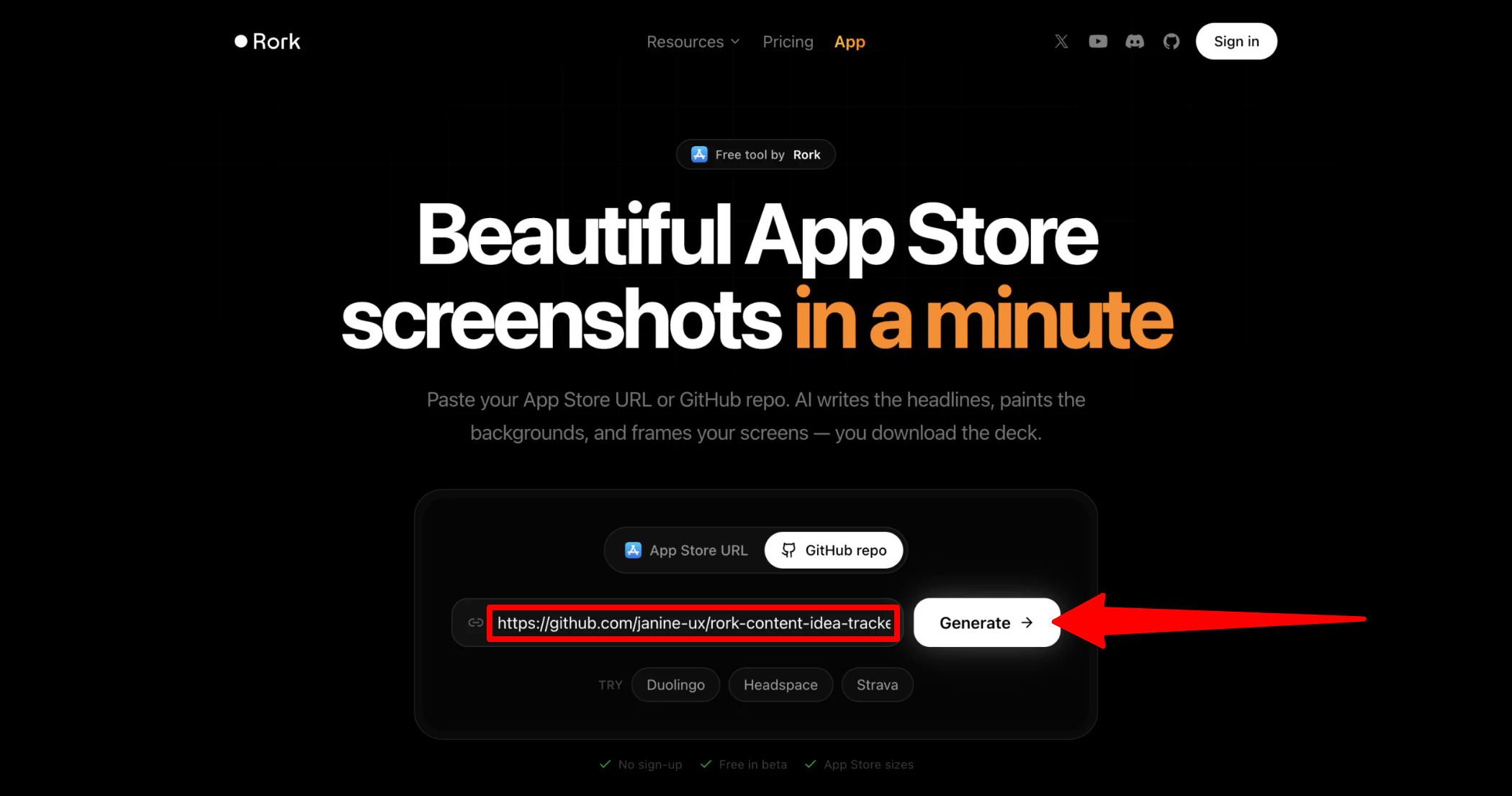
Paste the repo link into Rork’s Screenshot Studio to automatically generate screenshots formatted for an App Store listing instead of editing them yourself.
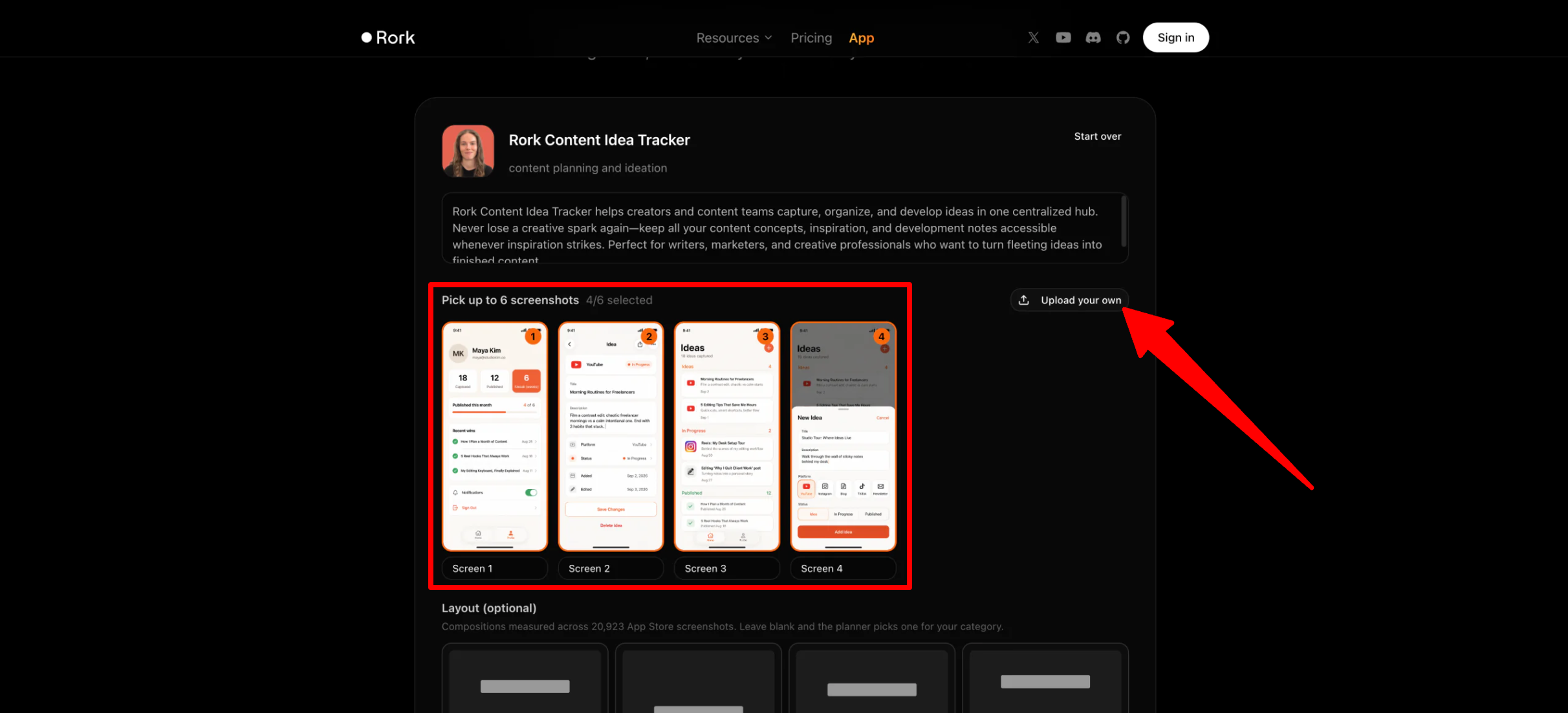
Next, upload up to six screenshots (I uploaded the four that Rork generated), optionally choose the layout and the style, and generate.
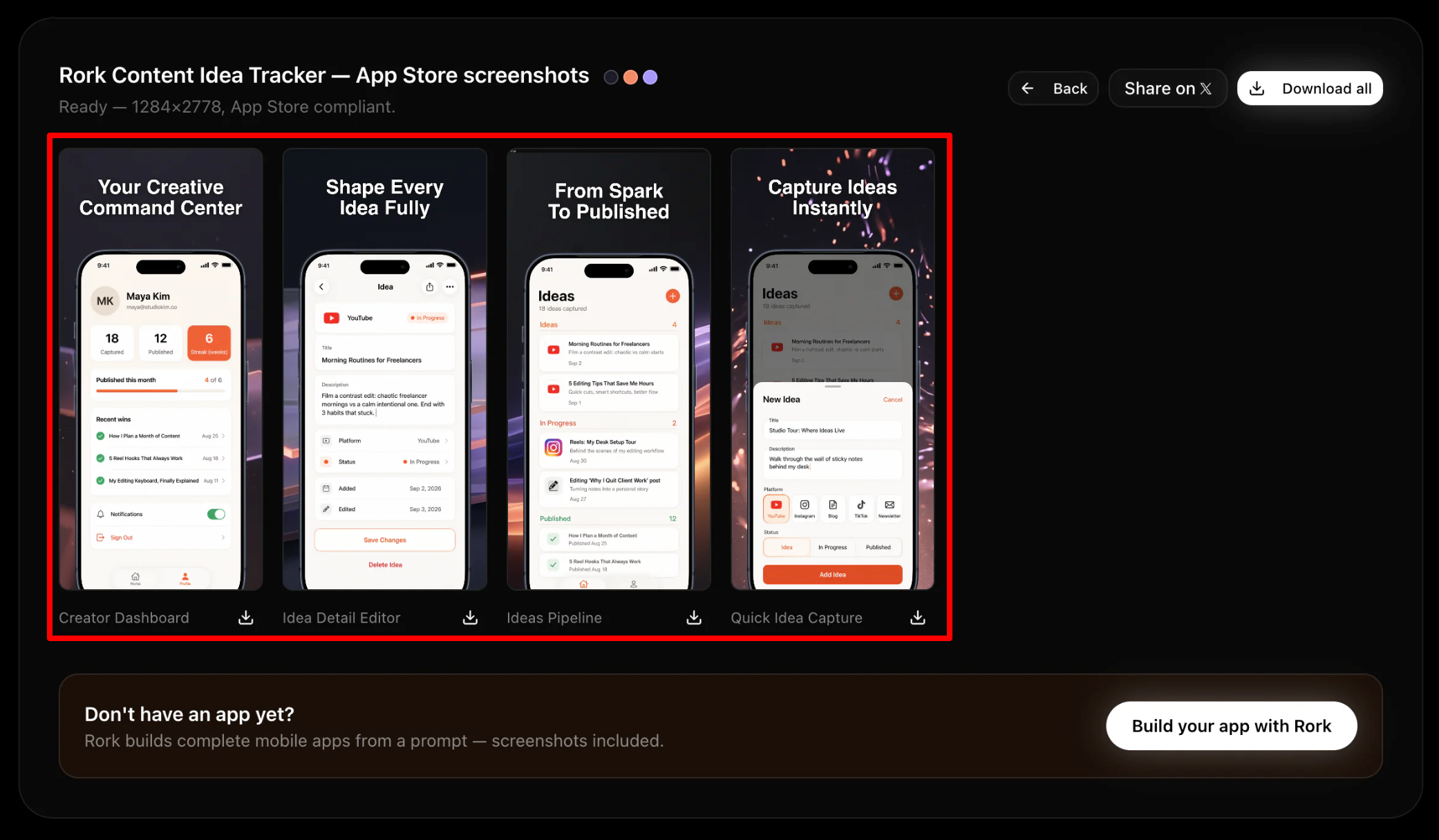
The App Store screenshots looked fantastic! They genuinely looked like they belonged on the App Store.
Step 15: Run the AI App Store Reviewer Check
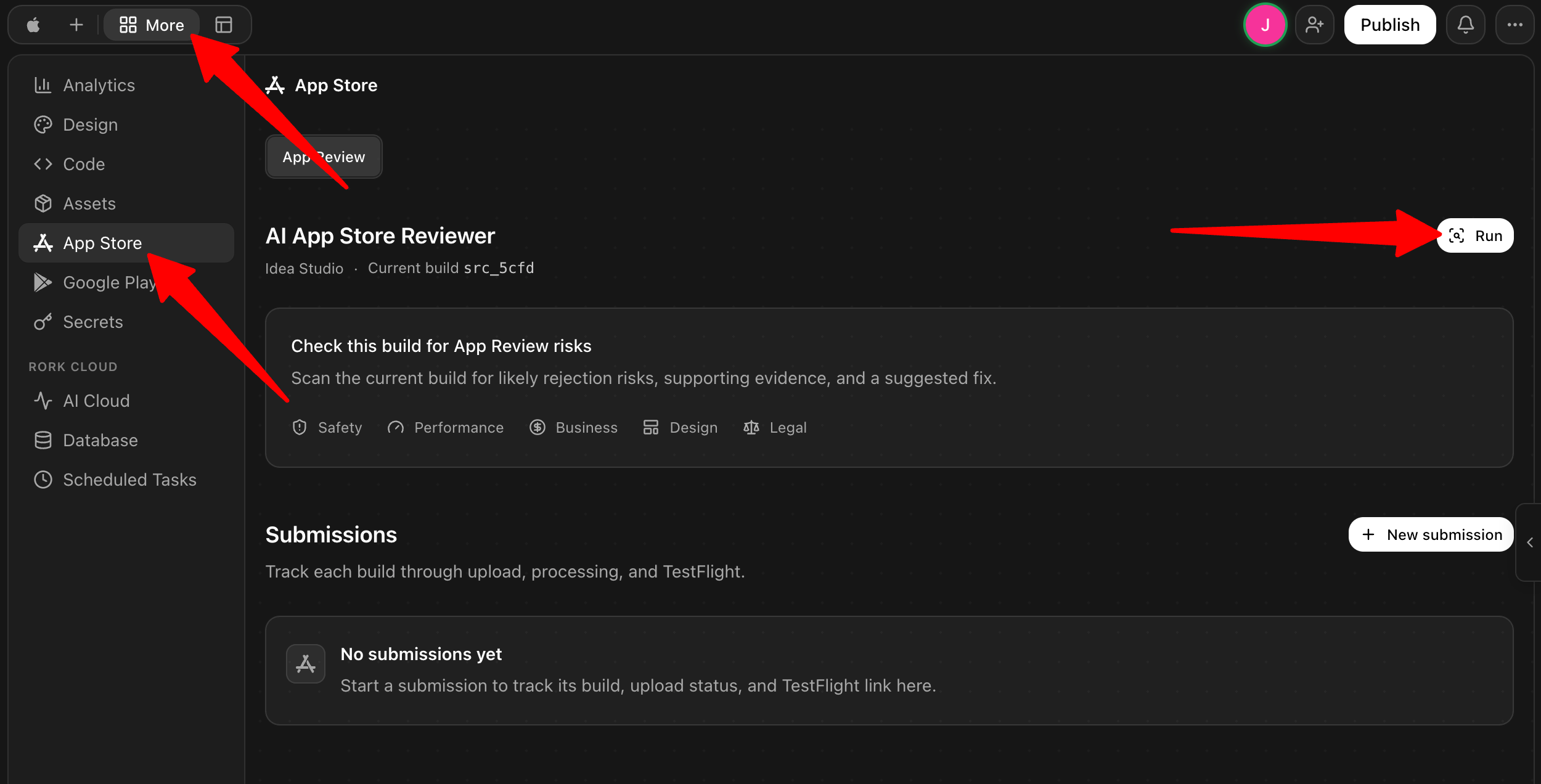
Before submitting anything, I ran Rork’s AI App Store Reviewer to flag anything that might get my app rejected by Apple’s guidelines. You can find this within your project on Rork in the App Store section under “More.”
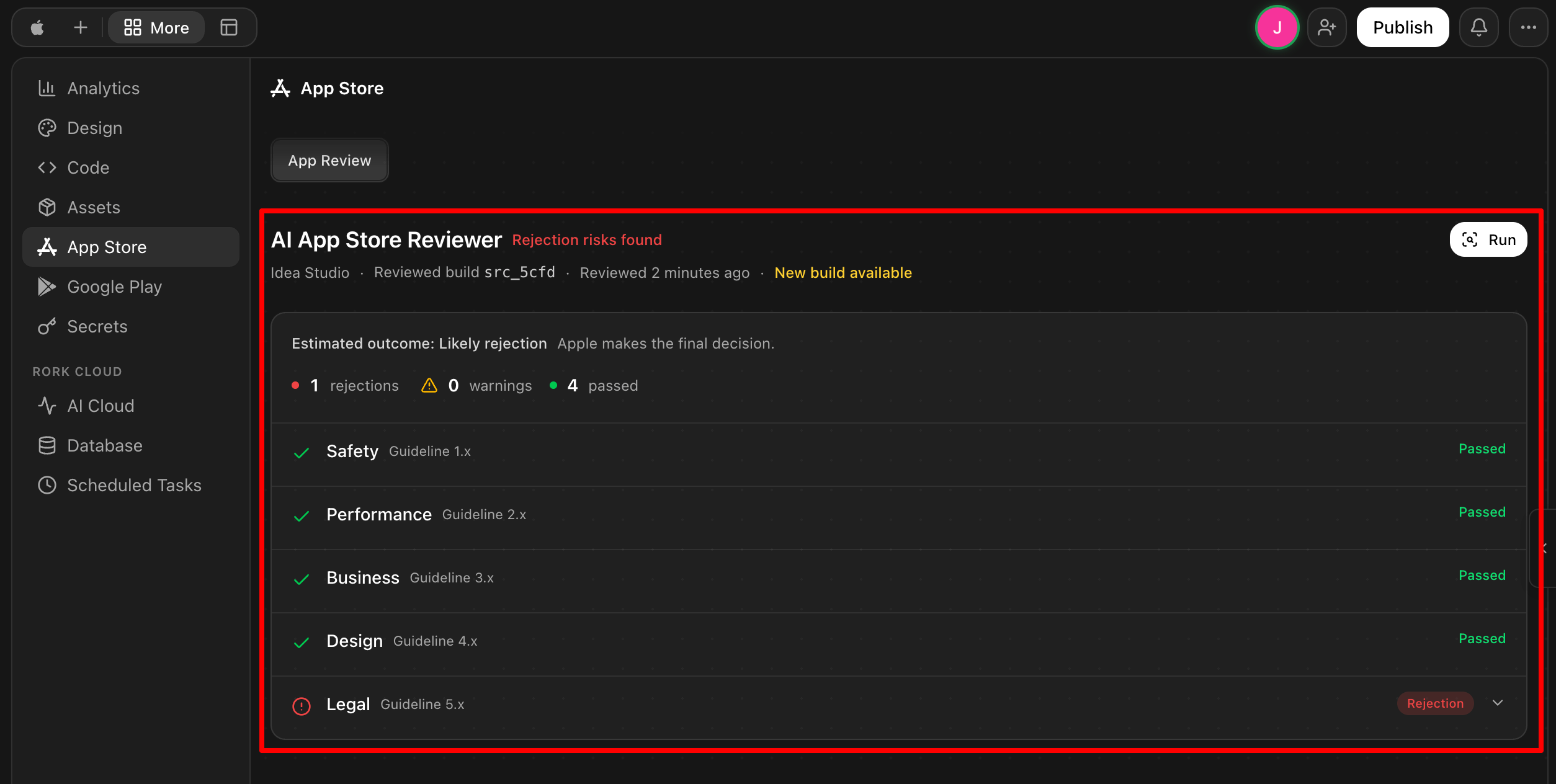
A few minutes later, Rork gave me the results: The Safety, Performance, Business, and Design of the app all passed. The only thing that was rejected was “Legal,” and in my case that was becuase the app has authentication but no account deletion flow found.
Step 16: Export Your Code or Publish to the App Store
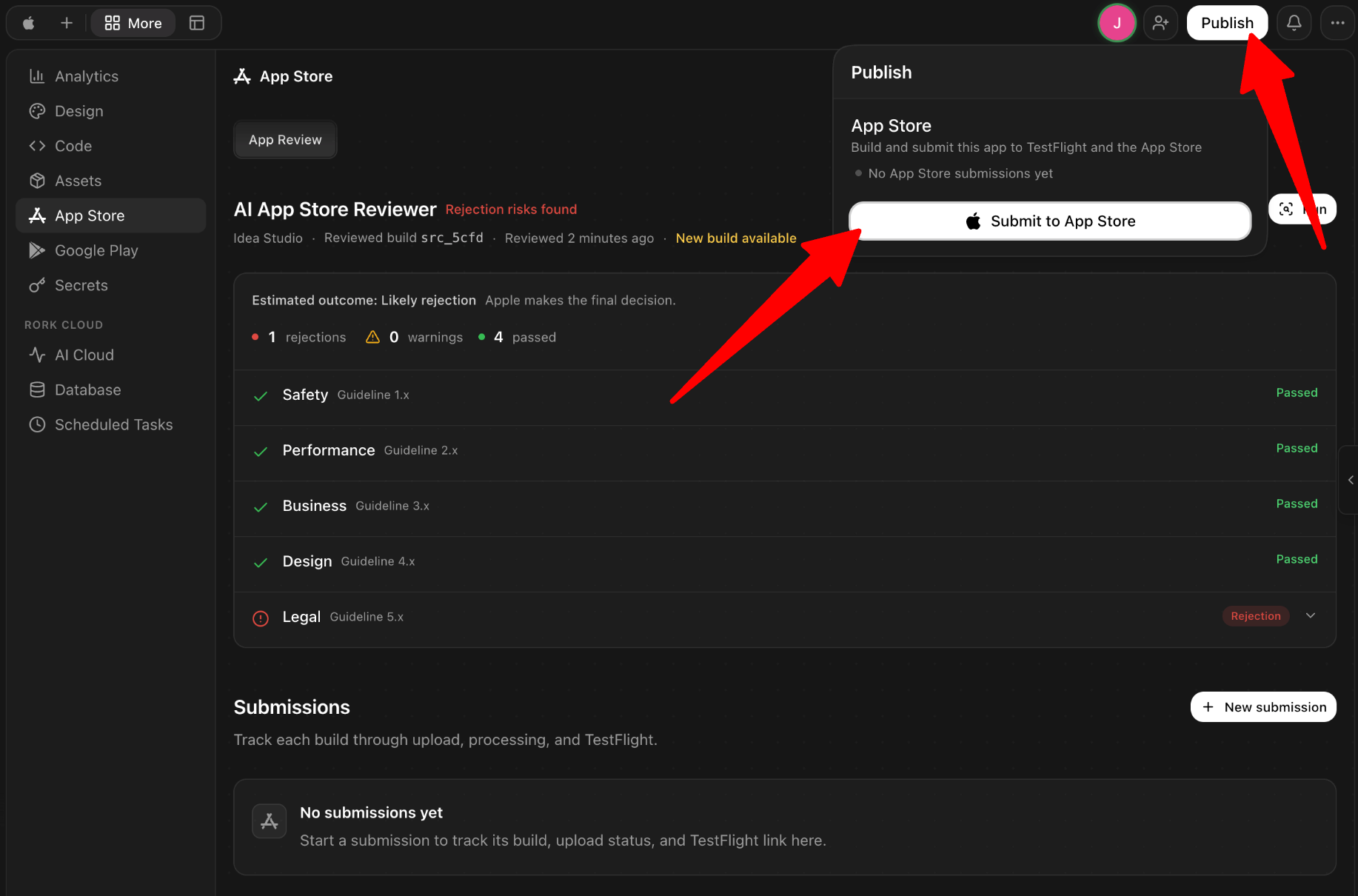
Finally, I checked out the publishing process for the App Store and Google Play. Before submitting, remember to address any potential rejection issues to give your app the best chance of getting approved.
Overall, Rork made the process of turning my idea into a functioning mobile app surprisingly quick and straightforward. I was impressed by how much it handled for me, from generating the initial design and building the app to connecting the backend and preparing it for the App Store.
Top 3 Rork Alternatives
Here are the best Rork alternatives I’ve tried that I’d recommend.
Bubble
The first Rork alternative I’d recommend is Bubble. It’s a no-code platform for building full-stack web and mobile apps that combines AI generation with a full visual editor, built-in hosting, databases, and backend infrastructure.
Bubble and Rork let you build apps without traditional code. However, they take very different approaches.
On the one hand, Rork is chat-only and laser-focused on shipping native iOS and Android apps quickly. Meanwhile, Bubble gives you a complete visual development environment where you can fine-tune the design and logic by hand. Bubble has also been around a lot longer (since 2012), so it comes with a bigger library of plugins, templates, and community tutorials to lean on if you get stuck.
Choose Rork if you want to describe an app and get a native mobile build in minutes. Otherwise, choose Bubble if you want more hands-on control over a more scalable web and mobile product.
Base44
The next Rork alternative I’d recommend is Base44. It’s an AI vibe coding platform that builds apps, websites, and AI agents from prompts, with built-in hosting and one-click deployment, and it was recently acquired by Wix.
Both tools generate working software from a conversation, but their focus is different.
On the on hand, Base44 is broader by covering websites and AI agents alongside apps. Meanwhile, Rork stays narrowly focused on native mobile apps, with dedicated tools like Screenshot Studio and an AI App Store Reviewer for shipping to the App Store and Google Play. It also comes with Rork Max for native Swift apps across the Apple ecosystem.
If you want one flexible tool for apps, websites, and agents, choose Base44. But if you specifically want a native mobile app built and published, choose Rork.
Read my Base44 review or visit Base44!
Softr
The final Rork alternative I’d recommend is Softr. It’s an AI no-code platform for business apps like internal tools, client portals, and dashboards. It also comes with an AI Co-Builder, a built-in database, workflow automation, and integrations with external data sources.
On the one hand, Softr is built for teams that need internal tools and portals. Softr has more than 1 million builders and 7,000 organizations, from single departments to enterprises like Netflix, Google, Stripe, and UPS. Meanwhile, Rork is built for shipping native mobile apps you can put in front of everyday users on the App Store and Google Play.
For internal business tools, client portals, and dashboards, choose Softr. If you want to build a mobile app people can actually download and use, choose Rork.
Read my Softr review or visit Softr!
Rork Review: The Right Tool For You?
After spending some time building with Rork, I came away impressed by how quickly I could turn a simple idea into a working mobile app. The first version looked clean, ran smoothly on my iPhone, and Rork handled things like the backend, GitHub connection, App Store screenshots, and app review checks without me needing to do everything manually. No wireframing, no coding, and no wrestling with a bunch of different tools.
However, it wasn’t completely hands-off. I had to go back and forth with the AI to make changes, and one of my requests seemingly failed on the first try. But overall, the experience was much easier than I expected, especially since I wasn’t writing the code myself. If you have an app idea and want to get a working version up and running quickly, I think Rork is worth trying.
But if Rork isn’t quite what you’re looking for, here are three alternatives to consider:
- Bubble is best for builders who want a full visual editor and more control over complex web and mobile apps.
- Base44 is best for anyone who wants one AI tool to build apps, websites, and AI agents together.
- Softr is best for teams that need internal tools, client portals, or dashboards rather than a consumer app.
Thanks for reading my Rork review! I hope you found it helpful. If you want to try Rork for yourself, sign up for free and see how you like it.