10 Best Construction CRM Software for Contractors

The best construction CRM helps contractors manage leads, quotes, proposals, invoices, job details, and field communication from one place. I reviewed both general CRM platforms and industry-specific construction CRM software based on how well each tool supports contractor sales, project handoffs, payment tracking, mobile field work, and client management.
Featured Partners
Fit Small Business is able to offer our services for free because some vendors may pay us for web traffic or other sales opportunities. Our mission is to help technology buyers make better purchasing decisions, so we provide you with information for all vendors — even those that don’t pay us.
Best construction CRM software compared
I chose the best construction CRM software by reviewing how each platform supports the work contractors manage before, during, and after a job. That includes lead tracking, bid and proposal workflows, contact management, quote creation, digital signatures, job scheduling, project tracking, invoicing, payment processing, field communication, and mobile access.
I also weighed how easy each CRM is for small construction teams to adopt. A roofing business may need aerial measurements and production tracking, while a general contractor may care more about job quoting, payments, scheduling, and client approvals. A growing construction company may need a CRM for contractors that can connect sales, project teams, finance, and field workers without creating more admin work.
I’ve spent the past decade helping to launch and manage retail and ecommerce businesses, giving me firsthand experience with sales operations, customer management, and workflow challenges that small businesses face every day. Alongside running digital marketing campaigns and ecommerce projects, I’ve worked with CRM systems to manage leads, track customer relationships, organize sales pipelines, and improve day-to-day business operations.
I also draw on experience working with major ecommerce platforms like Amazon and Shopify, and I regularly test and evaluate CRM, sales, and business management software for Fit Small Business. Every recommendation in this guide follows Fit Small Business’ editorial standards, scored using the methodology below, and is based on hands-on testing, product research, and real-world usability for small business teams.

Retail Software Expert at Fit Small Business
Which CRM for construction is best for you?
HubSpot CRM: Best for invoicing & payments
Pros
- Has reliable and multichannel payment processing features through Stripe, HubSpot payments, and other custom billing options
- AI-assisted content management creates and automates email campaigns, blog content, landing pages, and social posts
- Includes meeting scheduling to get jobs on the calendar, plus quote generation to send estimates and receive signatures.
Cons
- Has limited project management features and is designed mostly for task tracking in list views
- Bid management only available through third-party integrations
- Electronic signatures aren’t available on the free plan (available on the Starter plan at $9/user/month)
- Huge price jump from the Starter plan at $9/user monthly to the Professional plan at $90/user monthly
Why I like HubSpot CRM
HubSpot CRM is my top construction CRM pick for contractors that want to improve how they send quotes, collect payments, and manage customer communication. It is not a construction-only CRM, but it works well for contractors because it combines contact management, deal tracking, quotes, invoices, payment links, email marketing, forms, and meeting scheduling in one system.
I especially like HubSpot for smaller contractors that want to look more professional without setting up a heavy operations platform. A contractor can use HubSpot to track a lead from an estimate request to quote approval, payment, and follow-up communication. That makes it a practical CRM for contractors that care about cash flow, lead response time, and client communication.
Who should use HubSpot CRM
Use HubSpot CRM if you want a free or low-cost CRM with strong invoicing, payment, quote, and marketing tools. It is a good fit for general contractors, remodelers, and home service businesses that need better sales and payment workflows but do not need deep construction project management.
- “HubSpot Sales Hub offers a seamless, all-in-one interface for tracking leads, managing deals, and automating follow-ups. The ability to see email opens, schedule meetings directly, and log calls effortlessly has made our sales process faster and more efficient.” — G2 reviewer
- “I got a lot done with the free version, but the problem is you quickly run out of advanced features that you find yourself needing or wanting, and then they will take your firstborn once you start buying into their ecosystem.” — Reddit reviewer
- “If someone presses a button in Dispatch, it updates the deal stage over at HubSpot. Then we can run a report and see the entire lifecycle of that deal. It creates a seamless end-to-end experience.” — HubSpot user
Plan inclusions:
- Free: Includes invoicing, quote creation, basic payment links, contact and company management, one deal pipeline, document attachments, email templates, customer service ticketing, activity tracking, pipeline tracking, and app marketplace access.
- Starter: Adds 10 e-signatures per account per month, ACH and Stripe payments, up to 5,000 documents per account, up to one million products, multiple ticketing pipelines, conversation routing, basic automation, calling minutes, live chat, and content analytics.
- Professional: Adds account-based management tools, CRM association labels, deal metrics, prospecting workspace, duplicate management, e-signatures on documents, sequences, multiple sales teams, product library, playbooks, deal scoring, company scoring, and call performance tools.
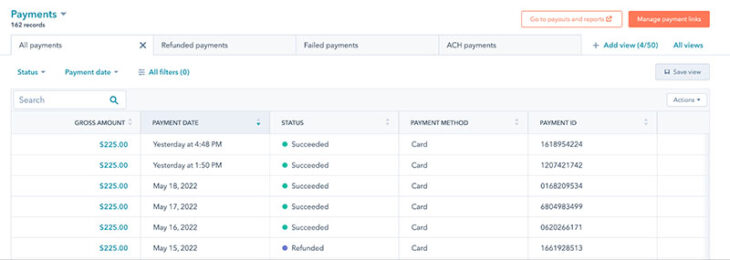
HubSpot CRM’s payments section enables contractors to track payment details for seamlessly managing cash flow and overall business revenue. (Source: HubSpot)
Zoho CRM: Best construction CRM for field sales tracking
Pros
- Field sales tracking monitors construction project operations and sales opportunities, like referrals and prospect visits, to provide free quotes
- Robust price book features let you add contracting services, assign jobs, and schedule appointments
- Deal management with quote and invoice generation, email and social media marketing, and customer support tools in one
Cons
- Has a steep learning curve to optimize feature usage benefits.
- Project management requires native integrations, with Zoho Projects with additional steps like configuration
- Contract management available as an add-on; bid management accessible through third-party integrations
- Inventory management for sending quotes, invoices, orders, and storing vendors requires a Professional plan ($23/user monthly)
Why I like Zoho CRM
Zoho CRM is a strong option for contractors that need field sales tracking and a flexible CRM at a low starting price. Contractors can use Zoho CRM to track deals, store contacts, manage files, monitor lead activity, and organize sales opportunities tied to site visits, referrals, estimates, or retainer work.
I also like Zoho CRM for contractors that want price books and inventory tools. Once a deal is moving forward, teams can use Zoho CRM to manage products or services, generate quotes, assign tasks, schedule appointments, and send invoices. It takes more setup than HubSpot, but it offers strong value for teams willing to configure it.
Who should use Zoho CRM
Use Zoho CRM if you need field sales tracking, lead management, quoting, invoicing, and basic automation at a low cost. It is a good fit for contractors that track site visits, free estimates, account relationships, and ongoing client work
- “I love Zoho CRM’s robust automation features, which streamline repetitive tasks like lead follow-ups and workflow management, saving me tons of time. … I find Zoho CRM’s interface a bit cluttered and outdated, which can make navigation feel clunky, especially for new users.” — G2 reviewer
- “We especially appreciate the flexibility to customize processes as we grow, and the mobile access keeps our team productive on the go. … Not all features available on desktop are equally functional or accessible on mobile apps, depending on the module.” — G2 reviewer
- “Zoho CRM on Mobile is the epitome of a waste of time. Its UI sucks and is hard to navigate. There are major limitations in what you can do/access/change. Some blueprints simply don’t work.” — Reddit reviewer
Plan inclusions:
- Free: Includes lead, account, contact, and deal management, activity tracking, basic workflow automation, email templates, standard reports, and limited file and data storage.
- Standard: Adds more workflow rules, sales forecasting, calendar booking, custom reports, custom dashboards, Google Workspace integration, and expanded storage.
- Professional: Adds inventory management, advanced automations, case management, SalesSignals, unlimited reports and dashboards, and higher email limits.
- Enterprise: Adds advanced automation, Zia AI, territory-based forecasting, anomaly detection, cohort analysis, email scheduling, autoresponders, and web form analytics.
- Ultimate: Adds higher feature limits, deeper AI and machine learning capabilities, advanced customization, data preparation, augmented analytics, and business intelligence tools.
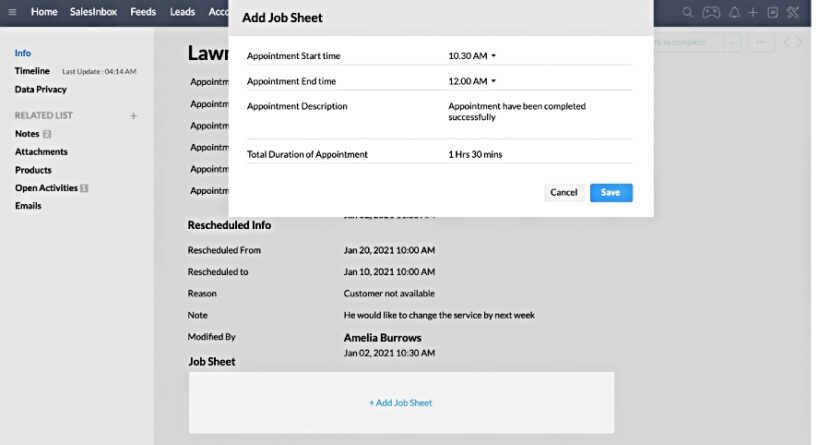
Zoho CRM lets you assign and track jobs, such as identifying completed appointments for seamless construction deals and project management. (Source: Zoho CRM)
Pipedrive: Best general CRM with proposal tracking for SMB contractors

Pros
- Strong proposal tracking and e-signature capabilities with Smart Docs
- Visual sales pipelines and customizable stages ideal for SMB sales workflows
- Optional project management module for post-sale execution and tracking
Cons
- Not tailored to construction; lacks built-in estimate builders or trade-specific templates
- Advanced features like document tracking and project tools require add-ons or higher-tier plans
- Contract management available with third-party integrations
- No built-in marketing or multichannel outreach tools
Why I like Pipedrive
Pipedrive is a strong general CRM for construction companies that want to track proposals, deals, and sales activity without a lot of setup. Its visual pipeline makes it easy to see which estimates are new, which proposals are awaiting approval, and which jobs have moved into production.
I like Pipedrive most for SMB contractors that already have a project management or estimating process but need a better sales CRM. Smart Docs helps teams send, track, and sign proposals, while deal rotting alerts can help prevent bids from sitting untouched. It is less useful as an all-in-one construction management system, but it is one of the cleanest tools for managing the sales side of contractor work.
Who should use Pipedrive
Use Pipedrive if your main need is proposal tracking, deal management, sales follow-up, and visual pipeline organization. It works well for contractors that want a sales-first CRM and do not need a trade-specific platform.
- “Overall, Pipedrive strikes a perfect balance between user-friendliness and advanced functionality. Highly recommended for any team looking to bring intelligence and efficiency into their sales process. … I do see some limitations in how flexible or granular the automations can be, especially when dealing with more complex workflows.” — G2 reviewer
- “The bid/no-bid process is all built around Pipedrive. Each pipeline has a bid/no-bid details section, with all the necessary information in it, which allows for much quicker decision-making. Everything they need to see is available in there.” — Pipedrive user
- “Some features are buried in menus. Calendar sync is not perfect, taking time for some updates to happen. Mobile app isn’t as easy to use as website.” — G2 reviewer
Plan inclusions:
- Lite: Includes lead, deal, contact, calendar, and pipeline management, AI-powered report creation, real-time sales feed, 500-plus integrations, and personalized onboarding.
- Growth: Adds full email sync with tracking, automations, nurturing sequences, subscription and forecast reports, meeting scheduler, contact timelines, and live chat support.
- Premium: Adds lead generation and routing, custom scoring, company data enrichment, AI-powered email tools, shared team inboxes, contracts, e-signatures, and advanced customization.
- Ultimate: Adds account security rules and alerts, phone and email data enrichment, sandbox testing, extended phone support, and partner discounts.
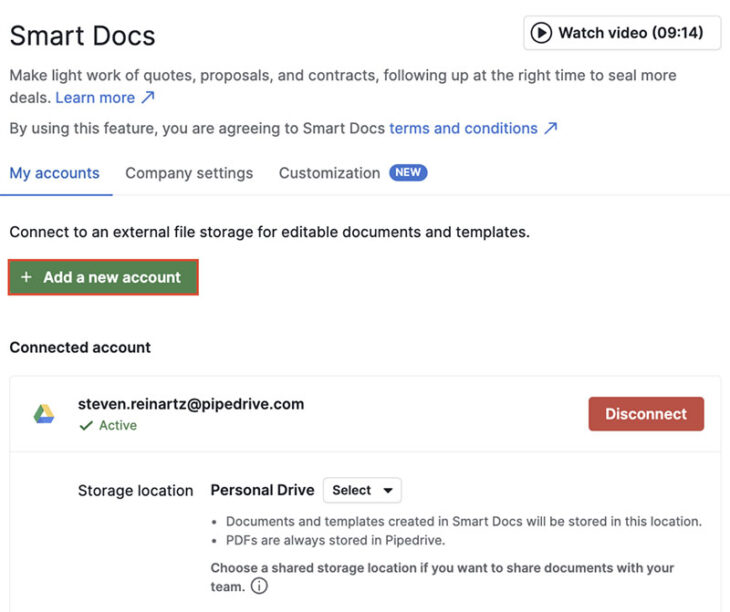
Pipedrive’s Smart Docs helps contractors quickly create and sign proposals and quotes with an audit trail to close more construction projects. (Source: Pipedrive)
monday CRM: Best for office-to-job-site communication

Pros
- Keeps job progress, changes, and deadlines in sync regardless of location, thanks to real-time updates, mobile access, and centralized task tracking
- Gives users the flexibility to tailor workflows to fit specific construction processes, from lead tracking to project management
- Integrates with tools like Slack, Gmail, and Outlook for a seamless data sync across platforms
Cons
- Lacks native tools for resource-leveling, subcontractor scheduling, and bid management, or locks them in higher plans
- Requires a minimum of three users for paid plans, which might not be cost-effective for very small teams
- More complex workflows and automations can require a learning curve or assistance from a monday CRM expert
Why I like monday CRM
monday CRM is a good fit for construction companies that need better communication between office staff, sales teams, and field workers. Its boards, timelines, owners, automations, and updates make it easy to track where a job stands and who owns the next step.
I like monday CRM for contractors that want a flexible system rather than a rigid trade-specific platform. It can support lead tracking, project handoffs, field requests, job updates, and internal communication, but it requires more customization than dedicated contractor CRMs.
Who should use monday CRM
Use monday CRM if you need a customizable workspace for sales opportunities, job requests, project updates, and team communication. It is a strong fit for contractors that want flexible workflows and visual work tracking.
- “If there’s an update, issue, or question, the factory leads can comment and tag the relevant team member. … We’ve even implemented a preemptive notification system where if there’s some custom production required in a specific item, the project manager writes a note in an update and tags the work orders to refer to that custom instructions note.” — monday CRM user
- “The visual layout, automations, and dashboards make it easy to keep track of leads and internal communication without micromanaging. It helped us streamline our entire sales process, and we are now preparing to roll it out to our operations team as well.” — G2 reviewer
- “Limited Email Tracking Functionality – Not as strong as dedicated CRMs for mass outreach or tracking email engagement. Clunky for Advanced Reporting – Some workarounds needed for more complex sales analytics or forecasting.” — G2 reviewer
Standout features:
- AI-powered CRM tools, including Monday AI credits and AI Sidekick.
- Contact and deal management, with limits based on plan.
- Custom dashboards for tracking sales activity, job progress, and team performance.
- Customizable boards with multiple column types for building contractor workflows.
- Quotes and invoices, starting with 20 per month on the Basic plan.
- Workflow automations for repetitive sales, task, and follow-up actions.
- Centralized communication hub for emails, calls, meetings, and notes.
- iOS and Android apps for updating CRM records from the field.
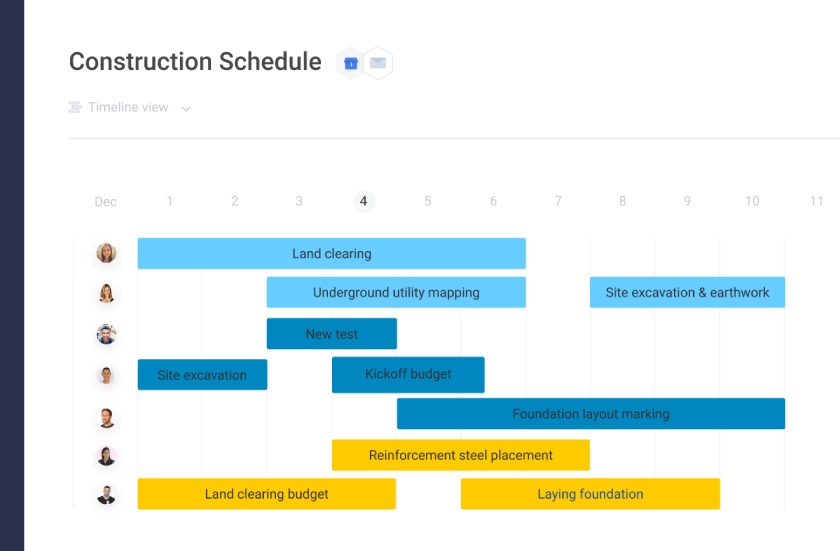
monday CRM turns insights into actions for construction workers in the office and in the field (Source: monday CRM)
Jobber: Best job quoting tools for general contractors

Pros
- Cost-scalable plans have job quoting tools like customizable templates, automated calendar reminders, and signature approvals
- Has a unique client hub feature for scheduling appointments, paying invoices, and approving quotes
- Has extensive job management features like expense tracking, job costing, job assignment, and progress tracking
- Manage quotes and bids from the mobile app
Cons
- Referrals and marketing campaigns require an additional fee of $79 per month
- Job forms and routing are relatively expensive at $119 per user monthly with the Connect plan
- It’s not intuitive because users need to scroll to search for a job or a quote
Why I like Jobber
Jobber separates itself as a great CRM for general contractors with its job quoting tools, ideal when overseeing full construction or remodeling projects. In fact, it’s one of our top quoting software tools.
Its job costing and expense tracking tools help ensure profitability and maintain up-to-date accounting records for contractors. While I wish the platform could better support sales and marketing campaigns, it’s still a powerful platform to manage contracting operations.
Who should use Jobber
Use Jobber if you are a general contractor or home service business that needs job quoting, scheduling, client approvals, invoicing, payments, and job costing in one platform.
- “Quoting, invoicing, scheduling, accepting payments, sending confirmations, and getting reviews [are] all available to you and able to be set up via automations. I’ve used other CRM’s before, and one of the biggest hurdles was implementation, and the complicated ways to integrate the features available into our daily process. Jobber had none of those challenges.” — G2 reviewer
- “I don’t like that you cannot manually enter measurements, i.e., feet, square feet, linear feet, for unit pricing. The online booking tool doesn’t allow my customers to enter in specific square footage of their house to get a scalable price.” — G2 reviewer
- “The ability to, from start to finish, track a job…assessment, quote, job, invoice, has been instrumental in keeping up with a growing business. The marketing tools and ad campaigns have been stellar; the AI rewrite tool might be my favorite component.” — G2 reviewer
For individuals
For teams
Standout features:
- Client manager CRM for tracking customer details from the office or field.
- Client hub where customers can approve quotes, view appointments, and pay invoices.
- Online booking and custom request forms for capturing new work.
- Professional quotes with customizable templates, signature approvals, and automated reminders.
- Invoicing and online payments for faster billing and collections.
- Job scheduling with real-time calendar updates.
- Job details and attachments, including notes, photos, and files from the field.
- Checklists for documenting work and keeping service quality consistent.
- Routing, time tracking, expense tracking, and job costing on higher plans.
- Two-way text messaging, workflow automations, and pipeline tools on advanced plans or as add-ons.
Insightly CRM: Best for contact relationship linking

Pros
- Offers a contact relationship-linking feature starting in the Plus plan ($29 per user monthly) to note important contact details
- Has built-in project management tools across all plans
- Converts won opportunities to construction projects and automates CRM workflows for contractor tasks
Cons
- Workflow automation only available starting with the Professional plan at $49 per user monthly
- Has limited report customizations
- Marketing and customer service modules incur an additional cost, starting at $29 per user monthly
- Little or no information on bid management features
Why I like Insightly CRM
Insightly CRM is a strong option for contractors that rely on referrals, repeat business, subcontractor relationships, and account connections. Its relationship-linking feature helps users map how clients, organizations, opportunities, and contacts are connected, which is useful when one job can lead to another through a referral or partner.
I also like Insightly because it combines CRM and project management. Contractors can manage leads and opportunities, then convert won deals into projects without losing the original customer and sales data.
Who should use Insightly CRM
Use Insightly CRM if you need relationship linking, project tracking, opportunity management, and workflow automation. It is a good fit for independent contractors, consultants, and construction businesses that need to track customer networks and project delivery.
- “Insightly is so easy to use. We group potential customers in opportunities where you can view them all and make visible notes without having to click into each organisation, this way you can see who has bought and who hasn’t.” — G2 reviewer
- “It’s an investment for a small organization, but it’s been worth it for us.” — G2 reviewer
- “Insightly has completely transformed how we manage our projects. The interface is intuitive, the features are exactly what we need, and it keeps our team organized and on track.” — G2 reviewer
Standout features
- Lead and contact management for tracking contractor prospects, customers, and business relationships.
- Native project management for handling work after a deal is won.
- Opportunity-to-project conversion that preserves customer and sales data.
- Relationship linking for connecting contacts, organizations, opportunities, and projects.
- Web-to-lead capture for collecting inquiries from website forms.
- Kanban views for visual lead, opportunity, and project tracking.
- Advanced reports and pre-built business dashboards.
- Lead assignment, routing, and workflow automation on higher plans.
- AI Copilot on Professional and Enterprise plans.
- Integrations with Google, Microsoft 365, QuickBooks, Xero, PandaDoc, and other business apps.
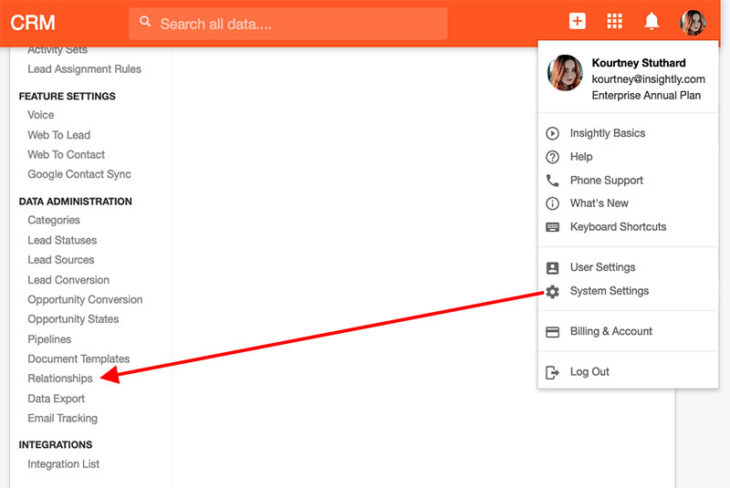
Insightly CRM lets contractors set up link relationships for their contacts. (Source: Insightly CRM)
JobNimbus: Best mobile CRM for roofers and remodelers

Pros
- Industry-specific mobile CRM helps roofers and remodelers manage jobs and grow their businesses
- Has robust job and project management features customizable for any type of contracting services
- Includes one-click invoicing capabilities with payment processing and the ability to sync accounting data with QuickBooks
Cons
- Lacks a free plan and transparent pricing
- Doesn’t currently have marketing features; users can get onto a waitlist for when the marketing module is released
- Sales tools are limited to lead tracking, contact storage, and appointment scheduling; they lack outreach tools via phone or email
- Little or no information on bid management features
Why I like JobNimbus
JobNimbus is the best industry-specific mobile CRM app for roofing and remodeling contractors. The mobile app lets customers sign documents and take photos of building projects.
This helps quickly relay what needs to be done in your back office for collaboration, decision-making, and job scheduling. Also, its project management features are highly customizable and detailed, so you can see all subcontractors, tasks, and progress in one place.
JobNimbus doesn’t make prices available online (pricing is only available by custom quote), which is why you won’t see a pricing section below.
Who should use JobNimbus
Use JobNimbus if you run a roofing, remodeling, or exterior home improvement business and need a mobile CRM that supports field documentation, scheduling, project boards, invoicing, and QuickBooks syncing.
- “I love that it keeps everything for each client in one area. I can go back and look at past emails, texts, and estimates. I can make notes and store pictures. I also love contracts can be signed digitally.” — G2 reviewer
- “I like the ability to run customized reports quickly and easily, and that creating contacts/jobs/tasks is relatively easy. The concept of boards is great as well, and being able to click/drag contacts around as needed.” — G2 reviewer
- “The way automations are set up could be less convoluted. For example, I am not able to set up a task type on the fly — if I am setting up an automation that needs a specific task type that we don’t have, I have to back out and go set up the task type first, then go back and set up the automation.” — G2 reviewer
- Job workflows for tracking work from lead capture to invoicing.
- Workflow automation with when-if-then logic to reduce repetitive admin work.
- Task scheduling with due dates, priorities, and event types like calls, appointments, and estimate follow-ups.
- Customizable job boards for tracking stages such as lead, estimate, signed contract, job in progress, payment, and closeout.
- Professional estimates with cover pages, line items, terms, and client signature options.
- Estimate-to-invoice conversion for faster billing.
- Invoice delivery by email or text payment request.
- Mobile app for adding jobs, tasks, forms, photos, contacts, and field updates.
- Photo feed and mobile capture tools for field documentation.
- Profit tracker for monitoring job costs and margins.
- QuickBooks integration on CRM plans.
- Custom reports, workflow boards, and integrations, with expanded options on higher plans.
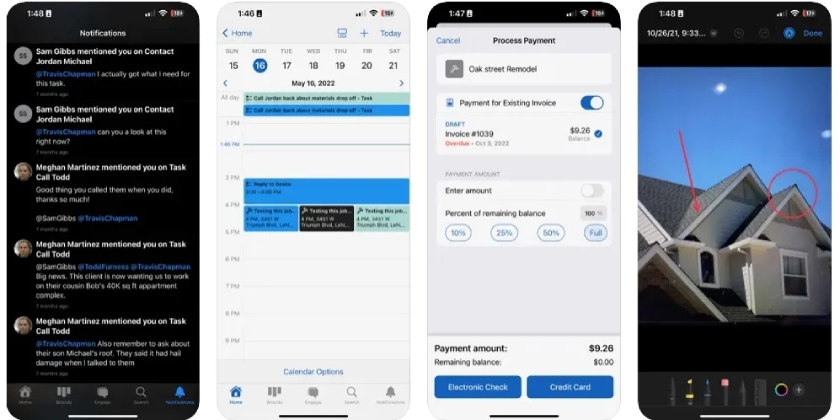
Take and annotate before-and-after photos inside the JobNimbus app. (Source: JobNimbus on G2)
AccuLynx: Best sales lead intelligence for roofers

Pros
- Has an AI-powered sales lead intelligence feature (Faraday) and sales tools for a vertical-specific product like lead scoring
- Offers specialty features for roofing businesses like aerial measurements, direct supplier ordering, and work progress tracking
- Has unique financial tools like job costing, profit forecasting, profit/loss analysis, and sales commission tracking
- Uses third-party integrations to for accurate price projections and measurements for roofing job bids
Cons
- Doesn’t have transparent pricing and only comes with two subscription options
- Most sales reporting tools require an Elite plan
- Doesn’t offer mass marketing capabilities
Why I like AccuLynx
AccuLynx is built for roofing businesses that want CRM, production, and financial tools in one system. Its Faraday-powered lead intelligence helps roofers score leads, track sales activity, and prioritize the opportunities most likely to convert.
I like AccuLynx because it supports roofing-specific workflows that general CRMs do not handle natively. Contractors can manage aerial measurements, materials, suppliers, labor resources, work orders, job costing, and production updates from one platform.
AccuLynx doesn’t make prices available online (pricing is only available by custom quote), which is why you won’t see a pricing section below.
Who should use AccuLynx
Use AccuLynx if you run a roofing business and want an industry-specific CRM with lead intelligence, supplier ordering, aerial measurements, job costing, and production tracking.
- “It’s been great! We utilize AccuLynx predominantly for estimates and ordering, as well as cataloguing client information. For these purposes, it’s a great piece of software. … AccuLynx allows for seamless workflow, from scheduling, to estimates, to ordering with our local suppliers.” — Capterra reviewer
- “Customer support is lacking. They always want to email. I prefer a phone call. The pricing continues to increase without any new features. All new features are additional costs to implement, and they are all expensive.” — Capterra reviewer
- “As a family business, we like it for keeping all of the info in a logical place. … Organization of clients and documents is easy and can hold a lot of data.” — Capterra reviewer
- Roofing-specific CRM for managing sales, production, finance, and operations.
- AI-powered lead intelligence and real-time analytics for sales pipeline management.
- Seamless measurement data and live material pricing for faster estimates.
- Custom sales proposals that can be presented or shared with prospects.
- Mobile roofing app for field teams and job updates.
- Drag-and-drop calendar for planning production work.
- Crew management tools for coordinating labor and field collaboration.
- Supplier direct ordering with real-time order status tracking.
- Centralized job financial tracking, invoicing, online payments, financing, cost tracking, and budgeting.
- Pre-built reports and customizable dashboards for business performance tracking.
- Document automation with drag-and-drop design tools.
- Custom workflow automation for routine tasks.
- Integrations with roofing and business tools, including ABC Supply, SRS Distribution, QXO, EagleView, CompanyCam, and QuickBooks.
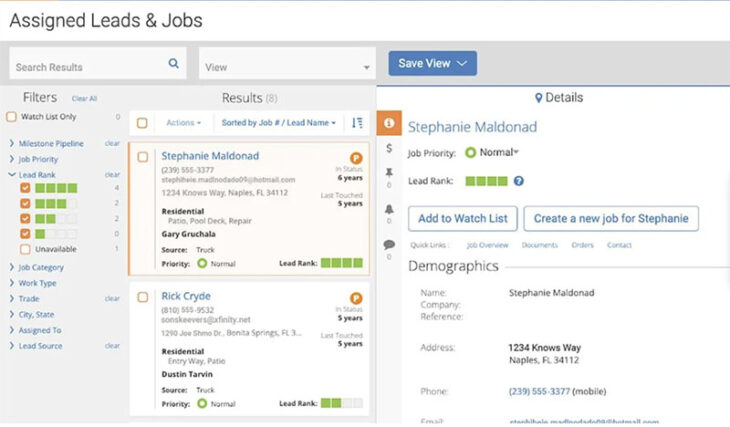
AccuLynx streamlines the roofing sales qualification process with lead intelligence. (Source: AccuLynx)
Capsule CRM: Best for construction project management

Pros
- Offers affordable project management features like daily task reminder emails and client activity management
- Equipped with an AI content assistant to facilitate auto-generated sales emails
- Advanced capabilities include workflow automation and performance metrics reporting
Cons
- Has no email tracker
- Workflow automation features are locked in higher tiers (starting in the Growth plan at $36 per user monthly)
- Only has a one-way integration with Google Contacts; other providers offer a two-way integration
- Little or no information on bid management features
Why I like Capsule CRM
Capsule CRM is the winner in project management with a dedicated module for seamlessly managing construction projects from renovations to building new houses and establishments.
I love how this CRM provides this capability in its free plan, benefiting new construction firms and contractors. With task management, automation, reminders, and an AI content assistant, contractors can save time responding to clients, generating quotes, invoicing, and performing other routine tasks.
Who should use Capsule CRM
Use Capsule CRM if you need affordable construction project management, task tracking, sales pipelines, and client activity management. It is a good fit for smaller contractors that want free or low-cost CRM and project tools.
- “This CRM is very easy to use and easy to set up, as someone with no prior CRM use. The opportunity feature enables us to keep on top of tasks per case. Also, the filtering options are helpful when trying to complete tasks at the same time and covering others’ tasks when they are not able to work.” — G2 reviewer
- “Have been using Capsule every day for the best part of 12 years now. … It’s very user-friendly and easy to set up [and] get to grips with. The opportunity and projects features are fantastic for keeping on top of tasks, and the new pipeline reporting features that are regularly being added are also solid additions to the tool.” — G2 reviewer
- “It would be nice to be able to choose different plans for different users within an account – not all users need the advanced reporting and perhaps only have access in order to see customer details, so it can really add to the subscription costs in these instances.” — G2 reviewer
Standout features
- Contact management for storing customer, subcontractor, supplier, and project contact details.
- Visual sales pipelines for tracking bids, proposals, and construction opportunities.
- Project boards for managing renovation, remodeling, and construction work after a deal is won.
- Task management with reminders for follow-ups, job updates, and client communication.
- Custom fields, tags, filters, and views for organizing construction-specific records.
- AI email assistant for drafting client emails and follow-up messages.
- Shared mailboxes for managing team communication.
- Workflow automation on higher plans.
- Activity reporting and sales pipeline dashboards for tracking team performance.
- Integrations with tools like Google Workspace, Microsoft 365, Mailchimp, Xero, FreshBooks, and Zapier.
- Mobile CRM access for managing contacts, tasks, and opportunities from the field.
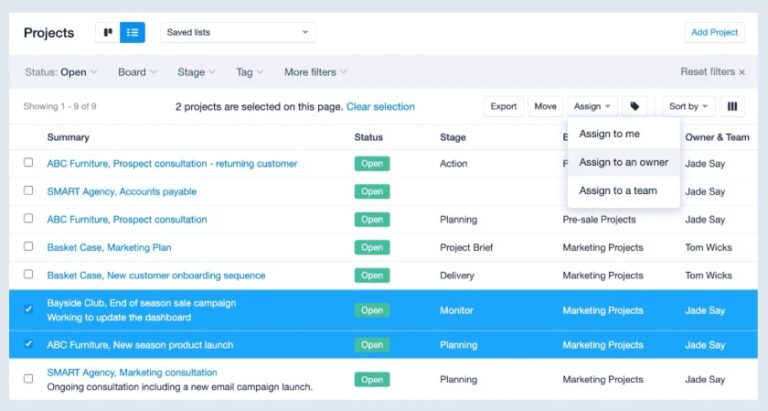
Capsule CRM’s project management dashboard provides contractors with an easy way to view and manage construction projects. (Source: Capsule CRM)
Daylite CRM: Best for construction companies strictly in the Apple ecosystem

Pros
- Brings contacts, emails, calendars, tasks, deals, and projects into one organized system, helping construction teams avoid the chaos of scattered tools
- Higher-tier plans give users structured oversight across client relationships and job progress
- Ideal for contractors using Macs, iPhones, and iPads who want a CRM that balances functionality with affordability
Cons
- Lacks deeper automation workflows, AI-driven forecasting, and third-party app integrations found in more advanced platforms
- Users suggest slow customer service responses or limited help with more technical configurations
- Not compatible with Windows or Android devices, making it a poor fit for mixed-device teams or firms looking for cross-platform flexibility
- Little or no information on bid management features
Why I like Daylite CRM
Daylite CRM is a capable and well-structured solution for small to midsize construction companies that operate within the Apple ecosystem. It’s purpose-built for Mac, iPhone, and iPad users, offering a unified workspace where teams can manage contacts, emails, sales opportunities, project timelines, and client communications from one platform.
What makes Daylite especially attractive for construction businesses is how it links all client interactions — from lead to quote to job tracking — in a single view. This visibility helps busy owners and office managers stay organized and on schedule, without bouncing between apps or losing critical context.
The platform performs well in core CRM functions like contact and task management, and its higher-tier features add useful capabilities such as sales and project pipelines, quote generation, lead scoring, and milestone tracking. It earned solid marks for pricing and general features, making it a good value for small teams that want depth without complexity.
However, Daylite’s automation and analytics tools are limited compared to enterprise-level CRMs, and its Apple-only design is a hard stop for teams using Windows or Android devices. Support also appears to be a weak spot, with user feedback pointing to inconsistent help for more advanced needs.
For Mac-based teams that prioritize organization, visibility, and integrated workflows, Daylite delivers a focused, cost-effective solution — but it’s not built for firms seeking heavy automation or cross-platform flexibility.
Who should use Daylite CRM
Use Daylite CRM if your construction business uses Mac, iPhone, and iPad and you want CRM, project management, email tracking, calendars, and tasks in one Apple-friendly platform.
- “Native integration with all Apple platforms puts it ahead of other SAAS solutions for macOS users. Includes email, tasks, contacts, calendars, and more. As an example, emails are automatically linked to matching contacts, accounts, opportunities, and/or projects regardless of which Apple platform you are using.” — G2 reviewer
- “Daylite has templated fields for adding contact information, while it gives you a lot of options, it doesn’t let you edit all of the field choices. So if you want to have a field with a specific date, you can’t change the name of the field to say ‘start date,’ it will just be ‘date’ or whatever it is preset to.” — TrustRadius reviewer
- “The dashboard is pretty much simple and helpful, as the user does not need a high level of knowledge to navigate things on the platform.” — TrustRadius reviewer
Standout features
- Apple-first CRM built for Mac, iPhone, and iPad users.
- Contact management with two-way Apple Contacts sync.
- Daylite Mail Assistant for Apple Mail integration, lead capture, email storage, and follow-up reminders.
- Task management with due dates, notes, priorities, reminders, and recurring tasks.
- Daylite Calendar with two-way Apple Calendar sync.
- Offline access from Mac, iPhone, and iPad.
- Contact linking for viewing client history, related records, emails, calls, meetings, and activities.
- Custom forms for collecting client, project, revenue, and process details.
- Sales opportunity boards and customizable sales pipelines.
- Quotes and estimates for sharing job details with prospects.
- Lead scoring and referral tracking for sales follow-up.
- Project boards, project pipelines, milestone tracking, and project reporting.
- Custom fields, categories, tags, roles, relationships, and workflow settings.
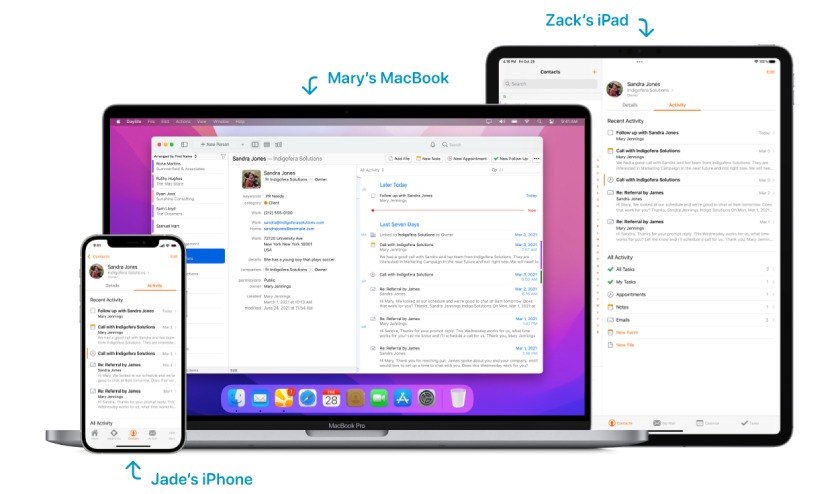
Daylite CRM keeps client and project details in sync across Apple devices. (Source: Daylite CRM)
Methodology: How I evaluated the best CRM for contractors
To find the best CRM for contractors, I evaluated both industry-specific and general-use CRM systems based on how well they support construction, maintenance, remodeling, and trade service workflows. I focused on features contractors need to manage leads, schedule jobs, send quotes, store documents, track projects, and communicate with customers from the office or field.
I also considered affordability, ease of use, support access, and user feedback to determine which platforms offer the best value for small construction businesses.
- General features (25%): I reviewed core CRM tools that apply across industries, including contact management, lead tracking, pipelines, reporting, customization, mobile access, and third-party integrations. I also looked at whether each CRM could connect with common contractor tools, such as accounting, email, calendar, and project apps.
- Advanced features (20%): I evaluated contractor-specific and niche CRM tools, including project management, quote generation, document storage, job scheduling, job costing, subcontractor management, and field-service dispatch tracking. These features are especially useful for construction companies managing jobs from estimate to completion.
- Pricing (20%): I compared free plan availability, entry-level plan costs, billing flexibility, and whether paid plans can scale with a growing construction business. I also considered how much it costs to access the features contractors need most, such as quoting, routing, project management, automation, and payment tools.
- Support (20%): I reviewed each provider’s support availability, including hours of service and access to phone, email, live chat, onboarding, help centers, and knowledge bases. Strong support matters because contractors need quick answers when CRM issues affect sales, scheduling, or customer communication.
- Expert score (15%): I used firsthand CRM testing, product research, and online user reviews to evaluate real-world value. This score reflects how easy each CRM is to use, how well its features work for contractors, and whether users feel the product is worth the cost.
How to choose the best construction CRM for your business
Choosing the best CRM for construction depends on whether your biggest issue is lead tracking, quoting, job management, field communication, payments, or project delivery. Follow these steps to narrow your options.
Step 1: Identify your main workflow gap
Start by listing where your current process breaks down. If leads are getting missed, prioritize lead capture and pipeline tools. If quotes and approvals take too long, choose a CRM with proposal tracking, e-signatures, and quote follow-ups. If field updates are the issue, prioritize mobile access, job photos, scheduling, and task tracking.
Step 2: Decide between general CRM and construction-specific CRM software
A general CRM for contractors, such as HubSpot CRM, Zoho CRM, Pipedrive, monday CRM, Insightly CRM, Capsule CRM, or Daylite CRM, works well if you mainly need better sales tracking and client communication. Industry-specific construction CRM software, such as Jobber, JobNimbus, or AccuLynx, is better if you need job costing, field work, roofing tools, scheduling, production tracking, or contractor-specific financial tools.
Step 3: Review quoting, proposal, and payment features
Most contractors need to move fast from estimate request to quote approval. Look for quote templates, proposal tracking, digital signatures, invoice creation, payment links, and automated follow-ups. HubSpot is strong for payments, Pipedrive is strong for proposals, and Jobber is strong for contractor quoting.
Step 4: Check project and job management tools
If you want the CRM to support work after the sale, check whether it includes project boards, task assignments, timelines, job scheduling, route planning, field notes, job photos, and progress tracking. Capsule CRM, Insightly CRM, monday CRM, Jobber, JobNimbus, and AccuLynx are the stronger options for post-sale work.
Step 5: Test the mobile app with field users
A construction CRM only works if the field team will use it. Before committing, test the mobile app with real tasks: add a lead, upload job photos, update a job status, send a quote, capture a signature, and check a schedule from the field.
Step 6: Compare total cost, not just starting price
Some CRMs have low starting prices but charge more for automation, e-signatures, project management, marketing, routing, or advanced reporting. Compare the plan that includes the features your team actually needs, plus add-ons and user costs.
Step 7: Run a trial with a real job
Before you buy, run one real job through the CRM. Add the customer, create an estimate, assign tasks, upload files, send a quote, track follow-ups, and review the payment or project handoff process. The best CRM for construction should make the job easier to manage from the office and the field.
Frequently asked questions (FAQs)
A CRM in construction refers to either a general-use or industry-specific CRM that can help manage and grow a contracting business. Like a typical CRM, it’ll have tools for storing contacts, interacting with customers, creating proposals, and monitoring lead or deal progress. Additionally, construction CRMs give teams features for job scheduling, project management, and invoicing with payment processing after the deal is closed.
Using a CRM meant for construction companies helps keep you better organized and centralized. Ideally, the more functions you can manage on one platform, the easier it is to find information, assign work, and collaborate with team members. Therefore, having sales, marketing, field service, finance, and work management features in one system ensures better work centralization.
CRM software in the construction industry helps teams organize leads, track job opportunities, send estimates, manage client communication, monitor proposal status, schedule follow-ups, and connect sales activity to project delivery. Some construction CRMs also include job costing, field documentation, routing, and production tracking.
The best construction management software depends on whether you need CRM, project management, or full job operations. For CRM and payments, HubSpot is a strong pick. For job quoting and contractor operations, Jobber is a better fit. For roofing, JobNimbus and AccuLynx offer more industry-specific tools.
Construction CRM software should include contact management, lead tracking, quote creation, proposal tracking, digital signatures, job scheduling, project management, invoicing, payment processing, mobile access, reporting, and integrations with tools like QuickBooks, email, calendars, and document storage.
A general CRM is better if you mainly need sales tracking, marketing, quotes, and client communication. A construction-specific CRM is better if you need job costing, field service tools, roofing workflows, supplier ordering, routing, production tracking, or deeper project operations.
Bottom line
The best construction CRM software helps contractors efficiently manage projects for existing clients and attract new prospects.
With automation, project management, and reports analytics, contractors can seamlessly generate leads and job quotes, track expenses and payments, and schedule and dispatch field workers.
While HubSpot is the best overall, you can also consider Zoho CRM, Pipedrive, or an industry-specific CRM like JobNimbus, depending on your needs.
Source link