Best Email Hosting for Small Business in 2026

The best email hosting for small business gives you a professional email address using your own domain, reliable inbox storage, spam protection, and tools for managing team communication.
Whether you need a full productivity suite like Google Workspace or Microsoft 365, a free option like Zoho Mail, or low-cost email bundled with web hosting, the right provider should make your business look credible and keep messages secure.
For this guide, I reviewed email hosting providers based on pricing, storage, custom domain support, security features, productivity tools, ease of setup, support, and scalability.
Google Workspace is my top pick overall because it combines business Gmail, custom email, collaboration apps, cloud storage, security controls, and 24/7 support in one platform.
To choose the best email hosting for small business, I compared providers based on pricing, custom domain support, mailbox storage, security, productivity tools, ease of setup, customer support, and overall value. I focused on services that help small businesses create professional email addresses, manage team inboxes, protect messages from spam and malware, and access email across devices.
My final recommendations prioritize email hosting providers that are easy to set up, credible for business use, and scalable enough for growing teams.
I’ve spent the past decade working in digital marketing for retail and ecommerce businesses, creating websites, managing online operations, building social media campaigns, and helping brands grow their online presence. I also have firsthand experience managing Shopify and Amazon stores, where reliable business email, admin access, team communication, and account security directly affect day-to-day operations.
For this guide, I reviewed email hosting providers through the lens of a small business owner or ecommerce operator who needs professional email addresses, secure inboxes, easy setup, reliable support, and room to add users as the business grows. All recommendations follow Fit Small Business’ editorial standards and are tested, verified, and scored using the methodology below.

Retail Software Expert at Fit Small Business
Best email hosting for small businesses compared
Email hosting is a service that stores, sends, and receives email for a custom business domain, such as [email protected]. Unlike a free Gmail, Yahoo, or Outlook.com account, business email hosting lets you use your own domain, manage team inboxes, create aliases, control security settings, and access email across devices.
Email hosting can be purchased as a standalone service, bundled with web hosting, or included in a productivity suite like Google Workspace or Microsoft 365. The best option depends on whether you only need professional email addresses or also want tools like shared calendars, cloud storage, video meetings, document editing, and admin controls.
Business email hosting vs web hosting vs free email
For most small businesses, business email hosting or productivity suite email is the better choice because it lets you use a branded email address, such as [email protected] or [email protected]. A free personal email can work when you are just starting out, but it looks less professional and offers fewer business controls.
Google Workspace: Best email hosting for small businesses overall

Pros
- Beginner-friendly interface
- Includes Google Workspace productivity suite (Google Docs, Sheets, etc.)
- 30GB storage on the starting plan
- Real-time team collaboration and auto-save to cloud
Cons
- Higher starting cost than other providers like IONOS or Zoho Mail
- Multiple users only available on the custom-priced Enterprise plan
- Doesn’t automatically encrypt emails
Google Workspace (formerly known as G Suite) is the professional version of Gmail for businesses. It’s also our best email hosting for small businesses overall for many reasons: it has an extremely user-friendly interface that even total beginners can set up easily. Plus, it also comes with the entire Google productivity suite, with Google Docs, Sheets, Slides, and Meet, which are helpful tools for any business.
While Google Workspace isn’t the most affordable email hosting service provider on the market, its cost is well worth it if user-friendliness and reliability are what you’re after. Google is the biggest email provider in the industry, and its tools are used by the biggest businesses in the world, so you can’t go wrong with it.
Google has email security and cloud storage on every plan, with up to 30GB of storage on the starter plan. Starting at $6.30, it’s still affordable enough for many small businesses, although there are cheaper options, like Zoho Mail, whose plans start at $1.
Another drawback with Google Workspace is it doesn’t have plans for multiple users, except on the custom Enterprise plan. However, it does have 24/7 customer service via live chat, phone, and email, which is a big plus especially if you’re a new user. But overall, when it comes to features, usability, and affordability, there’s no topping Google Workspace — there’s a reason it’s the platform of choice for many businesses around the world.
Google Workspace has many email web hosting, collaboration, and productivity tools — in fact, they’re some of the most used worldwide. It also offers video conferencing, shared calendars, cloud storage, content tools, and security features in the same plan.
Here are Google Workspace’s best features:
- Email hosting with a custom email address for your business (when you purchase a domain)
- Cloud storage
- Security and management tools, such as two-factor authentication and group protection controls
- Access to the Google Workspace productivity suite, including Google Docs, Sheets, and Slides
- Real-time team collaboration, shared calendars, and chat messaging
- 5,000-plus app integrations plus the ability to develop your own app
- 24/7 customer service across email, phone, and chat
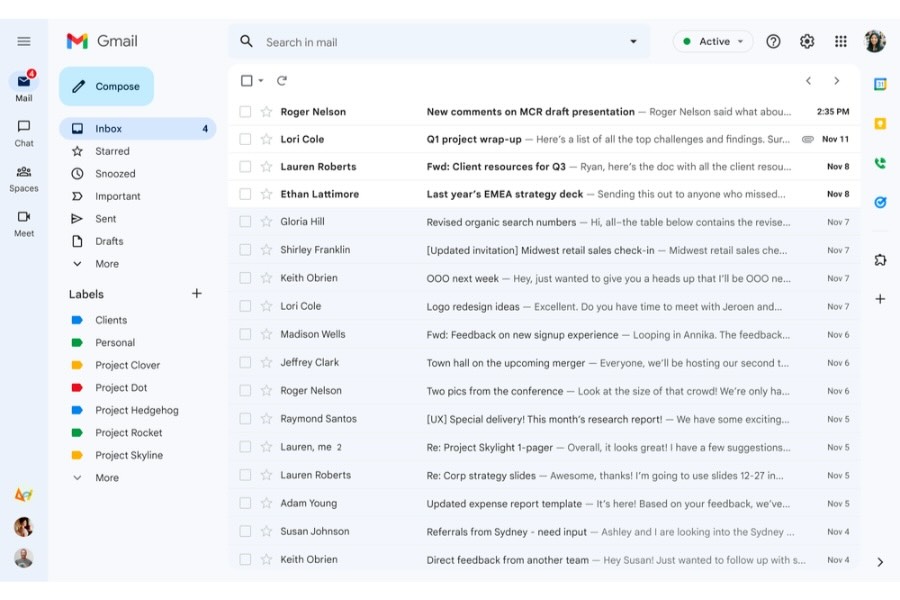
An example of Google’s Gmail interface (Source: Google)
- 4.6 out of 5 on G2 based on a little over 48,000 reviews: Users like the easy-to-use tools and collaboration features. However, some still find its apps lacking features, especially compared to Microsoft Outlook.
- 4.7 out of 5 on Capterra based on more than 17,500 reviews: Users also love its user-friendliness and how it helps their productivity. However, some also find its features and storage space lacking.
Microsoft Outlook: Best advanced email features

Pros
- Access to Microsoft’s productivity suite on all plans
- 1TB cloud storage per user on all paid plans
- Also has appointment-booking, user management, webinar hosting
Cons
- No month-to-month contracts
- Not very user-friendly interface
- No multiuser plans
You’ve probably heard of Microsoft Outlook before, it’s one of the oldest players in email and web hosting. It’s still an industry leader in email hosting, especially if you want your platform to come with more features than the basics; for instance, webinar hosting and video editing. Outlook’s plans also come with the Microsoft 365 productivity suite, including Microsoft Word, Excel, and its cohorts, so it’s also a good option if you’re already familiar with those tools.
Outlook’s many features are its biggest advantage, but they can make its interfaces confusing and complicated, which can be a significant drawback, especially if you’re a first-time user. Another disadvantage is that there are no month-to-month contracts, only annual plans.
Still, if you’re willing to take the time to learn how to use its tools, Outlook can be well worth the investment, especially if you plan to scale up your business in the long run.
Microsoft Outlook is one of the oldest email hosting providers around. It hosted emails before email hosting was a widespread practice, so you can bet on its trustworthiness and security. But it also stands out for its high user limits, cloud storage, and plentiful features.
Here are the features you’ll get with Microsoft Outlook:
- Email hosting with a custom domain
- Cloud storage for each user
- Microsoft 365 productivity suite (Word, PowerPoint, etc.)
- Webinar hosting
- Appointment booking and management tools
- Security tools, including access management, antivirus software, and cyberthreat protection
- Team management
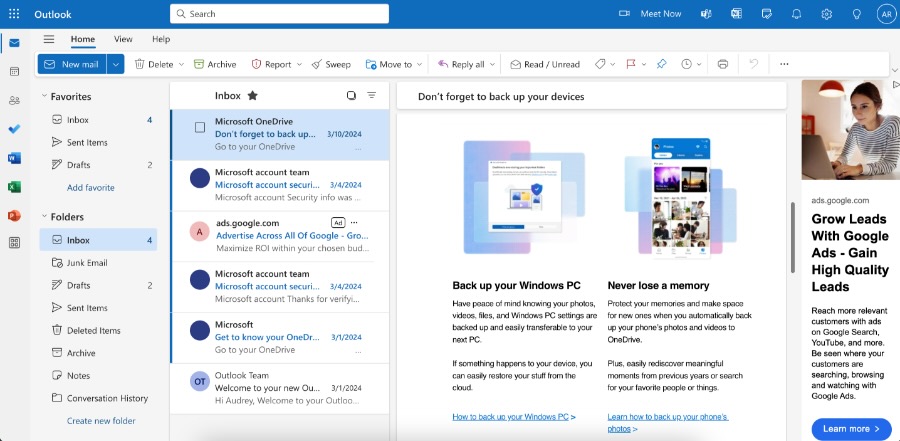
Here’s a look inside Microsoft Outlook.
- 4.5 out of 5 on G2 based on nearly 3,500 reviews: Users like how easy it is to send and organize emails on Outlook and that it has many useful features. However, some also report that it can sometimes be slow and that it tends to crash.
- 4.5 out of 5 on Capterra based on almost 2,500 reviews: Users also like how easy Outlook is to use and navigate across multiple devices. However, some also say connection and server issues can be frequent.
IONOS: Best privacy and security features

Pros
- Enterprise-level security on all plans
- Plans start at $1 monthly with a custom domain
- Beginner-friendly email interface
Cons
- Low storage limits (although you can expand at an extra cost)
- No productivity suite or video conferencing
- Team collaboration and multiple users are only available on the highest plan
IONOS has long been revered for its advanced security measures, whether for hosting emails or full-scale websites. Therefore, it’s the best email hosting for small businesses that prioritize privacy and security above all else. With IONOS, you get advanced antivirus and antispam protection on all plans, and you can even upgrade to premium security on the highest plan.
Aside from its security, IONOS also has cloud storage on every plan, which you can also expand at an additional cost. Its main shortcoming is that it doesn’t offer productivity tools like documents and spreadsheets, unlike Google Workspace and Microsoft Outlook above. And, you can only have multiple users (and team collaboration tools) on the highest plans.
All prices listed are for one user. You can also add more users (up to 10) at an additional cost. The same applies to storage limits; they’re also expandable for an extra cost. Find out more in IONOS’s full pricing guide.
Like Bluehost, IONOS is a top web domain name registrar and web host well-regarded for its advanced security. However, it also offers standalone business email web hosting plans at affordable prices (starting at $1), all of which come with all the essentials you need.
Here are the features you get with IONOS:
- Email hosting with a custom domain
- Enterprise-level antivirus and antispam tools
- Cloud storage (plus the ability to expand on every plan)
- Email synchronization across devices
- Shared calendars, contacts, and tasks
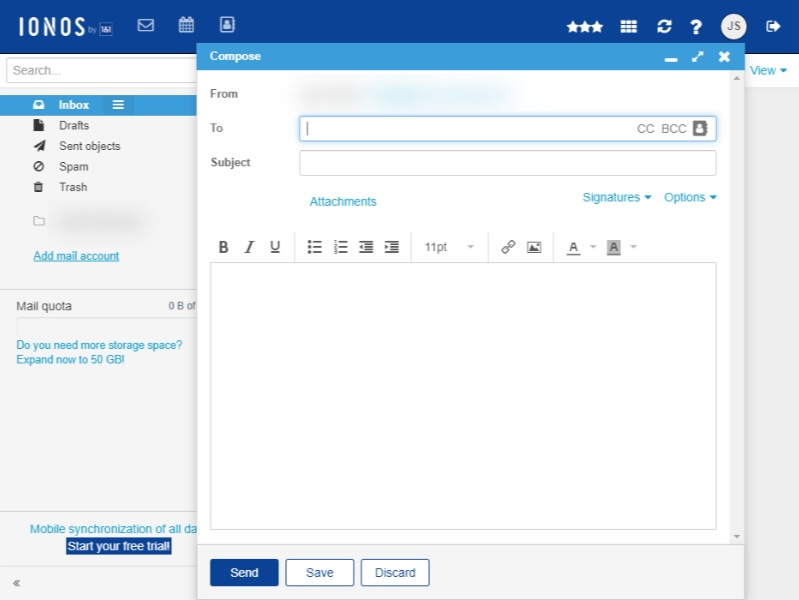
A look inside the IONOS webmail platform (Source: IONOS)
- 4.3 out of 5 on G2 based on more than 10 reviews: Users like IONOS’ advanced security measures more than anything, and found their support staff easy to communicate with. However, some found its features lacking.
- 4.7 out of 5 on Trustpilot based on close to 43,000 reviews: Many positive reviews praise IONOS’ efficient customer service and reliable servers. However, many users were also dissatisfied with the platform’s pricing scheme.
Zoho Mail: Best free email hosting

Pros
- Free-forever plan available with 5GB storage and up to five users
- Affordable and flexible plans ($3 monthly at most)
- Tasks, notes, and shared calendars on all plans
Cons
- Documents, spreadsheets, and presentations are only on the highest plans
- No month-to-month billing on paid plans
- No email antispam or anti-phishing measures (only passcode-protected emails)
Zoho Mail is one of the most affordable email platforms overall, so it’s the best business email hosting service if you’re on a tight budget but want all the essentials. At just $3 monthly, you can access all of Zoho Mail’s features, along with its productivity tools.
Zoho is well known for its marketing and customer relationship management (CRM) features. One of those is its Zoho Mail email hosting tool, which is available completely free of charge, and you can even use your domain for up to five users. However, the free plan doesn’t offer domain aliases, shared calendars, or collaboration tools; for these, you’ll need to upgrade to the higher plan starting at just $1 a month.
However, Zoho Mail falls short in its security measures, as it only offers password-protected emails unless you upgrade to its highest plan. If account security is more important to you than affordability, IONOS or Microsoft Outlook are better options. But when it comes to free email hosting, Zoho Mail’s features are unparalleled.
Zoho offers email hosting on your own domain even on a free plan. But if you upgrade to a higher plan, you also get shared calendars, tasks, notes, and even documents and presentations on the highest plans.
Here are the features you get with Zoho Mail:
- Email hosting on your domain, plus multiple domains on higher plans
- Cloud storage
- Multiple email aliases
- Shared tasks, notes, and bookmarks
- Documents, presentations, and spreadsheets (highest plan)
- Video conferencing
- Email recall
- Password-protected emails
- Integrations with Zoho apps
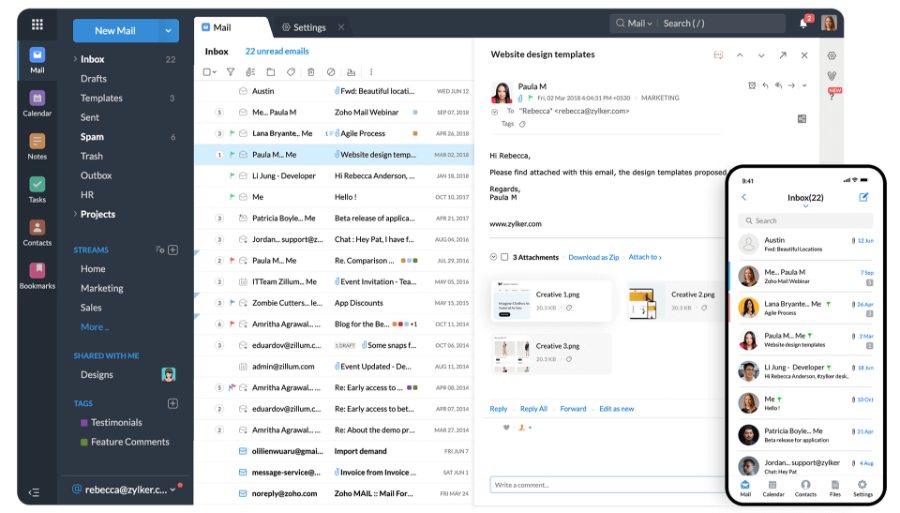
A look inside Zoho Mail’s interface (Source: Zoho Mail)
- 4.4 out of 5 on G2 based on more than 700 reviews: Many users praise its affordability, user-friendliness, and helpful features that support productivity. Negative reviews mentioned its fewer app integrations compared to other email hosts.
- 4.5 out of 5 on Capterra based on more than 1,000 reviews: Many users liked Zoho Mail’s easy-to-navigate interface, especially when connecting with a custom domain. However, some users had issues with servers and connections.
Bluehost: Best for multiple email aliases

Pros
- Create up to 25 email aliases on the first plan
- Security measures include spam filters, antivirus software, and anti-phishing software
- Also has documents, spreadsheets, and presentations
Cons
- No free plan
- No month-to-month contracts
- Lower email storage than others (the highest is only up to 80GB)
Bluehost is an industry-leading online hosting service provider and WordPress website builder. While most known for its website hosting, it also has business email hosting plans, which stand out especially for their multiple email aliases (aka having several email addresses leading to one inbox), which is something not always present in other email hosting services for small businesses. Its starter plan offers up to 25 aliases, while the higher plan has up to 50.
Aside from multiple email aliases, Bluehost also has all the email hosting essentials, including cloud storage (25GB and 80GB), a custom email domain that matches your business website, email recall, and security measures like spam filters, antivirus, and anti-phishing. It also has productivity tools for creating documents, spreadsheets, and presentations, and team collaboration.
The main downside with Bluehost is that it has no free plan or free trial, and all its plans are costlier than those of other email hosting providers. Still, if you’re looking for an email host with a good track record to build multiple email aliases with, Bluehost is the best email hosting small businesses can have.
Bluehost’s primary service is web hosting, but it also offers business email hosting with a custom domain, particularly if you want multiple email aliases. It also has email security and team productivity tools.
Here are Bluehost’s email hosting features:
- Email hosting with a custom domain
- Multiple email aliases
- Cloud storage
- Email security (spam filter, antivirus, anti-phishing)
- Email forwarding and recall
- Documents, spreadsheets, and presentations
- Shared team calendar, contacts, and tasks
It’s worth noting that email hosting isn’t the only service you can get on Bluehost. It also offers web hosting, domains, and even a no-code WordPress website builder, among others.
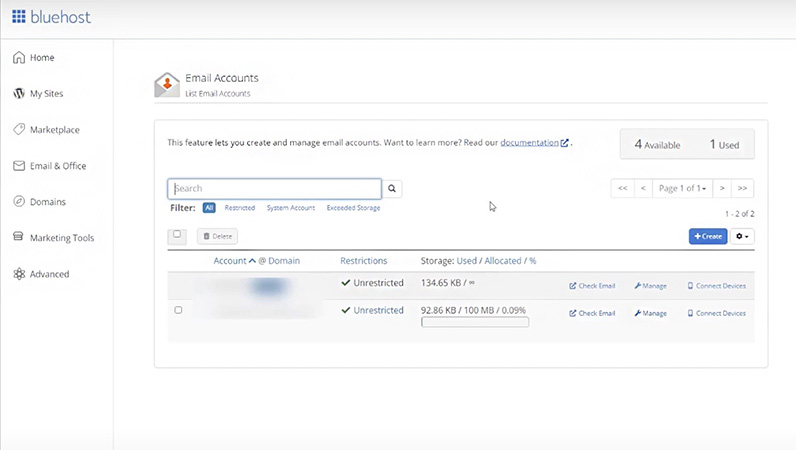
An example of Bluehost’s email interface (Source: Bluehost)
- 3.4 out of 5 on G2 based on nearly 300 reviews: Users like Bluehost’s low-cost web hosting and that it offers many services in one platform. However, many also complain about server downtimes and high renewal costs.
- 3.6 out of 5 on Capterra based on a little over 120 reviews: Users praise Bluehost’s reliability and seamless integration with WordPress. Negative reviews mention high costs and inefficient customer service.
DreamHost: Best bundled email and website hosting

Pros
- Affordable, value-packed bundles for email and WordPress websites
- Unlimited websites, emails, and traffic starting at $2.95
- Emails have antispam, antivirus, and anti-phishing measures
Cons
- Only up to 25GB storage on all plans
- No productivity features (documents, spreadsheets, etc.)
- No email recall
While DreamHost offers standalone email hosting, we recommend it best for its website and email hosting bundles, i.e., if you want an all-around platform for your email and your website. That’s because DreamHost’s Shared Unlimited plans offer some of the best value: starting at $2.95 monthly (on annual billing), you get unlimited emails on a custom domain, and unlimited websites you can build in the platform (DreamHost’s also one of our top small business website builders).
DreamHost’s email plans also offer custom domains that match your site and cloud storage. However, at 25GB maximum, it’s far lower than most providers. Also, DreamHost doesn’t offer productivity or collaboration tools like documents and spreadsheets. Its defining feature is its WordPress website builder platform, so it’s only the best option for that particular use case.
DreamHost offers some of the best value in its bundled plans: alongside websites and email, you also get cloud storage, custom domains, and more.
Here are the features you can get with DreamHost:
- Email hosting as a standalone or in bundled web hosting plans
- WordPress website builder and installer
- Spam, virus, and phishing filters
- SSL Certificate
- Cloud storage
- Unlimited email addresses on the highest plan
- Extensive knowledge base
- 100% uptime guarantee
- Daily website backups and automatic updates
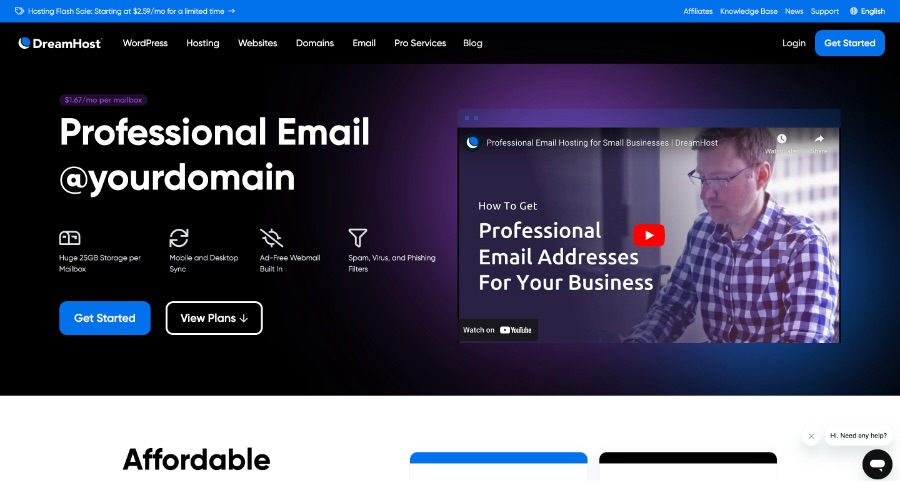
Get started with DreamHost Webmail via DreamHost’s website.
- 4.0 out of 5 on G2 based on a little over 150 reviews: Many users noted DreamHost’s easy WordPress migration process and prompt customer service. However, some found difficulties with formatting emails.
- 4.7 out of 5 on Trustpilot based on more than 8,000 reviews: Nearly all positive reviews revolved around efficient customer support. Many negative reviews were about DreamHost’s pricing scheme.
Learn more about DreamHost and how it stacks up against other platforms:
Methodology: How I evaluated the best email hosting providers
To evaluate the best email hosting for small business, I compared providers based on the needs of small teams that want professional email addresses, reliable inbox storage, security, support, and room to grow. I reviewed each provider’s pricing, custom domain support, mailbox storage, security tools, productivity features, ease of setup, customer support, and overall value.
I focused on providers that offer affordable entry-level plans, business email using a custom domain, and enough features to support day-to-day communication. I also considered whether each service works best as standalone email hosting, email bundled with web hosting, or part of a productivity suite like Google Workspace or Microsoft 365.
- Pricing (25%): I reviewed monthly starting costs, free plans, free trials, billing terms, storage limits, included users, and whether providers offer low-cost plans for small businesses. I gave higher scores to email hosts with affordable entry-level pricing, transparent renewal rates, and plans that let businesses test or start using business email without a large upfront cost.
- General features (25%): I evaluated the core features small businesses need for professional email hosting, including custom domain email, mailbox storage, mobile app access, email aliases, team inbox options, spam filtering, security tools, and admin controls. Providers scored higher if they included the basics in lower-tier plans instead of requiring an expensive upgrade.
- Business email and productivity features (20%): I looked at features that make an email host more useful for small teams, including shared calendars, cloud storage, document collaboration, video meetings, email marketing tools, spam and malware protection, and email encryption. I also considered whether the provider is better for standalone email, website hosting bundles, or full productivity suites.
- Support (10%): I reviewed each provider’s customer support options, including live chat, phone, email, ticketing, help centers, setup guides, and migration resources. Providers scored higher if they offered accessible support channels, clear documentation, and reliable help for setup, troubleshooting, and account management.
- Expert score (20%): For my expert score, I considered overall ease of use, value for money, feature quality, setup experience, reliability, and small business fit. I also factored in how well each provider supports common business email needs, such as creating custom addresses, managing users, accessing email across devices, protecting inboxes, and scaling as a team grows.
How to choose email hosting for small business
The best email hosting for a small business depends on how many people need inboxes, how much storage you need, whether you want collaboration tools, and how comfortable you are setting up domain-based email. Before choosing a provider, compare custom domain support, storage, security, aliases, setup help, and scalability.
Step 1: Decide if you need a standalone email or a productivity suite
Start by deciding whether you only need professional email addresses or a full set of business tools. Standalone email hosting is usually cheaper and works well if you mainly need addresses like [email protected]. A productivity suite costs more but adds tools like shared calendars, video meetings, cloud storage, documents, spreadsheets, and admin controls.
Choose Google Workspace or Microsoft 365 if your team needs collaboration tools with business email. Choose IONOS, Zoho Mail, Bluehost, or DreamHost if you want lower-cost email hosting or email bundled with your website hosting.
Step 2: Check custom domain support
Every business email host should let you use your own domain, such as [email protected]. This makes your business look more credible than using a free Gmail, Yahoo, or Outlook.com address.
Before signing up, confirm whether the provider includes a free domain, lets you connect an existing domain, or requires you to buy a domain separately. Also, check whether the setup instructions are clear for connecting your domain and updating DNS records.
Step 3: Compare storage per user
Storage matters if your team sends attachments, keeps long email histories, or uses email for customer service. A solo business may only need a small inbox, while a growing team may need more storage per user and shared cloud storage.
Compare each plan’s mailbox storage, attachment limits, cloud storage, and upgrade options. Check whether storage is pooled across the account or assigned per user.
Step 4: Review security tools
Business email should include more than a basic inbox. Look for spam filtering, malware protection, two-factor authentication, admin controls, and email authentication support.
Security features to check include:
- Spam and phishing protection
- Malware scanning
- Two-factor authentication
- Admin controls
- User access management
- Email forwarding controls
- Email authentication support, such as SPF, DKIM, and DMARC
- Encryption or advanced security options on higher plans
These tools help protect your business from phishing, spoofing, unauthorized access, and suspicious attachments.
Step 5: Check aliases, groups, and shared inboxes
Small businesses often need role-based addresses like info@, sales@, support@, billing@, or hello@. Before choosing a plan, confirm whether these can be created as aliases, groups, shared inboxes, or separate paid users.
Aliases are useful when one person manages multiple addresses. Shared inboxes or groups are better when multiple team members need access to the same business address. This can make a big difference in cost if you need several public-facing email addresses.
Step 6: Compare migration and setup support
If you are moving from Gmail, Outlook, Yahoo, another domain host, or a web hosting provider, check whether the email host offers migration tools or support. This is especially important if you already have important messages, contacts, calendars, or folders you need to keep.
Look for setup guides, migration tools, live support, and onboarding help. A cheaper provider may still cost you time if setup is confusing or migration support is limited.
Step 7: Review billing and scalability
Choose an email hosting provider that can grow with your business. Even if you only need one inbox today, you may need more users, aliases, domains, storage, security tools, or collaboration features later.
Compare monthly vs annual billing, renewal rates, user limits, storage upgrades, support tiers, and whether you can easily add or remove users. The best email hosting provider should fit your current budget while giving you room to scale without switching platforms too soon.
Frequently asked questions (FAQs)
Google Workspace is the best email hosting for small business overall because it includes custom domain email, Gmail, shared calendars, cloud storage, collaboration tools, security controls, and 24/7 support.
Email hosting stores, sends, and receives email for a custom business domain, such as [email protected]. It lets businesses create professional email addresses, manage users, set security controls, and access inboxes across devices.
IONOS, Zoho Mail, DreamHost, and Bluehost are among the cheapest email hosting options for small businesses. The best low-cost choice depends on whether you need a standalone email, a free plan, or an email bundled with website hosting.
Yes. Google Workspace is a strong small-business email hosting option because it combines Gmail, custom domain email, shared calendars, cloud storage, video meetings, admin controls, and collaboration apps.
Email hosting manages business email, while web hosting stores and publishes your website. Some providers bundle both services, but they are separate tools with different functions.
Yes, Zoho Mail offers a free email hosting plan for small teams. Free plans usually have limits on users, storage, apps, migration, support, and advanced security features.
Business email hosting typically starts around $1 to $6+ per user per month. Costs vary based on storage, security, support, included apps, billing terms, and whether email is standalone or bundled with productivity tools.
Bottom line
The best email hosting for small businesses is affordable, has sizable storage, and has all the tools you need to grow your small business.
So far, the best provider that covers all these benefits is Google Workspace. It’s reliable and packed with essential and extra features, all while being one of the easiest platforms available. Starting at $6.30, it’s also budget-friendly and well worth the investment. Check it out today to see if it’s a good fit for your small business.
Source link