7 Best HIPAA-compliant CRM Software in 2026

Healthcare businesses need more than a standard CRM when managing patient relationships. The Health Insurance Portability and Accountability Act (HIPAA) sets data security and privacy requirements for healthcare providers processing patient information. The best HIPAA-compliant CRM software helps providers organize patient data, manage communications, and support marketing activities. They protect sensitive health information using HIPAA-aligned security and privacy controls.
I evaluated dozens of CRM systems based on HIPAA-related features, BAA availability, security controls, ease of use, patient communication tools, marketing capabilities, workflow management, customization, and overall value.
monday CRM stood out as the best user-intuitive option, while other providers are better suited for practice marketing, healthcare operations, AI-supported client service, custom app building, advanced security, and telehealth.
My full methodology also included firsthand testing of each platform’s interface, reporting capabilities, automation features, and healthcare-related workflows, along with analysis of real user feedback.
Furthermore, I leverage the following work experience when conducting software reviews:

Sales & Marketing Analyst at Fit Small Business
To determine the best HIPAA-compliant CRM software, I focused only on providers that meet HIPAA-related security requirements through features such as secure data handling, encryption, access controls, and Business Associate Agreement (BAA) availability. I then evaluated how well each platform supports healthcare workflows, patient communication, scheduling, and practice management needs.
Beyond HIPAA-related functionality, I also considered pricing, ease of use, integrations, customization, customer support, and overall value for healthcare businesses.
- Pricing (10%): I reviewed free plan availability, scalable pricing options, monthly and annual billing flexibility, and the costs associated with healthcare-specific tools like appointment scheduling, patient communication, and patient data management.
- General features (25%): I evaluated core CRM capabilities, including mobile access, reporting tools, workflow automation, integrations, customization, and compatibility with healthcare-related applications and business tools.
- Advanced features (20%): I looked at healthcare-focused tools such as patient management, appointment scheduling, automated reminders, telehealth support, medical history tracking, and patient communication workflows.
- Help and support (15%): I assessed support availability through phone, live chat, email, tutorials, knowledge bases, and onboarding resources to determine how well providers support healthcare teams.
- Ease of use (15%): I evaluated how easy each platform is to set up, navigate, customize, and scale, particularly for healthcare providers without extensive technical expertise.
- Expert score (15%): In addition to firsthand testing, I analyzed customer feedback to evaluate real-world usability, value for the price, healthcare functionality, and overall satisfaction with each platform.
Overview of the best HIPAA-compliant CRMs
What makes monday CRM the best for easy-to-use healthcare CRM workflows?

Pros
- Intuitive features, like automation to create or edit patient health records with unlimited contacts, documents, and boards
- Multiple data views like spreadsheet format to store patient data and customized boards for healthcare data fields and tasks
- Broadcast feature deactivation to prevent Protected Health Information (PHI) disclosure
Cons
- HIPAA compliance, enterprise-grade security, and multilevel permissions locked in the Enterprise plan (custom pricing)
- No healthcare-specific features such as treatment and medication management tools
- No free plan; all plans require a minimum of three users
For healthcare teams that want a CRM that is easy to learn and manage, monday CRM stands out for its highly intuitive interface and visual workflow tools. In my testing, it was one of the simplest HIPAA-capable CRMs to navigate, making it especially well-suited for first-time CRM users or practices that do not want a steep onboarding process.
Its flexibility is another major advantage. monday CRM offers unlimited boards and documents, multiple workflow views, and customizable collaboration tools that help healthcare teams organize patient information more clearly and efficiently. Combined with its HIPAA compliance features and secure data management capabilities, it gives practices a more approachable way to manage patient-related workflows while maintaining healthcare privacy standards.
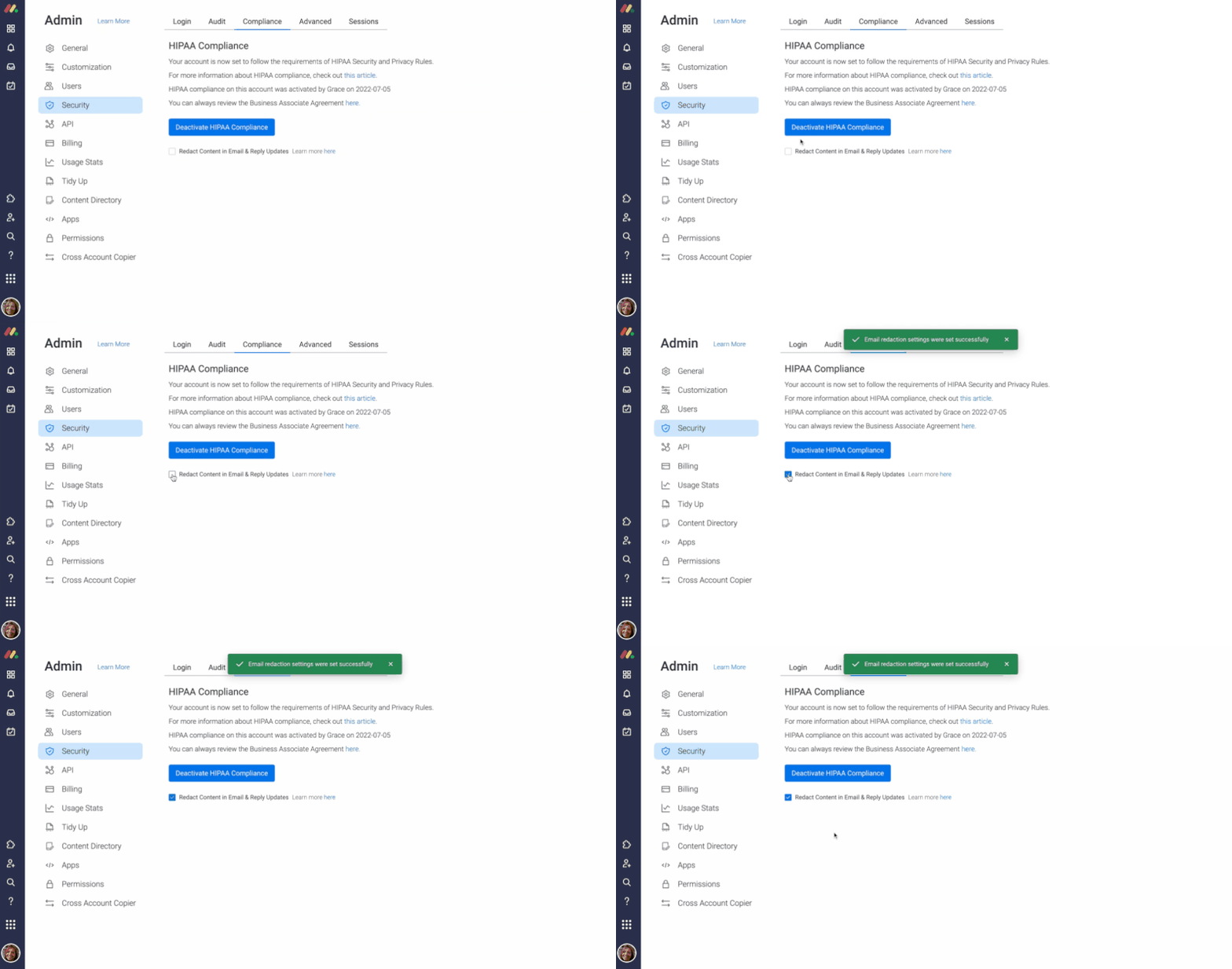
monday CRM’s intuitive admin dashboard lets users activate or deactivate HIPAA compliance to manage PHI seamlessly. (Source: monday CRM)
- Legal and security requests: Interact and collaborate with your security and legal teams in a centralized place to review and update statuses and contracts.
- Service organization control (SOC) 2 compliance: monday CRM is committed to meeting the most stringent availability, security, and confidentiality standards.
- Two-factor authentication (2FA): Users confirm the access code every time they sign in from a new or unfamiliar device.
- Single sign-on (SSO): This feature includes Okta, OneLogin, Azure AD, and custom security assertion markup language (SAML).
- Administration and controls: This feature includes audit log, session management, panic mode (entire account lock-down when any of the credentials are compromised), private workspaces, and advanced account permissions.
- System for cross-domain identity management (SCIM) provisioning: Automate how you form, preserve, and update user identity and access privileges.
- Other security features: This includes private boards and docs, Internet Protocol (IP) restrictions, integration permissions, content directory, and Google authentication.
*All monday CRM plans have a three-user minimum.
Free trial: 14 days
What makes Zoho CRM the best for healthcare practice marketing?
Pros
- Unique tools useful to marketing a healthcare business and managing inventory for medical supply sales
- Low-cost scalable plans available ($14 to $52 per user monthly)
- Robust system customization options for providers to convert into a CRM for healthcare
Cons
- No specific healthcare practice management tools for claims processing, treatment management, and medication reporting
- Steep learning curve because of robust features; can be overwhelming for new users
- Integration required for mobile emailing; other providers like monday CRM let users send and receive emails and review conversations
Zoho CRM works especially well for healthcare practice marketing because it combines patient outreach tools with strong customization and data management capabilities. In my testing, it offered one of the better balances between marketing functionality and HIPAA-related security controls, making it easier for healthcare providers to run campaigns while helping protect sensitive patient information.
The platform also supports encrypted data handling and role-based access controls to help practices manage patient records more securely. Another standout feature is Zoho CRM’s inventory management module, which can help medical, dental, and vision offices track supplies, monitor stock levels, and manage vendor relationships alongside patient and business operations.
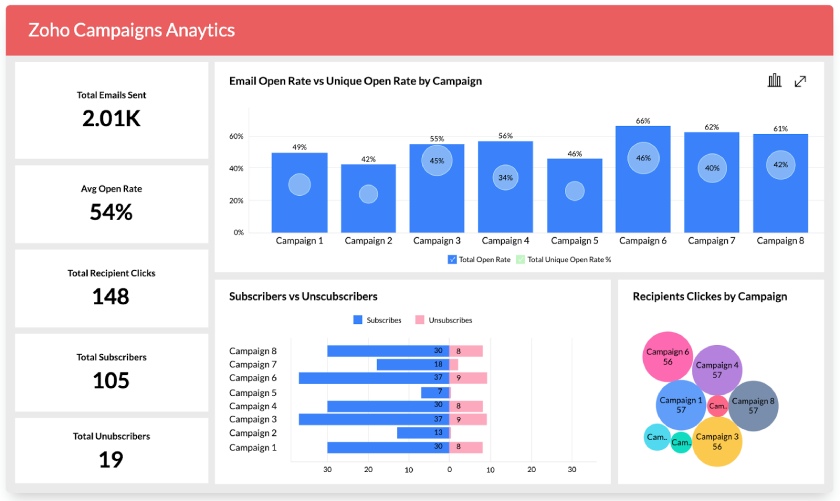
Zoho CRM’s campaign analytics dashboard shows email open rate data for accurate marketing performance monitoring. (Source: Zoho CRM)
- HIPAA compliance: ePHI encryption and other security features are available.
- General Data Protection Regulation (GDPR) compliance: Settings for GDPR compliance protect sensitive data of involved parties, like clinical survey respondents.
- Audit logs: This feature registers all user attempts to access ePHI and medical records and tracks modifications and deletions.
- Track data sources: This includes patient data capture and evaluation from web forms, application programming interfaces (APIs), manual creations, and third-party app integrations.
- ePHI encryption: With robust ciphers, Advanced Encryption Standard (AES) and AES-256 encrypt and secure server-stored healthcare data.
- Access ePHI control: Restrict transfer of PHI to other applications via API, other third-party applications, and Zoho products, and export from CRM modules.
- Other security features: This includes default data sharing settings, data sharing rules, custom links, and public read-only access.
Free trial: 15 days
What makes SimplePractice the best for healthcare practice management?

Pros
- Great for managing operations such as appointment scheduling, patient treatment, and billing features
- Unique tools specifically for mental health care providers like psychotherapy notes and a Wiley Treatment Planner
- Robust built-in automation for client communications, billing, and data exchanges
Cons
- No free plan
- Not ideal for marketing a medical practice as it lacks mass outreach and social media ad capabilities
- Doesn’t offer the most intuitive interface
SimplePractice is a strong option for healthcare practice management, focusing heavily on patient scheduling, billing, and day-to-day operations rather than serving as a traditional sales-focused CRM. In my testing, it worked especially well for therapy clinics and smaller healthcare practices that need to manage appointments, client records, documentation, and insurance workflows on a single platform.
The platform also includes specialized healthcare tools that many general CRMs do not offer, including group therapy scheduling and ePrescribe capabilities for medication management. Combined with its HIPAA-compliant workflows and patient management features, SimplePractice gives healthcare providers a more centralized way to manage both administrative and clinical operations.
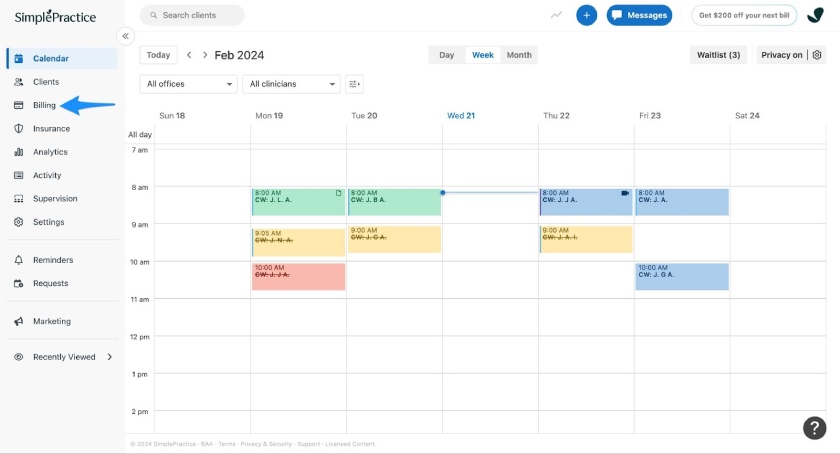
SimplePractice’s billing features help medical practitioners seamlessly manage billing and invoicing. (Source: SimplePractice)
- HIPAA compliance: SimplePractice earned HITRUST certification for its comprehensive, efficient, and flexible approach to risk management and HIPAA compliance on a global scale.
- Roles-based permissions: SimplePractice has a guided flow for creating, editing, and adding role-based permissions.
- Secure client messaging: Enable the Secure Messaging for a client to easily send them secure messages from the SimplePractice mobile app (the patient can only access the message by logging in to the client portal via a login link).
- Payment card industry (PCI) compliance and management: SimplePractice remains compliant with the PCI standard components, such as storing data securely and annually validating the required security controls for secure payments.
- Starter: $49/month
- Essential: $79/month
- Plus: $99/month
Free trial: 30 days
What makes Zendesk Suite the best for AI-powered patient support?

Pros
- Robust customer service tools including AI agents, email, chat, voice, social messaging, etc. for patient client service
- Advanced AI add-on, including intelligent triage, actionable insights and suggestions, and generative AI tools for agents
- HIPAA-enabled feature for PHI protection excellent for group practice and growing teams
Cons
- Most features focus on customer service; other providers like monday CRM and Zoho CRM offer more scalable features for marketing and sales
- Steep learning curve because of advanced and robust features that can affect onboarding and implementation
- HIPAA-enabled feature locked in the Suite Professional ($115 per user) and custom-priced Enterprise plans
Zendesk Suite works especially well for AI-powered patient support because it combines customer service tools, automation, and omnichannel messaging in one platform. In my testing, its AI agents and automated support workflows were particularly useful for helping healthcare teams respond to patient inquiries more efficiently while keeping communication organized across channels.
The platform is also a strong fit for group practices and growing healthcare teams managing higher volumes of patient interactions. Features like centralized messaging, ticket management, and conversation tracking make it easier to avoid missed inquiries and deliver more personalized patient experiences across email, chat, and other support channels.
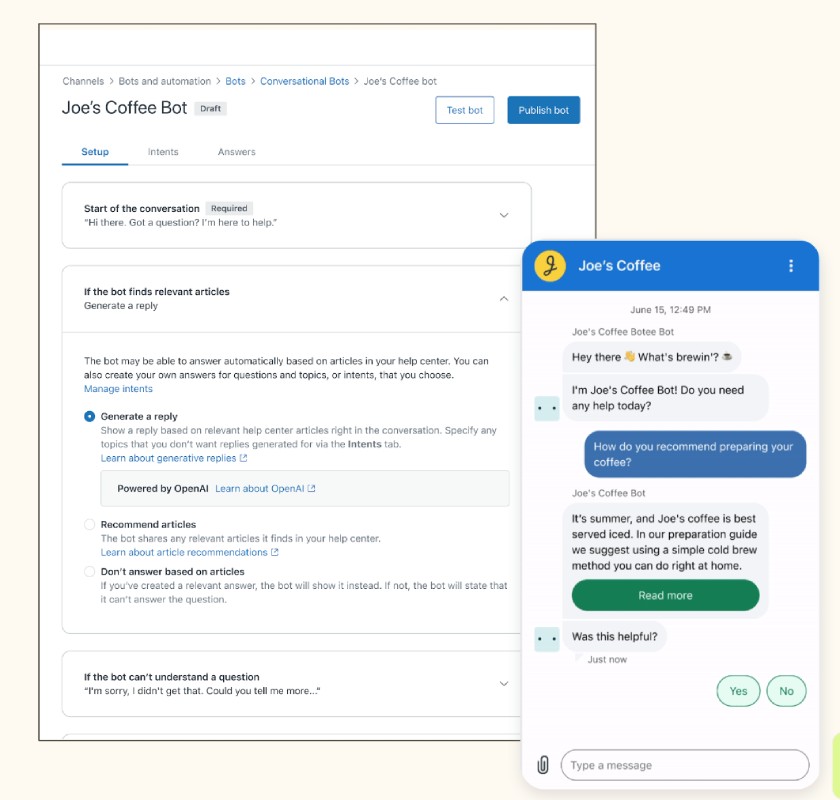
Medical practitioners can set up Zendesk AI agents to facilitate patient interactions and overall client support. (Source: Zendesk)
- HIPAA-enabled feature: Zendesk BAA is available for formal HIPAA compliance execution to protect PHI.
- Advanced compliance: Zendesk provides appropriate security configuration options that subscribers can use to help safeguard PHI; you can enter a BAA with Zendesk.
- Advanced data privacy and protection: This feature includes access log, advanced encryption, advanced data retention policies, advanced redaction, and data masking for an extra layer of protection and privacy.
- User authentication options: This includes native, SSO, and 2FA.
- Secure access options: This includes password complexity, IP restrictions, and session length.
- Other security features: This includes agent device management, host mapping, disaster recovery, and data encryption.
Free trial: 14 days
What makes Caspio the best for custom healthcare CRM development?

Pros
- Low-code database and application design tools
- Comprehensive patient, operations, and data management capabilities with payment integration for real-time payments
- All plans allow unlimited users and up to 8 million data records
Cons
- Additional fees ($500 per month) required for HIPAA compliance feature
- Outdated and tricky-to-navigate interface
- Relatively expensive for small teams
Caspio stands apart from the other providers on this list because it is not a traditional healthcare CRM but a highly customizable database platform that healthcare businesses can adapt to their exact operational needs. In my testing, it was one of the most flexible options for practices that need custom patient portals, intake systems, scheduling workflows, or internal databases beyond what standard CRMs typically support.
Its Enterprise plan is designed to support HIPAA-compliant environments with stronger control over security and data management. Caspio also supports branded patient experiences and real-time payment integrations, which can help healthcare organizations streamline billing, improve accessibility, and create more customized workflows for both staff and patients.
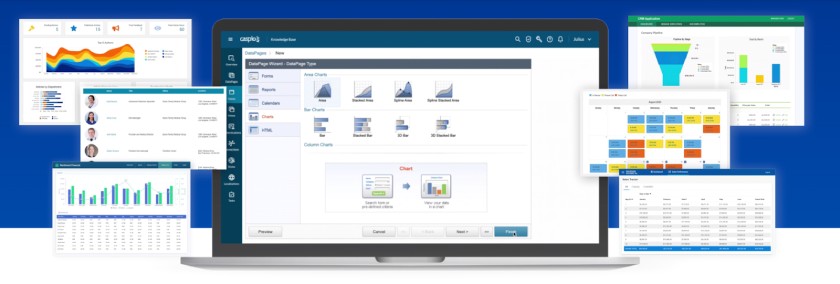
Caspio’s multiple dashboards can be customized to your healthcare system’s needs and business requirements for quick data access and effective collaboration. (Source: Caspio)
- HIPAA/Compliance Edition: This add-on provides turnkey compliance for healthcare and educational institutions for securely managing PHI.
- Enterprise SSO: Authenticate and authorize users with SSO using Caspio or any other SAML 2.0 identity provider.
- SSO for third-party apps (SAML out): Caspio serves as an SSO identity provider for authenticating users to third-party apps; SAML opt-out or delete all app sessions completely for security.
- Account security governance: Enforce a custom security policy (especially PHI handling) for all Caspio developers.
- User identity management: Identity and access management (IAM) service for authenticating users based on enterprise-grade security standards.
Free trial: 14 days
What makes Insightly CRM the best for advanced HIPAA security controls?

Pros
- Comprehensive HIPAA-compliant features; with administrative, technical, and physical safeguards in place
- Advanced contact management tools with relationship linking, data storage, and activity tracking, including from third-party tools
- Built-in business intelligence dashboards with customizable reports for income and activity tracking
Cons
- Add-ons (starting at $29 per user, monthly) required for marketing and customer service modules; other providers offer these tools already built into existing plans
- No specific healthcare practice management features like electronic medication management tool
- No free plan; only offers a 14-day free trial
Insightly CRM combines healthcare-focused security features with practical workflow management tools at a relatively accessible price point. It offers the access controls and operational flexibility healthcare providers need while remaining easier to manage than many enterprise healthcare systems.
Its built-in project and task management tools are especially useful for smaller or newer medical practices managing treatment plans, patient follow-ups, and internal workflows. Another feature I found valuable was its record-linking capability, which helps providers connect related patient and contact records for referral tracking, family relationships, and healthcare benefits coordination.
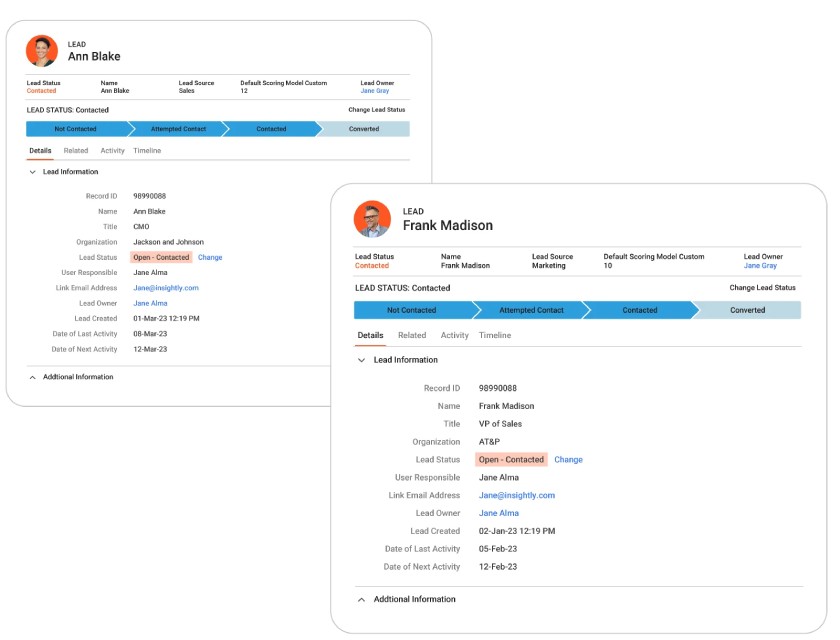
Insightly CRM captures accurate customer information like lead status for a seamless contact database and pipeline management. (Source: Insightly CRM)
- HIPAA compliance: The level of security is outlined in a formal BAA.
- Field-based permissions: User access management for PHI security.
- Comprehensive audit logging: This feature documents all actions in the CRM for a detailed record of changes, users, etc.
- SAML SSO: Administrators manage user access from one place, and users access applications with a single login.
- SCIM protocol: This feature reduces the complexity and cost of managing users when using several cloud applications.
Free trial: 14 days
What makes Mend the best for telehealth and virtual care?

Pros
- Reliable telehealth system with appointment and waiting room
- Integration with external patient management tools like AdvancedMD and eClinicalWorks
- Intuitive features and user-friendly interface
Cons
- Not ideal for marketing a healthcare practice as you can’t use the CRM to deploy email marketing campaigns or run ads
- Integration features locked in the paid plan; other providers like monday CRM and Zoho CRM offer these for free
- No free plan; nontransparent pricing for the paid plan
Mend works especially well for telehealth and virtual care because it combines patient communication, appointment management, and virtual visit tools in one HIPAA-compliant platform. In my testing, it was one of the more complete solutions for healthcare providers managing remote appointments and ongoing patient engagement.
The platform includes practical telehealth tools such as appointment scheduling, automated reminders, digital consent forms, and e-signature support to streamline virtual care workflows. Mend also centralizes patient data, treatment-related communication, and telehealth interactions in one system, making it easier for healthcare practices to manage virtual care while maintaining HIPAA-aligned security and privacy standards.
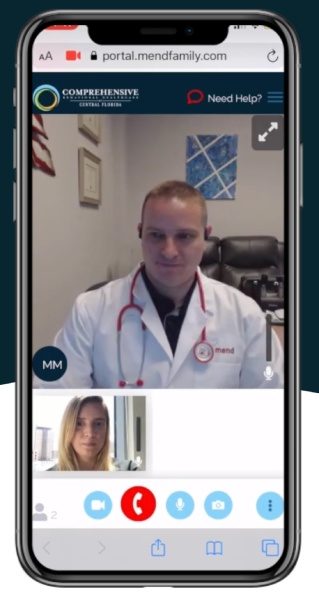
Mend offers a telehealth appointment feature for convenient doctor-patient consultation, greatly benefiting older patients and those with disabilities. (Source: Mend)
- HIPAA compliant telemedicine software: Meet compliance based on certifications like SOC 2 Type 2 (examines internal controls and systems), 42 CFR Part 2 (restrictions on the disclosure and use of records of patients with substance use disorder), and HITRUST.
- Secure intake forms: This feature integrates forms into the system and sends them to patients before the appointment via a secure text message link.
- HIPAA-protected messaging: Patients have more control over their medical treatment using the communication method most comfortable for them.
- Attendance Predictor: Artificially intelligent algorithm identifies no-shows and cancellations following HIPAA standards for secure appointment data exchange.
Mend uses custom pricing based on your healthcare organization’s size, telehealth requirements, and the patient engagement tools you select. Its platform includes features such as virtual visits, appointment scheduling, automated reminders, digital intake forms, and patient communication workflows, so pricing varies based on the scope of implementation and required integrations. To get exact pricing for your practice, you’ll need to contact Mend directly for a customized quote.
Frequently Asked Questions (FAQs)
A medical CRM that’s HIPAA compliant is software that maintains the proper data security controls per HIPAA regulations. It has features specifically useful for healthcare providers, such as medical, dental, vision, or mental health offices, to help generate, manage, and treat patients. Email marketing, appointment scheduling, medical history tracking, billing and payment processing, and treatment management are also available.
Not all CRM systems are HIPAA compliant. The best examples of HIPAA-compliant CRMs include monday CRM and Zoho CRM, which are generally used for different business niches, including healthcare. Industry-specific CRMs for healthcare like SimplePractice, Mend, and Caspio are mostly HIPAA-compliant.
A CRM for medical practices should be HIPAA compliant and have features that help a practice grow sustainably. Sales capabilities like email campaigns and appointment scheduling, for instance, help healthcare providers bring in new patients.
Tools for tracking medical history and managing treatments let you provide quality service treatments. Finally, invoicing features with payment processing and connections to insurance claims systems help collect revenue.
Bottom line
HIPAA-compliant CRM systems help healthcare businesses manage marketing campaigns, patient data, and treatment plans in one system. While monday CRM is our top pick for the best HIPAA-compliant CRM software, other systems could fit your business better. For example, SimplePractice is a specialty CRM built to help manage operations and treatments, while Zoho CRM cost-effectively allows users to deploy and automate marketing.
Source link