2026 Small Business Tax Prep Checklist [+Free Downloadable]

Owning a small business doesn’t require being a tax expert. Filing is mostly about finding the right documents and using a guided process to put them in the right place. With time before the April 15 deadline, this checklist breaks the work into simple, manageable steps — find each item, check it off, and move on.
In the sections that follow, I walk through what to look for, explain each item in plain language, and note where TurboTax can help simplify the step. The checklist remains the anchor, while the added context shows how certain tasks can be handled with less manual effort and fewer chances for error.
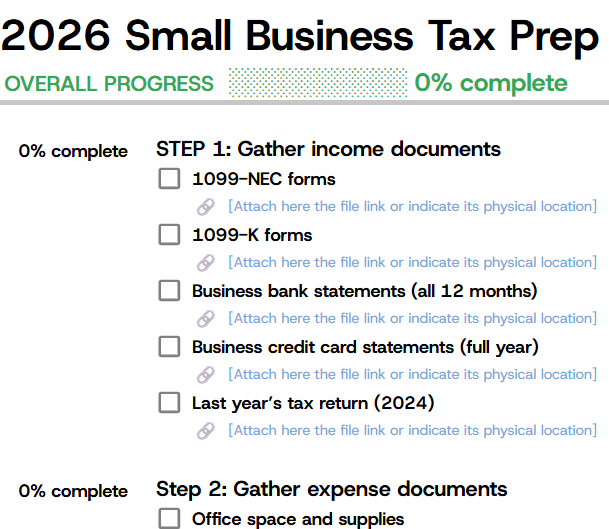
Below is a small business tax prep checklist that I created to help you get started with tax preparation.
Thank you for downloading!
Before you start: Identify your business type
Before gathering documents, identify how the business is classified for tax purposes. Different business types file different returns, and this determines which questions and forms apply later. This is a quick orientation step, not a paperwork task.
A business with a single owner and no separate tax entity reports income and expenses on Schedule C as part of the owner’s personal return. The filing relies on the documents gathered in Steps 1 through 4, and TurboTax uses that information to guide the process.
An LLC with one owner that did not elect S-corporation status files taxes the same way as a sole proprietor. Despite the LLC structure, the return still uses Schedule C, and the same documents from the earlier steps apply. TurboTax follows this workflow automatically.
Businesses with multiple owners or an S-corporation election file a separate business return. Ownership percentages must be identified, and additional rules apply, including reasonable salary requirements for S-corporation owners. TurboTax supports these filings, though the added complexity may require closer review of the details entered.
A formally incorporated business files a corporate return that is separate from the owner’s personal taxes. Income and expenses gathered earlier are still required, but they are reported on Form 1120 using a corporate filing flow in TurboTax.
Step 1: Gather income documents
These documents show how much the business was paid during the year. The task here is only to gather them. There is no need to total amounts or review details yet.
A 1099-NEC is sent when someone pays for services. In plain terms, it confirms, “We paid you $X.” These forms usually arrive by early February through email or regular mail. If one is missing, the payer can resend it. This form matters because the IRS also receives a copy, so the reported income must match. TurboTax allows you to upload a photo of the form and automatically enter the numbers.
If payments were received through platforms like Square, Stripe, or PayPal, those services send a 1099-K. It summarizes how much customers paid through their system. These forms are typically found in emails or within the payment platform’s account dashboard. They matter because they show total processed payments. TurboTax can read the form from a photo and fill in the amounts automatically.
Bank statements show all the money that moved through the business bank account. The only requirement is to gather all twelve months for the year. These can be downloaded from the bank’s website under statements or account history. TurboTax can connect directly to the bank and import transactions automatically, so downloading files is optional.
If a business credit card was used, statements for the full year should be gathered. These are available through the credit card provider’s online account. They matter because they show business expenses charged throughout the year. TurboTax can connect to the card and import charges automatically.
This is the tax return filed for the prior year and is used only as a reference. It may be stored in email, local files, or with a prior tax preparer. TurboTax uses it to carry forward prior-year information, with minimal manual input needed.
Step 2: Gather expense documents
These documents show what the business spent money on during the year. The goal is to gather receipts and records and loosely group them by type. Nothing needs to be totaled or finalized yet.
This covers where the work happens and what is used to do it. That includes rent for an office, office supplies, furniture, computers, and business-related electric or internet bills. Lease or rental agreements belong here as well. Receipts are usually found in email, credit card statements, or physical records. If a business credit card was linked earlier, many of these charges may already appear in TurboTax. TurboTax categorizes these as office expenses once they are linked or confirmed.
Travel expenses include business-related flights, hotels, rental cars, gas, parking, and tolls. Receipts are typically stored in email confirmations or shown on credit card statements. TurboTax places these expenses in the travel category and prompts reminders about special rules, such as limits on meal deductions during trips.
If a vehicle was used for business, mileage or car-related expenses need to be documented. This may include a list of business trips with dates and miles, along with gas, insurance, or maintenance receipts if actual expenses are claimed. Mileage can be estimated using mapping tools if needed. TurboTax lets you compare mileage and actual expenses and shows which option gives the larger deduction, so the better method can be chosen.
This includes payments to professionals such as accountants, bookkeepers, lawyers, consultants, designers, or developers. Invoices are usually found in email or reflected on credit card statements. TurboTax categorizes these costs as professional services automatically once they are imported or entered.
Marketing expenses cover money spent promoting the business, including online ads, website hosting, domain fees, and printed materials. Receipts are typically available through email confirmations or credit card records. TurboTax sorts these expenses into marketing or advertising categories.
This category includes subscriptions and tools paid for monthly or annually, such as bookkeeping software, design tools, office software, and communication apps. Charges are often easiest to find on credit card statements. When the card is linked, TurboTax imports and categorizes them automatically.
Insurance expenses include business liability coverage, professional insurance, and health insurance premiums for self-employed individuals. Bills are usually found in email or bank statements. TurboTax flags these as deductible and specifically asks about health insurance when applicable.
If part of the home is used as an office, measurements and household expense records are needed. This includes the square footage of the office and the full home, along with mortgage or rent statements and utility bills. TurboTax provides a built-in calculator that uses these inputs to calculate the deduction automatically.
Step 3: Gather employee and contractor records
This step applies only if employees were hired or contractors were paid $600 or more during the year. These records should be gathered by late January. Required forms can be issued and filed by the IRS deadline, which is generally January 31 or the next business day when that date falls on a weekend or holiday (February 2, 2026, for 2025 forms). If there were no employees or qualifying contractors, this step can be skipped.
Missed the January 31 deadline? File returns as soon as possible. Late filing is still required and usually results in lower penalties than not filing at all. Penalties increase the longer the delay, but corrected or late forms can reduce the impact. If there was a valid reason outside your control, reasonable cause relief may apply, so keep documentation if asked.
Employees must receive W-2 forms by January 31, or the next business day if that date falls on a weekend or holiday. Start by confirming the forms were created and delivered. If they were not, they should be prepared and sent as soon as possible.
Gather the following:
- Copies of each W-2 issued
- A list of employees and the total wages paid to each
- Proof of delivery, such as email confirmations or mailing records
W-2s matter because they report wages and withholdings that the IRS also receives. The amounts must match what is reported on the tax return. TurboTax connects to Quick Employer Forms, which can be used to create W-2s and, depending on the service selected, e-file them and deliver copies after payroll details are entered.
Contractors who were paid more than $600 and are not employees must receive a 1099-NEC by the same January 31 deadline, with the same next-business-day adjustment when applicable. Begin by identifying every qualifying contractor and confirming payment totals.
Gather the following:
- Contractor names and addresses
- Contractor tax IDs (SSN or EIN)
- Total amount paid to each contractor during the year
- Copies of any 1099-NECs issued
These forms matter because the IRS uses them to match contractor income against what the business reports as payments. TurboTax and its Quick Employer Forms tool can be used to prepare 1099-NECs and, depending on the option chosen, e-file them and provide copies to contractors or generate PDFs to print and mail.
Employers file Form 941 each quarter to report wages paid and payroll taxes withheld. All four quarters for the year should be available.
Gather the following:
- Form 941 for Q1 through Q4
- Confirmation that each return was filed
These forms show payroll tax compliance and help verify that wages and withholdings align with W-2 totals. TurboTax asks for payroll and wage details as part of the filing process and may surface certain inconsistencies based on the information entered. However, employers are responsible for reconciling Forms 941 with W-2 totals.
Throughout the year, payroll tax deposits should have been made to cover withheld federal taxes. The goal here is to confirm those payments were actually made.
Gather the following:
- EFTPS payment confirmations, if paid online
- Bank statements showing payroll tax payments
- Payroll system reports listing deposits
These records matter because missing or late deposits can result in penalties. TurboTax asks for payroll tax amounts during the return, but it does not reconcile payroll tax deposits to Forms 941. Confirming that deposits match filed payroll returns must be done through payroll records or the payroll system used.
If the business paid for employee benefits, those costs should be documented so they are not missed.
Gather the following:
- Employer-paid health insurance premiums
- Employer retirement plan contributions
- Other benefit-related payment records
These costs are generally deductible business expenses. TurboTax asks about employee benefits and helps categorize them appropriately.
States require unemployment tax payments based on employee wages. If applicable, gather records showing compliance.
Gather the following:
- State unemployment tax payment confirmations
- State quarterly or annual unemployment filings
- Bank records or receipts showing payments
These records matter because state agencies match them against reported wages, and the payments are typically deductible. TurboTax does not automatically manage SUTA filings but prompts users to account for these costs as payroll tax expenses.
You’ve already gathered your income, expenses, and payroll details. Guided filing can help pull it together, reduce manual entry, and offer expert help if questions come up. File with confidence using TurboTax Expert Assist, where tax experts review your return and help catch issues before you file.
Step 4: Gather big purchase records (equipment and assets)
This step applies if equipment, vehicles, computers, or other major items were purchased for business use during the year. These items are treated differently from regular expenses and can affect deductions over one or more years, so accurate records matter.
This includes items such as computers, printers, machinery, furniture, or vehicles bought for business use during the year. Start by listing everything purchased and locating the related paperwork.
Gather the following:
- Receipt or invoice showing what was purchased
- Purchase date
- Total cost, including sales tax if applicable
- Date the asset was first used for business (placed in service)
These details matter because large assets may qualify for accelerated deductions, such as Section 179 or depreciation, depending on eligibility and limits. TurboTax walks through asset questions and calculates available deductions based on the information entered, while applying current tax rules and thresholds.
When an asset is used for both business and personal purposes, only the business portion is deductible. This is especially common with vehicles and certain equipment.
Gather the following:
- Mileage records showing business versus personal use for vehicles
- Documentation or notes showing business-use time for equipment
The business-use percentage directly affects the amount of the cost that can be deducted. TurboTax asks for this percentage during the interview and uses it to calculate allowable deductions. Accuracy matters, as mixed-use assets are commonly reviewed by the IRS.
If business equipment or vehicles were sold, traded in, or otherwise disposed of during the year, those transactions must be reported.
Gather the following:
- Original purchase records for the asset
- Original purchase date
- Sale or trade-in date
- Sale price or trade-in value
- Documentation for any replacement asset if traded
These records matter because selling or trading business assets can result in a taxable gain or loss. TurboTax uses the original cost and disposition details to calculate the result and report it on the appropriate tax forms.
Assets purchased in earlier years may still be depreciated. Those schedules need to be carried forward correctly.
Gather the following:
- Prior-year depreciation schedules
- A list of assets still being depreciated
- Cost basis and accumulated depreciation
These records ensure that ongoing depreciation continues correctly. If a prior-year return was filed using TurboTax, this information may import automatically. Otherwise, it must be entered manually.
If equipment or vehicles were financed, the interest paid on those loans is generally deductible separately from the asset cost.
Gather the following:
- Loan or financing agreements
- Year-end statements showing interest paid
- Payment records
- Lender information
Interest deductions are reported separately from depreciation or Section 179 deductions. TurboTax includes prompts for business loan interest and applies the deduction based on the amounts entered.
Business assets may qualify for immediate expensing under Section 179 or for depreciation over time, depending on eligibility, annual limits, and business income.
What to know:
- Section 179 and depreciation are subject to annual caps and income limitations
- Not all assets qualify, and not every business benefits from immediate expensing
TurboTax calculates the available options based on the details entered and shows how different methods affect the return. The final choice remains with the filer, but the comparison helps determine which approach fits the situation best.
Step 5: Gather tax payments already made
This step applies if taxes were paid in 2025 or if a 2024 refund was applied forward rather than issued as cash. These payments reduce the final tax bill and must be included so they are properly credited.
Self-employed individuals and some business owners make estimated tax payments during the year. For the 2025 tax year, the federal due dates were April 15, 2025 (first quarter), June 16, 2025 (second quarter, adjusted for the weekend), September 15, 2025 (third quarter), and January 15, 2026 (fourth quarter).
Payment records can usually be found through the IRS payment system used, such as EFTPS, or in email confirmations from payments made with Form 1040-ES.
Gather the following:
- Confirmation showing the amount and date of each estimated payment
- Records for all four quarters, if applicable
These payments matter because they are credited against the total tax liability. If estimated payments exceed what is owed, the excess becomes a refund; if they fall short, the remaining balance is due. TurboTax asks for the dates and amounts of each payment and applies them when calculating the final result.
If a refund from the 2024 return was applied to 2025 instead of being paid out, that amount counts as a tax payment for the current year.
Gather the following:
- The 2024 federal tax return
- The amount shown as applied to the 2025 estimated tax
This matters because the payment has already been made and should not be paid again. TurboTax typically imports this information automatically if the prior return was filed using TurboTax; otherwise, the amount can be entered manually.
If state income tax payments were made during 2025, either as estimated payments or with the prior-year state return, those records should also be gathered.
Gather the following:
- Confirmation of state estimated tax payments made during 2025
- Proof of any state tax paid with the 2024 state return
- Payment dates and amounts
These payments matter because state and local taxes paid may be deductible on the federal return. For the 2025 tax year, the SALT deduction cap is $40,000 for married filing jointly (or $20,000 for married filing separately), subject to income-based limitations. TurboTax asks about state taxes paid and factors them into the deduction calculation.
Some self-employed filers track self-employment tax payments separately, especially when payments were made directly to the IRS rather than through an employer.
Gather the following:
- EFTPS payment confirmations
- Bank statements showing IRS tax payments
- Any Form 1040-ES vouchers submitted
These payments are credited toward total taxes owed. TurboTax includes them when calculating the final balance due or refund based on all payments entered.
If the business owner also worked as an employee elsewhere during the year, taxes withheld from wages count toward the overall tax liability.
Gather the following:
- W-2 forms from any employer
- Federal income tax withheld
- Social Security and Medicare taxes withheld
These withholdings reduce the total amount owed across all income sources. TurboTax incorporates W-2 income and withholdings alongside business income to calculate the final tax outcome.
How TurboTax makes tax filing easier
TurboTax reduces manual work by guiding data entry, performing calculations, and organizing information behind the scenes. The tools below handle many of the repetitive or technical steps, so the focus stays on gathering accurate information rather than managing tax mechanics. Read our review of TurboTax to know more about its features and what I think about the software.
- Snap and autofill: Forms and receipts can be photographed using a phone, and TurboTax reads the image to pull in key numbers. This works for common documents like W-2s, 1099-NECs, 1099-Ks, and many receipts. The main benefit is less manual typing and fewer transcription errors.
- Bank and credit card connections: Business bank accounts and credit cards can be linked so transactions import directly. Once connected, deposits and charges from the year appear automatically, eliminating the need to download statements or enter transactions one by one.
- Expense categorization suggestions: Imported transactions are reviewed, and suggested categories are assigned based on merchant names and transaction patterns. Each suggestion can be accepted or changed, helping organize expenses faster while keeping final control with the filer.
- Home office calculation: For qualifying home offices, TurboTax calculates the deduction using the square footage entered for the office and the home. The math is handled automatically, based on the measurements and expenses provided.
- Mileage and vehicle expense comparison: TurboTax calculates both the standard mileage method and the actual expense method using the information entered. It shows how each option affects the deduction so the filer can choose which method to use.
- Deduction prompts: Based on business type and answers entered, TurboTax asks targeted questions about common deductions. This interview-style approach helps surface deductions that may apply, though eligibility still depends on the facts and records provided.
- Section 179 and depreciation calculations: For business assets, TurboTax calculates depreciation options based on purchase details and usage. It shows how Section 179, bonus depreciation, and regular depreciation affect the return, subject to applicable limits and income rules.
- Expense review prompts: TurboTax may ask follow-up questions when entered amounts appear inconsistent with other information in the return. These prompts are meant to confirm accuracy, not to determine audit risk.
- Error checks before filing: Before e-filing, TurboTax checks for missing information, math errors, and incomplete sections. These checks help catch common mistakes but do not replace careful review of the information entered.
- Qualified Business Income (QBI) calculation: If applicable, TurboTax calculates the QBI deduction based on entered business income and limitations. The software applies the formula and thresholds automatically.
- Self-employment tax calculation: TurboTax calculates self-employment tax using reported net business income, including the deductible portion. The calculation is based entirely on the figures entered.
- Estimated tax guidance for the next year: After filing, TurboTax provides estimated tax payment guidance for the following year based on the completed return. Actual amounts may change if income or circumstances change.
- W-2 and 1099 preparation support: TurboTax links to Quick Employer Forms to help prepare W-2s and 1099-NECs. Depending on the service selected, forms may be e-filed or generated for printing and mailing.
- Electronic filing and confirmation: Returns are submitted electronically to the IRS and applicable states. Acceptance confirmations are provided, and processing is generally faster than paper filing.
- Refund status tracking: After filing, TurboTax displays refund status updates based on IRS information, allowing progress to be checked without contacting the IRS.
- Secure document storage: Filed returns and uploaded documents are stored within the TurboTax account, making prior returns accessible for reference, amendments, or future filings.
Pro tip: You don’t have to do this alone
Filing business taxes can feel heavy, especially when you’re juggling everything else that comes with running a business. Starting early helps, as does using TurboTax tools like Snap & Autofill and bank or credit card linking so you’re not entering everything by hand. Keeping this checklist — and taking quick photos of documents as you find them — can make the process calmer and more organized.
- If you want reassurance without handing everything off, TurboTax Expert Assist lets you prepare the return yourself while getting access to a tax expert who can answer questions, review entries, and help you understand tricky areas before you file.
- If you’d rather not deal with the process at all, TurboTax Full Service allows a tax professional to prepare and file the return for you using the information you provide. Both options are there if you want support, and either approach keeps the process moving without unnecessary stress.
Frequently asked questions (FAQs)
A small business tax prep checklist typically includes the business name and address, a Social Security number or EIN, last year’s tax return, and business bank and credit card statements. It also covers invoices issued and received, receipts for business expenses, mileage logs, payroll reports if there are employees, and any 1099s or W-2s tied to the business.
January is generally a practical starting point. Beginning then allows time to gather year-end financial records and collect tax forms such as 1099s and W-2s, which are usually due by January 31 or the next business day. Starting early helps reduce last-minute pressure and lowers the risk of missing documents or deductions.
Yes. Even one-person businesses need core items such as the prior-year return, income records like bank deposits and 1099s, expense receipts, mileage logs, and basic financial reports such as a profit and loss statement. Many providers offer checklists designed specifically for sole proprietors to make preparation easier.
Small-business tax prep software can import bank and credit card transactions, organize income and expense data, and guide users through required documents based on entity type. TurboTax can pull in financial data, help identify potential small-business deductions, handle self-employment tax calculations, and provide structured checklists with access to expert help if needed.
Source link