9 Best AI Tools for Business

Artificial intelligence is no longer just a future trend; it’s now a core part of how businesses operate. In fact, 67% of businesses are already using AI in 2026, with adoption continuing to grow amongst small businesses and solopreneurs. From automating customer support to generating marketing content and analyzing data, today’s AI tools can significantly reduce manual work while improving decision-making.
In this guide, I’ve evaluated the best AI tools for small businesses based on hands-on testing, real user feedback, and practical business use cases like content creation, meetings, coding, and customer support. I regularly review AI software and have tested dozens of platforms to understand how they perform in real workflow.
Below, you’ll find a comparison of top tools like ChatGPT, Gemini, and Writesonic to help you choose the right solution for your business.
To evaluate the best AI tools for business, I reviewed each platform against a weighted rubric covering the most important criteria for small business owners. I considered both functionality and practical value to make sure the recommendations will help you boost efficiency in your daily operations.
- Pricing (15%): AI pricing is especially important in fields such as AI in finance and business accounting, where teams must carefully balance costs against the benefits of automation. With that, I looked at each provider’s pricing transparency and whether they offer flexible plans for different budgets. Tools that offered free tiers or scalable pricing scored higher, as they fit a wider range of business needs.
- Automation (20%): Automation features were assessed based on how well they reduce manual effort and streamline workflows. Platforms that offered AI-driven efficiency across multiple tasks ranked higher.
- Ease of integration (15%): I evaluated how easily each tool integrates with existing software such as CRMs, productivity apps, and communication platforms. Seamless integrations add real value by reducing setup time and avoiding workflow disruptions.
- Scalability & performance (15%): The ability to scale with business growth was another key factor. I prioritized tools that perform well under higher workloads and support multiple users without sacrificing speed.
- Security & compliance (10%): Data security and compliance with industry standards were carefully considered. Providers that clearly outlined their security practices and offered compliance certifications scored higher.
- Usability (15%): I tested the overall user experience, focusing on how intuitive the interface was and how quickly teams can adopt the tool. Solutions with simple navigation and minimal learning curves ranked best.
- Support (10%): Finally, I reviewed the availability and responsiveness of customer support. The best AI tools offering live chat, knowledge bases, and reliable response times were rated higher than those limited to ticket-only systems.
Why you can trust Fit Small Business
The Fit Small Business editorial process adheres to strict standards to ensure that our best answers are grounded in accuracy, clarity, authority, objectivity, and accessibility. Drawing on several years of experience evaluating AI and automation solutions, I’ve identified industry-leading AI business tools, including popular choices among business professionals, and have thoroughly assessed each through in-depth reviews.
Comparing the best AI tools for small businesses
ChatGPT: Best all-around AI assistant

Pros
- Accepts text, image, and video inputs
- Daily usage credits available for free users
- AI model options tailored to various tasks
Cons
- Frequent updates can disrupt workflows
- Occasional bugs after new model releases
- Output may require editing for tone and accuracy
My expert opinion
Managing multiple AI tools in a single tech stack can quickly become expensive and overwhelming, especially when I’m evaluating apps for different business tasks. In my experience testing AI tools for different business use cases, ChatGPT consistently stands out as the most versatile all-in-one platform. I’ve used it to handle everything from content generation and research to spreadsheet analysis, automation workflows, and basic coding tasks.
What sets ChatGPT apart is its versatility and advanced capabilities, making it the most reliable solution for businesses that need to execute complex, dynamic tasks. Instead of switching between apps, I can use it to generate reports, analyze data, and create marketing content within the same workspace. Its frequent updates can occasionally introduce minor issues, but they also consistently improve performance, accuracy, and overall capability.
Users say ChatGPT is useful for everyday tasks such as drafting emails, creating LinkedIn posts, and building search queries. Some users report that outputs can feel overly AI-generated, citing formatting quirks that persist despite customization attempts, such as the use of em dashes. Others note that its performance has recently improved compared to competitors, making it a valuable tool for research and workplace content planning.
“It helps me in my day-to-day tasks like creating emails, writing LinkedIn posts, etc. It also helps in making a search string. It helps me to write a reply to emails.” – G2 review
“I often need to edit the information to make it look less AI-generated. This does improve regularly, but the long dash is a huge giveaway, and when I tried to customize my options and ask it not to use any more, it still does.” – SoftwareAdvice review
“I used to prefer Google Gemini, but recently ChatGPT is so much better. For work, I use it to find benchmarking data and plan out wellbeing newsletters on a variety of topics.” – SoftwareAdvice review
ChatGPT has a free plan, while paid tiers range from $8 to $200 per month, depending on the AI model and business features included
- AI agent Codex handles parallel coding tasks in a secure sandbox.
- Assign projects to synthesize data and generate reports and spreadsheets.
- Turn spreadsheets into insights with patterns and charts.
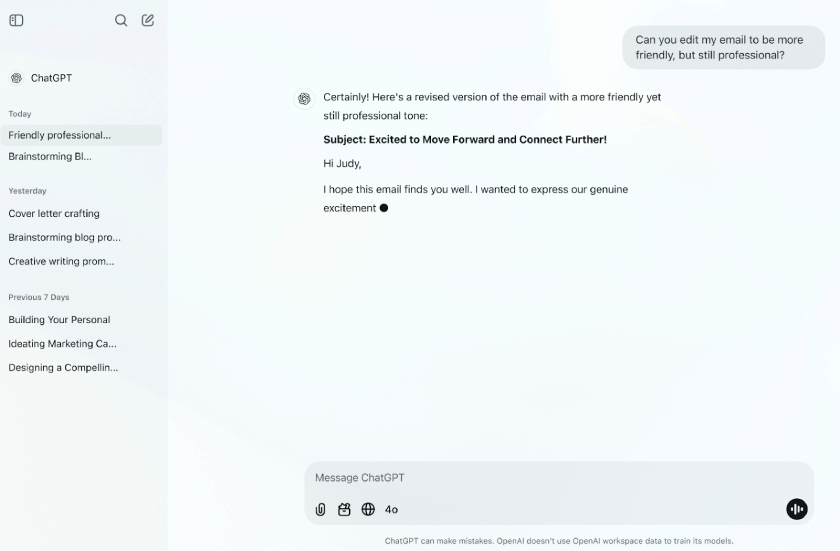
Improve productivity by using AI to draft, edit, and refine professional communication in seconds. (Source: OpenAI)
Gemini: Best for Google Workspace productivity

Pros
- Strong integration across Google Workspace apps
- Multimodal support for text, image, and video
- Built-in AI assistance across Gmail, Docs, and Sheets
Cons
- Certain advanced features, like Project Genie, are limited to specific plans
- Can struggle with complex prompts
- Limited customization compared to competitors
My expert opinion
While Gemini competes closely with ChatGPT in handling a wide range of tasks, I’ve found it especially effective for businesses already using Google Workspace or that need a virtual assistant. In my testing, it performed best when used directly inside tools like Gmail, Docs, and Sheets, where it can assist with drafting emails, summarizing documents, and analyzing data without requiring additional setup.
What sets Gemini apart is how seamlessly it fits into existing workflows. Instead of switching between platforms, I can activate it within Google apps to generate reports, build presentations, or summarize long email threads in real time. While it’s less customizable than some competitors and can occasionally miss context in more complex prompts, its ease of use and native integration make it a strong productivity tool for teams already embedded in the Google ecosystem.
Users appreciate Google Gemini’s multimodal capabilities and its ability to deliver real-time answers. Some reviewers caution that it can miss context in more complex questions, leading to incomplete responses. Others highlight how easy it is to use by voice, making it faster than traditional search engines for finding information.
“The thing I like most about Google Gemini is that it has a lot of multimodal capabilities that seem to be more powerful in terms of helping to get real-time answers” – SoftwareAdvice
“…sometimes it misses context in more complex or nice questions, which can lead to slightly off or incomplete answers.” – G2 review
“Can easily navigate to it with just asking. I can find answers quicker and better than if I were to type it in on a search engine. – SoftwareAdvice
Gemini is included with most Google Workspace Business and Enterprise subscriptions at no additional cost. But users with a personal account can upgrade to one of Google’s AI plans, ranging from $7.99 to $249.99 per month.
- Capture meeting notes and create summaries in real time.
- Generate documents, spreadsheets, and presentations with prompts.
- Draft, reply to, and summarize emails directly in Gmail.

Save time with AI that creates outlines and streamlines daily tasks. (Source: Google)
Writesonic: Best for SEO & branded content

Pros
- Generates SEO-optimized content quickly
- Combines AI models: ChatGPT, Claude, and Gemini
- Built-in tools for keyword research and optimization
Cons
- Steep learning curve during initial use
- No free-forever plan
- Limited collaboration features for teams
My expert opinion
I highly recommend Writesonic as an all-in-one marketing assistant. Its key strength is how it consolidates essential functions, such as writing articles, brand tracking, and SEO strategy development, into a single platform. For example, it seamlessly integrates leading language models (like ChatGPT and Gemini) with established marketing tools (such as Ahrefs and WordPress).
The platform also makes it easier to maintain a consistent brand voice across articles and campaigns. While it takes some time to learn its full feature set and lacks built-in team collaboration tools, it’s a powerful option for marketers who want to streamline content production and optimization in one place.
Reviewers highlight that the platform is useful for SEO audits, content corrections, and producing more natural, human-like writing. While some mention slight delays in site audit results, they generally don’t see this as a major drawback. Many also praise the tool’s fast content generation and seamless integrations that boost overall productivity.
“Starting from SEO audit, correcting the article and making the content more human-written, it’s worth all the pennies.” – G2 review
“Sometimes the site audit takes a little time to show the results, but other than that, there is nothing bad to say” – G2 review
“The speed of content generation is impressive, and the integration with other tools adds real value for productivity.” – G2 review
Writesonic pricing ranges from $249 to $499 per month, with an additional 20% off for annual billing. You can also try a free trial with limited feature credits.
- Track brand mentions, rankings, sentiment, and citations across AI tools in real time.
- Use the keyword planner and Ahrefs data to build SEO strategies and fix issues with AI.
- Create well-researched articles with internal links, trust signals, and a consistent voice.
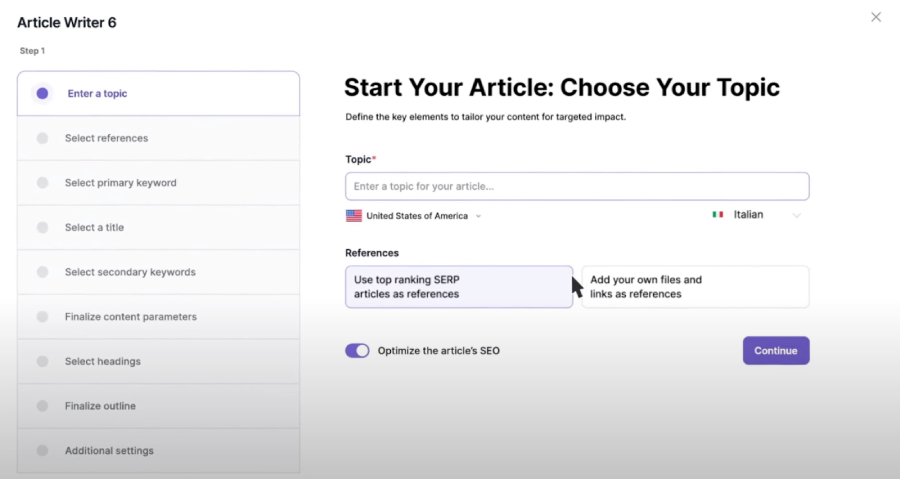
Generate SEO-optimized articles with built-in keyword data. (Source: Writesonic)
ElevenLabs: Best realistic AI voiceovers

Pros
- Produces highly realistic, human-like voiceovers
- Supports voice cloning and multilingual dubbing
- Fast audio generation
Cons
- Inconsistent tonal across some outputs
- Limited control over pacing and delivery
- Voice cloning requires a paid plan
My expert opinion
ElevenLabs is one of the most impressive AI voice tools I’ve tested, especially for businesses that rely on audio content like podcasts, videos, or ads. In my experience, its text-to-speech output sounds noticeably more natural than most competitors, making it a strong choice for professional-quality voiceovers. I’ve also found it particularly useful for scaling audio production without needing voice talent for every project.
For high-touch businesses, I recommend the platform’s conversational voice agents, which significantly elevate the customer experience by enabling personalized, human-sounding interactions. While tone consistency and editing controls can still be limiting in some cases, the overall quality and speed make it a reliable option for businesses looking to produce audio content at scale.
Users say ElevenLabs is easier to use than competing tools and helps them save time when generating voice content. However, some reviewers note issues with incorrect pronunciation and limited controls for adjusting tone, speed, and pauses. Others mention they would like the ElevenReader app to be available in a browser version.
“I’ve found that I have to spend a lot of time redoing generations to try and get something usable, but I have had way better success working with ElevenLabs. It’s much easier to use than the competitive tools, and saves me a lot of time.” – G2 review
“Sometimes gives incorrect pronunciation – Limited editing controls around tone, speed, and pauses in the voice statements” – SoftwareAdvice review
“One thing that I wish was available was if the ElevenReader app was available to use in browser.” – G2 review
ElevenLabs offers a free plan, with paid tiers ranging from $5 to $1,320 per month, and enterprise plans available for larger teams. Annual subscriptions offer savings of 2 months free compared to monthly billing.
- Engage customers with natural, human-like voice AI assistants.
- Automate inbound scheduling as voice agents handle bookings.
- Create AI voiceovers for videos, podcasts, and advertising campaigns.
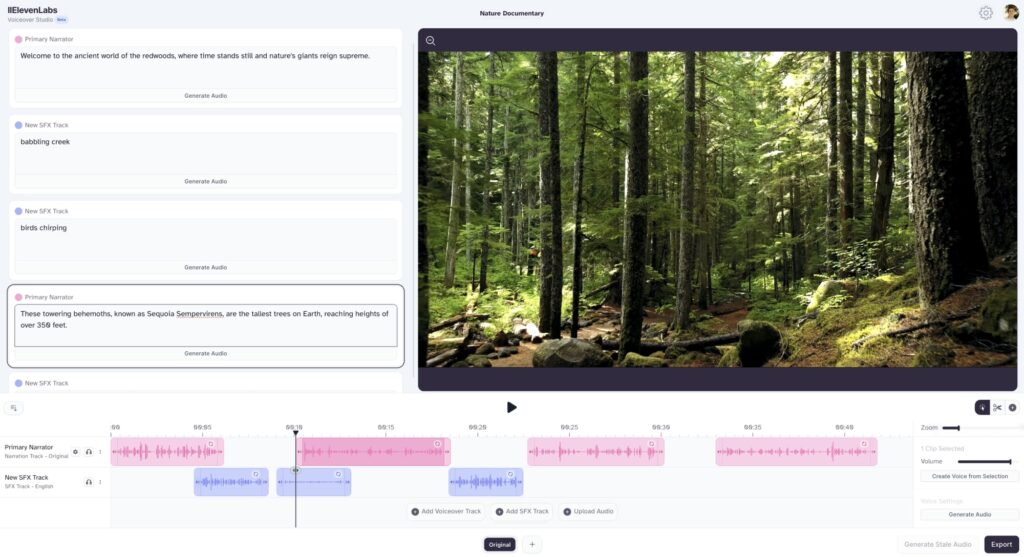
Use realistic AI-generated voice-overs tailored to different use cases. (Source: ElevenLabs)
Otter.ai: Best full-featured meeting assistant
Pros
- Offers unlimited AI-powered transcriptions
- Automatically captures action items and key points
- Integrates with Zoom, Google Meet, and Teams
Cons
- Slower processing for free users
- No live support (ticket/email only)
- Limit transcription to a maximum of 4 hours per meeting
My expert opinion
While most video conferencing platforms now include AI-generated transcripts, I still find some of them unreliable because of frequent inaccuracies. If you want a dedicated meeting assistant, I recommend Otter.ai. It goes further than others by capturing meeting notes, summarizing meetings when I’m absent, and highlighting action items with industry-specific notetakers.
I have also used Otter.ai to automatically extract action items, making it especially helpful for teams managing multiple conversations or projects. Its ability to join meetings across platforms such as Zoom, Google Meet, and Microsoft Teams enhances its flexibility. Although the free plan is somewhat limited and support options are minimal, it remains one of the most practical tools for enhancing meeting productivity.
Users praise Otter for its seamless meeting integration, accurate transcripts, and helpful features like annotations and automated summaries. However, some point out that the free version is restrictive, offering only 30 minutes of recording before cutting off without notice. Many also value how quickly and reliably the tool converts recordings into accurate transcripts.
“Otter is great for meeting integration and note-taking, transcripts, and especially for annotation and automated summaries.” – SoftwareAdvice review
“In terms of limitations, the free version only has 30 minutes, which is very limited to try, and it cuts out without warning.” – G2 review
“I like how easily Otter takes a recording of a meeting, podcast, etc., and is able to quickly produce a transcript that is very accurate and correct.” – Software Advice review
Otter.ai offers a free plan, while paid options range from $9.99 to $19.99 per month. You can save up to 51% with an annual prepayment.
- Use Otter AI Chat to get answers and draft content like emails or status updates from your meetings.
- Blend live conversations with async updates and chat with teammates.
- Receive automated notes, summaries, and action items after every meeting.
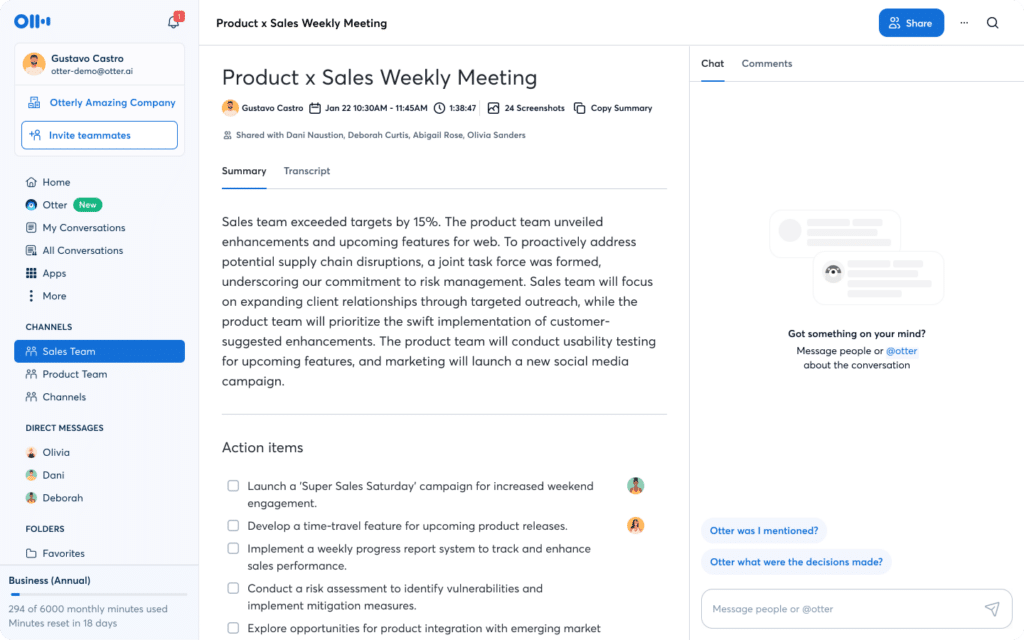
Capture and organize meeting notes automatically with AI that transcribes and highlights action items. (Source: Otter.ai)
GitHub Copilot: Best AI coding support

Pros
- Accelerates coding with AI suggestions and autocompletion
- Supports multiple AI models in one platform
- Handles repetitive and boilerplate code efficiently
Cons
- May generate code that doesn’t accurately reflect the developer’s intent
- Limited visibility into larger architectural issues
- May suggest code that isn’t relevant to the context
My expert opinion
If you’re looking to boost your developers’ productivity and reduce time spent on repetitive tasks, I recommend integrating GitHub Copilot into your workflow. It functions as an AI pair programmer, handling boilerplate code and enabling your team to focus on complex problem-solving and collaboration. Copilot excels at offloading work by analyzing code, suggesting edits, running tests, and validating results across multiple files.
It also supports different AI models, making it more flexible than many standalone coding tools. While it’s highly effective for writing and editing code, it’s not a replacement for developer oversight, especially when it comes to architecture or complex logic. Still, for teams focused on improving development speed and efficiency, it’s a strong addition to the workflow.
Reviewers praise GitHub Copilot for providing access to high-quality AI models under a single subscription and for generating and adapting complex code with ease. Some users describe the tool as powerful and transformative for development workflows. At the same time, others report frustrations with VPN compatibility, which often leads to errors and timeouts.
“The support for multiple high-quality AI models. All in a single subscription.” – G2 review
“I can’t even tell you how amazing Copilot is; it’s unbelievable what she can do. I still can’t believe it. She is able to generate really complex things and modify the code up/down how you ask her.” – Reddit
“Another major pain point is VPN compatibility. Copilot struggles significantly when running behind a VPN, leading to more frequent errors and timeouts.” – Reddit
GitHub Copilot provides a free plan for individual users, while paid options start at $10 or $39 per month. The business plan is available for $19 or $39 per month.
- Generate and edit code with real-time AI suggestions.
- Analyze and apply changes across multiple files.
- Use built-in chat for coding help and troubleshooting.
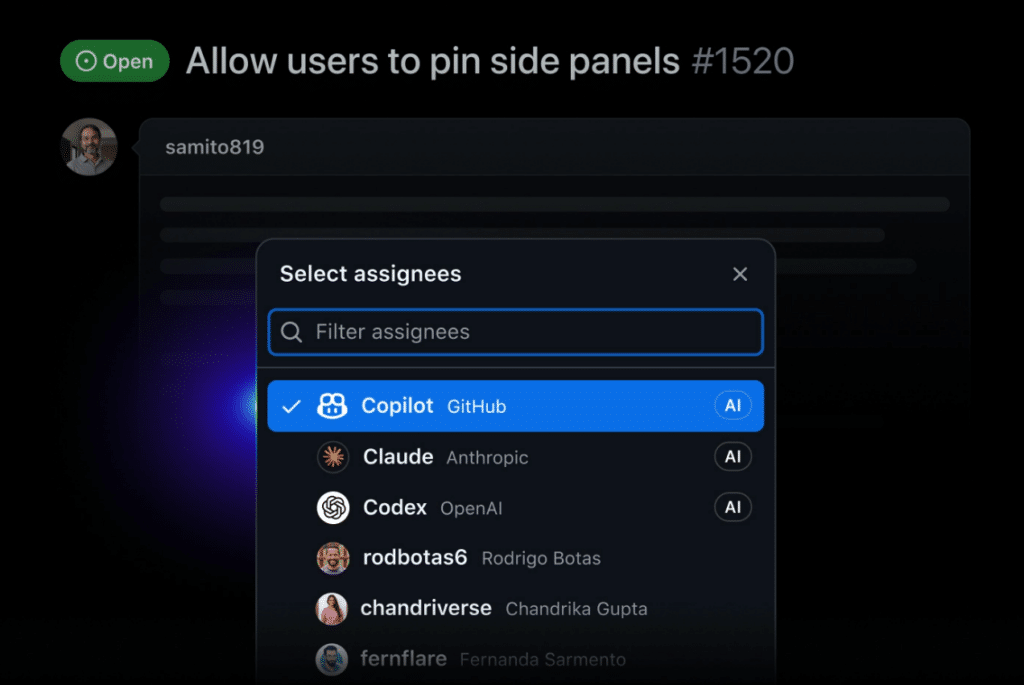
Accelerate coding projects with AI that allows users to select specific AI models. (Source: GitHub)
Chatbase: Best for building AI support agents

Pros
- No-code AI chatbot builder for fast deployment
- Train bots on your own data (websites, docs, knowledge bases)
- Supports automation with integrations and AI actions
Cons
- Access to advanced models requires a paid plan
- Limited customization for complex workflows
- Support could be more responsive
My expert opinion
Business owners looking to improve customer experience without the hefty overhead should consider Chatbase. Specifically, you can create powerful, AI-driven support agents in minutes by leveraging platforms like ChatGPT and Gemini. I’ve also found it particularly effective for creating AI agents that not only answer questions but also perform actions, such as capturing leads or booking appointments, through integrations.
This means your customers get instant, accurate answers to complex questions, freeing up your team members. But, even though it works well for straightforward use cases, it’s less flexible for complex workflows or highly customized chatbot logic. Still, for small businesses looking to quickly add an AI-powered support layer across channels like websites, messaging apps, or CRMs, it’s a strong and accessible solution.
Reviewers highlight that Chatbase makes it easy to build and deploy chatbots across social media platforms such as WhatsApp, Instagram, and Facebook. At the same time, some users feel the tool lacks depth in customization and struggles with handling complex queries. Others note that while it’s a strong option for getting started, its capabilities are best suited for basic use cases.
“Effortlessly develop a customized chatbot with multiple input methods, seamlessly integrating it with platforms such as WhatsApp, Instagram, and Facebook.” – G2 review
“Limited customization – You can’t fine-tune responses deeply. Struggles with complex queries – Works well for simple use cases but can feel rigid.” – Reddit
“I’ve tried a few AI chatbot builders recently, including Chatbase, and it definitely makes getting started easy…” – Reddit
Chatbase has a free plan, while paid monthly options range from $40 to $500. You can save 20% by choosing an annual subscription.
- Connect your agent with systems like AI CRMs and order management tools for seamless data access.
- Set up actions your agent can perform, such as updating subscriptions or changing customer addresses.
- Use natural language to guide your agent on when to escalate queries to a human.
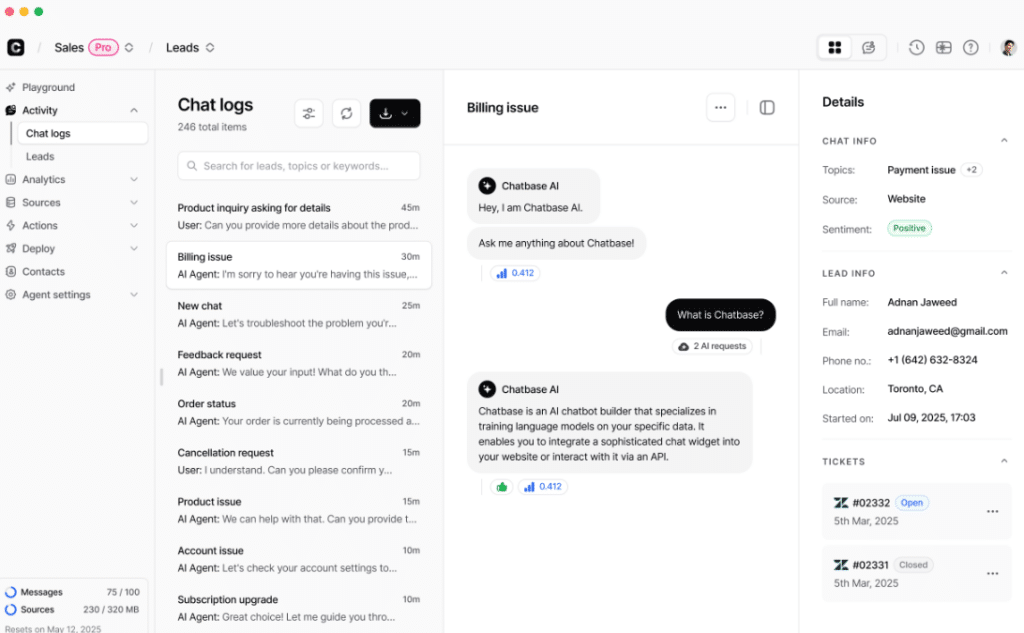
Build and customize AI chatbots that qualify leads and communicate with customers. (Source: Chatbase)
Beautiful.ai: Best for slideshow presentations

Pros
- Offers templates for small businesses and specific industries
- Supports team collaboration and shared branding
- Integrates with MS PowerPoint
Cons
- No free plan
- Limited customization compared to traditional tools
- Can feel restrictive for complex presentations
My expert opinion
Beautiful.ai is a strong option for businesses that want to create polished presentations quickly without spending time on design. In my testing, it worked best for building structured slide decks like reports, sales presentations, and internal updates, where consistency and speed matter more than customization.
For example, its “Smart Slides” system automatically adjusts layouts, spacing, and formatting as you add content. I’ve found this especially useful when creating repeatable presentations, since templates and brand controls keep everything aligned. However, that same structure can feel limiting when you need more control over layout or want to build more complex, data-heavy slides. Overall, it’s best suited for teams that prioritize speed and consistency over full creative flexibility.
Users say the platform makes it easy to create sleek and impressive slide decks with user-friendly design templates. However, several reviewers note that customization options are limited and customer support is lacking. Others add that the AI features work well enough to speed up PowerPoint creation.
“The slides can be made to look quite impressive. Very sleek! The design templates were fairly user-friendly.” – SoftwareAdvice review
“The options to customize it are limited, and the support is non-existent.” – SoftwareAdvice review
“…quick and easy creation of [PowerPoint]. Some use of AI is pretty good.” – SoftwareAdvice review
Beautiful.ai offers a 14-day free trial. Paid plans start at $12 for individuals and go up to $50 for teams of up to 20 users, with custom pricing available for larger groups and small business plans.
- Includes a vast library of images and icons designed to fit your brand.
- Templates include layout variations to preview content in different angles.
- Smart Slides and template galleries make it easy to kick off pitches, reports, or training decks.
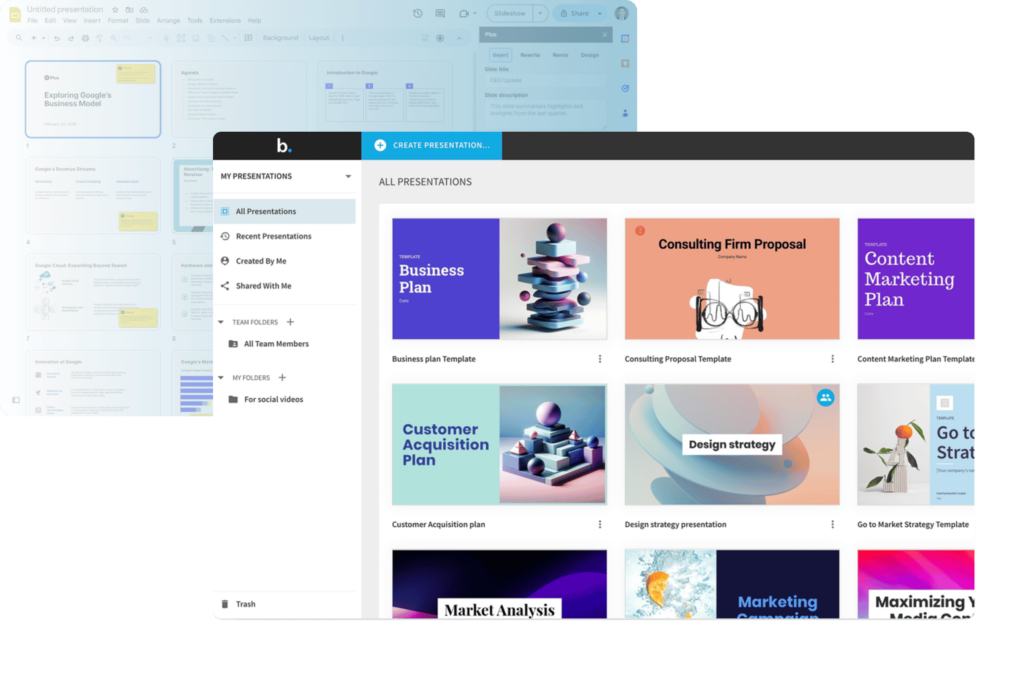
Create engaging presentations with AI-designed templates. (Source: Beautiful.ai)
Which AI tool fits your business needs?
AI adoption continues to grow, and 63% of organizations say they already use generative AI to generate text outputs. For some companies, this means exploring new AI business ideas that fit their industry, while others may focus on specialized tools for HR, finance, or marketing.
Beyond text, companies are experimenting with other modalities, from voice to video, as they explore how top AI tools can drive growth and efficiency. Choosing the right AI tool comes down to matching its strengths with your specific business needs.
AI marketing statistics show that AI is becoming a trusted partner in content creation, helping teams scale articles, blog posts, ads, and social media campaigns faster than ever. Organizations are also eager to adopt AI agents, with 82% planning to integrate them within the next one to three years. For marketers, this means now is the time to explore tools that streamline workflows and maintain brand consistency.
Businesses are finding real advantages by adding AI to their support systems. Early adopters report improved efficiency and stronger customer experiences, with customer engagement and satisfaction. For example, Chatbase helps companies handle routine queries through chatbots, freeing human agents to focus on complex issues.
AI plays a major role in data-driven decision-making, especially in predictive analytics, where 52% of companies already use AI agents. These tools make it easier to identify trends, forecast outcomes, and uncover insights from large data sets.
Platforms with strong BI capabilities give small businesses the same level of strategic advantage that large enterprises rely on. These insights also extend to HR platforms, where generative AI is being used to forecast workforce needs.
AI tools for business are transforming sales by automating repetitive tasks like lead tracking, outreach, and scoring. Instead of manually qualifying leads, sales teams can prioritize prospects most likely to convert and spend more time building relationships. This shortens sales cycles and ensures better time and resource use.
Engineering teams are also turning to AI for faster prototyping and more accurate development cycles. Tools like GitHub Copilot or Gemini assist with coding, testing, and debugging, making it easier to deliver high-quality products in less time. For product managers, AI can streamline team collaboration and accelerate go-to-market strategies.
What makes a great AI tool for business?
Artificial intelligence tools for business vary widely in quality, and the right choice comes down to finding a platform that delivers both advanced features and practical value. Here are the factors I looked at when evaluating AI tools:
- Choose multimodal capabilities: AI tools that support text, voice, image, and video inputs give your team flexibility across different workflows. A multimodal approach ensures you can handle diverse tasks without switching between multiple platforms.
- Ensure data readiness: The effectiveness of AI depends on how well it integrates with your business data. Tools that connect smoothly with CRMs, analytics systems, or productivity apps unlock more actionable insights.
- Prioritize ethics, governance, and security: A reliable AI platform must prioritize data security, compliance, and responsible usage. Transparent governance and strong security safeguards build trust for both your team and your customers.
- Adopt a strong LLM integration strategy: Tools that leverage leading large language models, such as GPT or Gemini, can handle more complex queries and perform more advanced reasoning. An effective integration strategy ensures your AI stays up to date as models evolve.
- Evaluate cost structures carefully: Pricing needs to match your business size and budget without forcing you into rigid plans. Look for business AI software that offers transparent pricing and scalable options, so you only pay for what you need.
AI automation tools are no longer optional as they’re becoming essential for productivity, efficiency, and growth. By focusing on key factors such as multimodality, data integration, and cost, you can choose a solution that meets both your current needs and future goals. With the right AI tool in place, your business is well-positioned to save time, reduce costs, and stay ahead of the competition.
Frequently asked questions (FAQs)
The best AI software for a small business depends on your specific needs, whether that’s marketing, customer support, or data analysis. However, if you’re looking for an all-in-one AI partner that can handle almost any business task, I recommend ChatGPT, thanks to its versatility, advanced reasoning, and ability to integrate into a wide range of workflows.
Artificial intelligence tools help marketing teams streamline content creation by generating ideas, drafting copy, and optimizing campaigns. It can also analyze audience behavior, track performance data, and personalize the customer journey by delivering targeted messaging that resonates with specific segments.
The best AI assistant for sales is Chatbase, which lets businesses build chatbots tailored to sales workflows. These bots can generate leads, qualify prospects, and guide customers through the buying process, automating repetitive tasks so sales reps can focus on closing high-value opportunities.
Safety depends on the platform you choose, so it’s important to review how each tool manages data privacy and compliance. Gemini is a strong choice, as it emphasizes ethical AI practices, data security, and alignment with Google’s enterprise-level compliance standards.
The ROI of AI varies depending on how it’s applied, but most businesses see gains through time savings, reduced costs, and increased efficiency. With the right tool, AI can also create new revenue opportunities by improving customer experiences and driving better decision-making.
Bottom line
The best AI tools for small businesses in 2026 depend on your specific needs, but ChatGPT stands out as the most versatile all in one solution. Tools like Gemini excel for Google Workspace users, while Writesonic, Otter.ai, and Chatbase offer more specialized capabilities for marketing, meetings, and customer support. By choosing the right AI platform, businesses can save time, reduce costs, and scale operations more efficiently.
Source link