Payroll System Requirements Checklist for SMBs [+Template]
Payroll system requirements are the core features needed to pay employees accurately, handle taxes, and keep records organized. These functionalities also play a key role during payroll implementation, when the system is set up to handle real payroll scenarios.
For small businesses, a payroll system checklist can help organize the functions and capabilities a system should support. Use our template to keep track of must-have features as you review your payroll needs.
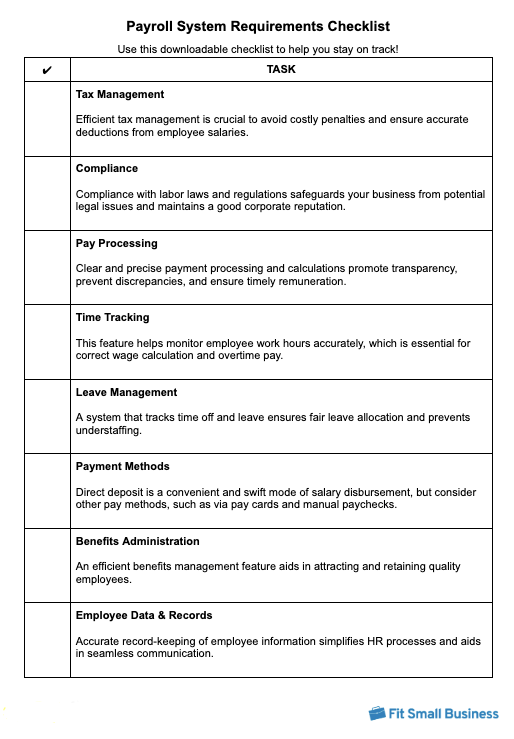
Thank you for downloading!
Key Takeaways:
- Choose a payroll system that supports federal, state, and local requirements in every jurisdiction where you pay employees.
- Make sure it can handle your pay setup, including wage calculations, deductions, and payment methods.
- Prioritize systems with strong security, clear reporting, and the ability to scale as your workforce grows.
- Reevaluate your payroll system at each growth stage. What works for five employees may not work for fifty.
1. Tax management
Key features to look for:
- Automated tax calculations and filings
- Support for multiple tax rates and jurisdictions
- Year-end tax forms
Tax management is one of the most important payroll system requirements because tax mistakes can create expensive problems fast. A good system should calculate, withhold, and track federal, state, and local payroll taxes, including Social Security, Medicare, and unemployment taxes. It should also keep payroll tax rates current and generate year-end forms, such as W-2s and 1099s.
You save valuable time and resources that would otherwise be spent navigating the labyrinth of tax regulations. This also ensures you’re not over- or underpaying taxes, keeping your company’s finances in check.
Without a system that excels in tax management, you risk falling into the abyss of non-compliance. The consequences are far from trivial—penalties, interest, audits, and a damaged reputation. Not to mention the stress and time spent rectifying these issues. So, if you want to avoid a date with the IRS and keep your business running smoothly, robust tax management is non-negotiable.
Payroll implementation checklist tip: Before running your payroll in the system, verify your EIN and state tax account numbers. Errors here can cause filing problems that can take months to resolve with state agencies.
2. Compliance
Key features to look for:
- Regulatory updates
- Audit trails
- Compliance reporting
- Alerts for pay issues, overtime inconsistencies, or missing data
Compliance should be built into the payroll system. At a minimum, the software should support wage and hour rules, maintain payroll records and audit trails, and help meet reporting requirements at the federal, state, and local levels. That includes minimum wage regulations, overtime calculations, final pay rules, and pay stub laws.
Some systems also flag missing employee details, incomplete entries, or unusual overtime before payroll is processed. I find those checks useful because they help catch problems early, when they are easier to fix.
Strong compliance support can also reduce the amount of manual monitoring your team has to do. It keeps records easier to access, makes payroll reviews more manageable, and helps you respond faster if an employee raises a pay question or an agency requests documentation.
3. Pay processing
Key features to look for:
- Automatic salary computations
- Support for multiple pay schedules and pay/deduction types
- Wage garnishments
- Overtime calculations
A payroll system should calculate overtime, regular wages, deductions, bonuses, commissions, reimbursements, and garnishments, including the applicable gross and net pay amounts. If your business has a mix of hourly and salaried employees, it should handle both without forcing extra manual work.
Accuracy is the main priority here, but flexibility matters too. Ensure that the system can support your actual pay setup, such as different pay rates and payroll schedules. Clear pay stubs are part of this as well, since employees need to see how their pay was calculated and what was withheld.
When pay processing falls short, problems show up fast. Employees notice incorrect paychecks immediately, and fixing those errors can take time you may not have. In some states, mistakes tied to overtime, deductions, or pay stub details can also create payroll compliance issues.
4. Time tracking
Key features to look for:
- Real-time attendance monitoring
- Break and overtime tracking
- Shift scheduling
- Timesheet approvals
Payroll systems with this feature usually have an employee attendance tracker that captures regular hours, overtime, and breaks correctly. This ensures that employee pay is based on approved and actual time details, while preventing errors from manual data entries. Shift scheduling and timesheet approvals can also reduce errors at the source.
Not all payroll software includes built-in time tracking, though. Some platforms rely on integrations with third-party tools. I’d check that early, especially if you mostly employ hourly workers.
It also helps to see how cleanly the system moves employee hours into payroll and whether it flags issues, such as missed punches, duplicate entries, or unapproved overtime. You might need mobile clock-in tools or location-based tracking, especially if your employees work across job sites or outside a fixed office.
5. Leave management
Key features to look for:
- Leave balance tracking
- Vacation and sick leave scheduling
- Time off policies
A reliable payroll software should manage paid time off (PTO) transactions and update leave balances automatically. That includes vacation, sick leave, and other leave types your business offers. The system should reflect approved time off in pay calculations, and help you apply leave policies consistently.
This becomes more important if you operate in a state or city with paid sick leave rules or other leave requirements. I’d also check whether the software can handle different time off accrual calculations, carryover limits, and policy settings without forcing manual adjustments each pay period.
If leave tracking is weak, payroll errors are harder to avoid. Employees may be paid incorrectly, balances can fall out of sync, and you might spend more time fixing PTO records by hand.
6. Payment methods
Key features to look for:
- Direct deposit (ACH)
- Supports pay cards or paycheck printing
- Payment scheduling and timelines
A good payroll system supports the different ways to pay employees. Most have direct deposit capabilities, while others provide additional options like pay cards and printed checks you distribute to your workers.
Payment setup should not be limited to one method. Some employees might not use bank accounts, and certain states may have specific wage payout rules. Having multiple payment options also helps avoid delays when your default method is not available.
However, I recommend prioritizing payroll software with direct deposit features. It’s fast, secure, and reduces the administrative burden and costs associated with paper checks.
Payroll implementation tip: Verify your ACH processing timeline and test direct deposit with a real bank account before your first live pay run. Discovering a routing error on payday is not where you want to be.
7. Benefits administration
Key features to look for:
- Benefits enrollment
- Retirement plan management
- Health insurance administration
Benefits are part of employee compensation, so payroll needs to account for them correctly. This includes deducting employee contributions for health insurance, retirement plans, and other benefits, as well as tracking employer contributions where applicable.
The system should keep these deductions aligned with each pay run and update them as employee elections change. This is important during open enrollment periods or when employees adjust their coverage mid-year.
When benefits data is not synced properly with payroll, deductions can be incorrect or delayed. That can lead to mismatched paychecks, employee questions, potential compliance issues, and additional time spent fixing records.
8. Employee data & records
Key features to look for:
- Centralized employee database
- Document storage
- Customizable data fields
Payroll depends on accurate employee information. In addition to each team member’s basic personal details, the system should store core data such as job title, pay rate, tax information, hire date, and benefit elections, along with supporting documents like signed forms and policy acknowledgments.
This information needs to stay current because payroll pulls from it every cycle. If employee records are incomplete or outdated, you can end up with incorrect pay, wrong tax withholding, or missed deductions. I also find it helpful when records and documents are stored in one place, since it makes updates easier to manage and reduces back-and-forth between systems.
9. Employee self-service
Key features to look for:
- Personal information updates
- Pay stub, tax form, and document access
- Leave requests
Employee self-service gives workers direct access to simple tasks, such as viewing pay stubs, checking tax forms, updating personal details, and submitting leave requests. That makes it easier for them to get what they need without relying on you for every small update.
It also helps keep information current while reducing the amount of manual support you have to provide. Mobile access can be useful, too, especially if you have remote or field employees.
When this feature is missing, routine requests often end up back with HR. That creates extra admin work and slows response times for both employees and your team.
10. System integration
Key features to look for:
- HRIS integration
- Time tracking and benefits platform connections
- Accounting software sync
- API access
Payroll works better when it connects with the systems that feed into it. That includes your HRIS, time tracking tools, benefits platforms, and accounting software. When those systems sync properly, employee data, hours, deductions, and payroll records stay more consistent across your workflow.
This reduces duplicate entries and cuts down on manual updates. It makes payroll easier to manage when employee details change, hours are approved, or payroll data needs to flow into your general ledger. API access can also be useful if your business uses tools that don’t come with built-in integrations.
When integration is limited, payroll teams often end up moving data by hand between systems. That creates more opportunities for errors and makes routine payroll tasks harder to manage.
11. Reporting & analytics
Key features to look for:
- Access to standard payroll reports
- Customization options
- Real-time data access
- Exportable formats
- Labor cost analytics
Reporting and analytics help you track payroll activity and use that data more effectively. A good system should provide standard reports for payroll summaries, taxes, deductions, and employee pay, along with options to customize reports based on what your business needs.
Real-time access makes it easier to review payroll details before processing, while exportable formats help when sharing data with accounting or leadership. Labor cost analytics can also help you monitor overtime, payroll trends, and total workforce spending over time.
If reporting is limited, it becomes harder to review payroll closely, spot issues early, or use payroll data for planning and budgeting.
12. System security
Key features to look for:
- Data encryption
- Two-factor authentication
- Regular backups
- Role access and user permissions
Payroll systems store sensitive employee and company data, so security needs to be built in. That includes protecting information such as Social Security numbers, bank account details, pay rates, and tax records through encryption, secure login controls, and backup protections.
Two-factor authentication adds another layer of access control, while regular backups help protect payroll data if there is a system issue, accidental deletion, or cyberattack. I’d also treat user permissions as important here, since not everyone on your team needs access to the same payroll information.
Weak security can create serious problems fast. A breach or data loss incident can expose employee information, interrupt payroll operations, and create legal or reputational risk for the business.
13. Scalability
Key features to look for:
- Modular features
- User capacity
- Business growth adaptability
Scalability determines whether your payroll system can keep up as your business changes. That includes adding employees, supporting new locations, handling more complex pay structures, or expanding into other payroll-related functions over time.
A system that scales well can support growth without forcing major process changes or manual workarounds. Modular features can also help if you want to add capabilities later, such as recruiting, performance reviews, or more advanced reporting, without replacing the entire system.
If scalability is limited, the system may start creating bottlenecks as headcount and payroll complexity increase. That can lead to more manual work, reporting gaps, and the need to switch platforms sooner than expected.
14. Customer support
Key features to look for:
- 24/7 support
- Live phone or chat assistance
- Knowledge base
- Access to payroll tax experts
Payroll issues often need fast answers, especially when they affect pay runs or tax filings. The software vendor should offer reliable support through channels your team can actually use, whether that is live chat, phone, or self-service help resources.
The level of support can make a real difference when something goes wrong or a setup question comes up during a payroll deadline. I also pay attention to whether help is available 24/7 or only during business hours.
If access to customer support is limited or the service quality isn’t good, small problems can take longer to fix and turn into payroll delays or avoidable errors. While a strong knowledge base can help with routine questions, direct access to live support still matters when payroll is on the line.
How to use this payroll system checklist
This checklist is meant to help you map out the functions your payroll system needs based on how your business operates. Not every requirement will apply in the same way, but together they cover the core capabilities most payroll software should have.
- Identify which areas affect payroll the most. Businesses with hourly employees may need stronger time tracking and overtime tools, while multi-state teams may need more advanced tax and compliance capabilities.
- Use the checklist to confirm whether the system fits your payroll process or to spot gaps that could create extra work or risk.
- Revisit the checklist when your headcount, locations, or pay structure changes.
The goal is not to check every box, but to make sure your payroll setup can handle your operations without adding unnecessary complexity as your business grows.
Cost should factor into that decision, too. Look beyond the base price and consider the long-term value of features such as scalability and reporting.
When to reevaluate your payroll system
A system that works today may not fit as well after a major change in how you run payroll. Reassessment usually makes sense when payroll becomes more complex, more manual, or harder to review.
It may be time to take another look when:
- You hire your first employee after running payroll only for owners or contractors
- You add hourly workers, multiple pay rates, or more complex schedules
- You start hiring in another state or city
- You add benefits, garnishments, or new deduction types
- Payroll corrections become more common
- You start relying on spreadsheets or workarounds to fill payroll system gaps
- You expand into a line of business with different pay rules, such as union, job site, or prevailing wage work
Revisiting your payroll setup at those points can help you catch gaps before they create errors, delays, or compliance problems.
Frequently asked questions (FAQs)
Small businesses usually need a payroll system that can handle pay calculations, taxes, compliance, employee records, payment methods, and reporting. The right setup depends on your workforce, locations, and how you run payroll.
No. It matters most for small businesses with hourly employees, overtime rules, or changing schedules. If your team has a simple salaried pay structure, it may be less important.
Yes. Some payroll systems also include tools for hiring, onboarding, learning management, and performance reviews, which can make payroll and HR processes easier to manage together.
Source link