8 Best Sales Management Software

Sales management software can be used by sales managers to address silos such as deal complexity and lack of communication, transparency, and shared language for performance metrics and other relevant data.
Sales management software solutions like customer relationship management (CRM) help sales managers improve their team’s sales process and better support reps in assisting customers in their buying journey. We reviewed several software products to identify the top eight sales management systems.
- Zoho CRM: Best for overall sales management software
- Freshsales: Best for AI-powered sales performance insights
- Apollo.io: Best for automated outreach
- HubSpot CRM: Best for free dashboard reporting
- Nextiva: Best for multichannel customer engagement
- UpLead: Best for B2B lead sources
- Clari: Best for sales revenue forecasting
- Gong.io: Best for simplified sales forecasting
Best Sales Management Software at a Glance
Zoho CRM: Best for Overall Sales Management Software
Pros
- Artificial intelligence (AI) assistant, Zia, retrieves lead info across multiple sources for data enrichment and lead generation.
- It has robust sales management tools like lead scoring, pipeline management, sales automation, and LinkedIn integration.
- Free and affordable plans are available, starting at $14 per user monthly.
Cons
- It has extensive customization options and a steep learning curve for non-tech-savvy users.
- It lacks ad creation tools; users can only monitor LinkedIn ads performance in the CRM.
- Custom CRM modules or applications,multiple scoring rules on lead scores, and territory-based forecasting are not available until the Enterprise plan at $40 per user monthly.
Why I chose Zoho CRM
Zoho CRM is my top overall choice for sales management software because it combines customizable pipelines, AI-powered insights, automation, quoting, and inventory tools in one platform without the high cost or complexity of many enterprise CRMs. In my testing, it consistently offered the best balance of flexibility, functionality, and value for growing sales teams.
What stood out most was Zia, Zoho’s AI assistant, which can enrich lead records with minimal initial input, helping teams maintain cleaner, more useful CRM data for follow-ups, forecasting, and sales planning. I also like that Zoho CRM goes beyond basic pipeline tracking with built-in quoting capabilities and a full inventory management module, making it especially useful for businesses managing both sales operations and product-based workflows inside one system.
Because it supports so many parts of the sales process well — from lead management and automation to quoting, inventory, and reporting — Zoho CRM is one of the most complete sales management platforms I tested.
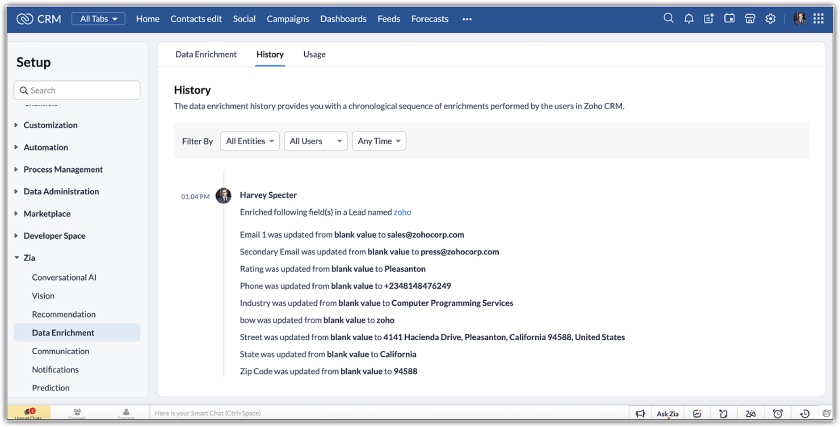
- You need a sales data enrichment tool: Zoho’s Zia feature enables users to enrich sales lead records with LinkedIn profiles automatically. This AI-powered sales assistant crawls the web for public information across online directories and company websites. This ensures that your CRM data has all the updated information. It also helps Zia predict lead conversion and helps sales teams personalize their communication.
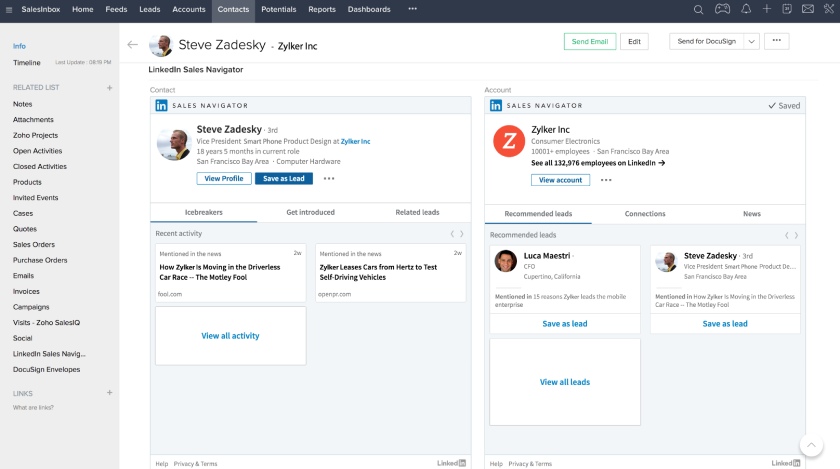
- You need a reasonably priced Sales Navigator connection: Zoho CRM offers different LinkedIn capabilities through CRM integration. The Zoho LinkedIn Sales Navigator integration only costs $23 per user monthly, which is cheaper than other CRM systems. Users can get prospect recommendations and updates on career and company info changes on LinkedIn.
- You need a simpler CRM with LinkedIn integration: Usability can be a problem for non-tech-savvy users because Zoho has advanced capabilities and many modules. This makes sophisticated features difficult to navigate and operate. Moreover, integrating with LinkedIn can be complicated.
- Alternatives: Zoho CRM and HubSpot CRM are both great simple CRM options that integrate with LinkedIn. These two are included in our best simple CRMs that on-the-go salespeople can use for faster lead generation, nurturing, and closing deals. Freshsales is also an easy-to-use CRM with cost-effective CRM LinkedIn integration based on our review.
- You want to manage ads: Connect to LinkedIn ads from Zoho CRM to monitor ad performance and engagement. However, there are no tools for creating ads from the CRM.
- Alternative: We recommend HubSpot for the best CRM LinkedIn integration for ad campaign management. Its connection with LinkedIn ads lets you design, schedule, and manage ad campaigns. Moreover, its mobile app connects you with leads and customers active on LinkedIn.
Free trial: 15 days
Zoho CRM Pricing Plan & Overview*
*Pricing is based on annual billing on a per-month breakdown of the plans for individuals and small teams. Monthly billing is available for a higher cost. It comes with a 15-day free trial. While we update pricing information regularly, we encourage our readers to check current pricing.
Our Expert Opinion
Zoho CRM is our top pick for sales management because it provides sales teams with Zia and other advanced sales management tools to enrich lead data. Zia retrieves lead details based on minimal initial input, enhancing the quality of CRM records. This ensures that your data is a valuable asset for effective sales strategies and better customer relationships. Additionally, Zoho CRM is one of our top quoting software systems, with a full inventory management module.
Freshsales: Best for AI-Powered Sales Performance Insights

Pros
- Sales lead prioritization and bid management tools convert AI-powered insights to identify upselling opportunities.
- Sales forecasting, custom reports, territory management, and quota management tools come at a reasonable price.
- It has an intuitive interface for easy setup and navigation.
Cons
- It lacks built-in project management tools.
- Forecasting insights can be expensive; they’re available in the Enterprise plan at $69 per user monthly.
- Creating branded documents like quotes and invoices needs the configure, price, quote (CPQ) add-on for paid plans.
Why I chose Freshsales
Freshsales is my top pick for AI-powered sales performance insights because its Freddy AI tool helps sales teams identify and prioritize high-converting leads using engagement and behavioral data. Instead of relying only on manual lead qualification, Freddy AI analyzes website activity, in-app behavior, engagement history, and customer profiles to score prospects and surface stronger sales opportunities.
I also like that Freddy AI goes beyond lead scoring by recommending next-best actions, including the best channels and times for follow-ups. That gives reps more guidance on how to engage leads effectively and keep deals moving. Combined with built-in calling, email tracking, workflow automation, and visual pipeline management, Freshsales offers a strong balance of AI-driven insights and practical day-to-day sales tools without feeling overly complex.
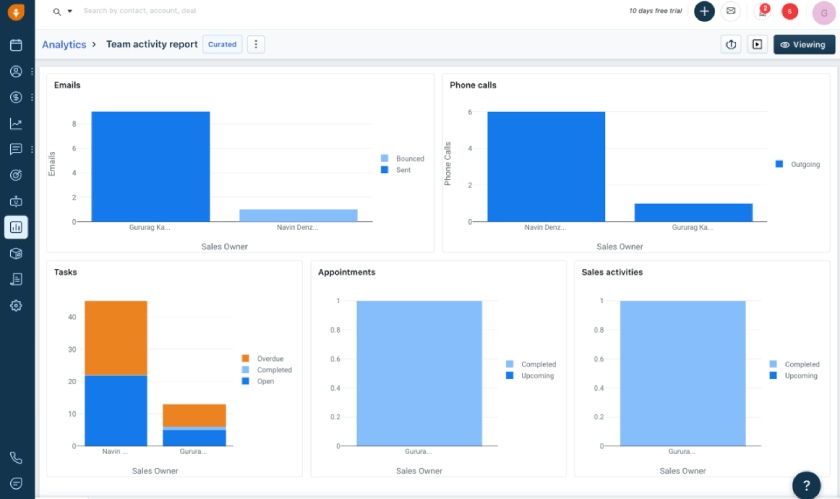
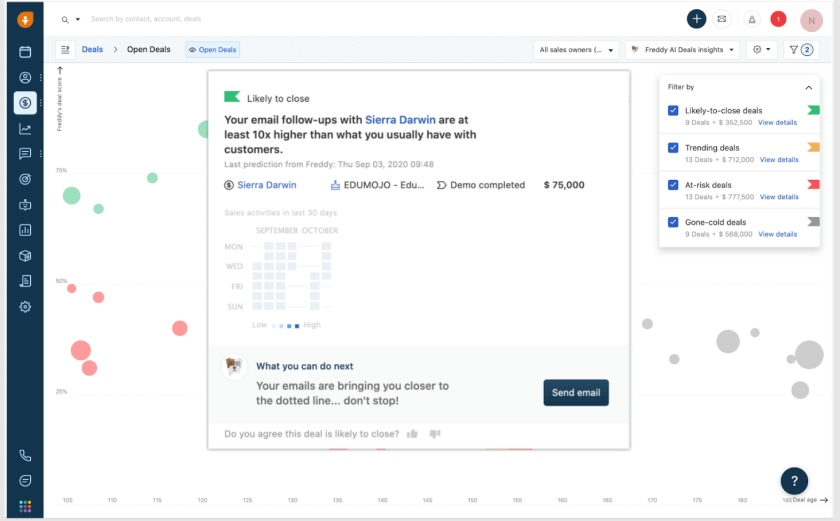
Freshsales’ Freddy AI is a sales assistant that helps salespeople predict wins. (Source: Freshsales)
- You want to prioritize and manage bids effectively: Freshsales’ Pro plan ($39 per user monthly) features Freddy AI for bid management, contact scoring, performance tracking, and other sales management activities. Gain in-depth insights based on the bids you submit to determine the likelihood of converting a bid into a contract. It is our best simple CRM, so expect easy setup and experience using its intuitive interface.
- You need sales forecasting and quota management capabilities: If you have a growing sales team, Freshsales’ Pro plan offers sales forecasting and quota management for only $39 per user monthly. Also, this plan provides you with custom fields and reports for CRM to perform calculations for easy sales performance tracking.
- You require built-in project management tools: While Freshsales has excellent lead and deal management capabilities, it has no built-in project management tools.
- Alternative: Zoho CRM’s free plan includes Zoho Projects integration, which uses a central feed to help users collaborate on a project’s status. Users can also use the document library to upload documents for project updates. You can also log data obtained after a call and have them appear in the projects feed, keeping your team informed on customer feedback for prompt action.
- You’re looking for a more affordable CRM with forecasting insights: Freddy AI makes suggestions on deals with a high likelihood of closing based on historical data and trends. However, some users may find the Enterprise plan costly at $59 per user monthly.
- Alternative: Zoho CRM is a cheaper option. This sales management solution’s Enterprise plan, which includes AI-powered forecasting, is only $40 per user monthly.
Free trial: 21 days
Freshsales CRM Pricing Plan & Overview*
Freshsales Add-ons:
- Workflows: $5 for 10 workflows
- Phone Credits: Starts at $5
- Fresh Bots
Buy additional Freshbots session packs to engage with customers. All interactions between an end-user and a chatbot within 24 hours are counted as 1 bot session.
: $100 for 1,000 Freshbot sessions - CPQ (Configure, Price, Quote)
Generate branded documents such as invoices, quotes, contracts, and onboarding documents
: $19 per user per month
*Pricing is based on annual billing on a per-month breakdown of the plans, though monthly billing is available for a higher cost. It comes with a 21-day free trial for the paid plans. While we update pricing information regularly, we encourage our readers to check current pricing.
Freshsales’ Freddy AI is a sales assistant that helps salespeople predict wins. (Source: Freshsales)
Our Expert Opinion
Freshsales’ Freddy AI can help you determine high-converting leads by scoring and prioritizing prospects based on their website, in-app behavior, engagement activities, and profiles. Aside from assigning each potential customer a score based on unique signals or identifiers, Freddy AI recommends the next best actions like the best channel and time to follow-up for effective engagement.
Apollo.io: Best for Automated Outreach

Pros
- It has built-in sequences or outreach campaign tools with several sequential contact points like phone and email.
- It has a buyer intent feature for specific products or services.
- Free plan is available.
Cons
- It has limited marketing features to generate marketing qualified leads.
- It has limited features for cold calling.
- Only 25 monthly records are downloadable on the free plan, limiting lead generation.
Why I chose Apollo.io
For teams focused on outbound sales, Apollo.io is one of the stronger platforms I tested for automated outreach. Its multi-step email sequences make it much easier to nurture prospects consistently and keep follow-ups moving without requiring reps to manually track every interaction.
I also like that Apollo.io combines outreach automation with detailed prospect filtering and buying intent data. Sales teams can narrow leads by company attributes, job roles, engagement signals, and purchase intent, helping them focus on prospects more likely to convert. Its built-in B2B contact database is another major advantage, as it keeps prospecting and outreach within the same workflow rather than relying on multiple separate tools.
For businesses running high-volume outbound campaigns, Apollo.io offers a strong mix of lead sourcing, targeting, and automated engagement tools while still being relatively easy to manage.
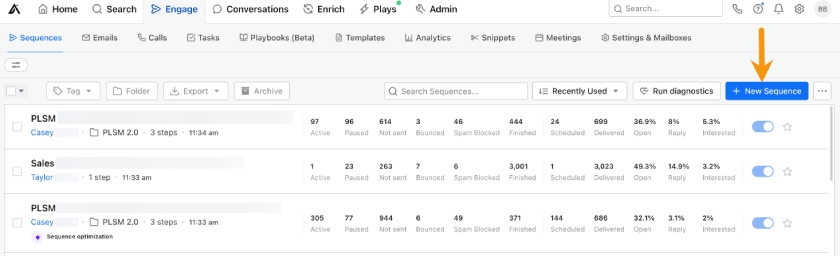
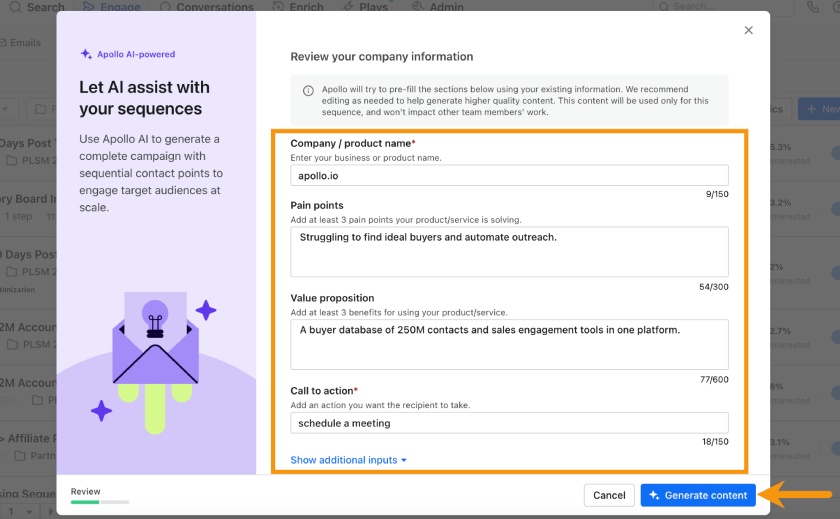
- You need automated outreach capabilities: This sales management provider’s free plan includes basic sequencing to create automated, repeatable processes for prospecting activities. Its Organization plan features account-based workflow automation for $119 per user monthly. This sales team management software helps reps and managers quickly identify lead signals for successful account-based sales motion.
- You need a buying intent feature: Apollo.io has a buying intent feature for filtering company searches and prospects interested in your products and services. The free plan already includes three intent topics, and the basic plan has six topics at $49 per user monthly. As you upgrade your subscription, your intent topic limit increases.
- You need software for generating marketing qualified leads: While Apollo.io has 275 million contacts across 73 million companies, it has limited marketing capabilities. Its marketing account intelligence requires a third-party app, like 6sense.
- Alternative: Zoho CRM lets you connect to LinkedIn ads to track ad performance and social tools for sales and marketing purposes.
- You need a cold calling feature for lead generation: Apollo.io is equipped with a dialer for cold calling. However, you need a different provider if you need to regularly cold call leads to book appointments.
- Alternative: Freshsales is equipped with built-in cloud telephony to handle calls efficiently. You can also book appointments and notify all the attendees before the meeting commences. Furthermore, you can integrate Nextiva for cold calling with your existing appointment system as an alternative if you need these capabilities.
Free trial: 14 days
Apollo.io Pricing Plan & Overview*
Apollo.io offers different tiers depending on the service you enroll in:
*Apollo.io offers two 14-day free trial plans (for Basic and Professional plans). While we update pricing information regularly, we encourage our readers to check current pricing.
Our Expert Opinion
Apollo wins at automating sales outreach campaigns because of its effective email sequences that continuously nurture prospects, leading to more successful deals. With Apollo’s automation capabilities, sales teams can improve productivity and focus more on enhancing customer journeys. Moreover, you can filter sales leads based on specific prospect profile criteria and buying intent, enabling sales teams to generate more sales qualified leads.
HubSpot CRM: Best for Free Dashboard Reporting
Pros
- Free plan for unlimited users includes dashboard and reporting capabilities for sales, marketing, and customer service.
- It has a clean interface with visually aesthetic reports.
- It has excellent marketing automation and content management features.
Cons
- Forecasting and sales analytics features are locked behind the Professional Customer Platform at $1,080 monthly for 5 users.
- It lacks gamification features.
- It lacks ecommerce features.
Why I chose HubSpot CRM
HubSpot CRM is one of the better options I tested for free dashboard reporting. It gives sales managers meaningful visibility into pipeline performance and team activity without requiring an immediate paid upgrade. Its reporting dashboards are easy to customize, making it simple to track sales, marketing, and customer service metrics from one platform.
I also like that HubSpot’s forecasting tools help managers analyze deal progress based on close probability instead of relying purely on manual estimates. Teams can also create custom forecast categories to organize deals and adjust projections more accurately. Combined with HubSpot’s clean interface and strong free plan, it gives small businesses an accessible way to monitor performance and make more data-driven sales decisions.
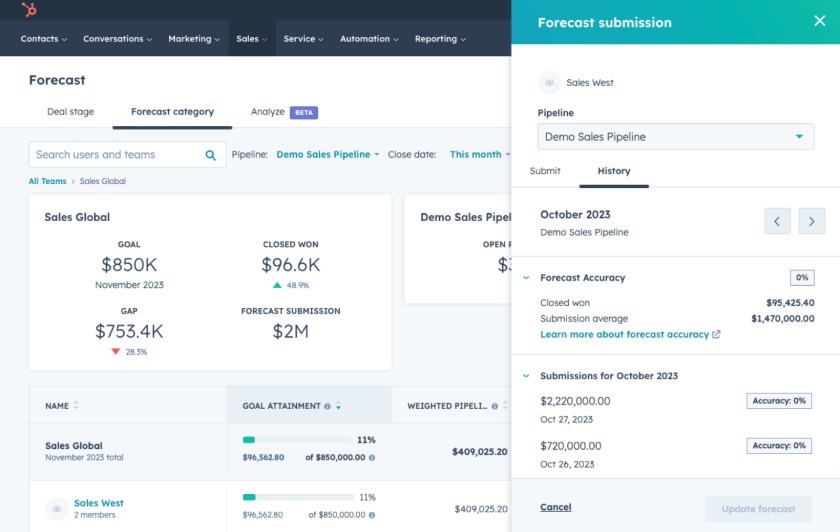
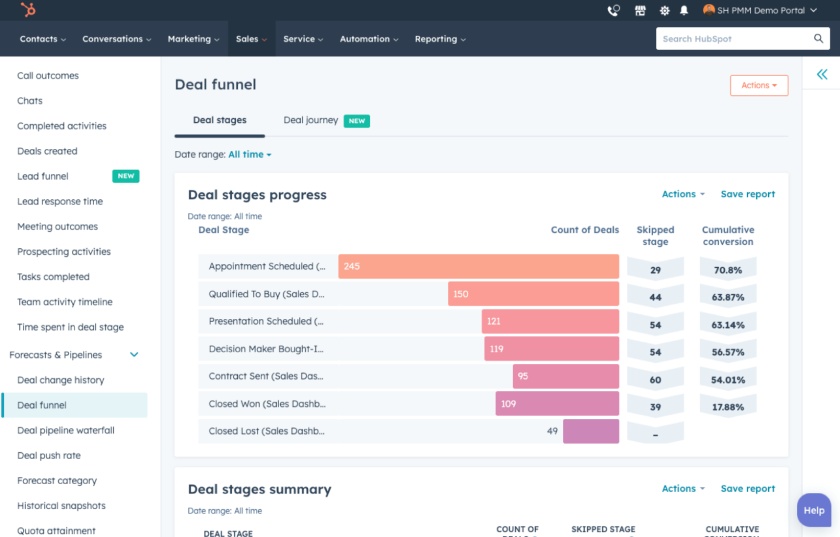
- You need free reporting tools: HubSpot CRM’s free plan offers up to three dashboards with 10 reports per dashboard. A reporting dashboard provides in-depth, customizable data on sales and marketing performance. This helps sales teams determine how they’re doing and areas to improve.
- You need a CRM with essential and advanced marketing tools: HubSpot CRM includes essential and advanced marketing tools. The free plan includes a marketing events object feature, which stores, tracks, and manages marketing event data from an event integration or API. Professional plan users can use omnichannel marketing automation, campaign management, and blog content optimization.
- You need more affordable sales forecasting software: HubSpot CRM requires a subscription to its higher-cost plans to activate sales forecasting, which can be expensive for some users. The Professional plan costs $1,080 per month for five users and the Enterprise plan costs $4,000 per month for seven users.
- Alternative: Zoho CRM has forecasting tools at a cheaper price in its Standard plan at $23 per user a month. This is friendlier on the pocket for startups and expanding teams.
- You’re looking for a CRM with gamification features: HubSpot CRM lacks gamification features. While the provider offers motivational pop-up messages and a checklist that turns green upon completing a task, these aren’t as robust as other providers. This can be a drawback for sales teams wanting to take sales competition and gamification strategies to a higher level.
- Alternative: Zoho CRM offers built-in sales gamification through Zoho Motivator in the Professional plan at $23 per user, monthly. Sales managers can set targets for sales reps like emails sent or deals closed, which come with a progress bar to visualize performance.
HubSpot CRM Pricing Plan & Overview*
*Pricing is based on annual billing on a per-month breakdown of the plans for individuals and small teams for its Customer Platform plans, though monthly billing is available for a higher cost. The Customer Platform bundles sales, marketing, content, operations, commerce, and service features. While we update pricing information regularly, we encourage our readers to check current pricing.
Our Expert Opinion
HubSpot CRM offers reporting dashboards starting with its free plan, providing customizable and comprehensive data on sales performance. Analyze available sales, marketing, and customer service data for well-rounded business forecasts. Its forecast tool analyzes deal progress based on the likelihood of closing sales. Users can create forecast categories to group deals for forecast adjustment.
Nextiva: Best for Multichannel Customer Engagement
Pros
- It has an all-in-one call center, virtual meetings, conference calls, internal chat, and text campaign management system in one app.
- All voice calling features for placing and receiving calls are available on the Essential plan at $18.95 per user monthly.
- All plans have 24/7 customer support.
Cons
- It lacks email capabilities and has only voicemail to email notifications.
- Microsoft Teams integration is only available at the most expensive tier in the Enterprise plan at $32.95 per user monthly; it can be costly for some users.
- It lacks inventory management features.
Why I chose Nextiva
Nextiva combines VoIP calling, SMS, video meetings, contact management, and team collaboration tools in one platform. For sales managers, that centralization makes it easier to keep customer communication visible and organized instead of spread across separate apps.
I also like that Nextiva includes call activity reporting and conversation tracking tools, which help managers monitor rep performance and customer interactions more effectively. Its integrations with CRMs like HubSpot are another advantage because they connect communication activity directly to sales workflows and customer records.
While it is not as sales-process-focused as a traditional CRM, Nextiva works especially well for teams that rely heavily on calls, messaging, and virtual meetings throughout the customer journey.
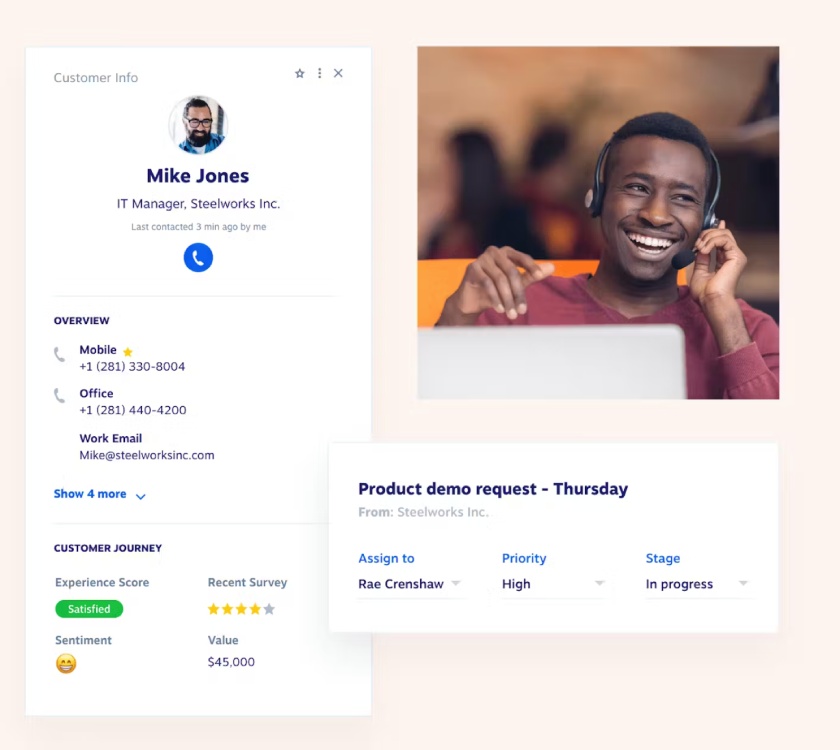
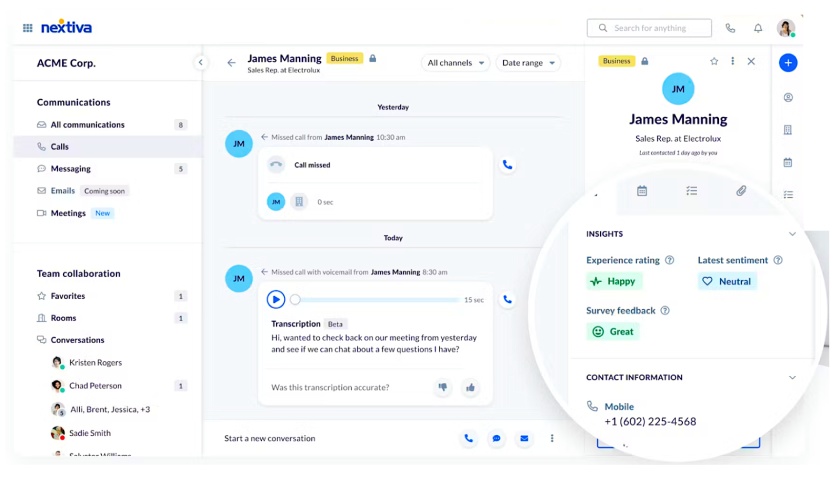
- You need multichannel customer engagement tools: Sales managers can use Nextiva to help their sales reps place more calls. The product includes customer-facing applications like a mobile app, a built-in phone to place and receive calls, a video meeting scheduler, and live chat tools. All these features help sales teams engage with leads and customers while improving collaboration and communication.
- You need omnichannel collaboration tools: Nextiva’s starting plan, Essential, already includes unlimited high-definition (HD) voice and video calls for only $18.95 per user monthly. It has file-sharing tools, a contact directory, shared calendars, and virtual meetings. Aside from lead nurturing, you can use all these features for individual or team collaboration, especially for field and remote salespeople.
- You need sales management software with robust email features: Nextiva can be integrated with Microsoft Outlook, Salesforce, HubSpot, and Zendesk to take advantage of their robust email features. However, Nextiva lacks email capabilities with only voicemail to email notifications available.
- Alternative: Apollo.io offers unlimited email credits and AI-assisted email writing for your lead nurturing, sales outreach, and team collaboration for free. The Basic plan is equipped with email open and tracking that allows users to track the performance of email marketing campaigns. You can see the subject lines and email messages that lead to the highest open and click rates.
- You need a more affordable Microsoft Teams integration: Sales teams wanting to integrate Nextiva with Microsoft Teams for sales collaboration must subscribe to the Enterprise plan at $32.95 per user monthly. This can be expensive for some users.
- Alternative: Zoho CRM offers Microsoft Teams integration across all paid plans. This means that you can subscribe to Zoho CRM’s Standard plan at $14 per user, monthly, which is more than half the price of Nextiva’s Enterprise plan.
Nextiva Pricing Plan & Overview*
**Pricing is based on annual billing on a per-month breakdown of the plans for individuals and small teams or the Customer Conversation Suite. Monthly billing is also available for a higher cost. While we update pricing information regularly, we encourage our readers to check current pricing.
Our Expert Opinion
Nextiva is a voice-over-internet-protocol (VoIP) phone system, call center, and collaboration platform built into one. It is the best sales management software with omnichannel communication tools for managers and reps, allowing virtual meetings in one app. This sales management system software also has SMS communication options, contact data storage, call activity reporting, and integrations with popular CRMs like HubSpot.
UpLead: Best for B2B Lead Source
Pros
- It offers 95% data accuracy guarantee for lead generation lists and email verification.
- Easy to filter and purchase B2B leads are based on company and contact data.
- Technographic feature lets users see the software products that a lead company uses.
Cons
- It lacks a free plan and only has a 7-day free trial.
- Costly monthly starting price of $99 per user and buyer intent is only available in the Professional Plan (custom pricing).
- Buyer intent data and competitor intelligence require a Professional plan at custom pricing.
Why I chose UpLead
UpLead gives sales teams access to verified business contact data with advanced filtering capabilities. In my testing, it made it much easier to build targeted prospect lists using criteria like job title, industry, company size, and location instead of relying on broader, less qualified lead lists.
Aside from that, UpLead includes data enrichment tools and technographic insights that show the technology stacks companies are using. That extra context can help sales teams personalize outreach and identify businesses that are a better fit for their products or services. While UpLead is not a full CRM or sales management platform on its own, it is a valuable tool for teams that need cleaner B2B data and more precise prospect targeting to support outreach and sales campaigns.
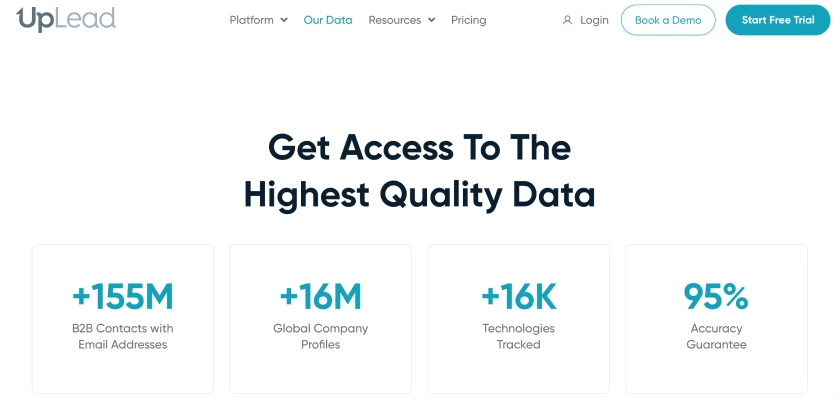
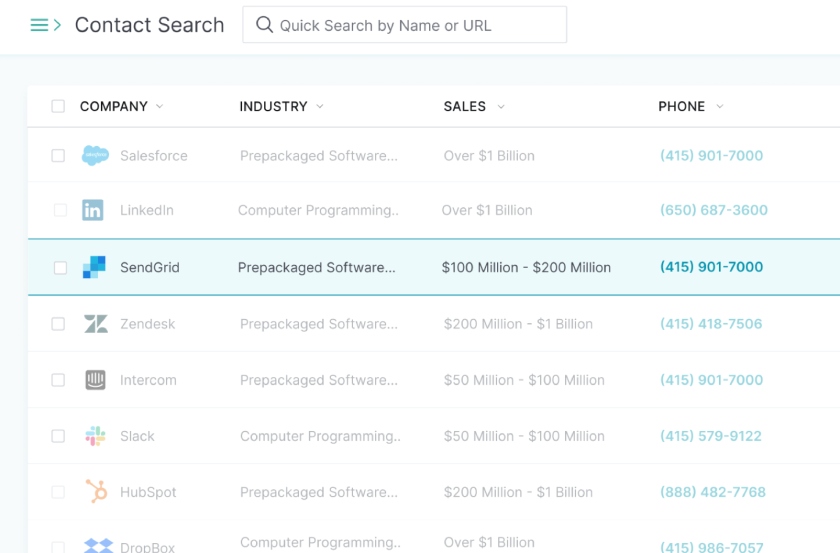
- You want to obtain clean and accurate contact data: UpLead provides sales teams with a 95% data accuracy guarantee for sales enablement, lead generation, and marketing. You acquire only the best leads with the highest chance of converting to paying customers with 50 search filters for running advanced searches.
- You need an intuitive sales database with technographics: This business-to-business leads database has a simple interface. UpLead’s technographic feature can inform your sales enablement strategy, giving you a full scope of the solutions leads use. Sales teams use technographic insights to uncover opportunities, showcase your unique selling points, and demonstrate why your solutions outshine
- You’re looking for free sales management software with a buying intent feature: One of the main downsides of UpLead is the lack of a free option. It also has a high starting price starting at $99 per user monthly. Moreover, the buying intent data is only available in the highest plan, the Professional Plan (custom pricing). UpLead’s plans can be costly for startups and budget-restricted small businesses.
- Alternative: Apollo.io offers a free plan with the buying intent feature already included, with a three-intent topic limit and intent filters. Buying intent lets you filter company searches to those interested in your products and services.
- You need revenue intelligence and forecasting tools: UpLead is equipped with supporting revenue features like buyer intent, technographic tools, and competitor intelligence. However, this software management tool doesn’t have specific revenue tools such as sales intelligence, forecasting, and reporting.
- Alternatives: Clari and Gong.io are our recommended industry-specific revenue software systems. The Clari Integration Hub unites partner solutions across the end-to-end revenue process, optimizing and accelerating time to revenue. Gong.io has built-in revenue intelligence that can be extended through its integration capabilities via Zapier.
Free trial: 5 credits for 7 days
UpLead Pricing Plan & Overview*
*Pricing is based on annual billing on a per-month breakdown of the plans for individuals and small teams. Monthly billing is available for a higher cost. It comes with a seven-day free trial with five credits. While we update pricing information regularly, we encourage our readers to check current pricing.
Our Expert Opinion
UpLead is a B2B database that sales managers can use to supply sales reps with reliable lead data for sales enablement, outreach, and marketing campaigns. You can filter out B2B leads based on job titles, industry, location, and company size to meet their desired customer profiles. Users can auto-enrich data sets and determine the technology stacks a company is using.
Clari: Best for Sales Revenue Forecasting

Pros
- It has revenue analytics capabilities with data capture for sales forecasting.
- It has mix-and-match features and modules (modular design-based fee).
- It has responsive customer support.
Cons
- It lacks transparent pricing; users need to sign up for a demo to request a custom quote.
- It has a steep learning curve for new users; configuring settings and integrating with other apps can be difficult.
- It lacks customization features like color labels for columns and viewing options.
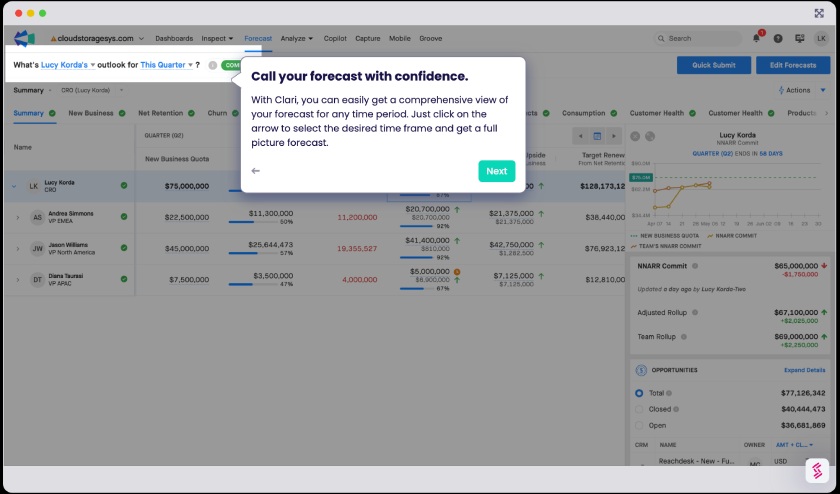
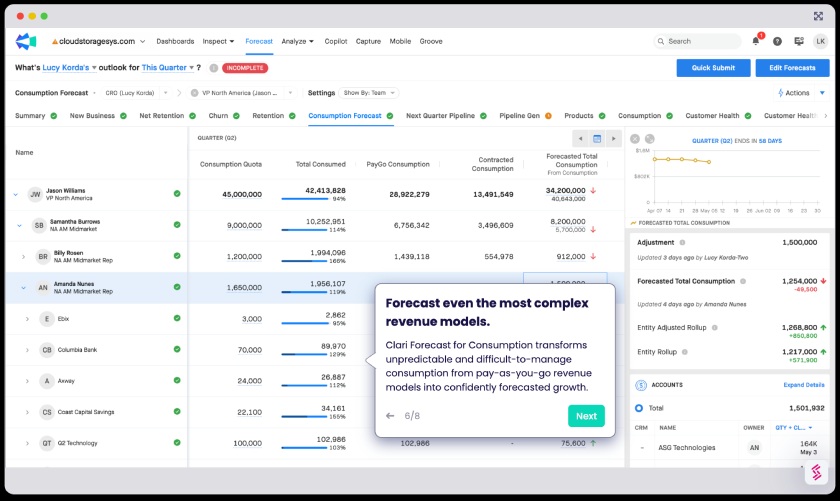
- You need a revenue database with forecasting features: Clari is an AI-powered revenue intelligence platform you can use to determine what’s happening with marketing, sales, and customer success teams. Its Revenue Database (RevDB) and sales forecasting features like data capture and analytics optimize sales process operation and business revenue.
- You want customized sales software: Clari is customizable, enabling you to add and remove modules for rapid deployment without disrupting system operations. If you have a startup business, you can begin with a basic configuration to reduce upfront costs. Then add modules as your company grows to use this software for sales management.
- You need a sales management tool with transparent pricing: Clari has custom pricing. You need to contact the provider for the quote, which is inconvenient for busy business owners and those who simply want transparent pricing.
- Alternative: Apollo.io, HubSpot, UpLead, and Freshsales offer transparent pricing. Startups can try free plans Apollo.io, Freshsales, and HubSpot to test the features before purchasing.
- You need simple sales software with revenue features: Clari is a sophisticated platform, which can be challenging to set up and navigate.
- Alternative: Gong.io is an easy-to-use, industry-specific tool with revenue capabilities. The sales forecasting tools are highly intuitive, too.
Clari Pricing Plan & Overview*
Clari offers a mix-and-match or a combination of features and modules for a customized system. The Clari Foundation’s main features, like dashboards, reporting, analytics, and AI forecasting, are included in all products without a platform fee. The Copilot module (coaching, revenue conversation, and intelligence) costs $1,080 to $1,320 per agent annually. Pricing for all the other modules is customized.
Clari Mix-and-match
Cost:
- Contact the provider for a custom quote
Key Features:
Clari Foundation (Included with all products without platform fee)
- Automated activity capture and relationship intelligence
- Dashboards, reporting, and analytics
- Single sign-on and self-serve admin
- CRM connector plus integration with revenue-critical tooling
- Unlimited number of customizable fields
- Clari Revenue Database (RevDB) with bi-directional sync, time-series snapshotting
- Deep Clari support with Premier Success
- AI deal scoring, forecasting, and RevAI workflow boosters
- RevCadences, certifications, and in-app guidance
Clari Modules
- Inspect includes managing deals, accounts, reps, and teams with pipeline analytics
- Groove by Clari
To engage prospects and buyers at scale with automation, scheduler, email templates, sequences, Groove dialer plus short messaging service (SMS) - Align to accelerate buyer or seller deal cycles
- Copilot for coaching reps with insights and alerts, including call recording and coaching
- Forecast to predict and influence your number with predictive analytics
- Capture with automatic data writeback to CRM for contacts, email activity, etc.
*While Clari offers custom pricing information, we encourage our readers to verify pricing independently to keep updated on any changes in pricing structure and product features.
Our Expert Opinion
Clari is notable for its revenue intelligence tools with mix-and-match modules for a tailored sales software system. View predictive analytics and real-time reports to create a repeatable, scalable forecasting process for business revenue growth. While Clari has unclear pricing, its modular design reduces upfront costs, especially if your business requirements frequently change.
Gong.io: Best for Simplified Sales Forecasting

Pros
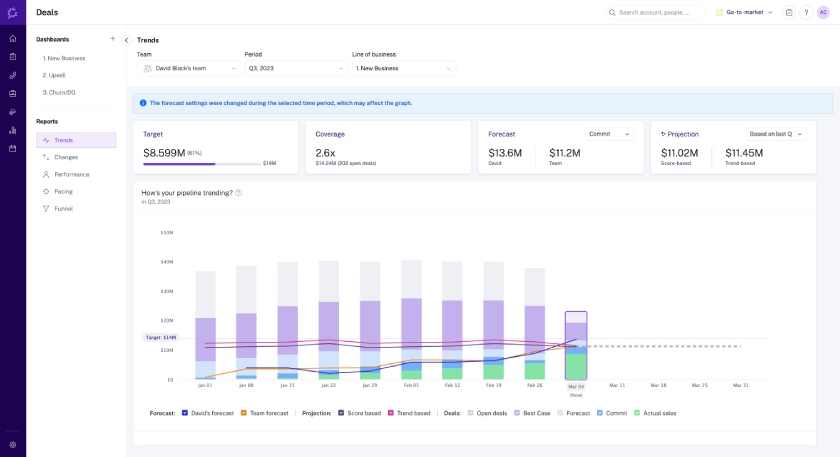
- It has a user-friendly interface and intuitive sales forecasting tools like AI-powered projections and automated workflows for quick data access.
- Users can build personalized coaching programs based on data insights on deals and individual rep activity.
- Data collection from multiple tech stack sources include CRMs, phone systems, performance management software, and email tools.
Cons
- Pricing is unclear; you must contact the sales team for a quote.
- CRM integrations are limited to HubSpot, Salesforce, and Microsoft Dynamics 365.
- Integration with customer success software is only available for Gainsight, Productboard, and Zendesk.
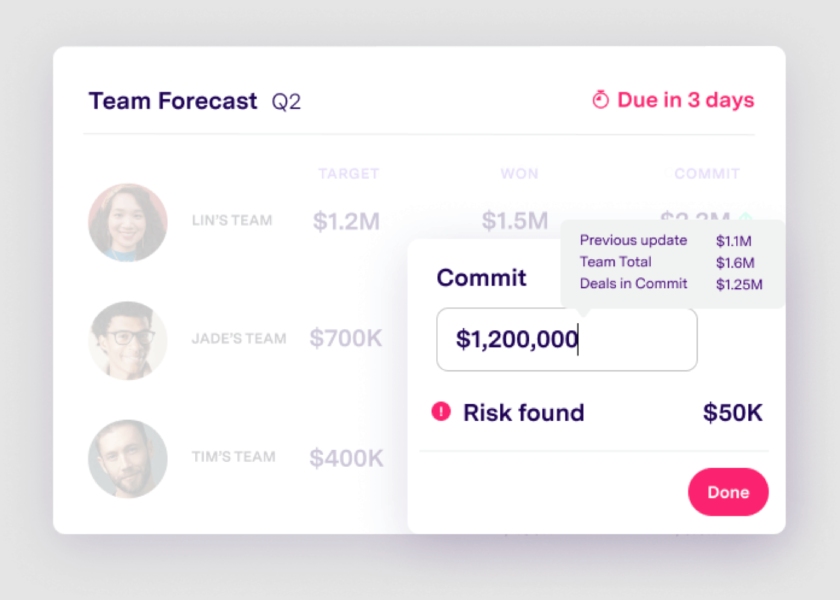
- You need user-friendly forecasting features: Gong.io has a modern yet simple and intuitive interface, ideal for smoothly navigating complex tasks like forecasting. It leverages over 300 unique signals to forecast deal outcomes. With AI-powered projections, sales teams can quickly determine what strategies to prioritize and streamline execution with automated workflows to resolve deal risks and track progress.
- You want to create insights-driven customized coaching programs: Gong.io lets you design coaching programs based on sales rep performance and activities. AI-powered coaching gives you total visibility into common topics and turns data insights into winning playbooks and deals.
- You want a sales management system with transparent pricing: While Gong.io has great sales features like revenue forecasting, unclear pricing could be a huge drawback. They would rather choose software with transparent pricing to avoid the hassle of contacting the provider for a sales talk.
- Alternative: Zoho CRM, HubSpot, Apollo.io, and Freshsales are our top picks for transparent pricing. These providers also offer free plans and scalable paid plans that cater to any small business budget.
- You need a sales management tool with robust CRM integrations: Gong.io doesn’t charge extra for integrations. Sales teams can integrate their existing tech stack and have 360-degree visibility into their deals for free. However, CRM and other third-party integrations are limited.
- Alternative: If you’re looking for more advanced features, excellent alternatives include HubSpot and Freshsales. These general-use CRMs can be integrated with payment processing, inventory management, and project management software systems.
Gong.io Pricing Plan & Overview*
Gong.io offers licenses per recorded user, with a platform fee based on the number of users supported. The prices range from $1,050 to $1,600. Get up to 15 percent discount for 50 users and above. Get in touch with Gong.io for a breakdown of license types and features.
Cost:
- Contact Gong.io for a quote
Key Features:
- AI-powered insights into customer interactions
- Sales engagement module
- Revenue intelligence
- Ask anything (generative AI)
- Forecasting
- Sales coaching module
- Analytics and reporting
- Auto-dialer and call recording
*While Gong.io offers custom pricing information, we encourage our readers to verify pricing independently to keep updated on any changes in pricing structure and product features.
Our Expert Opinion
Gong.io is a simple sales forecasting tool because of its intuitive interface and easy-to-learn features. New users can quickly see the information they’re looking for and analyze all data points in deals, providing the most reliable forecasts on the market. This intelligence tool takes data from CRMs, communication systems, performance management tools, video conferencing software, and calendar platforms to identify gaps and address risks early.
How We Evaluated the Best Sales Management Systems
Sales management consists of various responsibilities, like monitoring deal activity, managing individual rep performance, and supplying team members with resources to succeed. That said, we divided our evaluation into categories of sales management systems that can assist managers in overseeing and optimizing their operations:
- CRM for Sales Management
- Project Management Software
- Sales Enablement Solutions
- Sales Analytics Tools
Once divided, we made a more direct comparison of each software for sales management within each category using the following criteria:
20%
Advanced or Niche Features
25% of Overall Score
We carefully considered the total costs and pricing options when assessing the best sales management software. Additionally, we determined the availability of a free plan or forever-free forecasting tools and entry-level pricing options. We also confirm whether or not the provider offers monthly billing plans.
30% of Overall Score
We assessed the functional capabilities of each sales management software for small businesses in terms of built-in calling, workflow automation, reporting and analytics, and customizable pipelines. Specifically, we checked each provider’s sales reporting tools, forecasting and analytics, activity monitoring, and sales automation tools. The third-party integration options were also evaluated.
20% of Overall Score
The advanced features we looked for when evaluating the best sales management software solutions include lead management, email sequencing, sales tracking, gamification tools, and sales forecasting. We also determined if the providers offer collaboration tools like file sharing and virtual meeting features.
10% of Overall Score
We considered the selection of support channels available (live chat, phone, email, and self-service resources) and customer service hours.
15% of Overall Score
We leveraged the perception of how real users feel toward each product based on their reviews. These helped us evaluate how they like the product’s features, the value users have extracted for the price paid, and the ease of use when operating the features and navigating the interface.
*Percentages of overall score
Frequently Asked Questions (FAQs)
The best sales management software has performance tracking, analytics, and omnichannel collaboration tools. It helps sales teams overcome silos, particularly a lack of communication and streamlined team management. Moreover, a good sales management system is easy to use and provides excellent customer support.
The best sales management software depends on your needs. While Zoho CRM and Freshsales are our top picks, the best choice for you may be a different provider if you’re not looking for a CRM system. UpLead is great for generating B2B leads, while Clari is an excellent tool for revenue forecasting.
All types of businesses can benefit from sales management. Whether you’re a solo entrepreneur, a startup, or a small and midsize business (SMB), handling your sales transactions and processes using the right techniques and tools can save you time, effort, and resources. This allows sales teams to focus more on lead nurturing and closing deals for revenue growth.
Bottom Line
Sales management software helps managers address the challenges of managing their teams. It helps resolve gaps in rep performance, sales forecasting, task management, engagement, and other related silos. Zoho CRM is our top pick for its comprehensive features at scalable, reasonably priced plans. Depending on your use case, one (or a combination) of these sales management products can help you get the most out of your sales force.
Source link