How to Conduct a Payroll Audit [+ Checklist & Video]

A payroll audit is a structured review of your payroll records, tax filings, employee classifications, and internal controls to ensure accuracy, prevent fraud, and stay compliant with federal and state laws.
Payroll compliance is getting more complicated. In the 2025 Global Payroll Complexity Index (GPCI) by Strada, the U.S. jumped 17% from its 2023 ranking to enter the top 10 most complex countries for payroll processing. For small businesses, this rising complexity increases the risk of tax penalties, wage violations, and costly back-pay corrections.
Payroll mistakes can trigger IRS fines, Department of Labor investigations, employee disputes, and reputational damage. A payroll audit helps you catch issues early, whether they involve overtime miscalculations, incorrect tax withholdings, worker misclassification, or unauthorized payments.
In this guide, we walk you through exactly how to conduct a payroll audit step by step. You’ll also get access to our free, customizable payroll audit checklist to help you review pay data, tax payments, and bank reconciliations with confidence.
Prefer a visual walkthrough? Watch our How to Conduct a Payroll Audit video in the Payroll Video Library for additional guidance and practical examples.
Step 1: Determine the timeframe and process for your payroll audit
Key takeaway: Define what period you’re reviewing and what controls you’re testing before you begin. A clearly scoped audit prevents gaps, duplication, and overlooked compliance risks.
Start by identifying the timeframe you’ll audit. Most businesses conduct a full payroll audit annually. However, if this is your first review—or if you’ve recently hired remote employees, changed payroll providers, or experienced rapid growth—consider quarterly mini-audits to catch issues early.
Next, define the scope of your audit:
- Which pay periods will you review?
- Which systems are involved (payroll, HR, time tracking, accounting)?
- Which compliance areas will you test (overtime, tax withholdings, worker classification)?
- Who is responsible for pulling reports and validating data?
If possible, avoid assigning all audit tasks to the same person who processes payroll. Separating payroll processing from payroll review reduces the risk of undetected errors or fraud and strengthens your internal controls.
Use our Payroll Audit Checklist to map out what you’ll test, when it will happen, and who is accountable for each step.
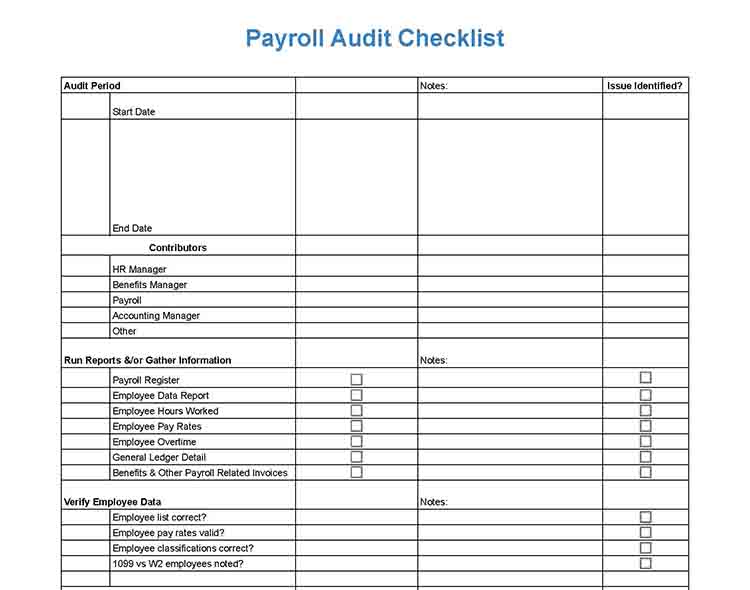
Thank you for downloading!
Step 2: Develop a spot-checking strategy
Key takeaway: Reviewing a targeted sample of employees and pay periods allows you to test pay accuracy, overtime compliance, and tax calculations without auditing every payroll run.
Instead of examining every transaction, select 5% to 10% of employees and review at least one full pay period for each. If you have fewer than 20 employees, review a minimum of three to five employee files.
If available, your sample should intentionally include higher-risk categories, such as:
- Nonexempt employees who earn overtime
- Employees with bonuses, commissions, or shift differentials
- Recently hired or terminated employees
- Employees with wage garnishments or benefit deductions
For each selected employee, verify:
- Pay rate matches the approved compensation record
- Hours worked match timekeeping data
- Overtime is calculated according to federal and state law
- Tax withholdings align with the employee’s W-4
- Any manual adjustments are documented and approved
This approach tests the areas where payroll errors most commonly occur, such as overtime, tax withholding, classification, and manual overrides, without requiring a full transaction review.
Step 3: Run reports for employee and payroll data
Key takeaway: Pulling system-level reports that summarize wages, taxes, and deductions for the audit period allows you to verify pay accuracy, tax compliance, and employee classifications across your payroll system, not just individual paychecks.
For the timeframe selected in Step 1, pull these standard reports from your payroll system:
- Payroll Register: Gross pay, overtime, bonuses, taxes withheld, deductions, and net pay.
- Employee Pay Rate Report: Pay rate, pay type (hourly/salary), exempt vs. nonexempt status, and hire date.
- Time & Attendance Report: Hours worked, overtime hours, PTO used, and manual edits.
- Payroll Tax Liability Report: Federal income tax, FICA, FUTA, and state and local tax withholdings.
- Deduction/Benefits Report: Health insurance, 401(k), garnishments, and other pre- and post-tax deductions.
- Payroll Journal or general ledger (GL) Report: Payroll expenses and tax liabilities posted to your general ledger.
Export these reports to Excel or CSV so you can sort, filter, and cross-check data across systems. If you process payroll manually, compile equivalent summaries using pay stubs, timesheets, Form 941 filings, and your accounting records.
These reports form the foundation for the verification steps that follow.
Run an employee roster report and confirm that every person listed is currently employed and authorized to be paid. Check:
- Name and employee ID
- Job title and department
- Hire date and termination date (if applicable)
- Employment status (active vs. terminated)
Look for terminated employees still marked active, duplicate records, or unfamiliar names, as these can signal payroll errors or “ghost employee” fraud.
If you use separate HR, timekeeping, and payroll systems, reconcile employee lists across platforms to ensure they match. Additionally, confirm that independent contractors are classified correctly and not set up as W-2 employees in payroll.
Compare each employee’s approved compensation to what is actually being paid. Pull your Employee Pay Rate Report and cross-check it against the Payroll Register for the same period. Confirm:
- Hourly rate or annual salary matches the signed offer letter or the latest pay change approval
- Exempt vs. nonexempt classification is correct
- Overtime rate (typically 1.5x) is calculated from the correct base rate
- Any recent raises, bonuses, or adjustments were properly documented and authorized
If there’s any discrepancy between the HR record and payroll output, investigate and support it with written approval.
Confirm that employees are paid for the correct pay period and that hours worked match hours paid. Do this by comparing your Time & Attendance Report to the Payroll Register for the same pay period. Verify:
- Pay period start and end dates align across systems
- Regular and overtime hours match time records
- PTO and leave hours are accurately reflected
- Any manual time edits are documented and approved
Next, confirm payroll is processed and distributed on the scheduled pay date. Many states have minimum pay frequency laws, and late payments can result in wage claims, penalties, or interest assessments. Keeping pay periods and payment dates accurate protects both compliance and your cash flow.
Payroll rules vary significantly by state. Some states allow mandatory direct deposit, while others require employee consent. Many states regulate minimum pay frequency, timing of final paychecks, overtime calculations, and permissible wage deductions.
As part of your audit, confirm that your payroll practices (pay dates, payment methods, overtime rules, and final paycheck timing) comply with the laws in every state where you employ workers.
For state-specific guidance, review our state payroll directory. You can also reference our guide to key federal and state payroll compliance laws to ensure your policies align with current regulations.
Step 4: Compare hours worked against timecard data
Key takeaway: Cross-checking time records against payroll ensures employees are paid accurately for all hours worked and that overtime is calculated correctly. It can also uncover issues like unpaid overtime, buddy punching, or other instances of timekeeping fraud.
Pay close attention to nonexempt employees, as overtime miscalculations are a common source of wage claims and Department of Labor penalties.
This step helps detect unpaid overtime, duplicate payments, unauthorized time edits, and potential timekeeping fraud before they become larger compliance issues.
Here are some of the essential data points you should check.
Compare time records to payroll data for the same pay period to confirm employees were paid for the exact hours worked. Review the employee’s timesheet (paper, punch card, or digital time clock) alongside the Payroll Register or pay stub. Verify:
- Total regular hours worked match regular hours paid
- Overtime hours worked match overtime hours paid
- Pay period start and end dates align
- PTO, sick leave, and holiday hours are accurately reflected
For example, if an employee’s timesheet shows 35 regular hours and 5 overtime hours for a given pay period, the payroll register should reflect 35 hours at the regular rate and 5 hours at the overtime rate. If payroll shows 40 regular hours instead, that discrepancy needs to be investigated and corrected.
Document any differences and determine whether they were data entry errors, system configuration issues, or unauthorized edits.
Also review manual overrides in your timekeeping or payroll system. Adjustments for missed clock-ins, retroactive corrections, or bonuses should be clearly documented and approved. Undocumented edits increase the risk of payroll errors or timekeeping fraud.
Overtime errors are one of the most common and costly payroll mistakes.
Under the federal Fair Labor Standards Act (FLSA), nonexempt employees must receive at least 1.5 times their regular rate of pay for hours worked over 40 in a workweek. However, several states impose stricter rules. For example, California requires overtime for hours worked over eight in a day and double time for certain extended shifts.
During your audit, recompute overtime for selected employees:
- Confirm total hours worked in the workweek.
- Identify hours that qualify for overtime under federal and applicable state law.
- Verify the overtime rate is based on the employee’s regular rate of pay, which may include certain bonuses or commissions, not just base hourly wages.
- Multiply overtime hours by the correct rate and compare the result to the payroll register.
How to manually recalculate a payroll transaction for payroll audit
Find a list of your pay runs and choose a few transactions that include overtime pay. For example, if a nonexempt employee worked 45 hours in a workweek at $20 per hour, they should receive:
First, calculate regular wages:
- 40 regular hours x $20 hourly rate = $800 (This covers the first 40 hours worked in the workweek at the employee’s standard rate.)
Next, calculate overtime wages:
- The overtime rate is 1.5 x the regular rate
- $20 x 1.5 = $30 overtime rate per hour
- 5 overtime hours x $30 = $150 (These are the hours worked beyond 40 in the workweek.)
Finally, combine regular and overtime wages:
$800 regular pay + $150 overtime pay = $950 total gross wages
If you operate in restaurants, hospitality, retail, or sales, review variable compensation carefully. Tips, bonuses, and commissions increase compliance risk because they affect both tax withholding and overtime calculations.
Confirm reported tips match POS or tip logs and are treated as taxable wages. If you use a tip credit, ensure it complies with federal and state law. For bonuses, verify the amount matches written approval, is classified correctly, and—if nondiscretionary—is included in the regular rate for overtime.
For commission roles, confirm payments align with the documented commission plan and underlying sales data. You should be able to trace each commission to specific transactions or performance metrics.
Because variable pay impacts overtime and payroll taxes, errors here can result in back-pay obligations or wage claims.
Step 5: Run a general ledger report
Key takeaway: Your payroll records should tie directly to your accounting records. The general ledger confirms that payroll expenses and liabilities were recorded accurately and cleared properly.
Run a payroll-related GL detail report for the audit period. Focus on:
- Wage and salary expense accounts
- Payroll tax expense accounts
- Payroll tax payable accounts (e.g., federal withholding, FICA, state taxes)
- Benefits payable accounts (e.g., 401(k), insurance)
- Payroll clearing or cash accounts
Verify that totals from your Payroll Register match the amounts posted to wage and tax expense accounts. Then confirm that payroll liabilities (taxes and deductions withheld) were cleared when payments were made to tax agencies and benefit providers.
If a payroll amount cannot be traced from timekeeping → payroll register → GL posting → bank payment, investigate the discrepancy. Missing or uncleared entries may signal posting errors, duplicate payments, or unpaid liabilities.
Remember: the GL reflects dollars paid—not hours worked—so your goal here is to confirm financial accuracy and proper reconciliation.
Review both the taxes withheld from employees and the employer taxes your business is responsible for paying.
Start by examining your payroll tax liability accounts in the general ledger. These typically include:
- Federal income tax withheld
- Social Security and Medicare (FICA)
- Federal unemployment tax (FUTA)
- State income tax withheld
- State unemployment insurance (SUI)
- Local payroll taxes (if applicable)
Spot-check several employee Form W-4s to confirm withholding aligns with payroll calculations.
Next, trace the lifecycle of payroll tax transactions:
- Taxes withheld should appear as credits in your tax payable accounts on each payday.
- When you remit payment to the IRS or state agency, those balances should clear as debits.
If you remit taxes quarterly, amounts withheld in January–March should not still appear in the payable account months later. A steadily growing tax payable balance may indicate missed payments, posting errors, or misapplied entries.
If accounts are not clearing properly, review the cash GL account around the payment date. Locate the tax payment transaction and confirm it offsets the correct tax payable account. If it does not, the entry may have been posted to the wrong account and will need correction.
Because payroll tax errors can trigger penalties and interest, reconcile these accounts carefully. If discrepancies are unclear, consult your bookkeeper or CPA to resolve posting issues before they escalate.
Review all non-tax deductions to ensure amounts withheld from employee paychecks are recorded, held, and remitted correctly. Common deductions include health insurance premiums, 401(k) contributions, wage garnishments (such as child support), commuter benefits, and uniform deductions.
For each deduction type:
- Confirm the amount withheld matches the employee’s election or court order
- Verify the deduction appears correctly on the employee’s pay stub
- Trace the withheld funds to the appropriate payable account in your general ledger
- Confirm the balance clears when payment is remitted to the vendor or agency
For example, 401(k) contributions and health insurance premiums should be credited to a benefits payable account on payday and then debited when sent to the provider whether that occurs each pay period or monthly.
If payable balances accumulate without clearing, or if amounts withheld don’t match vendor invoices, investigate immediately. Deduction errors can create compliance issues, vendor disputes, and employee complaints.
Here are some of the employee deductions you should verify.
- Health insurance: Aside from checking whether health insurance deductions have been deducted from the correct employees’ payroll, you should verify that these are being placed in the right insurance payable account and timely payments are being made to the insurance carrier.
- Garnishments: What you’re looking for is whether payroll garnishments are being tracked and deductions are being made against the employees’ paychecks. You should also check if the withheld amounts are paid to the requesting agency on time and from a garnishment payable account.
- Retirement: Verify that the 401(k) employee and employer contributions are being remitted to the plan as soon as administratively feasible (consistent with DOL regulations), and the employer contribution amounts or percentages are correct.
You may want to consider having separate payables accounts for each vendor and deduction type. For example, businesses in states that require employers to provide commuter benefits can set up a separate account for the said item. This makes payroll accounting and payroll auditing easier for you.
Compare your payroll bank account statements to your payroll cash general ledger (GL) account to confirm that all payroll transactions were authorized, accurate, and properly recorded. Check if:
- Each payroll run matches a corresponding bank withdrawal
- No duplicate payroll payments were issued
- Direct deposits align with net pay totals from the payroll register
- Payroll tax payments match amounts remitted to agencies
- No unexplained withdrawals appear in the payroll account
Review outstanding or uncleared checks, particularly final paychecks issued to terminated employees. If a check remains uncashed beyond your bank’s stale-date period, void and reissue it as appropriate. If you cannot locate the former employee after reasonable outreach, follow your state’s unclaimed property (escheatment) laws and remit the funds to the appropriate state agency.
Regular reconciliation helps detect duplicate payments, unauthorized transactions, and compliance issues before they escalate.
Step 6: Look for and document any atypical transactions
Key takeaway: Unusual transactions may indicate errors or fraudulent activity. By documenting these, you create a record that can be reviewed by management, used for future audits, or provided as evidence if legal action is required.
This is where you’re doing a gut check and looking for anything that’s out of the norm. If you see an employee is paid $2,600 every pay period for three months and, all of a sudden, they receive a $5,000 paycheck, you should look into it. If you notice a garnishment payment that seemingly starts all of a sudden, and you have no knowledge of it, dig deeper.
Here are some atypical transactions to look for and monitor.
- Retro pay: This is typically a line item that’s added to an employee’s paycheck when you’re paying them after a payroll mistake has been made in a prior pay period. Maybe they got a raise, but it wasn’t processed on time, or perhaps they forgot to tell you they worked six hours on a Saturday. The applicable retro pay amounts are then added to their current paycheck. However, these transactions should be infrequent.
- Back pay: Back pay is due when you’re ordered by a government agency to pay a person for prior pay period items—such as miscalculated overtime pay, having paid a worker below minimum wage, and docking an employee’s pay illegally. In cases of wrongful termination, back pay may be ordered by the court as part of the judgment. If you find yourself being ordered to pay back pay often, then it indicates that you have an HR or payroll compliance problem in your business that you have to fix going forward.
- Garnishments: Garnishments (like child support) are managed differently in different states, plus the IRS may also garnish a person’s wages for back taxes. You should ensure that the correct amounts are being deducted and paid, and that garnishment documentation is on file for payroll record-keeping purposes.
- Freelancer pay: Review 1099 Form and W-9 Form copies. In addition, you should ensure that your business is not expensing payroll taxes on the amounts paid to freelancers and that your freelancers are classified correctly to avoid tax penalties.
Step 7: Reconcile payroll accounts with bank account
Key takeaway: The total amount withdrawn from your payroll bank account should equal the total payroll you approved. Any difference must be identified and resolved.
Reconcile your payroll bank account to your payroll register totals to confirm that the total amount withdrawn equals the total payroll approved.
In addition to the GL, review the specific bank accounts used for payroll processing and tax payments. These accounts should reflect only authorized payroll-related activity.
Discrepancies at this stage may indicate calculation errors, posting mistakes, duplicate payments, or unauthorized transactions. Reconciling payroll to the bank ensures your financial records are accurate for tax reporting, audits, and business planning.
Here are the data items that you should verify.
Compare what’s in your GL accounts versus the balances and transactions in your bank accounts used for payroll processing—make sure that the data they reflect line up.
Checks that have gone uncashed for a year or more need to be managed according to your state’s escheat laws, commonly known as unclaimed property laws. The check amount belongs to the employee, but how you handle it varies by state. Check your state’s regulations on how to turn over unclaimed funds to a state agency.
Why you need a payroll audit
Payroll audits can help you check the accuracy of your company’s payroll processes. It works as a risk-avoidance tactic to prevent you from making mistakes that may end up being costly to your company and business reputation. For payroll audits, you typically examine and verify data across various software systems and tools that manage your staff data, such as pay rate, overtime rules, pay type (like salary vs hourly), and employee job classification (exempt vs nonexempt).
Auditing also helps you uncover payroll-related fraudulent activity and innocent mistakes. For example, a staff member may have switched to part-time but is still being paid a full-time salary. On the more nefarious side, a staffer with access to payroll and bank accounts can deduct money from one account to pay themselves extra. Your payroll audit will likely catch that.
One of the best practices to avoid potential fraudulent payroll activities is to have separate individuals managing employees, timekeeping, and payroll data. If HR can add a new hire, they shouldn’t be allowed to also make payroll changes. Instead, you need segregation of duties to eliminate any temptation for staffers to steal from you. Payroll audits then verify that your processes are being followed.
Tips for effective payroll auditing
To ensure your payroll audits are effective, here are some tips:
- Make sure you understand payroll laws. It’s important to have a clear understanding of the payroll laws at the federal level, but also in your state and every state where you have a remote employee. Certain jurisdictions have specific rules and regulations for overtime, minimum wage, and employee classification, which could significantly impact your payroll.
- Regularly conduct payroll audits. While the frequency of payroll audits may vary depending on the size and nature of your business, it’s generally recommended to conduct one at least annually.
- Use payroll software. Using automated payroll systems can reduce human errors and make the auditing process simpler. However, it’s important to periodically review the system’s settings to ensure accuracy.
- Work with a professional. If you’re unsure about conducting a payroll audit yourself, consider working with a CPA or other payroll audit professional. They can provide valuable insights and help ensure compliance.
- Be transparent with your employees. Keep your employees informed about the payroll audit process. Transparent communication can alleviate concerns and ensure smooth cooperation from all parties involved.
Payroll audits frequently asked questions (FAQs)
Can I conduct a payroll audit myself?
Yes, whether you’re a small business owner or an HR or payroll employee, you can conduct the audit yourself. However, it’s important to understand the complexities involved, including multiple state laws, if you have remote workers. If you’re not comfortable or familiar with these regulations, consider seeking help from your payroll provider or CPA.
How can I prevent payroll errors in the future?
Implementing a reliable payroll system, providing proper training to those who handle payroll, and conducting regular audits can significantly reduce payroll errors and costs. Keeping updated with changes in labor and tax laws also helps ensure compliance and accuracy.
What are some common payroll errors I should look out for during an audit?
Common payroll errors include incorrect employee classification, miscalculated overtime pay, inaccurate tax deductions, and missed or late payments. These can result in significant penalties if not corrected.
What are the consequences of not conducting regular audits?
Failure to conduct regular payroll audits can lead to undetected errors, overpayment or underpayment of employees, non-compliance with labor and tax laws, and potential legal issues. Regular audits help mitigate these risks.
How can a payroll audit help improve my business operations?
Besides ensuring compliance and accuracy, a payroll audit can reveal inefficiencies in your payroll process. The insights gained from an audit can help you streamline operations, save time, and potentially reduce costs.
Bottom line
You don’t have to wait until year-end to do a payroll audit. Listen to your gut. If something looks or feels off in your accounting system or payroll bank account, it’s time to investigate. After all, it’s your money at risk and your business reputation at stake if payroll violations that you aren’t aware of crop up. By doing regular payroll audits, you can avoid getting fined for late taxes or sued for unfair pay practices.
Source link