Guide for Small Businesses in 2026

Payroll services cost can vary widely depending on the provider you choose, the features you need, and how your business runs payroll. While many solutions advertise straightforward pricing—typically around $30–$50 per month plus $4–$6 per employee—the actual cost is often more layered, depending on pricing structures, add-ons, and the level of support included.
Many small businesses tend to focus on base pricing without fully accounting for how costs scale over time. Factors like payroll frequency, compliance services, and additional HR tools can quickly increase what you end up paying.
This guide breaks down what payroll services typically include, how different pricing models work, and where hidden costs tend to show up, so you can better evaluate your options and choose a solution that aligns with both your budget and your long-term needs.
What payroll service costs cover
Payroll service costs typically cover the systems, compliance processes, and support needed to run payroll accurately and on time. At a basic level, most providers include the following:
- Calculation of wages, overtime payments, and applicable state, local, and federal taxes
- Withholding taxes and other deductions
- Preparation of basic payroll reports (such as payroll registers)
- Access to a payroll system or online self-service tools where employees can view payslips
- Basic customer support
However, not all payroll services are all-inclusive. In many cases, providers charge extra for services that businesses often assume are standard. These can include payroll tax payments and filings, direct deposit processing, paycheck printing and delivery, wage garnishments, time tracking tools, and access to benefits like 401(k) plans or workers’ compensation.
In my experience, this is where payroll costs become less predictable. A provider with a low base fee may exclude critical services, leading to higher total costs once add-ons are factored in.
Because providers package and price these services differently, there isn’t a one-size-fits-all answer to “how much payroll services cost.” You will need to ask what’s included and what isn’t each time to accurately compare options and avoid unexpected expenses.
To know more, head on over to our sections that discuss pricing structures, factors that influence costs, and additional or hidden fees.
Payroll service cost structures
One of the biggest factors that influences payroll services cost is how providers structure their pricing. While most pricing models are based on your employee count, some also factor in how often you run payroll, which can significantly impact your total cost, especially if you pay employees weekly.
When evaluating providers, the pricing structure matters just as much as the base rate. Two providers may appear similarly priced at first glance, but depending on how they charge, you could end up paying very different amounts over time.
Here are some examples:
This is the most common payroll service cost structure. It requires paying an ongoing base fee per month plus an additional per-employee fee. The base fee covers the basic payroll services. Sometimes, this also includes access to online tools to track pay runs and for employees to access their payslips.
Apart from the base fee, the provider will bill you monthly per-employee fees. This can apply to either all of your employees or only to workers paid for the pay period. To avoid unnecessary fees for inactive workers and higher payroll services costs, be sure to clarify the coverage of the per-employee rate before choosing the right payroll solution for your business.
Note that most providers also offer tiered payroll packages with higher packages costing more, and you’re given access to advanced functionalities (like wage garnishment payments). For a basic plan, some providers (such as Patriot Payroll and Wave Payroll) offer low-cost payroll options that cost around $17–$20 per month and $4–$6 per employee. Others (like Gusto and Square Payroll) charge starter monthly fees of $35–$49 and per-employee rates of $5–$6.
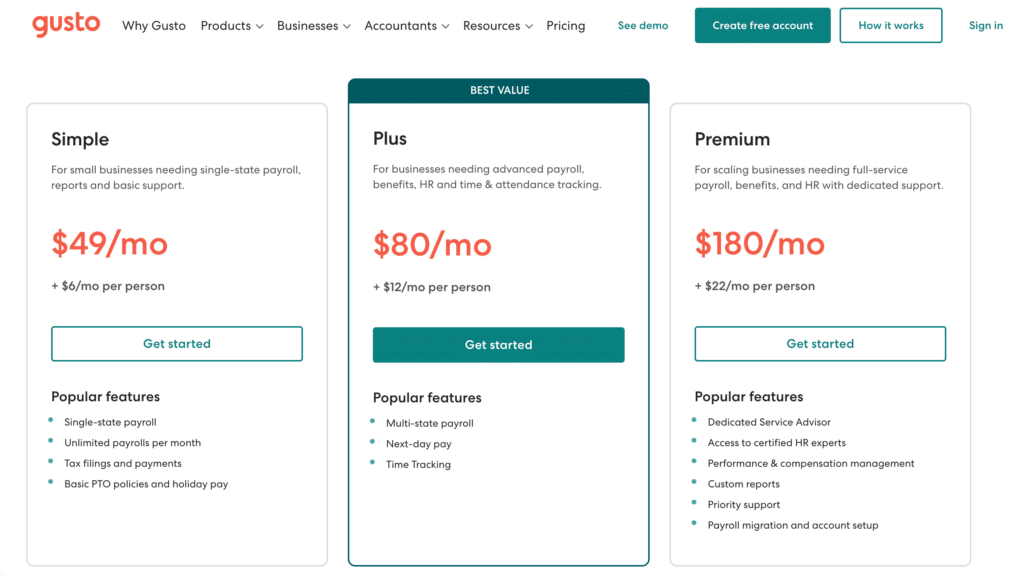
Gusto is one of the payroll providers that charge monthly base and per-employee fees.
(Source: Gusto)
Depending on your company’s payroll frequency, some providers charge fees on a per-pay run basis (either weekly, biweekly, semimonthly, or monthly). Note that this is on top of the per-employee rates. This is great for businesses that only process payroll once or twice a month because they can save on costs compared to those that pay workers every week.
However, providers that follow this cost structure typically don’t have transparent pricing. This means that you won’t likely see the starter fees on their website. You have to contact the provider to discuss your payroll requirements and request pricing details.
An example of this pricing structure is the ADP payroll services cost. Based on a previous quote we received, the provider charges $49 per monthly pay run plus $2.50 for each employee.
There are only a few payroll providers that charge a flat monthly rate per employee. These are usually professional employer organizations (PEOs), which act as co-employers to help handle your day-to-day HR tasks—from processing payroll to administering benefits plans and ensuring that payroll compliances are followed. Companies that offer employer of record (EOR) services (solutions to help you hire and pay workers outside of the US) also have the same cost structure.
For US-only payroll services, you can expect to pay starter fees of $50–$80 per employee monthly. For EOR services, monthly rates start at around $400–$700 per employee.
While this cost structure may be more expensive than the others in this guide, it usually comes with a more complete payroll service package, robust HR support, and access to Fortune 500 benefits plans. Some even offer slightly lower rates if you exceed a specific number of employees.
For example, Justworks offers its basic PEO services at $79 per employee monthly for the first 50 workers (as of this writing).
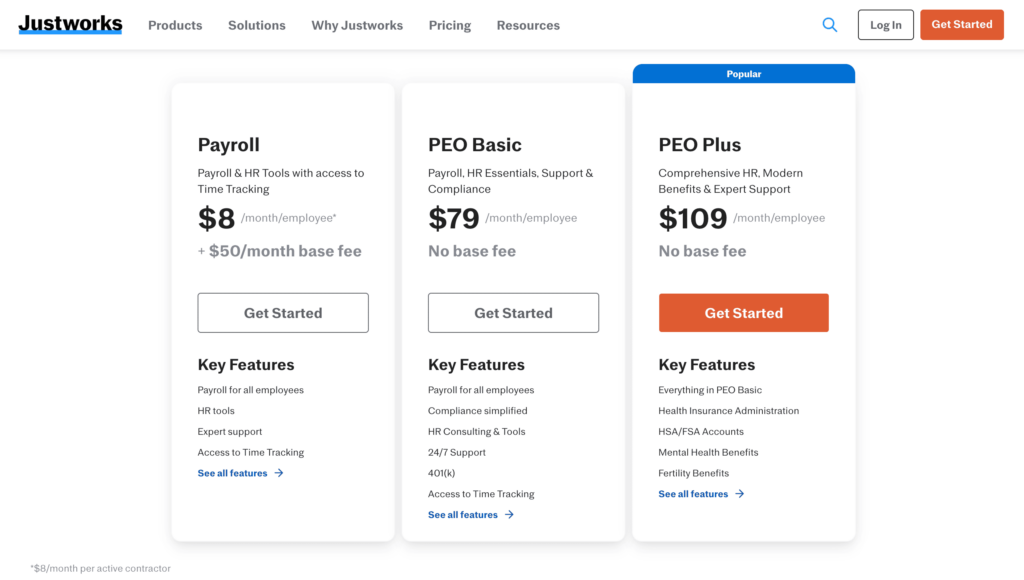
The Justworks flat monthly per-employee fees cover both payroll and HR services.
(Source: Justworks)
In this scenario, instead of paying the applicable fees every month, you pay the provider a lump sum amount upfront, which covers all the expected fees for the entire year. The cost of payroll services is also typically reduced due to a special discount.
The discount varies, depending on the provider, but you can typically save up to 20% if you pay annually. Note, however, that some providers don’t have discounted pricing. Instead of a discount, they offer either one or two months free if you sign up for an annual plan.
Factors that impact payroll service costs
Aside from the provider’s pricing structure, several other factors can influence the cost of payroll services. Here’s a list of the common factors.
- Your business location: Ensure that the state where your business operates is covered by the provider’s payroll services. To avoid unnecessary costs for multi-state pay runs, check if there are add-on fees or if this feature is included in the base plan.
- Employee count: The more employees you have, the higher payroll service fees you have to pay. If you plan to grow your workforce in the next few months or within the year, let the payroll provider know, and you may be able to negotiate better rates.
- Types of workers: Some providers offer different rates, depending on the types of employees you have. For example, as of this writing, Gusto charges starter fees of $49 per month + $6 per person per month if you pay both employees and contractors. This goes down to $35 + $6 per worker monthly if you only need to process contractor payments.
- Payroll schedule: Your pay periods, or the number of times you process payroll, can influence costs. If you run payroll every week, you have to pay higher payroll service costs as opposed to running it once a month.
- Required payroll features: Providers offer different packages with a variety of functionalities. The starter plans usually come with basic features to calculate wages and deductions, withhold the applicable federal and state taxes, and track time off. However, some solutions (such as wage garnishment payments, payroll tax payments and filings, and access to time tracking tools) either cost extra or are included in higher tiers. These can contribute to the cost of payroll services, especially if you consider them essential to your business.
- Payment method: Check if there are add-on fees for payments made through direct deposit or paper checks. If you prefer direct deposits, ask the provider about the processing timelines. Most offer two- and four-day direct deposits in their basic plans, but you may have to upgrade to a higher tier if you prefer next- or same-day payouts.
Additional or hidden payroll service fees
While most providers are generally straightforward about their fees, there can be services or details that you might overlook. You could find yourself having to pay add-on fees for features or solutions that aren’t listed on the provider’s main pricing plans. However, knowing what these are and asking about them can help you plan your payroll services budget for the quarter or year. Here are some of the common additional or “hidden” payroll service costs.
- Setup and implementation: Check if the provider charges fees to set up your account. There could also be add-on costs if they offer to migrate your employee and payroll data into their system or conduct user training on how to utilize their services and online solutions.
- Minimum employee limits: While most providers charge per-employee fees, some have additional headcount requirements if you want to use its services. This information is typically listed on the provider’s pricing page, but it may not be easily visible. If you don’t want to pay for extra user seats that you don’t need, check if the payroll plan you want requires a minimum number of employees.
- Paycheck signing: For paper check payouts, don’t forget to ask what services are included in the add-on fee. Does it cover the entire process—from preparing the check to stuffing it inside an envelope and delivering it to your office? Does the provider also charge additional fees for signing paper checks?
- Tax form delivery: Most providers offer digital versions of employee tax forms (Form W-4) that workers can access online. However, you likely have to pay extra if you want the provider to print the forms and send them to employees via mail. Note that this cost is separate from mailing and postage fees.
- Participation fees for employee benefits plans: Some providers offer an all-in-one payroll service that includes access to employee benefits. While you have to pay the insurance premiums, check if there are participation fees for the plans you selected.
- Third-party software integrations: If the provider’s system supports payroll software integrations, there may be add-on fees for connecting third-party solutions (such as time tracking or accounting software). While it may seem like an unnecessary expense, the integration can help you avoid potential errors from manual data inputs, given the seamless data transfers between the two systems.
- Tax guarantee: Most providers offer a tax guarantee, wherein it will cover all penalties for late or erroneous tax filings if they make a mistake. While this is typically free, it’s best to inquire if there are additional charges for it or if the tax guarantee is only available in a higher payroll package.
- Access to HR advisors and HR resources (like compliance updates): Does the provider offer access to HR advisory services and compliance updates? This can be essential to your business, especially if you don’t have an in-house HR or payroll expert. Check how much they charge for the service and whether it is priced on a per-call basis or a fixed amount per month.
- Customer support: Be mindful of any add-on fees for customer support. Some providers may offer email and chat support, but charge extra for live phone assistance. Others have a paid priority support service, which can include access to a dedicated payroll specialist or a direct phone number to contact.
Top payroll services: Cost comparison
For a peek at the fees that top-rated payroll services charge, below is a table showing each provider’s starter payroll services cost. Note that these fees come with basic services and tools for handling direct deposit payments, managing employee data, and calculating wages, taxes, and deductions. You may need to pay extra or upgrade to a higher tier if you want advanced HR functionalities.
Payroll services you actually need (Based on business size)
At this stage, simplicity matters more than breadth. Most small businesses only need reliable payroll processing and basic compliance support.
Paying for advanced HR features too early is one of the most common ways businesses overspend on payroll. A five-person startup using a premium payroll and HR bundle may end up paying significantly more for features like performance management or benefits administration that they won’t use yet.
This is where payroll complexity starts to increase. Compliance risks grow, and manual processes like tracking hours or filing taxes become harder to manage efficiently.
At this point, services like automated tax filings and time tracking integrations start delivering real value by reducing errors and saving time. A 25-person company relying on basic payroll tools may begin experiencing inconsistencies or delays, making it worth upgrading to a provider with stronger automation and compliance support.
Payroll becomes more operational than administrative. Efficiency, accuracy, and system integration become essential as your workforce grows.
Here, you’re essentially paying for scalability. Integrations with accounting systems, HR tools, and benefits platforms can streamline processes and reduce manual work. A growing company managing multiple departments or pay schedules will benefit more from automation and integrations than from choosing the lowest-cost provider.
At this stage, payroll is closely tied to compliance, risk management, and employee experience. Errors can lead to penalties, legal issues, or employee dissatisfaction. More robust solutions with dedicated support, compliance alerts, and multi-state or global payroll capabilities are necessary.
Tips to reduce payroll service costs
There’s only so much you can do to minimize payroll service costs since the fees you pay are usually based on the number of employees you have and the features you need. However, here are some tips to help you make the most of what you spend on payroll services.
1. Evaluate your payroll needs regularly: Review your payroll service plan often and check if the solutions offered still fit your needs. For example, you may have signed up for a single-state payroll plan but would soon need multi-state pay processing. This might require paying add-on fees or upgrading to a higher tier. Take this chance to negotiate rates, check other options, and compare fees with similar providers.
2. Take advantage of process automation tools: Look for solutions that automate processes, as these can help you save time and money. It can be online self-service tools, which automate how you capture pay-related employee information (such as tax status changes and benefits information updates). You can also look for time tracking automation functionalities to enable easy collection of employee attendance data for payroll processing.
3. Get multiple quotes: Do your research and get quotes from multiple providers so you know how much payroll services cost. Evaluate each quote, compare services, and do sample cost computations even if the pricing structures are different. Don’t forget to check online user reviews. Their feedback can give you an idea of whether or not the provider is equipped to handle your requirements, including the quality of service offered.
Bottom line
When evaluating payroll services cost, always go beyond comparing monthly fees. Know what you’re actually paying for and how those costs will scale with your business. Always check pricing structures and add-on services, and how they match your payroll complexity.
In my experience, the biggest cost mistakes happen when businesses focus too heavily on base pricing without accounting for hidden fees or future needs. Evaluate what’s included, how providers charge, and which features you truly need so you avoid unexpected expenses and choose a solution that grows with you.
If you’re ready to explore your options or benchmark pricing, check out our guides to the best payroll software and top payroll services. For more practical tips on managing employee pay, you can also read our guide to payroll management.
Source link