Guide for an Automated Payroll System

Payroll automation has evolved from being just a convenience into a turning point for growing businesses. As teams expand and compliance requirements become more complex, managing payroll manually can quickly shift from a simple task to a source of risk.
Payroll automation uses software to streamline how you calculate, process, and report employee pay. It handles wages, taxes, benefits, and deductions automatically, reducing errors, saving time, and helping businesses stay compliant. But more importantly, it allows business owners and HR teams to move away from repetitive administrative work and focus on higher-value priorities.
Key takeaways
- Payroll automation reduces manual work, freeing up time and lowering administrative costs.
- As payroll complexity increases, automation becomes essential for maintaining compliance.
- Automating calculations and tax handling significantly reduces errors and costly corrections.
Types of payroll automation software
There are many payroll software available in the market but they don’t all solve the same problem. The right one depends on how complex your payroll needs have become. Small businesses often start with basic payroll tools but quickly outgrow them as they add employees, locations, or more nuanced pay structures.
Below, we break down the main types of payroll automation software to help you understand which option best fits your current stage, and where you might need to upgrade as your business scales. You can also explore our detailed guides to compare providers tailored to small business needs.
Cloud-based payroll software
Cloud-based payroll software is typically the first step into automation for small businesses. These tools handle core payroll functions, like calculating taxes, running payroll, setting up direct deposit, and offering employee self-service portals without requiring complex setup or infrastructure.
Most platforms start at around $5 per employee per month, plus a base fee of about $40, making them a cost-effective option for teams looking to move away from manual payroll.
When evaluating cloud-based payroll software, look beyond basic functionality. We recommend prioritizing features that support growth and reduce manual intervention over time, such as:
- Unlimited and automated pay runs
- PTO tracking and leave management
- Automated tax filings and year-end reporting
- Support for both W-2 employees and contractors
The right solution should not only handle payroll today but also scale with your business as compliance requirements and workforce complexity increase.
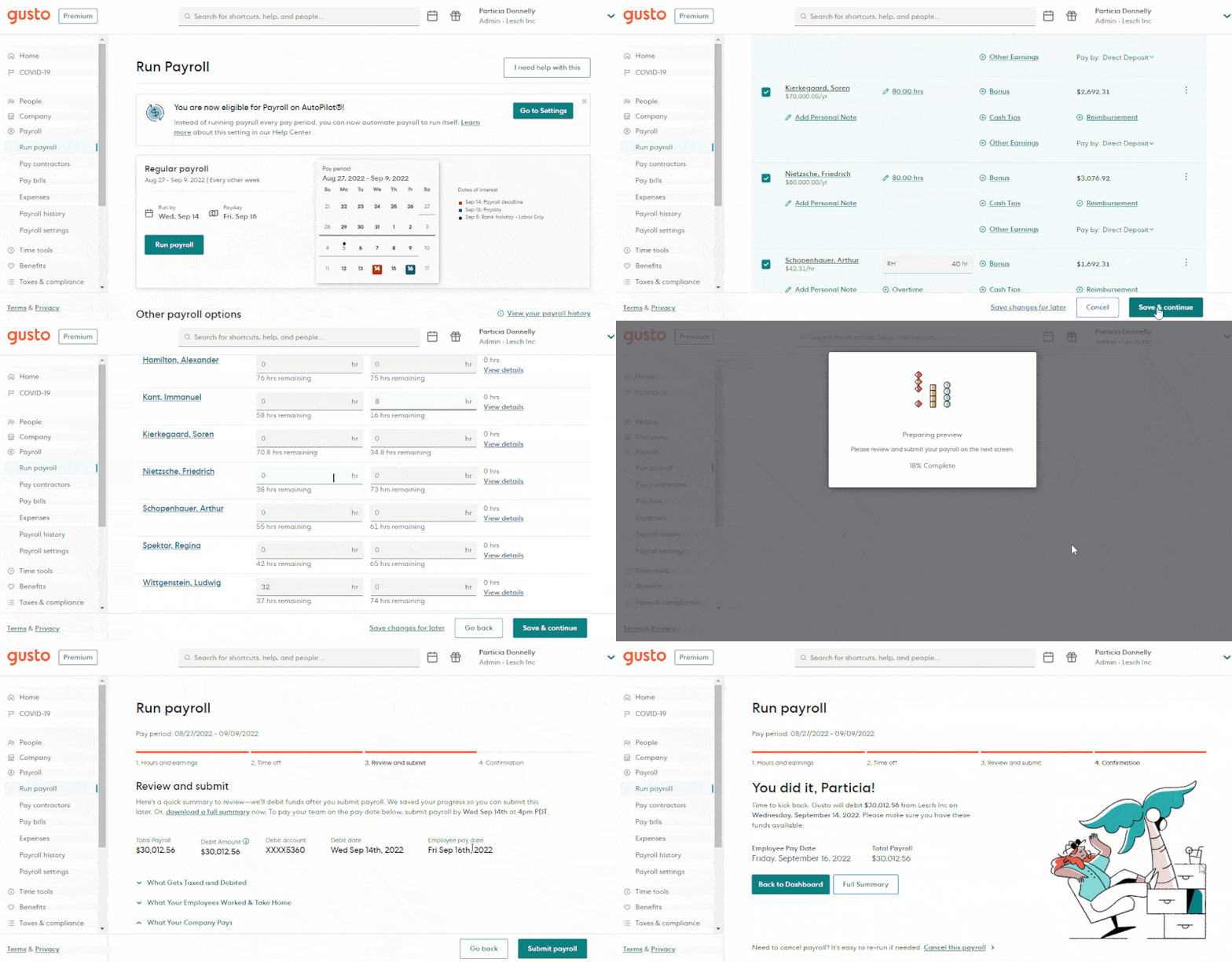
Cloud-based payroll software, like Gusto, makes it easy to automate payroll. (Source: Gusto)
Gusto provides robust payroll services, and can help streamline your payroll processing. Learn more about it in our Gusto Review—or check out our best payroll software for small businesses guide for our other top picks for payroll automation.
Human resources (HR) software
Most payroll processing services can be found within human resources (HR) software.However, HR software often goes beyond payroll to bring together hiring, onboarding, benefits, and performance management into one system.
Instead of managing payroll in isolation, it centralizes employee data and workflows that reduce manual work and improve accuracy. This is the natural next step once payroll becomes part of a broader HR workload. If you’re handling onboarding, tracking time, and managing benefits alongside payroll, using separate tools can quickly create inefficiencies.
Most platforms charge a base fee (around $40/month) plus about $6 per employee monthly, making them a practical option for small teams without a dedicated HR department.
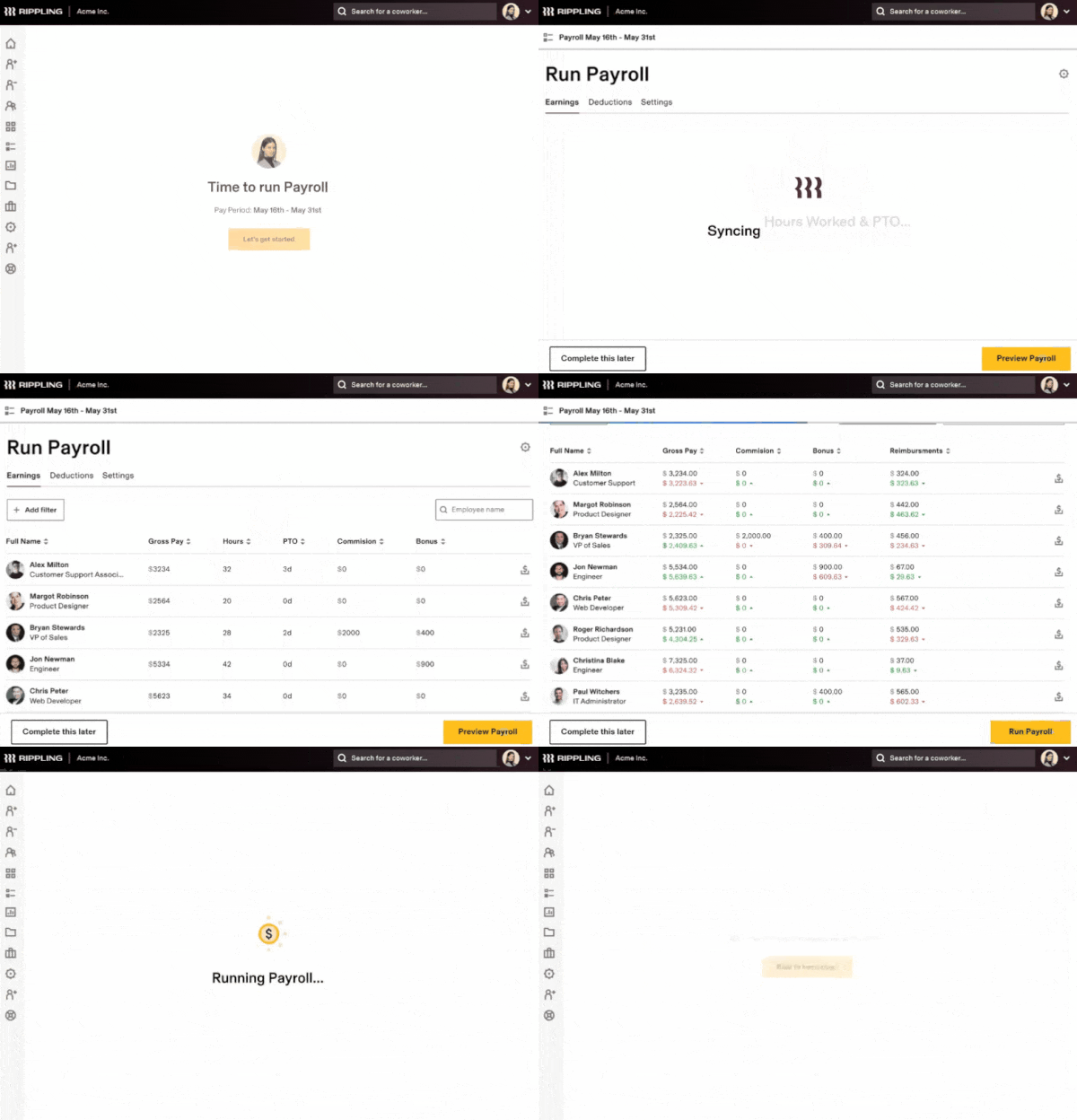
Rippling combines payroll and HR functions by syncing hours worked, benefits, and taxes into one system. (Source: Rippling)
The best HR software for small businesses are all-in-one systems, which include payroll automation and help in handling daily HR functions. Tools like Rippling combine payroll and HR functions by syncing hours, benefits, and taxes in one place.
We typically recommend all-in-one HR systems for businesses looking to streamline operations and manage the full employee lifecycle more efficiently. Learn more in our Rippling Review.
Time and attendance tracking software
Time and attendance software helps eliminate manual timesheets by automatically tracking employee hours and feeding that data directly into payroll. This improves accuracy and reduces the risk of errors, especially for teams with hourly workers or variable schedules.
This becomes essential once you’re managing overtime, shift work, or multiple employee types. Manual tracking in these scenarios often leads to discrepancies that slow down payroll and create compliance risks.
Many tools offer free basic plans, though payroll integrations or advanced features may come with a monthly fee. The key is choosing a solution that not only tracks time but also integrates seamlessly with your payroll system.

Homebase allows your employees to easily track their time, and your HR rep to run payroll with a click of a button. (Source: Homebase)
Tools from our list of the best time and attendance software, like Homebase, allow employees to clock in and out easily while enabling managers to run payroll with minimal effort. We typically recommend time tracking software for businesses where hours worked directly impact pay accuracy and compliance. Homebase offers a free plan for businesses to try with one location with a max of 20 employees. Learn more in our Homebase review.
PEO Software
A professional employer organization (PEO) takes payroll automation a step further by fully outsourcing payroll, benefits, and HR management. As the employer of record, the PEO handles compliance, tax filings, and employee administration. This gives small businesses access to enterprise-level benefits at lower costs.
PEOs make the most sense when payroll and compliance complexity start to outweigh the need for direct control. This is especially true for businesses managing multi-state employees, benefits administration, or rapid growth.
Because PEOs are all-inclusive, they come at a higher cost (around $60 per employee per month) and may include features you don’t need. However, they significantly reduce administrative burden by centralizing payroll processing, reporting, and compliance in one system.
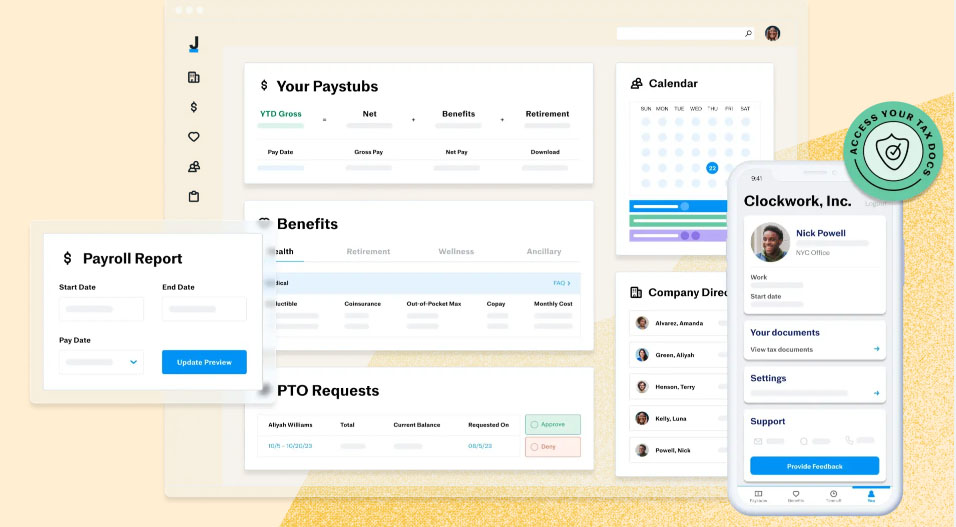
Justworks PEO allows you to process payroll, update benefits, and manage PTO through their online dashboard and easily via mobile devices. (Source: Justworks)
Platforms like Justworks allow you to run payroll, manage benefits, and track PTO from a single dashboard. We typically recommend PEOs for businesses that want a hands-off approach to payroll and HR, which means trading some control for simplicity and reduced risk. Learn more about it in our Justworks review—or check out our best PEO companies guide for an in-depth look at the top PEO companies.
When should a business automate payroll?
Payroll automation typically becomes necessary sooner than most businesses expect. Once payroll takes more than 3–5 hours per cycle or your team grows beyond 5–10 employees, manual processes start to break down in accuracy and compliance.
Aside from saving time, managing complexity is another business case for automating payroll. As soon as payroll involves overtime rules, multiple pay types, benefits deductions, or tax filings across jurisdictions, manual systems introduce risk that compounds with every pay run.
Signs it’s time to automate payroll
You may benefit from payroll automation if you notice any of the following:
- Payroll takes several hours each pay period. Manual calculations, spreadsheets, and cross-checking tax rates can significantly slow down payroll processing.
- You manage multiple types of workers. Businesses paying a mix of hourly employees, salaried staff, and contractors often need automated calculations for taxes, deductions, and reporting.
- Employees work overtime or varying schedules. Tracking overtime, shift differentials, or paid time off manually increases the chance of errors.
- You operate in multiple states or locations. Different state tax rates and labor laws make payroll compliance more complex.
- You calculate payroll taxes manually. Federal, state, and local payroll taxes change regularly, and mistakes can lead to penalties.
- You’ve had payroll errors or corrections. Late payments or inaccurate paychecks can damage employee trust and require time-consuming adjustments.
Payroll complexity benchmark
Based on common small business payroll cases and industry benchmarks, most teams transition to automated systems when complexity reaches a tipping point. Here’s a sample matrix you can use as a benchmark:
Rule of thumb: If payroll requires spreadsheets, manual tax calculations, or multiple systems to track hours and pay, automation can significantly reduce administrative work and compliance risk. For many small businesses, payroll automation becomes less about convenience and more about accuracy, compliance, and time savings as the team grows.
Benefits of payroll automation
Cuts down hours spent on spreadsheets, manual calculations, and double-checking numbers. For example, instead of pulling hours from timesheets, calculating taxes manually, and verifying totals, payroll can run in minutes once everything is synced, especially if you’re processing payroll for 10+ employees.
Helps avoid common mistakes like incorrect tax withholdings or missed overtime. A common issue with manual payroll is miscalculating overtime or applying outdated tax rates. Automation handles these calculations automatically, reducing the need for corrections after payroll is processed.
Automatically updates tax rates and helps you stay on top of filings. If you’re operating in multiple states, keeping track of changing tax laws manually can lead to penalties. Payroll software updates these rules in the background and can handle filings for you.
Employees get paid accurately and on time, with fewer corrections. Even small payroll mistakes, like shorting a paycheck or delaying payment, can create frustration. Consistent, accurate payroll helps avoid those issues and reduces back-and-forth with employees.
Makes it easier to track payroll costs and spot issues quickly. Instead of digging through spreadsheets, you can quickly see total labor costs, overtime trends, or payroll spikes, helping you catch issues like unexpected overtime before they become costly.
Overall, the biggest benefit is fewer problems to fix later. Manual payroll often leads to small mistakes that take even more time to correct. Automation helps prevent those issues upfront, so payroll runs are smoother and more predictable.
How to implement payroll automation
While implementing payroll automation doesn’t have to be complicated, getting the setup right is critical to avoid errors later. Here’s a simple step-by-step approach:
Step 1: Choose the right software
Start by selecting a payroll system that integrates with your existing HR or accounting tools. Look for features you’ll actually use like automated tax filings, direct deposit, and time tracking integrations.If you’re a smaller team, it’s easy to overbuy at this stage. Many businesses jump straight into full HR suites when a simpler payroll tool would do the job just fine.
Step 2: Migrate your payroll data
Once you’ve chosen your software, the next step is moving your payroll data into the new system. This includes employee details, tax information, pay rates, and any historical payroll records you want to keep.
This is where small mistakes can cause bigger issues later. It’s worth taking the time to clean your data before importing. Things like outdated employee records, incorrect pay rates, or missing tax details tend to surface during your first payroll run if they’re not caught early.
Many teams also keep a backup of their old payroll files during this transition, just in case they need to double-check something.
Step 3: Set up workflows and permissions
After your data is in place, you’ll need to configure how payroll actually runs. This includes setting pay schedules, defining approval processes, and deciding who has access to what.
In practice, this is more about how your team operates. For example, setting clear deadlines for timesheet submissions can prevent last-minute delays, and limiting admin access can help avoid accidental changes to payroll settings. If your payroll is fairly consistent, you can also automate parts of the approval process to reduce manual work each cycle.
Step 4: Train your team
Even the best payroll system can fall apart if people don’t know how to use it properly. Make sure everyone involved—whether they’re running payroll, approving hours, or submitting time—understands their role. It’s especially helpful to show employees exactly how to log time or access their pay information before the first live run.
Step 5: Test before going live
Before fully switching over, it’s a good idea to run one or two payroll cycles alongside your current system. This gives you a chance to compare results and catch any discrepancies.
Beyond just total payroll amounts, also check individual pay, taxes, and deductions to make sure everything lines up. Testing also gives you a chance to see how the system handles less common scenarios, like overtime, bonuses, or unpaid leave.
Step 6: Go live and monitor closely
Once everything looks accurate, you can move fully to the new system. Even then, the first few payroll runs should be monitored closely. Most teams find that any remaining issues show up within the first couple of cycles. It helps to review those runs in detail and encourage employees to flag anything that looks off.
Pro tip: Some payroll providers offer migration and training support for new clients, which can assist you with payroll automation implementation. Check out our Best Payroll Services providers for more information.
Payroll automation compliance
When you handle all payroll processes yourself, you must ensure you remain compliant in all areas—wages, tax laws, overtime regulations, and more. Using payroll automation software means built-in compliance. These features allow you to reduce the risk of non-compliance penalties.
Tax Laws
Payroll automation software has the capability to adapt to new tax laws, helping you stay compliant while streamlining administrative processes. This means the software can navigate complex tax codes without you having to manually update the system.
It calculates and pays taxes for you, making sure the correct rates are applied no matter where the employee is located. Additionally, it can generate detailed reports that help you demonstrate compliance with specific tax regulations.
Labor Regulations
With constantly changing labor regulations, using payroll automation software keeps you compliant with legal requirements on employee wages and benefits. This is especially helpful if you pay employees in multiple states, as it ensures you are paying the required minimum and overtime wages and that your benefits comply with state and federal laws.
Not sure if you’re compliant? Learn more about payroll compliance and how it can help you navigate state and federal labor laws.
Bottom Line
Automating anything makes life easier, but when you automate payroll it makes paying your employees easy while remaining compliant. It reduces the time spent calculating employee hours, time off, and taxes. By streamlining the payroll process and reducing manual errors, you save time and money and ensure employees are paid accurately.
Source link