8 Best Crypto Payment Gateways in 2026

Cryptocurrency payment gateways allow businesses to accept digital currencies, such as Bitcoin and Ethereum, as a payment method. Major companies like Microsoft, AT&T, and Overstock have already integrated crypto payments, and the technology has become much more accessible for small businesses in recent years.
Adding a crypto payment gateway is relatively simple. Many providers handle wallet connections, payment confirmations, and even automatic conversion to US dollars, so you don’t need advanced blockchain knowledge to get started. The best crypto payment gateways offer secure transactions, flexible settlement options, and affordable processing fees.
Based on my research, the following are the best crypto payment gateways for small businesses:
In addition to dedicated crypto payment gateways, some traditional payment platforms and merchant service providers also offer ways for businesses to accept cryptocurrency. These options can be useful if you already use their ecosystem or operate in industries that require specialized merchant accounts.
- Stripe: Best for businesses already using Stripe
- PayPal: Best for PayPal users
- PaymentCloud: Best for high-risk merchants
Crypto payments for small businesses: A quick guide
Cryptocurrency may sound complex, but accepting crypto payments is easier than most small business owners think. With the right payment gateway, businesses can let customers pay with Bitcoin, Ethereum, or stablecoins while receiving payouts in US dollars, often without coding or advanced blockchain knowledge.
What is cryptocurrency?
Cryptocurrency is a digital form of money that runs on blockchain technology — a secure, shared ledger that records transactions without relying on banks or governments. The most common cryptocurrencies include Bitcoin and Ethereum, along with stablecoins such as USD Coin (USDC) or PayPal USD (PYUSD), which are pegged to the US dollar to reduce price volatility.
When a customer pays with cryptocurrency, the transaction happens between their digital wallet and your business wallet. Crypto payment gateways act as intermediaries that verify the payment and, if you choose, automatically convert the amount into US dollars so you receive a stable payout.
Benefits of crypto payments for small businesses
Accepting cryptocurrency can help small businesses expand their reach, lower processing costs, and modernize checkout options. Here are the main advantages:
- Lower transaction costs: Most crypto gateways charge 0.5% to 2% per transaction, compared with roughly 2.9% or more for credit card processing.
- Faster settlement: Payments are typically confirmed within minutes or hours, rather than several business days, which can improve cash flow for small businesses.
- Fewer chargebacks: Crypto transactions are final and recorded on the blockchain, reducing the risk of payment disputes and fraud.
- Global reach: Crypto payments allow you to sell to international customers who may not have access to major credit cards or traditional banking.
- Automatic conversion: Many gateways instantly convert crypto into US dollars or stablecoins to protect merchants from price volatility.
- Customer convenience: Offering crypto provides a modern payment option that can appeal to tech-savvy and global customers.
Together, these benefits make crypto payments a practical way for small businesses to cut costs and reach new markets without taking on unnecessary risk.
How crypto payment gateways work
A crypto payment gateway for business functions much like a credit card processor, but for digital currencies. It connects your customer’s digital wallet to your business and handles the technical details behind each transaction. Here’s how the process typically works:
- Customer selects crypto at checkout: When paying online or in person, the customer chooses a cryptocurrency payment option, such as Bitcoin or USD Coin.
- Payment request is generated: The gateway displays a unique payment address or QR code with the exact amount owed, converted into the chosen cryptocurrency.
- Transaction is confirmed on the blockchain: Once the customer pays, the gateway verifies the transaction and ensures funds are received securely.
- Conversion and settlement: Depending on your settings, the gateway can convert the payment into fiat currency or a stablecoin, or keep it in crypto.
- Funds are deposited: You receive the funds in your business wallet or bank account, often within a few hours to one business day.
Most gateways also include tools for generating invoices, tracking payments, and syncing transaction data with your ecommerce or accounting software. In short, they make accepting crypto nearly as simple as taking a card payment.
Custodial vs noncustodial crypto payment gateways
Crypto payment gateways fall into two main types, depending on who controls the funds and private keys. Custodial options handle everything for you, while noncustodial ones give you full control. Here’s how they compare:
Most small businesses start with a custodial gateway for convenience and compliance, then explore noncustodial options once they’re more comfortable managing wallets and crypto transactions directly.
Fees and settlement: What to expect
Crypto payment fees are typically simpler than traditional card processing rates. Most crypto payment gateways charge between 0.5% and 2% per transaction, although some providers offer lower fees or volume discounts. In addition to processing fees, blockchain network fees, which are small costs paid to validators, may also apply depending on the cryptocurrency used.
Settlement options vary by provider. You can choose to receive payouts in cryptocurrency, stablecoins, or fiat currency (like USD) through a linked bank account. Some gateways lock in the exchange rate at the time of sale to shield you from market volatility.
Deposits are often processed within one business day, though on-chain settlements may take longer depending on the cryptocurrency network’s activity.
Best crypto payment gateways compared
*All crypto payment gateways listed in the table offer cryptocurrency and fiat currency settlement.
The Fit Small Business Editorial Policy is driven by our company mission to “deliver the best answers to people’s questions.” This involves thorough research and expertise to provide accurate, clear, and authoritative information to meet our audience’s needs.
I have over five years of order and payment processing experience and have been evaluating, testing, and writing about POS and payment solutions, including inventory management software, for over two years.
You can learn more about my specific evaluation of international merchant accounts in the methodology section below.

Payments Staff Writer at Fit Small Business
Dedicated crypto payment gateways
These platforms are designed specifically to help businesses accept cryptocurrency payments online or in person.
BitPay: Best overall payment gateway for crypto

Pros
- Simple QR code invoices and hosted checkout
- Daily settlements to bank account or crypto wallet
- Locked-in exchange rates to protect against volatility
- Easy ecommerce integrations (Shopify, WooCommerce, Magento)
Cons
- No free processing tier for low-volume merchants
- Transaction fees higher than some competitors
- Limited POS features compared with traditional payment processors
BitPay overview
Who should use it:
Small businesses that want a reliable, easy-to-integrate crypto payment gateway with automatic fiat settlement.
Why I like BitPay:
BitPay is one of the earliest and most established cryptocurrency payment platforms, making it a dependable choice for businesses that want to start accepting crypto payments. It supports a wide range of cryptocurrencies and allows merchants to automatically convert payments into US dollars, helping reduce exposure to price volatility.
What makes BitPay stand out is its exchange rate lock feature, which secures the conversion rate at the moment a transaction is initiated. This ensures businesses receive the exact value they expect even if cryptocurrency prices fluctuate during payment processing.
BitPay also offers straightforward integrations with major ecommerce platforms such as Shopify, WooCommerce, and Magento, allowing businesses to add crypto payments without complex development work.
Pricing
- 2% + 25 cents processing fee per transaction for monthly volume under $500,000
- 1.5% + 25 cents processing fee for $500,000-$999,999 monthly volume
- 1% + 25 cents processing fee for $1,000,000+ monthly volume
- Higher fees apply to high-risk merchants
Key features
- Accepts major cryptocurrencies including Bitcoin, Ethereum, Litecoin, and stablecoins
- Automatic crypto-to-fiat conversion to protect against price volatility
- Exchange rate lock (volatility protection) for invoices
- Hosted checkout pages and payment buttons
- Digital invoicing tools
- QuickBooks integration for accounting
- Ecommerce plugins for Shopify, WooCommerce, Magento, and more
- QR code payments for online and in-person transactions
- Multi-user merchant dashboard
- Two-factor authentication (2FA) for account security
BitPay allows businesses to accept cryptocurrency payments through several methods, including hosted checkout pages, payment buttons, and digital invoices. When a customer selects crypto at checkout, BitPay generates a payment request with a QR code or wallet address and calculates the equivalent cryptocurrency amount based on the current exchange rate.
After the payment is confirmed on the blockchain, BitPay can either deposit the funds into your crypto wallet or automatically convert the payment into fiat currency and transfer it to your bank account. Settlements are typically processed within one business day.
For in-person transactions, businesses can use BitPay’s Quick Checkout for Web, which generates QR-code payment requests that customers scan with their crypto wallets.
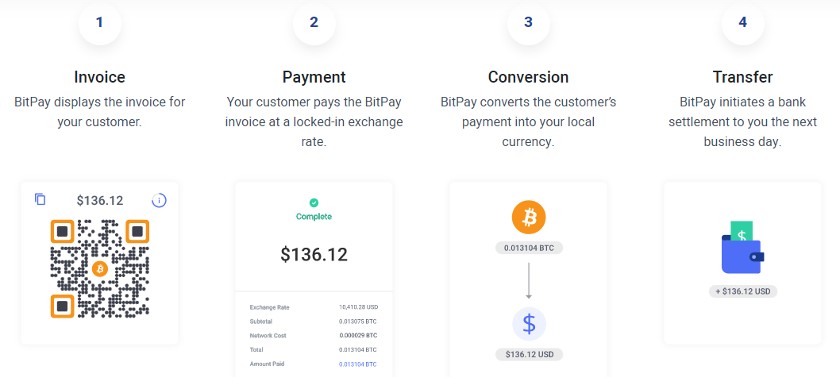
BitPay displays the invoice with a QR code on your website or on your checkout device. (Source: BitPay)
How to add crypto payments with BitPay
To start accepting crypto with BitPay, create a merchant account and connect it to your ecommerce store or payment workflow. BitPay provides plugins for platforms such as Shopify and WooCommerce, making integration relatively simple.
Once connected, you can generate payment buttons, invoices, or QR-code checkout pages directly from the BitPay dashboard. Businesses accepting in-person payments can open BitPay’s Quick Checkout page on a tablet or phone to generate QR-code invoices at the point of sale.
Coinbase Commerce: Best for accepting multicurrency transactions

Pros
- Supports 150+ cryptocurrencies
- Simple setup with just an email address
- Flat 1% transaction fee
- Hosted checkout pages and payment links
Cons
- Fiat withdrawals require a Coinbase account
- Limited native ecommerce integrations
- Some features depend on region
Coinbase Commerce overview
Who should use it:
Small businesses that want to accept a wide range of cryptocurrencies with a simple, developer-friendly checkout setup.
Why I like Coinbase Commerce:
Coinbase Commerce makes it easy for businesses to accept cryptocurrency payments online without complicated setup. Merchants can start accepting payments quickly with just an email address and a crypto wallet.
One of Coinbase Commerce’s biggest advantages is its multicurrency support. Customers can pay using hundreds of cryptocurrencies through Coinbase’s Onchain Payment Protocol, while merchants can settle payments in crypto or stablecoins like USDC.
The platform also offers flexible checkout tools, including hosted checkout pages, payment buttons, and shareable payment links. These tools allow businesses to add crypto payments to an online store or invoice workflow without requiring extensive development work.
Pricing
- Processing fee: 1% per transaction (flat rate)
- Currency conversion: Free for USDC settlements
- Account types:
- Self-managed: Merchant controls private keys and receives payments directly in crypto or USDC
- Managed (Coinbase Account): Coinbase manages custody and enables optional fiat conversion/withdrawals in supported regions
- Setup cost: $0 (you can sign up with just an email address)
- Settlement options: USDC (default), supported crypto assets, or fiat via managed Coinbase account
Key features
- Accepts 150+ cryptocurrencies, including Bitcoin, Ethereum, and stablecoins
- Multiple settlement options: crypto, USDC, or fiat through Coinbase
- Hosted checkout pages and payment buttons
- Shareable payment links and invoices
- APIs and webhooks for custom integrations
- Integrations with Shopify, WooCommerce, and other ecommerce platforms
- Two-factor authentication and enterprise-grade security
Coinbase Commerce allows businesses to accept crypto payments directly on their website or through payment links and invoices. When a customer selects crypto at checkout, Coinbase generates a payment request showing the exact cryptocurrency amount required.
Customers send the payment from their wallet, and the transaction is verified on the blockchain. Once confirmed, the funds are credited to your Coinbase Commerce account, where they can be held in crypto, converted to USDC, or withdrawn to fiat through a linked Coinbase account.
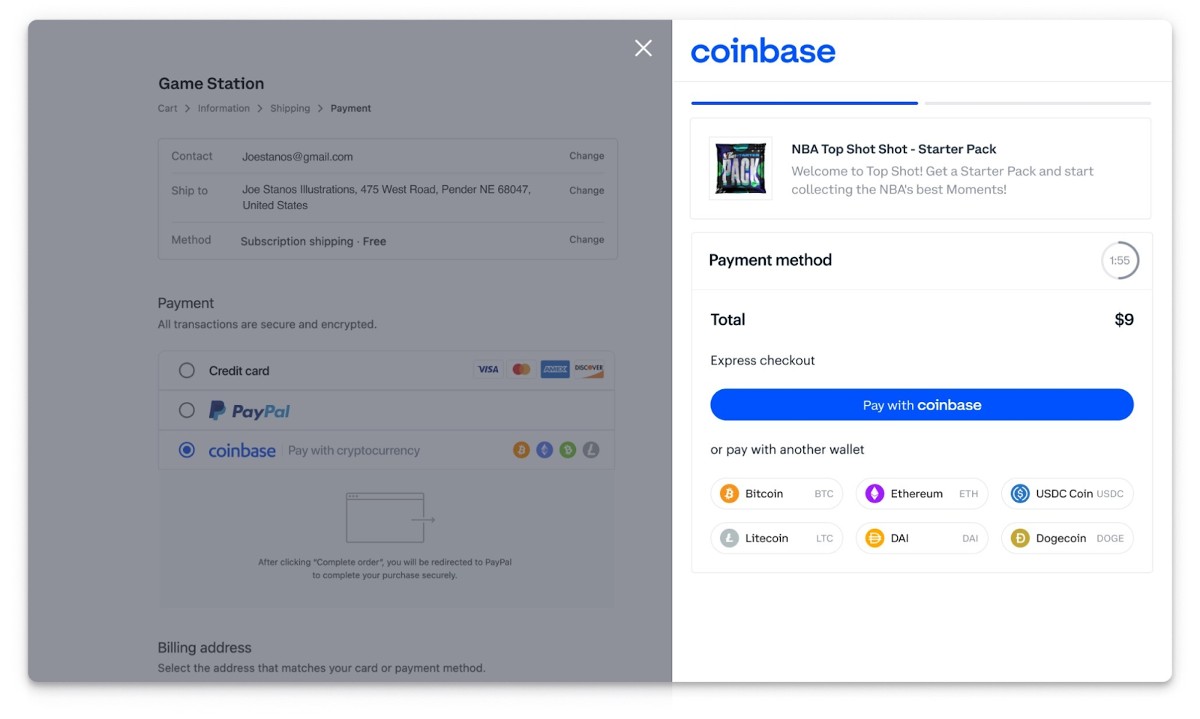
Coinbase Commerce features a built-in on-screen wizard that lets you create a hosted checkout or payment link in minutes and share it directly with customers. (Source: Coinbase)
How to add crypto payments with Coinbase Commerce
Getting started with Coinbase Commerce requires only a few steps. Create an account using your email address, then connect a crypto wallet or link your Coinbase account.
Once set up, you can install ecommerce plugins for platforms like Shopify or WooCommerce, add payment buttons to your website, or generate payment links and invoices from the dashboard. Customers can then pay using a wide range of cryptocurrencies, and payments are automatically recorded in your merchant dashboard.
NOWPayments: Best for payment services

Pros
- Supports 300+ cryptocurrencies
- Low processing fees (starting at 0.5%)
- Noncustodial option (funds go directly to your wallet)
- Multiple payment tools including invoices, payment links, and POS
Cons
- Fiat settlement requires a third-party off-ramp
- Interface can be less beginner-friendly than some competitors
- Network fees apply depending on the blockchain used
NOWPayments overview
Who should use it:
Online businesses that want to accept a wide range of cryptocurrencies with flexible payment tools and low processing fees.
Why I like NOWPayments:
NOWPayments stands out because it supports more cryptocurrencies than almost any other payment gateway, with over 300 coins available for merchants to accept. This makes it a good option for businesses that want to accommodate customers using less common tokens or alternative cryptocurrencies.
The platform is also noncustodial by default, meaning payments go directly to your crypto wallet instead of being held by the gateway. This gives businesses full control of their funds and can reduce custody risks.
NOWPayments offers several ways to accept payments, including hosted checkout pages, payment buttons, invoices, and a web-based POS interface. These tools make it easy for ecommerce stores, digital service providers, and nonprofits to start accepting crypto without building a custom payment system.
Pricing
- Service (processing) fee: 0.5% for same-coin (“mono-currency”) payments; 1% when you use conversion or fixed-rate checkout
- Network fees: Blockchain miner/gas fees apply on transfers (passed through at cost)
- Custody/payouts: Custodial accounts enable mass payouts; no extra service fee on payouts (network fee only)
- Fiat off-ramp/on-ramp: Fees depend on the provider (KYB required). Example from Guardarian: ~1.5% + $2 on certain flows
Key features
- Accepts 300+ cryptocurrencies, including Bitcoin, Ethereum, Litecoin, and stablecoins
- Flexible settlement options (receive payments directly in crypto or convert coins)
- Hosted checkout pages, payment buttons, and payment links
- Digital invoices and donation tools
- Web-based POS for in-person crypto payments
- Ecommerce integrations for WooCommerce, Shopify, Magento, OpenCart, and more
- Full REST API for custom integrations
NOWPayments works by generating a unique payment address or QR code for each transaction. When a customer selects crypto at checkout, the gateway calculates the correct cryptocurrency amount and displays payment instructions.
Once the payment is sent from the customer’s wallet, the transaction is verified on the blockchain. Funds are then delivered directly to your crypto wallet or converted into another cryptocurrency depending on your settings.
Businesses can accept payments through hosted checkout pages, ecommerce plugins, payment buttons, or invoices created within the NOWPayments dashboard.
How to add crypto payments with PayPal
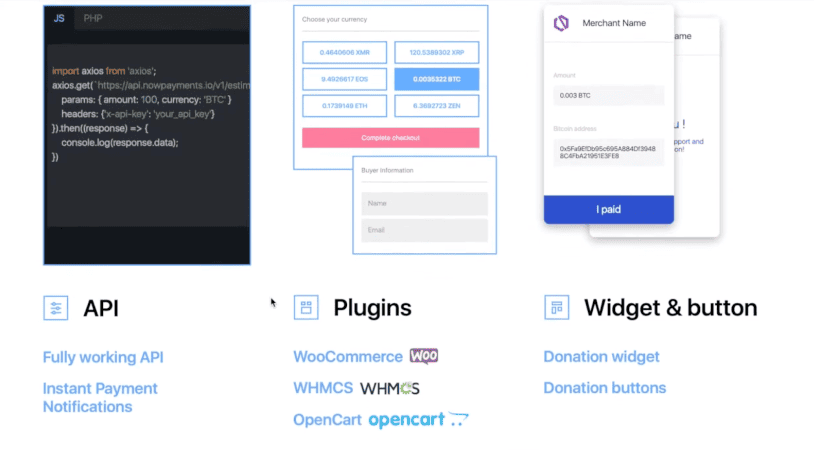
You can integrate NOWPayments in several ways depending on your technical setup:
- Plugins (no coding required): Install the official plugin for ecommerce platforms such as WooCommerce or Shopify and follow the setup guide to connect your store.
- API integration: Developers can create an API key, add a payout wallet address, and use the NOWPayments API to generate checkout pages, payment links, and QR codes for transactions.
- Payment links, invoices, and POS: Businesses can create payment links or invoices directly from the dashboard. For in-person sales, you can display a QR code on a tablet or phone for customers to scan and complete the payment.
Once connected, you can embed crypto checkout on your website, include payment links in invoices or emails, and accept QR-code payments at the point of sale. Processing fees start at 0.5% for same-coin payments or 1% for conversions or fixed-rate payments, plus standard blockchain network fees.
Crypto.com Pay: Best for lowest merchant fees

Pros
- 0% processing fee for merchants accepting payments
- Supports major cryptocurrencies and stablecoins
- Ecommerce integrations with popular platforms
- QR code payments for online and in-person transactions
Cons
- Not available for merchants in New York
- Some settlement methods may require minimum withdrawal amounts
- Limited automatic fiat conversion options compared with some competitors
Crypto.com Pay overview
Who should use it:
Small businesses that want to accept crypto payments with minimal processing fees.
Why I like Crypto.com Pay:
Crypto.com Pay is one of the few crypto payment gateways that advertises zero merchant processing fees for accepting cryptocurrency payments. This makes it an appealing option for businesses that want to reduce payment costs while offering customers a crypto checkout option.
The platform supports a variety of cryptocurrencies and allows merchants to accept payments through hosted checkout pages, payment links, or QR codes. These features make it suitable for ecommerce businesses, online service providers, and merchants that occasionally accept in-person payments.
Crypto.com Pay also integrates with several ecommerce platforms, including Shopify, WooCommerce, and Magento, making it relatively easy for businesses to add crypto payments without building a custom payment system.
Pricing
- Monthly fees: $0
- Processing/transaction fees to accept payments: $0 (customers paying from non-Crypto.com wallets may incur network/gas fees)
- Payout/withdrawal (merchant side):
- Fiat settlements: Bank transmittance/wire fees may apply and vary by intermediaries; minimum payout amounts: USD 100, EUR 130 (SEPA), GBP 100, AUD 150
- Crypto settlements: Network fees may apply; minimum payout amounts include BTC 0.01, ETH 0.1, CRO 500, USDC 100
Key features
- Supports 30+ cryptocurrencies, including Bitcoin, Ethereum, and stablecoins
- Hosted checkout pages and payment links
- QR code payments for online and in-person transactions
- Ecommerce plugins for Shopify, WooCommerce, Magento, and OpenCart
- Invoicing and recurring payment support
- Merchant promotions through the Crypto.com Pay marketplace
Crypto.com Pay works by generating a payment request when a customer chooses crypto at checkout. The system converts the purchase amount into the equivalent cryptocurrency value and displays a QR code or payment link for the customer to complete the transaction.
Customers can pay using the Crypto.com app or a supported external wallet. Once the payment is confirmed on the blockchain, the funds are credited to your Crypto.com Pay merchant account.
Merchants can choose to keep the funds in cryptocurrency or withdraw them to a supported bank account, depending on the settlement options available in their region.
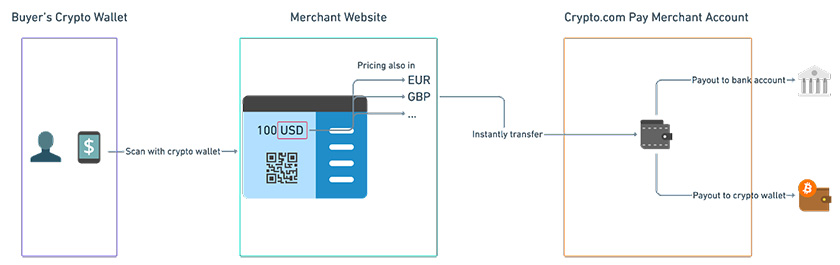
Crypto.com Pay can be used to accept both online and in-person payments with a QR code feature (Source: Crypto.com)
How to add crypto payments with Crypto.com Pay
To start accepting payments with Crypto.com Pay, apply for a merchant account and complete the onboarding process. Once approved, you can integrate the gateway using ecommerce plugins, payment links, or APIs.
Merchants using platforms such as Shopify or WooCommerce can install the official plugin and connect their store to the Crypto.com Pay dashboard. After setup, customers can pay using supported cryptocurrencies by scanning a QR code or completing payment through a hosted checkout page.
BTCPay Server: Best noncustodial gateway

Pros
- No processing fees (only blockchain network fees)
- Fully noncustodial — you control your own funds
- Open-source and highly customizable
- Supports Bitcoin and Lightning Network payments
Cons
- Requires technical setup and server hosting
- Limited native support for cryptocurrencies beyond Bitcoin
- No built-in fiat conversion
BTCPay Server overview
Who should use it:
Businesses that want full control over their cryptocurrency payments and prefer a noncustodial, open-source payment solution.
Why I like BTCPay Server:
BTCPay Server is one of the most trusted noncustodial crypto payment gateways, meaning merchants maintain full control of their funds and private keys. Unlike custodial processors that hold or convert funds on your behalf, BTCPay Server sends payments directly to your wallet.
Another advantage is its zero processing fees. Because it is open-source software rather than a traditional payment processor, merchants only pay standard blockchain network fees.
BTCPay Server is especially popular among businesses that want privacy, control, and independence from third-party payment processors. It supports both Bitcoin and Lightning Network payments, which can enable faster and lower-cost transactions compared with traditional blockchain transfers.
Pricing
- No processing fees
- Only blockchain network fees apply
- Hosting costs may apply if you run your own server or use a managed host
Key features
- Fully noncustodial payment gateway
- Accepts Bitcoin and Lightning Network payments
- Hosted checkout pages and payment buttons
- Invoicing and payment request tools
- Web-based POS interface for in-person payments
- Integrations with WooCommerce, Shopify (via plugins), Magento, and other ecommerce platforms
- Open-source software with customizable integrations
- Self-hosted or available through managed hosting providers
BTCPay Server generates a payment request when a customer selects Bitcoin at checkout. The system displays a wallet address or QR code with the exact amount due, which the customer sends from their crypto wallet.
Once the transaction is confirmed on the blockchain, the funds are delivered directly to your wallet without passing through an intermediary payment processor. If you enable Lightning Network payments, transactions can be confirmed almost instantly with lower fees.
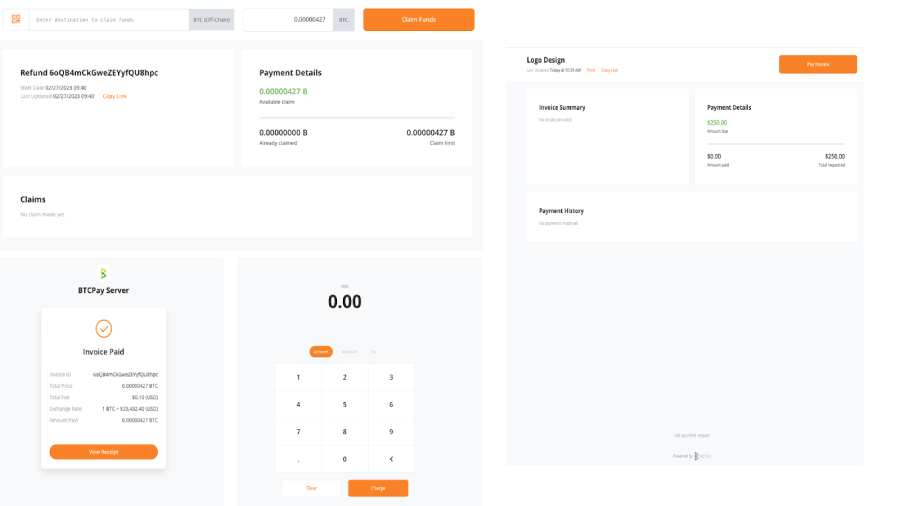
BTCPay Server dashboard showing a paid invoice, payment details, and QR code checkout interface for accepting Bitcoin payments. (Source: BTCPay Server)
How to add crypto payments with BTCPay Server
To start using BTCPay Server, you need to install the software on your own server or use a managed hosting provider that offers BTCPay Server deployment. After installation, connect your Bitcoin wallet and configure your payment settings.
Once set up, you can integrate BTCPay Server with your ecommerce platform using plugins or APIs. Businesses can then accept Bitcoin payments through hosted checkout pages, invoices, or QR code payments displayed at the point of sale.
Other platforms that support crypto payments
Some traditional payment platforms and merchant service providers also offer ways for businesses to accept cryptocurrency. While they are not dedicated crypto payment gateways, they can still be useful if you already use these platforms or operate in industries that require specialized merchant accounts.
Stripe: Best for businesses already using Stripe

Pros
- Supports stablecoin payments (USDC)
- Easy to enable for existing Stripe merchants
- Powerful APIs and developer tools
- Integrates with thousands of ecommerce platforms and apps
Cons
- Supports limited cryptocurrencies compared with dedicated crypto gateways
- Crypto payments primarily focused on stablecoins
- Requires Stripe account approval and setup
Stripe overview
Who should use it:
Businesses already using Stripe for payments that want to add cryptocurrency checkout without switching payment platforms.
Why I like Stripe:
Stripe is one of the most widely used payment platforms for online businesses, and it has recently expanded into cryptocurrency payments through stablecoin support and on-chain payment tools. This allows merchants to accept crypto payments while still managing transactions within the familiar Stripe ecosystem.
Instead of supporting hundreds of cryptocurrencies like traditional crypto gateways, Stripe focuses mainly on stablecoins such as USD Coin (USDC). This approach reduces volatility and allows businesses to receive payments that maintain a stable value relative to the US dollar.
Stripe also offers powerful developer tools and APIs, making it a strong choice for SaaS companies, ecommerce platforms, and startups that want to integrate crypto payments into a custom checkout flow.
Pricing
- Custom pricing depending on payment setup
- Standard Stripe transaction fees may apply
- Blockchain network fees may apply depending on the payment method used
Key features
- Accept stablecoin payments (USDC)
- On-chain payment support through Stripe integrations
- Powerful APIs for custom checkout experiences
- Built-in fraud protection and payment management tools
- Integrates with major ecommerce platforms and website builders
- Unified dashboard for managing both traditional and crypto payments
Stripe enables businesses to accept crypto payments by supporting stablecoin transactions within its payment infrastructure. When a customer chooses a supported cryptocurrency at checkout, Stripe processes the payment and settles the funds according to the merchant’s configured payout settings.
Because Stripe focuses on stablecoins like USDC, businesses can accept crypto payments while minimizing exposure to price volatility.
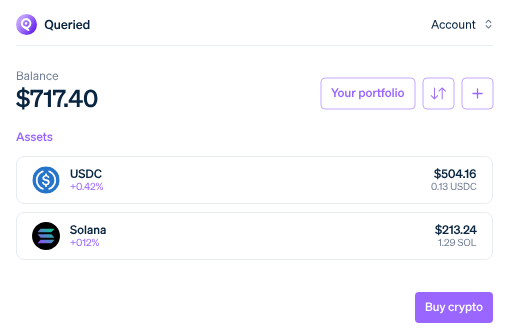
Stripe dashboard displays the crypto portfolio with stablecoin (USDC) and Solana balances, illustrating how businesses can manage digital assets alongside traditional payments. (Source: Stripe)
How to add crypto payments with Stripe
Businesses already using Stripe can enable crypto or stablecoin payments through the Stripe dashboard or developer tools. Depending on the integration, merchants can add crypto payment options to their checkout pages, apps, or ecommerce stores.
Developers can use Stripe’s APIs and payment tools to build custom checkout flows that support stablecoin payments alongside traditional payment methods such as credit cards or digital wallets.
PayPal: Best for PayPal users

Pros
- Easy to enable for existing PayPal Business accounts
- Automatic crypto-to-fiat or stablecoin conversion
- Familiar checkout experience for customers
- Large global user base
Cons
- Merchants do not receive cryptocurrency directly
- Standard PayPal checkout fees can be higher than crypto-native gateways
- Limited control compared with dedicated crypto payment processors
PayPal overview
Who should use it:
Merchants already using PayPal Business and who want a familiar checkout and easy crypto acceptance.
Why I like PayPal:
PayPal now lets US merchants accept crypto at checkout via Pay with Crypto. Customers can pay with 100+ cryptocurrencies, and PayPal automatically converts the payment to PYUSD (PayPal USD stablecoin) or fiat for the merchant, delivering near-instant settlement and significantly lower fees (introductory ~0.99% for merchants, with “up to 90%” cost reductions on some cross-border transactions).
PayPal also supports a legacy flow, Checkout with Crypto, where a customer’s crypto is converted to fiat at checkout with no extra fee to the customer; merchants in that flow pay PayPal’s standard online pricing.
Because PayPal is already widely recognized and easy to add as an additional payment method on most sites, existing PayPal merchants can enable crypto with minimal changes to their checkout. And with PYUSD, PayPal provides a built-in stablecoin option to help mitigate price volatility between the customer’s crypto and your settlement.
Pricing
- PayPal Business account: $0 monthly (standard account)
- Optional services:
- Virtual Terminal: $30/month
- Recurring Billing: $10/month
- Recurring Payments Tool: $30/month
- Payflow Gateway: $0-$25/month (for advanced integrations)
- Standard online transactions: 3.49% + $0.49 per transaction (U.S. domestic)
- Chargeback fee: $20 per dispute
- Pay with Crypto: Introductory ~0.99% merchant fee, up to 90% lower than some cross-border card fees
- Conversion: Crypto payments are automatically converted to PYUSD or fiat for merchants; customers pay no extra conversion fee
Key features
- Accept crypto payments through PayPal Checkout
- Automatic crypto-to-fiat or stablecoin (PYUSD) conversion
- No crypto wallet management required for merchants
- Access to PayPal’s global network of hundreds of millions of users
- Works alongside other payment methods such as cards and digital wallets
- Customizable checkout through PayPal APIs and payment buttons
When a customer chooses to pay with crypto through PayPal Checkout, the option appears automatically if their PayPal account holds a cryptocurrency balance or PYUSD. At checkout, the selected cryptocurrency is converted into fiat currency or PYUSD at the current exchange rate.
Merchants do not receive cryptocurrency directly. Instead, PayPal completes the conversion and deposits the payment into the merchant’s PayPal account in USD or PYUSD. This protects businesses from cryptocurrency price volatility and eliminates the need to manage crypto wallets.
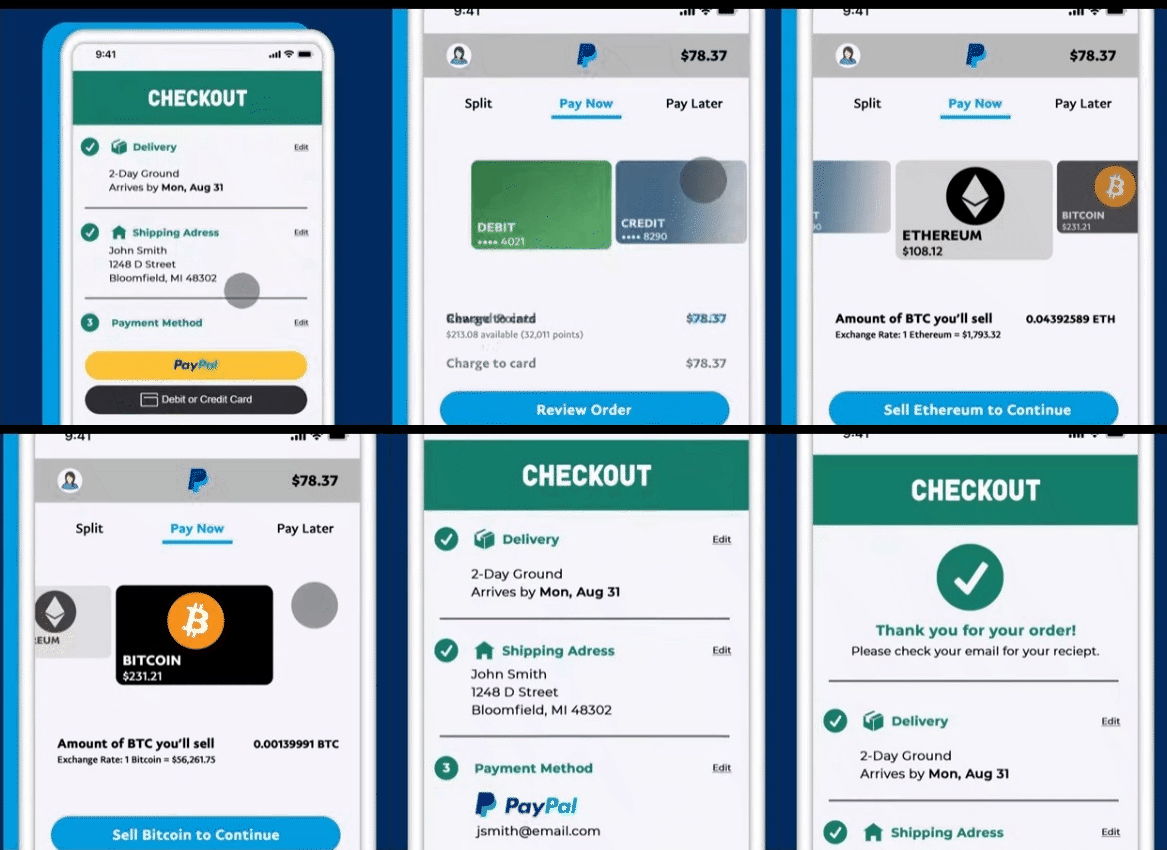
Your customer’s cryptocurrency balance will be converted to fiat currency during checkout. (Source: PayPal)
How to add crypto payments with PayPal
Enabling crypto checkout requires no special setup for PayPal Business users. Simply keep PayPal Checkout active. Customers with a crypto balance or PYUSD will automatically see “Pay with Crypto” as an option at checkout. Merchants receive settled funds in USD or PYUSD, depending on their account setup.
Traditional Checkout with Crypto transactions fall under PayPal Payments Online, which carries the standard 3.49% + $0.49 fee. The new Pay with Crypto program, however, offers a reduced introductory ~0.99% fee for eligible merchants.
PaymentCloud: Best for high-risk merchants

Pros
- Works with many high-risk industries that struggle to get approved elsewhere
- Supports crypto payments through partner integrations
- Personalized onboarding and account setup
- Wide network of processors and payment gateways
Cons
- Requires a full merchant account application and underwriting process
- Pricing is custom and not publicly listed
- Crypto payments rely on third-party integrations
PaymentCloud overview
Who should use it:
High-risk businesses that want to accept cryptocurrency payments but may have difficulty getting approved with standard payment processors.
Why I like PaymentCloud:
PaymentCloud specializes in merchant accounts for high-risk industries, making it a practical option for businesses that are often rejected by traditional payment processors. Through partnerships with crypto payment providers such as RocketFuel Blockchain, PaymentCloud merchants can add cryptocurrency acceptance alongside credit cards and other payment methods.
Instead of acting as a standalone crypto payment gateway, PaymentCloud functions as a merchant services provider that connects businesses with suitable processors and payment solutions. This can help high-risk merchants access crypto payment tools that might otherwise be difficult to obtain.
PaymentCloud is also known for its hands-on onboarding process, where merchants work with specialists to set up payment processing, integrations, and compliance requirements.
Pricing
- Monthly account fee: $10 to $45
- Virtual terminal: $15 to $45 per month
- Payment gateway: $15 per month
- Low-risk transaction fee: 2% to 3.1%
- Medium-risk transaction fee: 2.3% to 3.4%
- High-risk transaction fee: 2.7% to 4.3%
Please note that PaymentCloud’s pricing is custom for each solution and that the above are estimates provided by PaymentCloud.
Key features
- Merchant accounts for high-risk industries
- Cryptocurrency payments via third-party gateway integrations
- Ecommerce and POS payment processing
- Recurring billing and invoicing tools
- Access to a network of payment gateways and processors
- Dedicated account managers and onboarding support
PaymentCloud enables crypto acceptance through partner integrations with cryptocurrency payment providers. When a customer chooses to pay with crypto at checkout, the payment gateway generates a wallet address or QR code for the transaction.
Once the payment is confirmed on the blockchain, the funds can be settled in cryptocurrency or converted into fiat currency, depending on the integration used.
Because PaymentCloud specializes in high-risk merchants, this setup can allow businesses in regulated or restricted industries to add crypto payments alongside traditional card processing.
How to add crypto payments with PaymentCloud
To start accepting crypto payments with PaymentCloud, merchants must first apply for a merchant account. The company reviews business details, risk profile, and payment requirements during the onboarding process.
Once approved, PaymentCloud helps configure the appropriate payment gateway and crypto integration. After setup, businesses can add crypto checkout options to their ecommerce store or POS system through the connected payment provider.
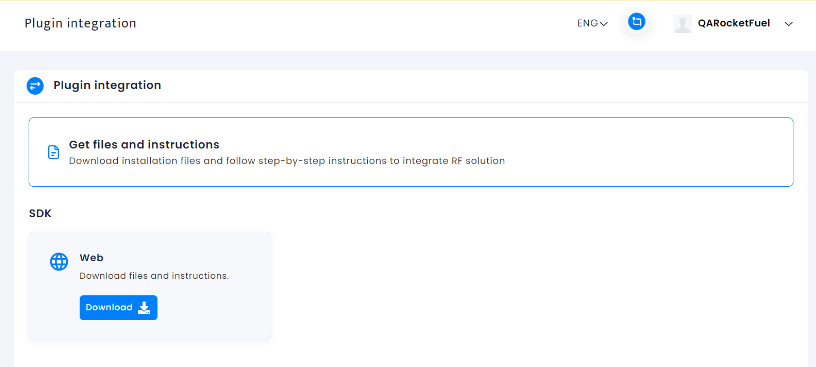
What to look for in a crypto payment gateway
Unlike with traditional payment methods, making cryptocurrency work to boost your sales goes beyond just consumer preference. There are many crypto currency payment gateway providers on the market, and it’s easy to get bogged down by technicalities as you try to decide which one is best for your business.
So, I listed some guidelines below to help you get started. When choosing a payment gateway solution to accept cryptocurrencies, make sure to:
- Check for legalities. Before anything else, make sure that a crypto payment wallet or platform is valid to use in the country or state where your business is located. While most crypto payment gateways support US dollar conversion, it’s still important that you check the terms of service.
- Look for exchange rate security. Also known as volatility security, this feature ensures that the exchange rate value of your cryptocurrency is locked for a specific period of time to protect your transaction from any loss due to volatility.
- Evaluate trustworthiness. Because crypto payment gateways are unregulated by nature, it’s important that you research the platform’s history/background for any complaints or legal actions.
- Identify security functions. Look for security features such as two-factor authentication, temporary lock-in rates during transactions, and even reliable, responsive 24/7 customer support in case issues come up with your account.
- Check for integrations and partnerships. Crypto payment gateway can integrate with website builders and online marketplaces and partner with online stores that provide you access to a larger customer base.
- Easy withdrawal and deposits. Not only should you make sure that your crypto payment gateway provides you with the fastest deposit times. It should also allow you to choose among different withdrawal options such as banks, cards, and even digital wallet balances for instant access. You should also be able to choose between fiat and cryptocurrency withdrawal options. Don’t forget to compare fees.
Methodology: How I evaluated the top crypto payment gateways
To create this guide, I put together a list of top cryptocurrency platforms that offer a payment gateway functionality, then narrowed down the options to those that are legally available to US merchants. I also considered a number of traditional payment gateway providers, such as Shopify, Stripe, and PaymentCloud, that support cryptocurrency payment methods.
From there, I evaluated each provider based on key crypto payment gateway requirements:
- Volatility shield: Whether built-in, via third-party, or through stablecoins
- Settlement options: Options for fiat, crypto, or both. I also considered whether the provider supports holding crypto or just a specific fiat currency (auto conversion)
- Number of supported cryptocurrencies: Hundreds of cryptocurrencies are available, including stablecoins
- Supported payment services: Includes invoicing, billing, subscriptions, donations, B2Bs, crossborder, and high-risk
- Supported payment channels: Ability to accept payments online, in-person, and on a mobile app
- Available integrations: With ecommerce platforms, other crypto wallets, POS software, billing management, and other business solutions
- Ease of use: Compared user experience, signing up for the platform, setting up the payment gateway, working with integrations, and using the checkout
- Security and reliability: Available security features that protect users against unauthorized access, such as two-factor authentication and tokenization
- Fees: Compared each provider’s transaction, conversion, settlement, and other related monthly and incidental fees for using the payment gateway
Frequently asked questions (FAQs)
No. While most providers support conversion to US dollar currency, it does not automatically mean that the gateway is available for US merchants. CoinGate, for example, is only available for merchants within certain US states (Alabama, Arkansas, Arizona, Iowa, Kentucky, Maine, and Mississippi).
Meanwhile, NOWPayments’ user agreement section 4.1 includes the United States of America (including all US territories) among its list of prohibited jurisdictions. Make sure to check the provider’s website for this type of restriction beforehand.
Cryptocurrency payments are not subject to chargebacks, so you don’t need to worry about chargeback fees or fraudulent transactions. You can also opt for payment gateways like Coinbase that offer to insure their user’s funds.
Yes, most crypto payment gateways support conversion into your preferred fiat currency and even deposit your funds into your local bank account via ACH or wire transfer.
Like most payment gateways, it takes two to three business days for withdrawn funds to reflect in your bank account.
- Choose a crypto payment gateway
- Register for a merchant account
- Validate your account
- Integrate the payment gateway with your website or send invoices via email
Crypto payments can make sense for businesses with international customers, online stores selling digital products, or companies that want to reduce payment processing fees. However, adoption among everyday consumers is still relatively limited compared with credit cards or digital wallets. For many small businesses, crypto works best as an additional payment option rather than a primary one.
Bottom line
One report found that nearly one out of three US consumers own at least one cryptocurrency in 2025, and ownership rates are set to accelerate. Merchants need to begin adopting this payment method to enjoy a share of the revenue. If you have a small business, several reliable crypto payment gateway providers can help you start accepting cryptocurrency payments in no time.
Source link