10 Best Merchant Services

Merchant services allow businesses to accept credit and debit card payments. Many providers also include tools such as payment gateways, virtual terminals, and point-of-sale (POS) systems.
My recommendations focus on providers with transparent, competitive pricing, month-to-month agreements with no cancellation penalties, and flexible tools for both in-person and online payments so you can choose a processing setup that fits your business and keeps more of every sale.
The best merchant service providers combine transparent pricing, reliable payment processing, and tools for both in-person and online sales. Below are my top picks for 2026 based on pricing, features, ease of use, and overall value for small businesses.
Best merchant services compared
How I chose the best merchant services for small businesses
To evaluate the best merchant services, I fact-checked each provider to ensure that pricing and features were accurate. I then scored each one on 23 data points, prioritizing value for money and ease of use. See my full methodology below.
I have over five years of experience testing and reviewing payment processing technology, merchant services, and POS systems. My goal is to help small businesses streamline financial workflows and boost efficiency.

Payments Staff Writer at Fit Small Business
How to choose the best merchant services for your business
The best merchant services provider depends on your sales volume, risk level, and how you accept payments. According to the Nilson Report, US businesses paid over $187.20 billion in card processing fees in 2024, or about $1.57 for every $100 accepted. Even a small reduction in your effective rate can save thousands of dollars annually.
Use the quick recommendations below to find your best fit, then follow the step-by-step guidance to compare providers in detail.
Best merchant services by business type
Different providers specialize in different types of businesses. Some prioritize ease of setup, while others focus on lower costs or specialized underwriting.
Best merchant services by monthly processing volume
Processing volume plays a major role in determining the best pricing structure. Flat-rate processors are often cheaper for small businesses, while interchange-plus or membership models usually become more cost-effective as your volume increases.
As your business grows, it may make sense to switch providers to take advantage of lower pricing structures designed for higher volumes.
Once you’ve narrowed down your options, use the steps below to compare providers in detail.
Merchant services providers support a variety of payment methods for both card-present and card-not-present transactions. Most businesses need a combination of both.
Choosing a processor that supports your most common payment types helps ensure you receive the best possible rates and customer experience.
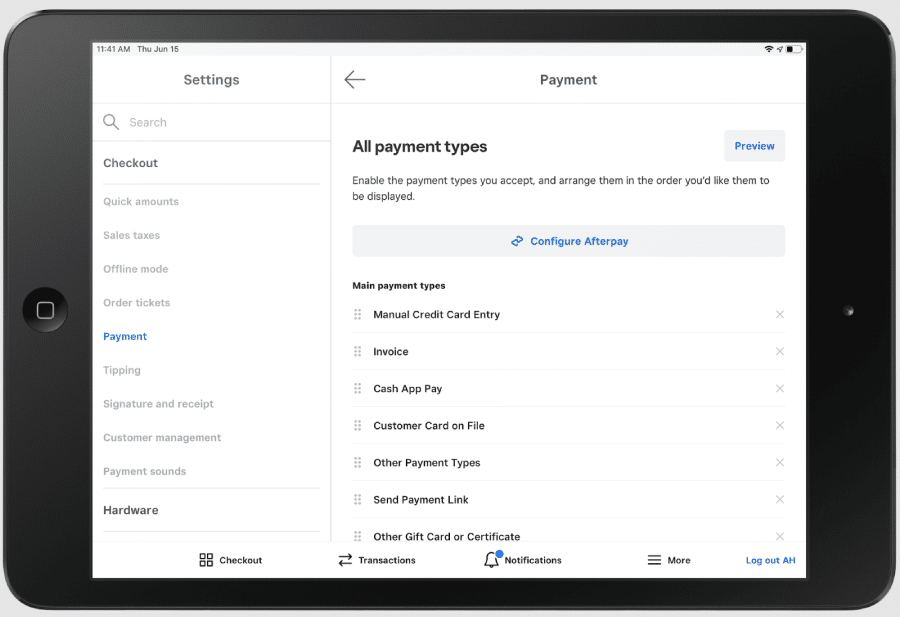
The best merchant services offer a wide range of payment options (Source: Square)
If you work independently or provide services, see our guide to the best payment methods for freelancers.
Many merchant services providers include built-in tools that help businesses accept payments across multiple channels.
Common payment processing tools include:
- Invoicing and recurring billing
- Virtual terminal
- Online payment gateway (website checkouts, shareable payment links)
- Stored card payments
- Level 2 and 3 data processing for B2Bs
- Cross-border payments
- Nonprofit payment processing
Ideally, these features should be included without additional monthly fees. If they require add-ons, make sure they are necessary for your business before paying extra.
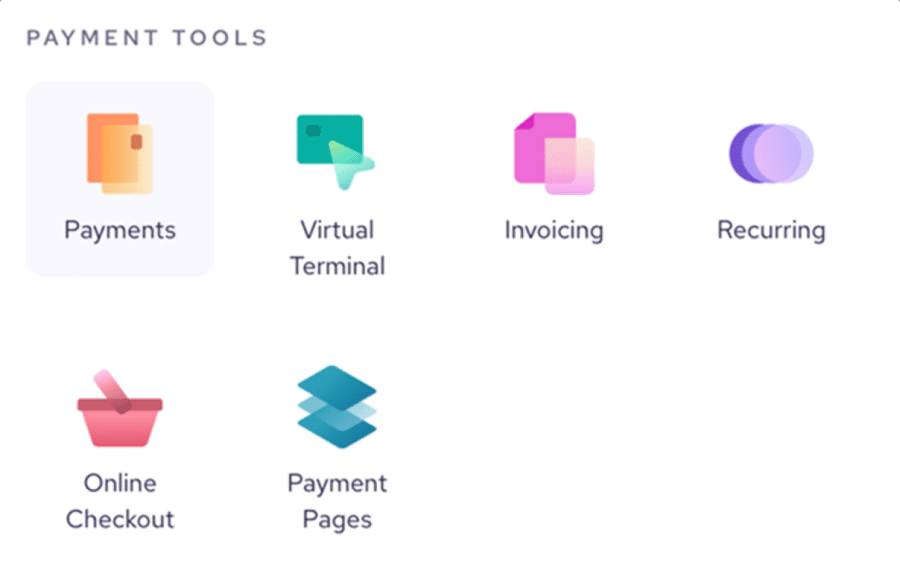
Native payment tools instead of additional integration will help you launch your business faster. (Source: Helcim)
Check out our recommendations for:
Many businesses rely on accounting, POS, or ecommerce platforms to manage daily operations. Some merchant services providers offer built-in tools, while others integrate with third-party software.
Examples include:
- QuickBooks or Wave for accounting and bookkeeping
- Square for POS and business management tools
- iATS for nonprofit payment processing
- Clover POS systems integrated with multiple processors
Choosing a processor that integrates with the tools you already use can simplify payment management and reduce manual work.
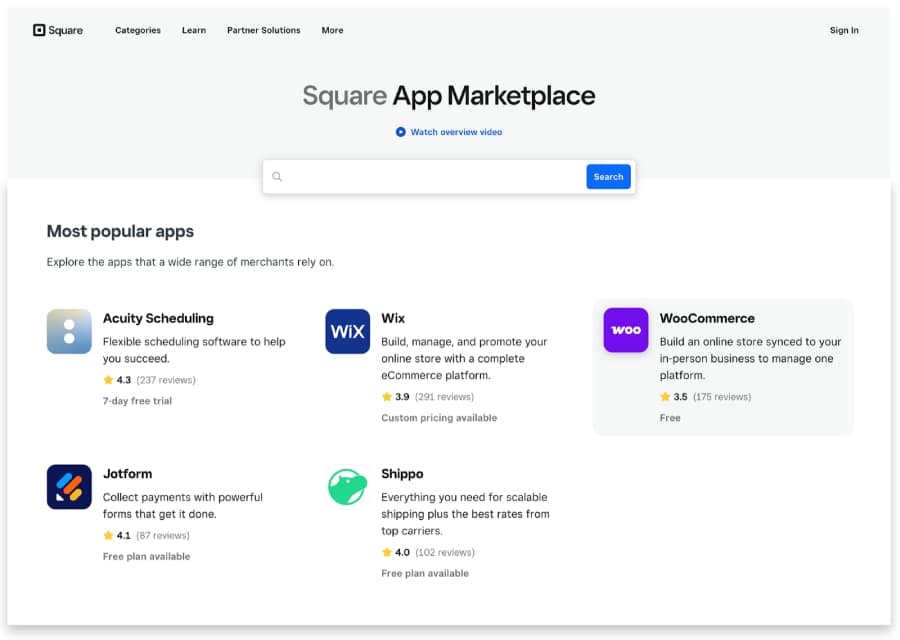
Make sure your merchant services provider integrates with your most used business tools. (Source: Square)
Businesses that accept in-person payments should ensure their processor supports the hardware they need. Card readers may be:
- Mobile readers connected to a smartphone or tablet
- Wireless terminals with built-in POS apps
- Countertop POS devices
Look for hardware that includes:
- At least a one-year warranty
- Support for swipe, chip, and contactless payments
- Compatibility with your mobile devices or POS system
- Offline payment capability
- Strong user reviews for reliability and battery life
- Built-in security features such as encryption and tokenization
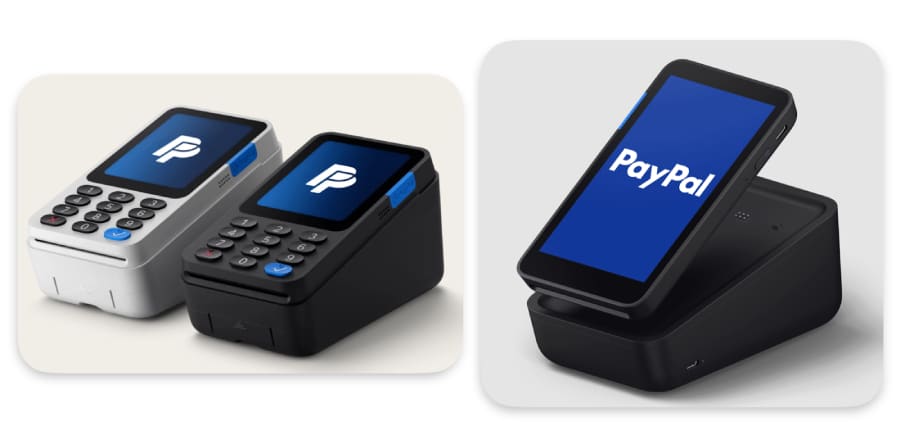
Your choice of card readers and card terminals should offer customer convenience without sacrificing security. (Source: PayPal)
Read our selection of the best credit card readers.
Merchant services providers vary widely in their pricing models, contract terms, funding speed, and support options. The best choice often depends on your business size and transaction volume.
- Startups and small businesses often benefit from processors that offer simple signup, no monthly account fees, and flat-rate pricing.
- Established businesses with higher sales volume may reduce costs with interchange-plus pricing from traditional merchant account providers.
- Large or high-volume businesses can sometimes obtain the lowest processing rates through membership-style pricing models that charge a monthly fee plus wholesale transaction costs.
Other factors to consider include:
- Funding speed (same-day or next-day deposits)
- Payment security features such as tokenization and encryption
- PCI compliance support
- Fraud detection tools
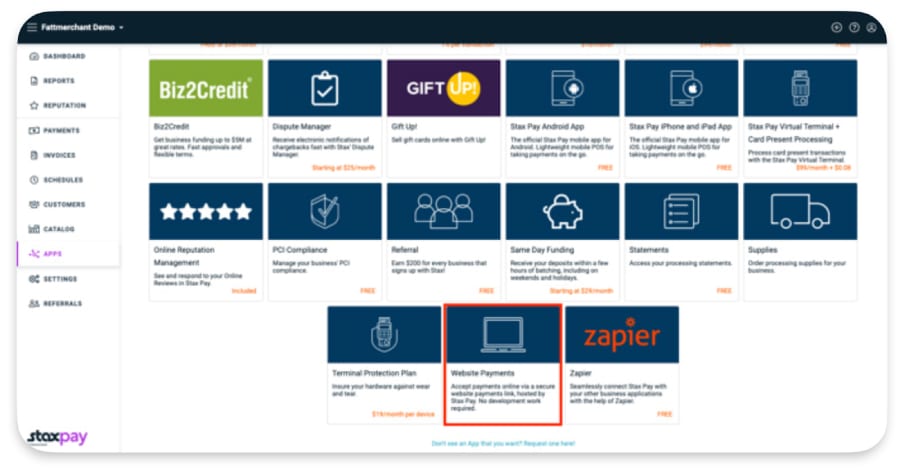
Merchant service providers vary so it’s important that you only pay for features you actually need. (Source: Stax)
How do I apply for a merchant account?
Choosing the merchant services you want for your business is just the beginning. Depending on the solution you choose, you’ll need to submit an application.
Our guide walks you through the application process, the documents you’ll need, red flags to watch out for, and tips for negotiating lower rates.
Thank you for downloading!
Helcim: Best for lowest credit card processing fees

Pros
- Interchange-plus pricing with no monthly fee
- Free POS, customer relationship management (CRM), invoicing, and online store software
- Options to pass processing fees onto customers
Cons
- Limited third-party integrations
- Charges extra for Amex transactions
- Strict approval process
Overview
Who should use it:
Helcim is best for established businesses that want to minimize credit card processing costs with transparent interchange-plus pricing. It also works well for B2B companies, wholesalers, and professional services that benefit from Level 2 and Level 3 processing.
Why I recommend Helcim:
When I evaluated merchant services providers for this guide, Helcim stood out for its transparent interchange-plus pricing and built-in cost optimization tools. Unlike flat-rate processors, Helcim charges interchange plus a small markup and does not require a monthly subscription, which can reduce processing costs for businesses with consistent transaction volume.
Helcim also includes several payment tools at no extra cost, including POS software, invoicing, subscription billing, and an online payment gateway. The platform automatically applies volume discounts as your processing grows and can capture Level 2 and Level 3 data for eligible B2B transactions to help qualify for lower interchange rates. Helcim also offers Fee Saver, a program that allows merchants to pass credit card processing fees to customers through surcharging or convenience fees.
Because Helcim provides a traditional merchant account, businesses must complete an application and underwriting process before approval. While this requires more setup than payment facilitators like Square, it typically results in more stable accounts and lower long-term processing costs.
Read our guide to merchant accounts to learn more about dedicated or traditional merchant accounts (like Helcim) vs payment facilitators (like Square).
- Monthly fee: $0
- Card-present transaction fee: From interchange plus 0.15% + 6 cents
- Card-not-present transaction fee: From interchange plus 0.15% + 15 cents
- American Express transaction fee: 0.10% + 10 cents
- Tap-to-pay on iPhone: + 10 cents per transaction
- Contract length: Month-to-month
- Early termination fee: $0
- Chargeback fee: $15 per lost dispute
- Card readers: $199
- POS terminal: $349 or $32/month for 12 months
Helcim also has a free credit card processing program called Helcim Fee Saver, which allows merchants to pass processing fees over to customers via a surcharge or convenience fee.
- Automated volume discounts: Helcim automatically lowers your processing markup as your monthly transaction volume increases. Unlike many providers that require negotiating better rates, Helcim applies these discounts automatically as your business grows.
- Transparent pricing structure: Helcim combines interchange-plus pricing with no monthly subscription fee and refundable chargeback fees. This transparent pricing model can result in lower effective processing costs compared with flat-rate processors.
- Free credit card processing: Helcim’s Fee Saver feature allows merchants to pass credit card processing fees to customers through surcharging or convenience fees. This option can significantly reduce or eliminate processing costs for businesses that choose to shift those fees to card payments instead of cash or ACH transactions.
- Built-in payment tools: Helcim includes POS software, invoicing, subscription billing, CRM tools, and an online payment gateway at no additional cost, features many processors charge extra for.
- Level 2 and Level 3 processing: Helcim can automatically capture the additional transaction data required for Level 2 and Level 3 B2B transactions, helping eligible businesses qualify for lower interchange rates.
Square: Best all-in-one POS and payment processing

Pros
- Transparent, predictable pricing
- Free, user-friendly software & card reader
- No application, contract, monthly fees, or minimum requirements
Cons
- Can only be used with Square POS
- Limited or inconsistent support
- Interchange-plus rates only for large enterprise clients
Overview
Who should use it:
Square is best for new and small businesses that want an easy way to start accepting payments with minimal upfront costs. Its free POS software, simple flat-rate pricing, and quick signup process make it one of the easiest merchant services platforms to launch with.
Why I recommend Square:
In my evaluation of merchant services providers for this guide, Square stood out for its simplicity, accessibility, and all-in-one business tools. Unlike traditional merchant account providers, Square operates as a payment facilitator, which means businesses can sign up and start accepting payments without going through a lengthy underwriting process.
Square includes POS software, payment processing, ecommerce tools, invoicing, and mobile payment capabilities in a single platform. Businesses can accept payments in person, online, through invoices, virtual terminals, and even QR codes without needing additional integrations or third-party software.
While Square’s flat-rate pricing is typically higher than interchange-plus providers like Helcim, the platform’s free software, simple setup, and lack of monthly fees make it one of the most cost-effective options for small businesses and startups.
Square also leads our list of the best free POS software, free merchant accounts, and retail credit card processors.
- Monthly fee: $0 to $149
- Card-present transaction fee: 2.6% + 15 cents
- Ecommerce and invoice transaction fee: 2.9% + 30 cents
- Card-not-present transaction fee: 3.5% + 15 cents
- Contract length: Month-to-month
- Early termination fee: $0
- Chargeback fee: Waived up to $250 per month for chargeback protection
- Card reader: $59
- Free POS software and business tools: Square’s free plan includes POS software, inventory tracking, reporting, invoicing, ecommerce tools, and customer management features, allowing small businesses to run their operations without additional software subscriptions.
- Multiple payment methods: Square supports in-person payments, online checkouts, invoices, manually keyed transactions, ACH bank transfers, recurring billing, and buy now, pay later (BNPL) options, giving businesses flexibility in how they accept payments.
- Chargeback protection: Square waives up to $250 per month in chargeback dispute fees, which is a generous policy compared with many traditional merchant services providers.
- Affordable hardware ecosystem: Square offers a range of hardware options for different business sizes, including mobile card readers, countertop terminals, and full POS registers. New merchants also receive a free card reader when they sign up.
- CBD payment program: Square supports online sales of hemp and hemp-derived CBD products through its specialized CBD program, which is uncommon among mainstream payment processors.
Payment Depot: Best for growing businesses

Pros
- Custom interchange-plus rates
- No contract or cancellation fee
- 24/7 customer support
Cons
- Next-day funding available with fee
- ACH payment is an add-on service
- US merchants only
Overview
Who should use it:
Payment Depot is best for growing businesses that want customized processing rates and a flexible payment solution that can scale with their operations.
Why I recommend Payment Depot:
Payment Depot stood out for its customizable pricing and strong integration capabilities. Like Helcim, it uses an interchange-plus pricing model that can reduce processing costs compared with flat-rate processors.
Payment Depot supports a wide range of payment options, including in-person payments, ecommerce checkouts, invoicing, virtual terminals, and subscription billing. Businesses can also integrate the service with popular POS platforms and payment gateways, which provides more flexibility than processors that require proprietary hardware or software ecosystems.
Another advantage is that Payment Depot operates under Stax, a well-established payments company. Businesses that need additional features, such as advanced subscription tools, surcharging programs, or developer-focused payment solutions, can transition to Stax products as they scale.
Because Payment Depot is a traditional merchant account provider, businesses must complete an application and underwriting process before approval. While this may make onboarding slower for very small or new businesses, it often results in more stable merchant accounts and the ability to negotiate better processing rates over time.
- Monthly fee: $0
- Transaction fees: Custom-quoted (variable rates from around 0.2% to 1.95%)
- Contract length: Month-to-month
- Early termination fee: $0
- Chargeback fee: $25
- Card readers: From $49
- Other fees: Payment Depot will charge a $19.99 monthly fee for Payment Card Industry (PCI) non-compliance if you do not keep your business compliant
Payment Depot has a wide selection of card readers available, including mobile and countertop solutions from popular brands like Clover, Poynt, and SwipeSimple. Those hardware items have quote-based pricing.
- Custom interchange-plus pricing: Payment Depot offers custom-quoted interchange-plus processing rates, allowing businesses to negotiate pricing based on transaction volume and business type.
- Flexible POS integrations: Unlike processors that require proprietary systems, Payment Depot integrates with several popular POS platforms and payment gateways, giving businesses more flexibility in choosing their hardware and software setup.
- Powerful virtual terminal: Payment Depot’s virtual terminal allows businesses to accept manually entered payments, digital wallets, and card-not-present transactions through a secure web-based interface.
- Business funding options: Merchants can apply for business financing through Payment Depot if they meet eligibility requirements, such as minimum credit scores and monthly revenue thresholds.
Chase Payment Solutions: Best for direct bank processing
Pros
- Same-day funding for Chase Business Checking customers
- Negotiable rates
- Leverages all Chase network data to offer business insights
Cons
- Some plans require long-term contracts
- Not all pricing disclosed on website
- Best value for Chase banking customers
Overview
Who should use it:
Chase Payment Solutions is best for businesses that want a merchant services provider directly connected to their bank, especially those already using Chase Business Checking.
Why I recommend Chase:
When I evaluated merchant services providers for this guide, Chase Payment Solutions stood out as one of the few options offered directly by a major bank. Businesses that process payments through Chase benefit from having their processor and deposit account within the same financial institution, which can improve funding speed and simplify payment management.
Chase offers both flat-rate pricing for small businesses and negotiable interchange-plus rates for larger merchants This flexibility makes it a viable option for businesses that expect to scale and want the ability to negotiate processing costs as their transaction volume grows.
Another advantage is access to Chase QuickAccept, a mobile payment app available to Chase Business Checking customers. QuickAccept allows businesses to accept payments through mobile devices and receive same-day deposits, which can help improve cash flow compared with processors that require longer settlement times.
Chase also provides built-in analytics tools that use its banking and payment data to deliver insights into sales trends, customer behavior, and business performance. These reporting features can help merchants identify growth opportunities and better understand their transaction patterns.
- Monthly fee: $0
- Card-present transaction fee: 2.6% + 10 cents
- Card-not-present transaction fee: 3.5% +10 cents
- ACH processing fee:
- Real-time deposits: 1% (capped at $25), non reversible
- Same-day deposits: 1% (capped at $25), reversible
- Standard deposits (1 business day): $2.50 for the first 10 transactions, 15 cents for additional, reversible
- Contract length: Most plans are month-to-month
- Early termination fee: $0
- Chargeback fee: $25
- Card readers: From $49
- Same-day deposits: Chase offers same-day deposits for eligible transactions, especially for businesses using Chase Business Checking and the QuickAccept mobile payment app. This faster settlement can improve cash flow compared with processors that take several days to release funds.
- Business analytics tools: Chase provides built-in reporting tools that analyze payment and banking data to generate insights into sales trends, customer behavior, and business performance.
- Direct bank processing: Because Chase acts as both the payment processor and the receiving bank, transactions can move through fewer intermediaries, which may improve funding reliability and security.
- 24/7 customer support: Chase provides round-the-clock customer support along with online resources and help documentation.
GoDaddy Payments: Best for GoDaddy ecommerce sellers

Pros
- Competitive flat-rate pricing
- No monthly fees or long-term contracts
- Seamless integration with GoDaddy websites and online stores
Cons
- Limited third-party integrations
- Fewer advanced POS features than some competitors
- Best suited for businesses already using GoDaddy
Overview
Who should use it:
GoDaddy Payments is best for small businesses already using GoDaddy’s website builder or ecommerce platform that want a simple, integrated payment processing solution.
Why I recommend GoDaddy Payments:
GoDaddy Payments stands out for its seamless integration with GoDaddy’s website builder and ecommerce platform. Businesses that already run their website or online store through GoDaddy can activate payment processing quickly without needing additional gateways or third-party integrations.
The platform supports multiple payment methods, including in-person payments, online checkouts, invoices, and virtual terminal transactions. Businesses can manage payments, orders, and website activity from the same dashboard, which simplifies operations for small teams.
GoDaddy Payments also offers competitive flat-rate pricing with no monthly subscription fees or long-term contracts. This straightforward pricing structure makes it a practical option for small businesses that want predictable payment processing costs without negotiating custom rates.
While the platform does not offer the same level of POS functionality or third-party integrations as providers like Square or Stripe, it works well for businesses that prioritize simplicity and already operate within the GoDaddy ecosystem.
- Monthly fee: $0
- Card-present transaction fee: 2.3%
- Card-not-present transaction fee: 2.7% + 30 cents
- Invoices/Online payment links: 2.8% + 30 cents
- Keyed-in (virtual terminal): 3.5%
- ACH processing fee: 0.8% (max $10)
- Contract length: Month-to-month
- Early termination fee: $0
- Chargeback fee: $15
- Card readers: From $79
- Built-in ecommerce integration: GoDaddy Payments works natively with GoDaddy websites and online stores, allowing businesses to accept payments without configuring a separate payment gateway.
- Competitive flat-rate pricing: GoDaddy offers lower flat-rate processing fees than many competitors, especially for in-person payments.
- Unified business dashboard: Merchants can manage website activity, orders, payments, and customer data from a single GoDaddy dashboard.
- Virtual terminal and invoicing: Businesses can accept card-not-present payments and send invoices directly through GoDaddy’s payment tools.
U.S. Bank Merchant Services: Best for fast funding

Pros
- Same-day funding
- Hardware rentals
- Surcharging and debit card optimization programs
Cons
- Limited user reviews
- Need to call for consultation on full feature set
Overview
Who should use it:
U.S. Bank Merchant Services is best for businesses that want fast access to funds and prefer working with a bank-backed payment processor.
Why I recommend U.S. Bank Merchant Services:
U.S. Bank Merchant Services stands out for its fast funding capabilities and bank-backed payment infrastructure. Businesses that already use U.S. Bank for business banking can benefit from seamless payment processing and faster access to deposited funds.
The provider offers a traditional merchant account that supports credit cards, ACH payments, invoicing, and online payments. Merchants also receive tools such as fraud protection, reporting dashboards, and access to dedicated account support.
One of its most notable features is Everyday Funding, which allows eligible businesses to receive funds the same day transactions occur, including weekends. This capability can significantly improve cash flow compared with processors that take one to two business days to settle payments.
U.S. Bank Merchant Services also supports surcharging programs and debit card optimization tools that can help businesses reduce processing costs. While its advertised pricing uses flat rates, larger businesses may also qualify for custom pricing depending on transaction volume.
- Mobile: $0
- Unlimited users
- Up to 100 products
- Starter: $29+ per month
- Unlimited users
- Up to 500 products
- Standard: $69+ per month
- One-time set-up fee of $99
- Unlimited users and products
- Good for retail shops and small restaurants
- Premium: $99+ per month
- One-time set-up fee of $99
- Unlimited users and products
- Good for large restaurants and multi-location businesses
- Processing fees:
- In-person transactions: 2.6% + 10 cents
- Keyed-in transactions: 3.5% + 15 cents
- Online transactions: 2.9% + 30 cents
- Same-day funding: U.S. Bank’s Everyday Funding service allows businesses to receive deposits on the same day transactions are processed, including weekends for eligible accounts.
- Surcharging and debit optimization: Businesses can use surcharging programs and debit optimization tools to shift credit card fees to customers or reduce processing costs.
- Fraud protection tools: U.S. Bank offers multiple fraud prevention layers through services like Real-Time Payments monitoring, SinglePoint account controls, and IBM Trusteer Rapport security tools.
Stax: Best for high-volume businesses

Pros
- Membership model interchange-plus pricing
- User-friendly software
- Unique add-on tools
Cons
- Pricey software packages
- Lacks same-day funding options
- ACH payments and next-day funding with fee
Overview
Who should use it:
Stax is best for businesses with high monthly transaction volumes that want to reduce effective processing costs through wholesale-style pricing.
Why I like Stax:
In my evaluation of the best merchant services providers, Stax stood out for its membership-based pricing model, which separates the processor’s markup from transaction fees. Instead of paying a percentage markup on every transaction, businesses pay a monthly subscription and process payments at interchange plus a small fixed fee. This structure can significantly reduce processing costs for merchants with large sales volumes.
The platform supports a full range of payment methods, including in-person transactions, online payments, virtual terminals, and recurring billing. Businesses that rely heavily on invoicing or subscription payments can also benefit from Stax’s built-in billing tools and automation features.
Stax also offers a flexible ecosystem with integrations for popular POS systems, ecommerce platforms, and business tools. This flexibility makes it a strong option for companies that want more customization than proprietary payment platforms typically provide.
Because Stax provides a traditional merchant account, businesses must complete an application and underwriting process before approval. While the monthly subscription fee may be higher than other providers in this guide, high-volume merchants can often offset that cost through lower transaction markups.
- Monthly fee: $99-$199 (depends on processing volume and software packages)
- Card-present transaction fee: Interchange plus 8 cents
- Card-not-present transaction fee: Interchange plus 15 cents
- Contract length: Month-to-month, 30 days’ notice to cancel
- Early termination fee: $0
- Chargeback fee: $25
- Card readers: Custom quote
Stax hardware is custom-quoted. A selection of BBPOS mobile readers, Z terminals, and PAX terminals are available. We have previously been quoted $100 for mobile readers, $175 to $300 for Z terminals, and $500 to $650 for PAX models. These are available for purchase for a one-time fee, or through monthly fees with protection plans.
- Membership-based pricing: Stax uses a subscription model that allows businesses to process payments at interchange plus a small fixed fee, which can reduce effective transaction costs for high-volume merchants.
- All-in-one payment platform: Stax Pay provides a unified dashboard for managing in-person, online, and mobile payments while offering reporting tools and payment links for websites.
- Surcharging solution: CardX by Stax allows merchants to shift credit card processing fees to customers while maintaining legal compliance with surcharging regulations.
- Subscription and recurring billing tools: Stax Bill enables automated recurring payments and subscription management, including a self-service customer portal and support for multiple payment gateways.
PaymentCloud: Best for high-risk businesses

Pros
- Excellent customer support
- Customized high-risk payment gateway
- Crypto and zero-cost processing available for low-risk businesses
Cons
- Pricing not disclosed
- Longer application and approval process
- Charges extra for virtual terminal and payment gateway
Overview
Who should use it:
PaymentCloud is best for businesses in high-risk industries, such as tobacco, vape, firearms, and liquor, that may struggle to obtain approval from traditional merchant service providers.
Why I recommend PaymentCloud:
PaymentCloud specializes in helping mid-risk and high-risk businesses obtain merchant accounts that other processors may decline. The company works with a network of partner banks and guides merchants through a structured application process to improve approval odds.
The platform supports a wide range of payment methods, including in-person payments, online transactions, invoicing, subscriptions, and manually entered payments. Businesses can also integrate PaymentCloud with many POS systems, gateways, and ecommerce platforms.
Another advantage is pricing flexibility. PaymentCloud offers custom quotes based on business type, transaction volume, and risk profile. Depending on the business model, merchants may qualify for flat-rate pricing or interchange-plus rates.
Because high-risk merchant accounts typically involve more underwriting and monitoring, businesses should expect higher processing costs than with standard processors. However, PaymentCloud’s banking partnerships and experience with high-risk industries can make it one of the most reliable options for businesses that have difficulty securing payment processing elsewhere.
PaymentCloud’s fees are always custom-quoted based on specific business factors. Flat-rate and interchange rates are available depending on your business needs, and discounts are available for high-volume businesses. The pricing below are estimates we obtained from PaymentCloud.
- Monthly fee: $10 to $45
- Typical low-risk transaction fees: 2% to 3.1%
- Typical mid-risk transaction fees: 2.25% to 3.4%
- Typical high-risk transaction fees: 2.7% to 4.3%
- Payment gateway monthly fee: $15
- One-time virtual terminal fee: $15 to $45
- Contract length: None, month-to-month options available
- Early termination fees: Waived
- Chargeback fees: $25 to $45
- Cross-border fees: 1% to 2%
- 1000+ integrations available, no API required
PaymentCloud has many options for card readers and POS systems. However, PaymentCloud does not disclose specific models or pricing on its site. You’ll need to contact the provider for a specific quote.
If you’re migrating over to PaymentCloud from a different processor, PaymentCloud will reprogram your existing equipment if possible.
- High-risk merchant account approval: PaymentCloud supports industries that many payment processors decline, including firearms, tobacco products, CBD, bail bonds, and other regulated categories.
- Chargeback monitoring and protection: Businesses receive dispute alerts, tracking tools, and prevention analytics to help manage chargebacks and reduce risk.
- Flexible integrations: PaymentCloud works with a wide range of POS systems, payment gateways, and ecommerce platforms, allowing businesses to keep their existing software when switching processors.
Stripe: Best for customizable online payments

Pros
- Powerful, user-friendly developer tools, and application programming interfaces (APIs)
- Robust security, reporting, and account management tools
- Supports more than 35 countries and 135 currencies
Cons
- Lacks out-of-the-box mobile functionality
- Best for those with software development skills or resources
- Add-on fees for invoicing and recurring billing
Overview
Who should use it:
Stripe is best for online businesses that need a highly customizable payment platform, especially companies that process international transactions or require developer-level payment integrations.
Why I recommend Stripe:
Stripe is widely used by online businesses that need flexible payment infrastructure and deep customization options. The platform provides a large library of APIs and developer tools that allow companies to build custom checkout experiences, subscription systems, and payment workflows.
Stripe supports a broad range of payment methods and international transactions. Businesses can accept payments in more than 135 currencies and offer local payment methods in many global markets, making the platform a strong option for companies selling internationally.
In addition to developer tools, Stripe also offers no-code checkout options and prebuilt integrations that make it easier to connect payments to websites and ecommerce platforms. This combination of flexibility and scalability allows businesses to start with simple integrations and expand into more customized payment systems as they grow.
However, Stripe focuses primarily on online payments and developer-driven integrations. Businesses looking for a ready-to-use POS system or mobile payment solution may find platforms like Square or PayPal easier to implement.
- Monthly fee: $0
- Card-present transaction fee: 2.7% + 5 cents
- Card-not-present transaction fee: 2.9% + 30 cents
- Keyed-in transaction fee: 3.4% plus 30 cents
- ACH: 0.8%, $5 cap
- Invoicing: + 0.4% to 0.5%
- Recurring Billing: + 0.5% to 0.8%
- 1% additional fee for international cards and currency conversion
- Contract length: None, pay-as-you-go billing
- Early termination fee: $0
- Chargeback fee: $15 per lost dispute
- Chargeback protection and coverage available for 0.4% transaction fee
- Card readers: $59 to $349
You will need to sign up for a Stripe merchant account to access the purchase hardware options within the merchant account dashboard.
- Global payment support: Stripe allows businesses to accept payments in more than 135 currencies and supports local payment methods in many international markets.
- Advanced developer tools: Stripe’s APIs and software development kits allow businesses to build custom checkout flows, subscription systems, and payment workflows.
- Stripe invoicing: Businesses can create branded invoices with payment links, automated numbering, and integrated payment tracking.
- Fraud prevention tools: Stripe uses machine learning and network data to detect suspicious transactions and reduce fraud risk, while allowing merchants to customize fraud detection rules.
PayPal: Best for flexible checkout options

Pros
- Easy to use
- Trusted by customers
- Accept international and PayPal payments
Cons
- Account stability issues
- Monthly fee for virtual terminal
- Complex pricing
Overview
Who should use it:
PayPal works well for solopreneurs, small businesses with occasional sales, and online merchants that want to offer PayPal as an additional checkout option.
Why I recommend PayPal:
PayPal remains one of the most widely recognized digital payment platforms, with hundreds of millions of active consumer accounts worldwide. Businesses that offer PayPal at checkout can often improve conversion rates because customers can complete purchases without manually entering card or shipping details.
The platform supports a wide range of payment methods, including PayPal wallet payments, credit and debit cards, digital wallets, QR code payments, and invoicing. PayPal can be used as a standalone payment processor or added alongside other merchant accounts to expand checkout options.
Like Square, PayPal operates as a payment facilitator, allowing businesses to create accounts quickly without a traditional merchant account application process. This simplifies onboarding for small businesses and startups that want to start accepting payments immediately. Read our Square vs PayPal comparison to learn more.
However, because PayPal uses an aggregated merchant account structure, accounts may occasionally experience reviews or temporary holds if unusual activity is detected. Businesses that depend on daily deposits may prefer a traditional merchant account provider for greater account stability.
- Monthly fee: $0 to $30
- In-person transaction fee: 2.29% plus 9 cents
- Online transaction fee: 2.59% to 2.99% plus 49 cents
- Keyed-in processing fee: 3.49% + 9 cents
- Invoice payment processing fee: 3.49% + 9 cents
- QR code payment fee: 2.29% + 9 cents
- PayPal Checkout transaction fee: 3.49% plus 49 cents
- Contract length: Month-to-month
- Early termination fee: $0
- Chargeback fee: $20
- Card readers: $29 to $199
- Instant PayPal payouts: Funds received in a PayPal account are available immediately. Merchants can also transfer funds instantly to a linked bank account for a 1.5% fee.
- Social selling integrations: PayPal Business can connect with platforms like Facebook and Instagram, allowing merchants to accept payments directly through social commerce channels.
- International payment support: PayPal allows businesses to accept payments from customers worldwide, with support for multiple currencies and cross-border transactions.
- Fastlane guest checkout: PayPal’s Fastlane feature allows returning customers to complete purchases quickly without creating an account, improving checkout speed and reducing friction.
- Smart Receipts: PayPal digital receipts can include personalized product recommendations and promotions based on purchase history.
Methodology: How I evaluated the best free merchant services
In evaluating the best merchant services, I focused on finding providers with the widest range of payment processing features and the most reasonable pricing. I narrowed down my list to 34 traditional merchant service account providers and payment facilitators and scored each one against 23 data points divided into 4 categories of pricing and contract, payment types, account features, and expert score.
- Pricing & contract (30%): I focused on transaction rates, pricing transparency, and contract flexibility. Providers score higher for month-to-month terms, no early termination fees, predictable flat-rate or interchange-plus pricing, and volume discounts.
- Payment types (30%): I evaluated each provider’s support for in-person, mobile, contactless, and online payments, along with virtual terminal, invoicing, and recurring billing capabilities where available.
- Account features (20%): I assessed customer support availability, deposit speed, dispute management, reporting tools, and hardware flexibility, including rental and purchase options.
- Expert score (20%): My expert score reflects ease of use, transparency, account stability, user feedback, and integration with common small business software such as POS, accounting, and ecommerce platforms.
Please note that my scores are based on the currently available features and information. This list will be regularly updated based on the latest technology and user demands to ensure that I provide you with the best information.
In evaluating the best merchant services, I focused on finding providers with the widest range of payment processing features and the most reasonable pricing. I narrowed down my list to 34 traditional merchant service account providers and payment facilitators and scored each one against 23 data points divided into 4 categories of pricing and contract, payment types, account features, and expert score.
Frequently asked questions (FAQs)
The best merchant services provider depends on your business size, sales volume, and how you accept payments. Helcim is our top choice for businesses looking for low processing fees and transparent interchange-plus pricing. Square is ideal for new or small businesses that want an easy setup with free POS software. PaymentCloud is a strong option for businesses in high-risk industries that may have difficulty getting approved by traditional processors.
Anything under 2.5% is good and under 3% is average.
Small businesses typically pay between 1.9% to 3.75% per transaction, with online and card-not-present transactions being more expensive.
550 is the minimum credit score you’ll likely need for a dedicated merchant account. Aggregate payment processors (like Square or PayPal) don’t require a credit check. However, aggregate processors aren’t compatible with all businesses. It’s possible to get a merchant account with bad credit; you just may need to work with a dedicated high-risk processor.
No. In some cases, you can pass along the fees to your customers through surcharging, cash discounting, or convenience fees, but there is no way to accept credit or debit payments without a fee.
Bottom line
Choosing the right merchant account provider can save your business lots of money in fees each month. The best payment processors are also easy to use, offer good value with business solutions, and integrate with popular software. Plus, merchant accounts should be transparent and reliable.
Visit Helcim, our top pick, to see if it’s a good fit for your business.
Source link